

Wearable data can be useful, though it is not perfect. Accuracy changes based on fit, wrist position, skin contact, movement, sweat, tattoos, and skin tone. During workouts, readings often shift more because sensors have a harder job. Your device reads raw signals, then software turns them into stats like steps, sleep, and calories, so small errors can grow fast.
What Wearable Accuracy Means
Accuracy is the promise your wearable makes every time it turns your movement and body signals into numbers you can trust. When you check your stats, you want to feel included in a shared view of health, not left guessing. That starts with clear measurement definitions, so you know what a step, heartbeat, or sleep reading actually means.
From there, accuracy benchmarks show how close your device comes to a trusted standard under real conditions. A reading can look precise yet still miss the mark if fit, placement, movement, or sensor contact changes the signal. Your wearable also depends on solid components, steady processing, and algorithms that interpret messy human data.
Which Wearable Metrics Are Most Reliable?
Once you know what accuracy really means, the next question feels personal: which numbers can you trust most once you glance at your wrist and plan your day around them? In most metric ranking lists, heart rate at rest and basic step counts usually feel the most dependable for everyday use. They tend to stay steadier, especially once your routine is simple and your fit stays snug.
- Resting heart rate often tracks well when you’re still
- Step counts work best during regular walking, not unusual movement
- Calories, sleep stages, and SpO2 vary more across brands
That’s where device comparison helps your community-minded choices. Once two wearables disagree, treat calorie burn and detailed sleep stages carefully. You’re not doing anything wrong. These metrics are harder to estimate consistently, so the most reliable numbers are usually the simplest ones initially.
How Sensor Quality Affects Wearable Accuracy
The quality of your wearable’s sensors shapes how much you can trust each reading. When your device uses better sensor grades, tighter calibration, and steadier contact with your skin, you usually get more precise data.
But when signal noise rises during movement, sweat, or a loose fit, your numbers can shift more than you’d expect.
Sensor Grade Differences
Because sensor grade sets the ceiling for what a wearable can detect, it shapes your results long before any app turns raw signals into steps, heart rate, or sleep scores.
When you choose a device, you’re also choosing how well its parts capture real life. Better component materials, cleaner signals, and stronger internal hardware help you feel confident your numbers belong in your health story.
- Higher grade sensors catch weaker signals with less noise
- Better optics and electrodes hold up more reliably during movement
- Stronger chips and storage support steadier data collection
That’s why chest straps often beat wrist trackers, and why some arm bands perform better during harder exercise.
Lower grade sensors struggle when bands shift, sweat builds, or motion increases. You deserve data that supports you, not numbers that make you second guess.
Calibration And Precision
While sensor grade sets the baseline, calibration decides whether your wearable turns that raw signal into numbers you can trust. Even a premium sensor can drift if device calibration is weak.
That matters to you because small errors can stack up fast and make your progress feel confusing instead of encouraging.
Good calibration aligns the sensor with real-world measures, and precision tuning helps keep readings steady across workouts, rest, and daily wear.
You’ll notice the difference when a chest strap, arm band, or watch gives results that stay close to validated tools.
Fit still matters, but calibration tells the hardware how to interpret what it detects. Picture it like joining a team where everyone follows the same playbook.
Whenever your wearable is tuned well, you feel more confident, included, and ready to trust your numbers.
Signal Noise Impact
Even whenever your wearable uses smart software, noisy signals can still throw off the numbers you see. If light, motion, sweat, or a shifting band disrupts the sensor, your device may mistake noise for real data. That’s why heart rate readings often slip during exercise, especially with optical sensors on your wrist.
- Better sensor contact gives you steadier readings.
- Strong signal filtering helps separate movement from true body signals.
- Smart noise reduction improves trust in your daily stats.
You deserve data that helps you feel confident, not confused.
Higher-quality parts, tighter fit, and better processing all help your wearable capture cleaner signals. In turn, you get numbers that feel more consistent with what your body is doing. If your device reduces noise well, you stay connected to your progress and your goals.
How Device Placement Changes Accuracy
Although most wearables promise simple tracking, where you place the device on your body can change the numbers you see in a big way. If you want results that feel trustworthy, placement matters more than many people expect.
For step counting, ankle placement benefits can be real, especially when wrist motion doesn’t match your actual steps. That’s why some pedometers perform better there than on your wrist or hip.
Heart rate tracking also depends on location. A chest strap usually gives your readings closer to an ECG, while some arm-worn devices stay strong during harder workouts. In contrast, the wrist can struggle when motion gets messy.
Just as important, strap position consistency helps your sensor read the same area each time, so your trends feel steadier and easier to trust.
How Fit and Strap Tightness Affect Readings
If your wearable doesn’t sit snugly on your skin, the sensor can miss signals and give you shaky readings.
When the strap is too loose, it shifts, lets in more motion noise, and makes heart rate or step counts less reliable.
You want a fit that’s secure but still comfortable, so you can trust the data without feeling like your wrist is in a headlock.
Proper Sensor Contact
Because your tracker can only measure what its sensors can actually touch, fit matters more than most people believe. When the sensor sits flat against your skin, you give it a fair chance to capture cleaner signals. That’s especially true for optical heart rate sensors, which struggle when contact breaks or shifts. Good contact also depends on small habits, like sensor cleaning and removing sweat buildup, lotion, or hair that can block light.
- Keep the sensor centered on the recommended spot
- Check for clean, dry skin before workouts
- Reposition it if the data suddenly looks off
You want your device to feel like part of your routine, not a random guesser on your wrist. A secure, comfortable feel helps you trust the numbers and stay in step with your goals every day.
Effects Of Loose Straps
A clean sensor helps, and strap tension decides whether that clean sensor can keep working once you start moving. If your band sits too loose, the sensor shifts, light leaks in, and your readings can jump around. You may see missed heart rate spikes, uneven step counts, or random gaps during workouts.
That’s why noticing strap slippage signs matters. If your device twists, slides toward your hand, or leaves changing data patterns, it’s telling you contact isn’t steady. In a community that counts on shared goals and honest progress, you want numbers you can trust.
Start starting with adjusting band tension so the tracker stays in place through normal motion. Keep it secure enough to limit shifting, especially during faster activity, because even small movements can add noise and lower precision for everyone chasing steady improvement together.
Comfort Versus Accuracy
While a snug band usually gives you better data, the tightest fit isn’t always the smartest one. If your tracker presses too hard, you might feel irritation, sweat buildup, or numbness, and then you won’t want to wear it long enough to get useful trends. That’s where comfort tradeoffs matter.
You want steady skin contact without cutting into your routine or your sense of ease.
- A secure fit limits band shifting and reduces sensor noise
- Too much pressure can make daily wear preferences harder to maintain
- A small gap often balances comfort and cleaner readings
When your device feels good, you’re more likely to keep it on through work, walks, and rest. That consistency helps you feel part of your health trip, not stuck fighting your gear every single day.
Why Movement Distorts Wearable Data
As you move, your wearable has to separate real body signals from extra motion, and that’s where accuracy often starts to slip. During active movement, sensors pick up signal noise called motion artifacts. That noise can make your heart rate jump, flatten, or lag behind what your body is actually doing.
This gets worse if the band shifts, lifts, or loses steady contact with your skin.
If you’ve ever checked your stats mid-workout and thought, that can’t be right, you’re not alone.
Wrist devices often struggle more than chest straps because your arms swing, twist, and absorb impact. Even step counts can drift if placement isn’t ideal. As movement gets faster or less steady, your device has to guess more. And whenever it guesses, you may feel less confident in the numbers you share.
How Skin Tone and Tattoos Affect Sensors
Because optical sensors read light through your skin, skin tone and tattoos can change how clearly your wearable sees that signal. If you have darker skin, extra melanin may absorb more light, which can increase skin tone bias in heart rate readings. Tattoos can also scatter or block light, causing tattoo interference that weakens the signal your device needs.
- Dark ink can confuse green-light sensors used for heart rate
- Uneven readings may happen even when your device fits well
- You deserve data that works fairly for your body
That matters because accuracy should feel inclusive, not hit or miss.
You can improve results by wearing your device snugly, keeping the sensor clean, and testing another wrist or spot with less ink.
Small changes can help you feel seen, supported, and confident.
Why Activity Type Changes Accuracy
Your skin can affect sensor readings, and the kind of movement you do can change them just as much. Whenever you switch activities, your device has to read new exercise specific motion patterns, and it doesn’t always keep up.
Walking, cycling, rowing, and strength training create different rhythms, arm swings, and impacts. Should your tracker expect steady steps, it may miss reps, overcount motion, or label effort poorly.
That mismatch leads to sport specific tracking errors, especially in niche workouts or drills with quick direction changes. You may notice better results once your device sits on the body part doing the clearest work, like an ankle for steps. A secure fit also helps because less shifting means cleaner signals.
How Heart Rate Accuracy Changes by Situation
You’ll usually see the best heart rate accuracy while you’re resting, but readings can get shakier once you start moving and optical sensors pick up more noise.
You also need a snug, steady fit, because band shift, poor wrist placement, sweat, or blocked skin can throw the numbers off fast.
And because skin tone and your body’s own rhythms can affect sensor performance, it helps to read your heart rate data with a little care instead of treating every number like gospel.
Resting Vs Active Readings
While wearable heart rate tracking can feel impressively smooth while you’re sitting still, it often gets less reliable once your body starts moving. At rest, your device usually does best because your pulse is steadier, so you can trust resting baselines and spot recovery trends more clearly. That gives you a shared starting point you can feel good about.
As activity picks up, results can vary more through intensity, device design, and your own physiology. So, instead of expecting the same precision in every moment, it helps to read active numbers as useful guides.
- Resting readings often give you the clearest day-to-day image
- Active readings might lag or miss quick changes during harder effort
- Comparing patterns over time helps you stay confident and connected to your progress
That way, you stay informed without feeling left out.
Motion And Sensor Noise
Although heart rate wearables can feel incredibly smart, motion often throws them off more than most people realize. Whenever you swing your arms, grip weights, or pick up speed, optical sensors must sort your pulse from extra movement. That creates motion artifacts, and your device can mistake noise for a heartbeat or miss beats completely.
Because of that, your numbers might look solid during calm moments, then drift during exercise, chores, or excited movement with friends. You’re not doing anything wrong.
The sensor is trying to read blood flow while your body keeps changing pace, pressure, and rhythm. Signal interference adds another layer, especially whenever vibration, sweat, or quick direction changes confuse the light-based reading. That’s why wrist readings often struggle more during intense activity than steadier, chest-based tracking.
Fit, Skin, And Placement
Because heart rate sensors rely on a clean signal, the way your device sits on your body can change the reading fast. If it shifts, gaps form, light scatters, and your numbers drift. You’ll usually get better results when strap fit consistency feels snug but not tight and skin contact quality stays steady through movement.
- Wear it secure enough to prevent slipping
- Keep the sensor clear of sweat, lotion, and hair
- Place it where the manufacturer recommends
- Recheck fit before workouts and after warming up
Your skin and placement matter too. Optical sensors can struggle on the wrist during hard exercise, especially when motion increases noise. A chest strap often tracks better, and some arm-worn devices do well at higher intensity.
When your fit matches your activity, your data feels more trustworthy and shared.
Why Sleep Tracking Accuracy Varies
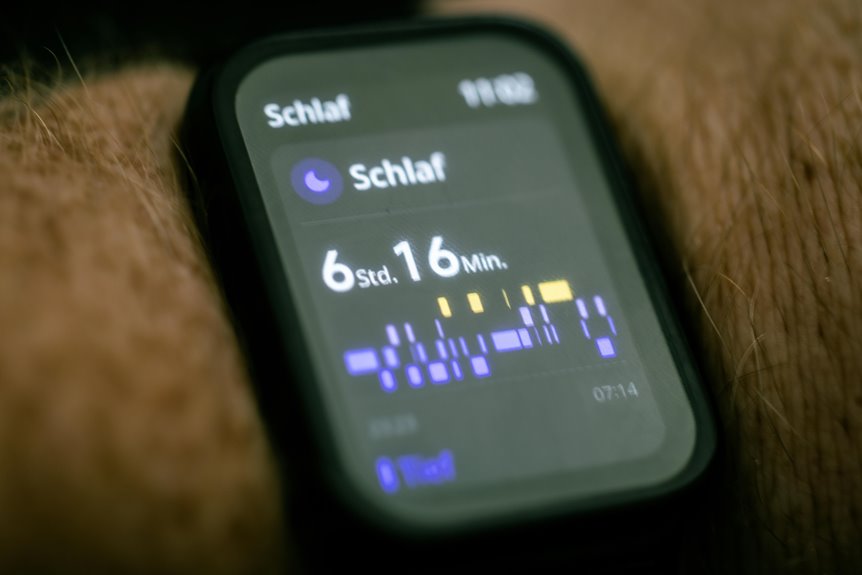
Even while your sleep tracker feels smart, it can still struggle to read sleep with real precision. You want clear answers, but your device mostly studies movement and heart rate, not your brain. That creates sleep stage ambiguity, especially while you’re lying still but still awake, or shifting lightly during real sleep.
Because of that, deep sleep detection can vary a lot from one night to the next. A loose band, skin contact changes, sweat, or low sensor quality can blur signals. Algorithms also guess based on patterns from large groups, not your unique body, bedtime habits, or stress levels.
Should you use your tracker as a guide instead of a judge, you’ll feel more grounded and less frustrated. You’re not failing sleep. The device just can’t see the whole view yet.
Why Calorie Burn Estimates Are Less Accurate
While calorie numbers can look exact on your screen, they often come from rough estimates, not direct measurement. Your body doesn’t burn energy the same way as everyone else’s, so metabolism variability makes results less personal than they seem. That’s why two people can do the same workout and see very different totals.
- Your age, size, fitness, and body composition change energy use.
- Quick wrist movements can make effort look higher or lower than it is.
- Cycling, lifting, and yoga need exercise specific estimates to be closer.
That matters because you want data you can trust, not numbers that make you feel behind the group.
Wearables usually do better with steps than calories, since calorie burn depends on many concealed body processes.
How Algorithms Affect Wearable Accuracy
As helpful as the sensors are, the algorithm is the part that turns raw signals into the numbers you see, and that step can add a lot of error. When your device guesses what your body is doing, it relies on patterns from past data, not your exact life. That gap matters.
If the system learned from limited groups, algorithm training bias can skew results for people who move, rest, or recover differently. You may feel left out when your numbers don’t match your effort.
Also, exercise classification errors happen when the device confuses cycling, strength work, or daily chores with something else. Then heart rate, steps, sleep, or calories can shift too.
Because brands build models differently, two wearables can read the same moment and still tell your community of data two different stories.
How to Use Wearable Data Realistically
Because wearable numbers can shift with fit, motion, skin contact, and the activity itself, you’ll get the most value provided that you treat them as helpful signals, not perfect facts. That mindset helps you stay confident, informed, and connected to others on the same health path. Focus on trend tracking, not single readings. One odd heart rate, sleep score, or calorie estimate doesn’t define your progress.
To use your device realistically, keep data limitations in mind and look for patterns across days and weeks:
- Wear it the same way each time, with a snug, comfortable fit.
- Compare hard workouts, rest days, and sleep over longer periods.
- Double-check unusual results with how you feel.
- Use trusted tools for medical concerns.
- Share goals with your community, coach, or care team for support and outlook.
Frequently Asked Questions
How Often Should I Clean My Wearable Sensors?
Clean your wearable sensors after each sweaty workout and at least once a week with regular use. This routine helps prevent sweat and debris buildup, supports accurate readings, and keeps your device ready to wear every day.
Can Firmware Updates Improve My Wearable’s Accuracy?
Yes, firmware updates can improve your wearable’s accuracy by refining calibration and sensor processing. Updates may lead to more reliable readings, but fit, placement, and the way you move still have a strong effect on results.
How Does Battery Level Affect Tracking Reliability?
A low battery can make tracking less reliable because reduced power affects processing, Bluetooth connectivity, and data storage. When the device shifts to low power sensors, heart rate, sleep, and activity readings may become less accurate.
Should I Sync My Wearable Daily to Prevent Data Loss?
Yes. Syncing your wearable each day lowers the chance of losing data and helps keep your records backed up. It also lets you spot problems early and keeps your shared health record current and complete.
What Privacy Risks Come With Storing Wearable Health Data?
Storing wearable health data can expose you to account breaches, behavioral profiling, and sharing with insurers, advertisers, or third party platforms without clear awareness. You reduce that risk by checking for strong encryption, reading consent settings closely, and choosing companies with a clear record of protecting user privacy and community trust.