

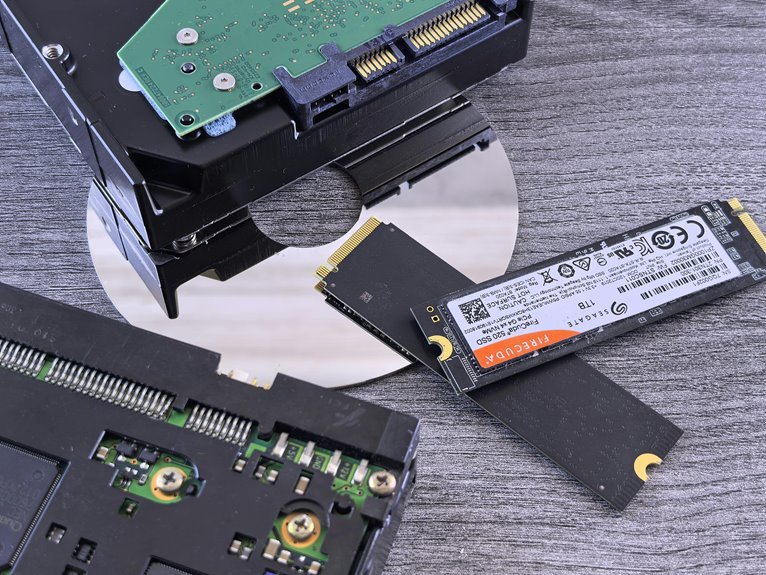

SSDs are much faster than HDDs in everyday use. They boot Windows quicker, open apps faster, and move files with far less waiting. HDDs still work fine for cheap, large storage, though they feel slower in normal tasks. This speed gap changes how a PC feels from the moment it starts.
SSD vs HDD Speed at a Glance
How much faster is an SSD than an HDD in real life? You’ll feel the difference right away. An SSD usually boots your computer in 10 to 15 seconds, while an HDD often takes 30 to 40. Apps open much faster too, so your system feels ready whenever you are. For file moves, SSDs often reach 200 to 550 MB/s, while HDDs stay closer to 80 to 160 MB/s.
That quick jump matters in daily use. You spend less time waiting and more time creating, gaming, or working with your group. Even random access feels dramatically smoother, with SSDs nearly 28x faster in some tasks. Still, interface differences affect top speed, and storage capacity tradeoffs matter whenever you choose your drive. So you’re not just buying speed. You’re choosing the experience that fits your life.
Why SSDs Are Faster Than HDDs
The big speed gap comes from the way each drive finds and stores data. Whenever you use an SSD, data lives in flash memory cells, so the drive reaches it almost instantly. An HDD must spin a platter and move a read head, which adds delay you can feel. That mechanical chase raises access time, while SSD controller latency stays tiny.
| Feature | SSD | HDD |
|---|---|---|
| Data location | Flash chips | Spinning platters |
| Moving parts | None | Yes |
| Access time | ~0.1 ms | 5.5 to 8 ms |
| Random files | Very quick | Much slower |
SSD vs HDD Boot Time
When you press the power button, an SSD gets your system moving much faster than an HDD because it can grab startup files almost at once. That speed matters when you’re ready to jump in and feel connected, not stuck waiting. In most systems, an SSD boots in about 10 to 15 seconds, while an HDD often needs 30 to 40 seconds.
That gap comes from how each drive handles the boot startup sequence and operating system initialization. An SSD reaches tiny system files in fractions of a millisecond, while an HDD must spin and seek them out. So your desktop appears sooner, updates settle faster, and restarts feel less disruptive.
Whenever you want your computer to feel modern, welcoming, and ready when you are, an SSD makes that initial moment smoother every day.
SSD vs HDD App Launch Speed
Whenever you open an app from a cold start, an SSD gets you in much faster because it grabs scattered data almost instantly.
You’ll notice an even bigger gap as you launch several apps at once, since an HDD slows down as it juggles more read requests.
And when updates, syncing, or other background tasks are running, an SSD keeps your apps feeling quick and responsive instead of making you wait.
Cold Start Timing
Because every second feels longer while an app crawls open, you’ll notice the biggest real-world speed gap between an SSD and an HDD during a cold start. Right after power on initialization, your system still has to clear BIOS handoff delays, find app files, and load scattered data. That’s where an SSD feels like your fast lane. With access times near 0.1 ms instead of roughly 4.2 to 8.0 ms, it grabs what the app needs almost instantly.
- You click once, and the app feels ready before your focus slips.
- You spend less time staring at splash screens and more time getting started.
- You feel in step with everyone else using modern hardware, not stuck waiting behind spinning platters.
If you open Photoshop or another heavy app from a full stop, an SSD can feel seconds faster, every single morning.
Multi-App Launching
That same speed gap gets even easier to feel whenever you open several apps back to back. With an SSD, each click feels like it belongs in the same smooth rhythm, so your browser, chat app, music player, and editor appear ready almost together. You stay in flow, and your system feels like part of your team.
On an HDD, those launches stack up because the drive must seek data again and again. That’s where tabbed app startup starts to feel clunky, especially as you jump between tools.
An SSD’s tiny access times, often around 0.1 ms instead of several milliseconds, cut that wait sharply. In real use, that means simultaneous productivity multitasking feels natural, not crowded. You get a desktop that keeps up with you, which makes everyday work feel more welcoming.
Background Load Impact
Even though you open just one app, background tasks can quietly change how fast it appears, and this is where an SSD feels far calmer than an HDD. When your system workload rises, an HDD must juggle each request with moving parts, so apps stall while updates, sync tools, or antivirus scans compete for attention. You feel that delay.
With an SSD, background process overhead hurts far less because access times stay tiny and random reads stay quick. That means your app can still launch smoothly, even when your PC is busy.
- You stay in rhythm when chat apps and updates run together.
- You notice fewer freezes during scans, backups, or cloud syncing.
- You get a steadier launch feel that helps you trust your system.
That shared sense of smoothness matters when you want your setup to feel dependable every day.
SSD vs HDD File Transfer Speed
When you copy files, the speed gap between an SSD and an HDD becomes easy to feel, not just measure. With an SSD, you move large videos, photo folders, and work files much faster, so your day keeps flowing. Typical SSD transfers reach about 400 to 550 MB/s, while many HDDs sit closer to 70 to 160 MB/s.
That difference matters even more during bulk archive moves, where long waits can make your whole setup feel behind. If you’re sharing projects with your team or backing up family memories, faster external drive copy speeds help you stay in step with everyone else. SSDs also handle lots of small files better because they don’t pause to find data on spinning disks. So when you transfer mixed folders, you get steadier speed and less waiting around overall.
SSD vs HDD Gaming Performance
As you game on an SSD, you get into matches faster because load times drop a lot compared with an HDD.
As you move through big open-world areas, an SSD pulls in data much faster, so you’re less likely to see texture pop-in or annoying stutter.
That also helps your gameplay feel smoother, because faster storage can support better frame stability when the game keeps streaming new assets.
Game Load Time
Because games constantly pull textures, maps, and save data while you play, storage speed has a direct effect on how fast you get from the menu to the action. With an SSD, you spend less time staring at level load screens and more time jumping in with everyone else. That matters whenever your squad is already queuing up.
- Faster reads help games open levels, menus, and checkpoints sooner.
- Quicker asset preloading reduces waiting before matches and after fast travel.
- Shorter load times keep the experience smooth, so you feel ready, not left behind.
An HDD can still run games, but its slower access times make loading feel sluggish. Since SSDs access data in tiny fractions of a millisecond, they pull files far faster than HDDs, which often take several milliseconds. You notice that difference right away.
Open-World Streaming
As you move through a huge open-world game, your storage drive has to stream in roads, buildings, textures, voices, and effects almost nonstop. With an SSD, you stay immersed because asset streaming happens fast, helping seamless world loading feel natural and shared across the whole community.
| Drive | Open-world effect |
|---|---|
| SSD | Pulls nearby data quickly |
| HDD | Waits longer for scattered data |
| SSD | Handles random reads smoothly |
| HDD | More pop-in during travel |
That gap comes from access time. An SSD can reach data in about 0.1 ms, while an HDD often needs 5.5 to 8.0 ms. Since open worlds constantly request small files from many places, that speed matters. You feel fewer pauses at city edges, during fast travel arrivals, and during racing across busy maps with friends online together.
In-Game Frame Stability
Consistency matters just as much as raw speed, especially provided that you want your game to feel smooth instead of jumpy. Whenever textures, audio, and map data stream in fast, your system keeps frame pacing tighter and sudden hiccups show up less often. That’s where an SSD helps you feel more connected to the action.
- Faster access times let your game pull small files quickly during combat.
- Better stutter reduction means fewer dips whenever new effects, enemies, or areas appear.
- Smoother frame pacing helps your inputs feel natural, so you stay in sync with your squad.
An HDD can still run games, but its slower 5.5 to 8.0 ms access times might cause uneven delivery. In contrast, SSD access near 0.1 ms supports steadier performance during busy moments and boss fights, too.
SSD vs HDD in Daily Use
Whenever you use your computer every day, the speed gap between an SSD and an HDD feels huge almost right away. You notice it whenever your PC boots in about 10 to 15 seconds instead of 30 to 40, and whenever apps open without that awkward waiting. That quick response helps you feel in sync with your work, not stuck behind it.
In office workflows, an SSD keeps files, browser tabs, and apps moving together smoothly because access times sit near 0.1 ms instead of several milliseconds. You click, and things happen. Large attachments copy faster, updates finish sooner, and multitasking feels calmer.
Should you carry a laptop, SSDs also help laptop battery life since they use less power and have no moving parts. So your day feels lighter, quieter, and more reliable too.
When an HDD Is Fast Enough
Although SSDs feel much faster in most tasks, an HDD can still be fast enough whenever you mainly store photos, videos, music, backups, or documents that you don’t open every minute.
Provided that your files mostly sit there until you need them, you’ll still feel right at home using one.
That matters most whenever you use a drive for:
- backup storage that runs overnight or on a schedule
- archival media, like old family videos or project files you keep safe
- large personal libraries where capacity matters more than instant access
In these cases, you’re not chasing tiny access times or super-fast boot speed. You’re choosing enough speed for the way you actually live and work. That makes an HDD practical, familiar, and dependable for many people in your circle today.
Should You Buy an SSD or HDD?
If you’re trying to choose between an SSD and an HDD, the right answer depends on what you need your drive to do every day. If you want fast boots, quick game loads, and smooth multitasking, you’ll feel at home with an SSD. It accesses data in about 0.1 ms, while HDDs take far longer.
| Need | SSD | HDD |
|---|---|---|
| Speed | Very fast | Slower |
| Price | Higher | Lower |
| Best fit | Daily performance | Cheap bulk storage |
At the same time, budget considerations matter. If you need lots of space for photos, backups, or media, an HDD can still serve you well. For many people, the sweet spot is both: an SSD for speed and an HDD for extra room and storage longevity.
Frequently Asked Questions
How Long Do SSDS and HDDS Typically Last?
SSDs usually last about 5 to 10 years, while HDDs often run for 3 to 7 years. Daily workload, operating temperature, and power conditions have the biggest impact on how long each drive keeps working reliably.
Can SSD Speed Decrease When Nearly Full?
Yes, SSD performance can drop when the drive is nearly full because there is less free space available for write operations and background management. Keeping a healthy amount of unused capacity helps maintain faster speeds and more consistent system performance.
Do SSDS and HDDS Differ in Data Recovery Difficulty?
Yes, data recovery is usually more difficult on SSDs than on HDDs because TRIM and wear leveling can remove recoverable traces very quickly. On HDDs, deleted files are often easier to restore, so it is normal to feel concerned when recovery is needed.
Which Drive Type Is Better for Long-Term Cold Storage?
For long term cold storage, HDDs are usually the better choice because they are easier to keep offline and have a stronger track record for archival use. Store them in a cool, dry place, check them occasionally by powering them on, and keep at least one duplicate copy so your files remain safe.
How Does Drive Speed Affect Battery Life in Laptops?
Faster SSDs can improve laptop battery life because they use relatively little power and complete reads and writes quickly. Shorter active time can reduce overall energy use during storage tasks, while also making boot times and app launches noticeably faster.




