If you own an Asus ROG Ally, the right accessories make it easier to protect, carry, and enjoy daily use.
You might think a dock or case is optional until you need better charging, improved grip, or a safer way to travel with the device.
The best options solve real problems quickly, but not every add-on earns its place.
Here is what tends to matter most.
| JSAUX Anti-Glare Screen Protector for ROG Ally |  | Best for Visibility | Compatibility: ROG Ally / Ally X / Xbox Ally / MSI Claw A1M | Protection: Screen scratch protection | Material: Tempered glass | VIEW LATEST PRICE | Read Our Analysis |
| JSAUX 6-in-1 Docking Station for ROG Ally X |  | Best Docking Station | Compatibility: ROG Ally / Ally X / Xbox Ally / Steam Deck / Legion Go | Protection: Docked device protection | Material: Plastic/metal dock | VIEW LATEST PRICE | Read Our Analysis |
| ASUS ROG Ally TPU Protective Case (Black) | Best Protection | Compatibility: ASUS ROG Ally only | Protection: Shock/drop protection | Material: TPU/ABS | VIEW LATEST PRICE | Read Our Analysis | |
| JSAUX Carrying Case for ROG Xbox Ally X | 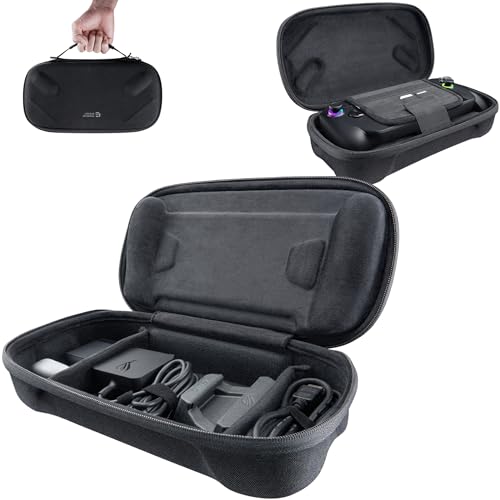 | Best Carry Case | Compatibility: ROG Xbox Ally / Ally X only | Protection: Hard-shell travel protection | Material: Felt hard shell | VIEW LATEST PRICE | Read Our Analysis |
| iVANKY ROG Ally Docking Station 8-in-1 |  | Best Feature-Rich Dock | Compatibility: ROG Ally / Ally X / Xbox Ally / Steam Deck / Legion Go | Protection: Docked device protection | Material: Metal/plastic dock | VIEW LATEST PRICE | Read Our Analysis |
| Skull & Co. Thumb Grips for Steam Deck/ROG Ally |  | Best Grip Upgrade | Compatibility: Steam Deck / ROG Ally | Protection: Joystick protection | Material: TPE | VIEW LATEST PRICE | Read Our Analysis |
More Details on Our Top Picks
JSAUX Anti-Glare Screen Protector for ROG Ally
If you want a cleaner view on your handheld, the JSAUX Anti-Glare Screen Protector is a smart pick for the ROG Ally family. It is a 7-inch matte tempered glass shield that fits the ROG Ally, Ally X, ROG Xbox Ally, ROG Xbox Ally X, and MSI Claw A1M. It reduces glare, improves visibility, and protects against scratches, smudges, and daily wear with 9H hardness and an oleophobic coating. At 0.33 mm thickness it keeps touch input responsive. You also get two alignment frames, so installation is quick and bubble-free, even if you are new to applying screen protectors.
- Compatibility:ROG Ally / Ally X / Xbox Ally / MSI Claw A1M
- Protection:Screen scratch protection
- Material:Tempered glass
- Function:Anti-glare screen protection
- Portability:Ultra-thin
- Install/Setup:Guide-frame install
- Additional Feature:Matte anti-glare finish
- Additional Feature:9H tempered glass
- Additional Feature:Fingerprint-resistant coating
JSAUX 6-in-1 Docking Station for ROG Ally X
The JSAUX 6-in-1 Docking Station is a strong pick if you want a compact, modular hub for your ROG Ally X that does more than just hold the device. You get 4K at 120 Hz HDMI output, Gigabit Ethernet, USB-C PD charging, and four USB ports in one black dock. It supports the ROG Ally X, Ally, Steam Deck, Legion Go, and more. With a 100 W charger you will get the best charging performance; 65 W may charge slower. Detach the base to use it as a stand, use the silicone pad for grip, and customize the card slot.
- Compatibility:ROG Ally / Ally X / Xbox Ally / Steam Deck / Legion Go
- Protection:Docked device protection
- Material:Plastic/metal dock
- Function:6-in-1 docking
- Portability:Compact dock
- Install/Setup:Modular dock setup
- Additional Feature:4K@120Hz HDMI output
- Additional Feature:DIY card slot
- Additional Feature:Detachable stand base
ASUS ROG Ally TPU Protective Case (Black)
Designed for the 7-inch ASUS ROG Ally, this black TPU protective case is a smart choice if you want full-body protection without adding much bulk. Precise cutouts keep ports and buttons easy to reach, while shock-absorbing TPU helps guard against bumps, drops, dust, and scratches. The slim, lightweight build feels comfortable in hand, and the non-slip design improves grip during long sessions. A built-in kickstand supports tabletop play, and a removable front cover keeps the case practical. It will not fit Ally X models or the XG Mobile connector.
- Compatibility:ASUS ROG Ally only
- Protection:Shock/drop protection
- Material:TPU/ABS
- Function:Protective case/kickstand
- Portability:Lightweight case
- Install/Setup:Easy snap-on fit
- Additional Feature:360° full coverage
- Additional Feature:Built-in kickstand
- Additional Feature:Washable reusable design
JSAUX Carrying Case for ROG Xbox Ally X
JSAUX’s Carrying Case for the ROG Xbox Ally X is a smart pick when you want a custom-fit travel case that protects your handheld without adding bulk. It fits the ROG Xbox Ally and Ally X (2025) exactly, and its double-decker hard shell shields against bumps, scratches, and dust. Raised zones protect the joysticks, and the soft lining with a hook-and-loop strap keeps everything steady. The bottom layer holds the charger, stand, cables, earphones, and cards. The felt exterior, smooth zipper, and shoulder strap make transport easy.
- Compatibility:ROG Xbox Ally / Ally X only
- Protection:Hard-shell travel protection
- Material:Felt hard shell
- Function:Carrying/storage case
- Portability:Carrying case
- Install/Setup:Zip-and-go carry
- Additional Feature:Double-decker hard shell
- Additional Feature:Joystick protection zones
- Additional Feature:SD card slots
iVANKY ROG Ally Docking Station 8-in-1
If you want a reliable all-in-one dock for your handheld, the iVANKY ROG Ally Docking Station 8-in-1 is a strong pick for ROG Ally, Ally X, and even Steam Deck or Legion Go users. You get HDMI 2.1 for 4K at 144Hz, plus a wired USB-C connection that helps you avoid wireless hiccups. The dock supports ROG Turbo Boost and 30W Turbo Mode on BIOS v323+. It also gives you 1Gbps Ethernet, three USB-A 3.0 ports, fast 100W PD charging, and a USB-C charge port, all in one black unit with joystick caps included.
- Compatibility:ROG Ally / Ally X / Xbox Ally / Steam Deck / Legion Go
- Protection:Docked device protection
- Material:Metal/plastic dock
- Function:8-in-1 docking
- Portability:Desk dock
- Install/Setup:Plug-and-play dock
- Additional Feature:HDMI 2.1 support
- Additional Feature:30W Turbo Mode
- Additional Feature:Joystick caps included
Skull & Co. Thumb Grips for Steam Deck/ROG Ally
Skull & Co. Thumb Grips for Steam Deck and ROG Ally give you better control without making your sticks feel bulky. The special grippy material increases friction and sensitivity, so your inputs feel sharper in fast games. Their ultra-thin skin design preserves the original control feel while protecting the analog sticks from abrasion and corrosion. You also get durable TPE protection for your joystick caps. Choose CQC Elite for a 3 mm lift and a 20% larger active radius, or FPS Master for a 7 mm lift and 42% more precision.
- Compatibility:Steam Deck / ROG Ally
- Protection:Joystick protection
- Material:TPE
- Function:Thumb grip enhancement
- Portability:Pocket-size grips
- Install/Setup:Clip-on installation
- Additional Feature:3mm stick height
- Additional Feature:42% larger radius
- Additional Feature:TPE grippy material
Factors to Consider When Choosing Asus Rog Ally Accessories
When choosing Asus ROG Ally accessories, ensure they fit your device and provide the level of protection you need. Consider portability, charging requirements, and whether an accessory will affect display quality. Selecting the right combination keeps your setup practical and enjoyable.
Device Compatibility
Compatibility is the first checkpoint when choosing Asus ROG Ally accessories, so confirm each item is made for your exact model, screen size, and hardware revision before you buy. Check the product listing for your handheld’s generation, since some accessories fit only a 7-inch unit or do not support later X versions. If you are buying a dock or charger, verify the ports match your setup: USB-C, HDMI, Ethernet, or any proprietary connector. For cases, covers, and grips, make sure they do not interfere with buttons, joysticks, vents, or expansion ports you use every day. If you want a screen protector, match it to the display’s dimensions and ensure full coverage so it lines up cleanly and still responds well to touch.
Protection Level
Protection level should match the kind of damage you want to prevent, whether that is scratches, fingerprints, bumps, drops, dust, or everyday wear. For the screen, choose tempered glass with a 9H hardness rating if you want strong scratch resistance. If fingerprints bother you, pick a protector with an anti-smudge or oleophobic coating so you can keep the display clearer between cleanings. A matte anti-glare option can also help you see better in bright light, though it may soften image sharpness a bit. For the body, use a case with shock-absorbing materials and full coverage to help absorb impacts. Make sure the fit feels right and does not add more bulk than you are comfortable with.
Portability Needs
If you carry your Asus ROG Ally often, portability should weigh just as heavily as protection. Choose accessories that stay light and slim so they do not turn a handheld setup into a bulky load. Ultra-thin options around 0.33 mm and compact cases help you keep the device easy to slip into a bag. If you travel more than you stay at home, pick protection that will not add unnecessary volume, even if that means skipping heavier shells. Thin thumb grips and slim screen protectors can improve control without making packing harder. When you need to organize extras, choose a compact case with dedicated slots so everything fits neatly. Multi-function accessories also help, since fewer separate items mean faster packing and simpler transport.
Charging Requirements
When you choose charging accessories for your Asus ROG Ally, start by checking its power needs, because some handhelds can charge slowly or even trigger a “not enough power” warning with a 65W or lower charger, even when gameplay still works. For the most dependable results, aim for a USB-C Power Delivery charger rated at 100W, especially if you will connect a dock or other accessories that pull extra power. If you use a dock, confirm that it supports pass-through USB-C PD and can keep charging at full speed while powering peripherals. Higher wattage can shorten charging time, but your Ally’s power mode, software, or BIOS settings may still affect speed. Always match the charger’s rated output with the console’s supported charging limit so you do not buy an underpowered setup that disappoints.
Display Quality
Display quality starts with choosing a screen protector that matches how you use your Asus ROG Ally. If you play in bright rooms or move between lighting conditions, a matte anti-glare option can cut reflections and make the screen easier to read, although it may slightly soften sharpness. For the clearest image possible, choose a high-definition glossy protector. Look for full-screen coverage and a precise fit so the edges stay protected without affecting the image boundary. Ultra-thin tempered glass, around 0.33 mm, helps keep touchscreen response feeling natural while adding scratch resistance. An oleophobic coating is useful as well, since it helps repel fingerprints and smudges and keeps the display cleaner during frequent gaming sessions.
Grip and Control
Grip and control accessories should improve how your Asus ROG Ally feels without making the sticks or buttons sluggish. Choose thin, skin-like grips that add friction while preserving the original analog feel. If you want finer aim, look for stick caps or extenders that raise height and widen the active radius, since just a few millimeters can make small movements more precise. For frequent travel or heavy use, prioritize joystick protection that resists abrasion and corrosion. If you play fast-paced games, pick grips that keep inputs snappy while cutting thumb slip. For long sessions, choose ergonomic shapes and non-slip surfaces that reduce fatigue and help you stay steady, comfortable, and in control over time.
Frequently Asked Questions
Which Accessory Is Best for Handheld Gaming on the Go?
You’ll get the best on-the-go handheld gaming with a slim power bank. It keeps your Ally charged, adds little bulk, and lets you play longer anywhere without hunting for outlets or stopping mid-session.
Do These Accessories Work With the ROG Ally X Model?
Yes. Most of these accessories fit your ROG Ally X, but check port shape and power requirements first. You can use the same gear; some charging docks may require different power profiles or firmware support.
How Do I Choose Accessories for Better Cooling?
Choose a cooling dock, a vented grip, and a stand that keeps airflow clear. Pick models with fans, heat-dissipating materials, and open backs. Avoid anything that blocks the Ally’s exhaust vents.
Are Third-Party Accessories Safe for the ROG Ally?
Yes, third-party accessories can be safe for your ROG Ally if you choose reputable brands, check reviews, and match specifications. The safest picks often come from makers with clear compatibility and warranty support.
Which Accessory Improves Comfort During Long Gaming Sessions?
An ergonomic grip or detachable controller shell improves comfort during long gaming sessions. You will reduce hand strain, maintain better control, and play longer without fatigue. For extra support, add a lightweight stand.