

With GTA 6 expected to push many systems past 60 FPS at high settings, you will want a laptop that does not flinch under pressure. The best options balance strong GPUs, fast CPUs, and cooling that stays steady in long sessions.
From the ASUS ROG Strix G16 to the Acer Nitro V and ASUS TUF models, a few stand out quickly. The right pick depends on what you plan to spend and what kind of performance you expect next.
| ASUS ROG Strix G16 Gaming Laptop (2025) |  | Best Overall | Processor: Intel Core i7-14650HX | Graphics: NVIDIA GeForce RTX 5060 | Display Size: 16-inch | VIEW LATEST PRICE | Read Our Analysis |
| Acer Nitro V Gaming Laptop (ANV15-52-586Z) |  | Best Budget | Processor: Intel Core i5-13420H | Graphics: NVIDIA GeForce RTX 4050 | Display Size: 15.6-inch | VIEW LATEST PRICE | Read Our Analysis |
| Acer Nitro V Gaming Laptop (ANV15-52-76NK) |  | Best Value | Processor: Intel Core i7-13620H | Graphics: NVIDIA GeForce RTX 4050 | Display Size: 15.6-inch | VIEW LATEST PRICE | Read Our Analysis |
| ASUS TUF Gaming F16 Laptop (FX607VU-SS53) | 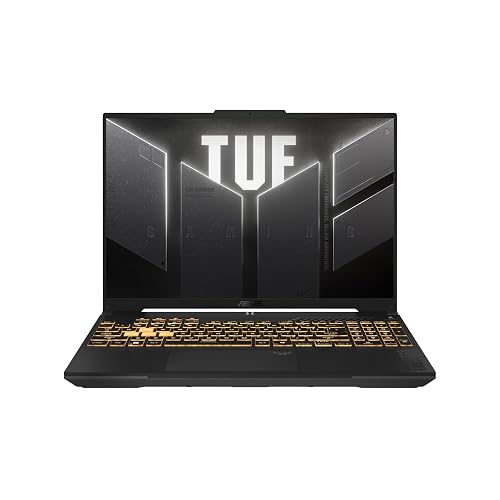 | Best Durable Pick | Processor: Intel Core 5 210H | Graphics: NVIDIA GeForce RTX 4050 | Display Size: 16-inch | VIEW LATEST PRICE | Read Our Analysis |
| Acer Nitro V Gaming Laptop (ANV15-52-98KV) |  | Best Performance | Processor: Intel Core i9-13900H | Graphics: NVIDIA GeForce RTX 5060 | Display Size: 15.6-inch | VIEW LATEST PRICE | Read Our Analysis |
| HP Victus 15.6″ Gaming Laptop (i5-12450H RTX 3050) | 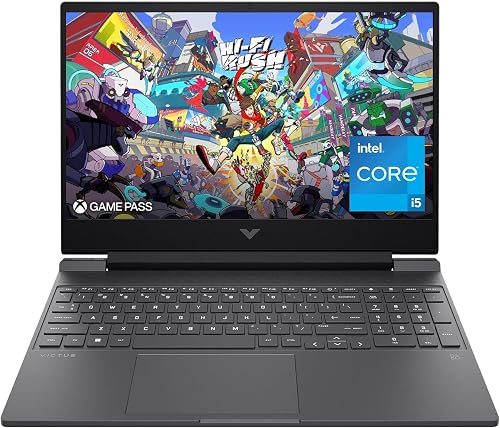 | Best Entry-Level | Processor: Intel Core i5-12450H | Graphics: NVIDIA GeForce RTX 3050 | Display Size: 15.6-inch | VIEW LATEST PRICE | Read Our Analysis |
| MALLRACE Gaming Laptop with Ryzen 7000 16GB/512GB |  | Best Lightweight Pick | Processor: AMD Ryzen 5 7430U | Graphics: AMD Radeon Graphics | Display Size: 15.6-inch | VIEW LATEST PRICE | Read Our Analysis |
More Details on Our Top Picks
ASUS ROG Strix G16 Gaming Laptop (2025)
The ASUS ROG Strix G16 Gaming Laptop (2025) is a strong pick if you want a GTA 6-ready machine that balances speed, cooling, and visual quality. You get Windows 11 Home, an Intel Core i7-14650HX, and an NVIDIA GeForce RTX 5060 with Blackwell, DLSS 4, and Max-Q support. Its 16GB DDR5 memory and 1TB PCIe Gen 4 SSD help you multitask and store a large library. The 16-inch FHD+ 165Hz display with 3ms response keeps gameplay smooth. ROG intelligent cooling includes a vapor chamber, a tri-fan design, and liquid metal to help it stay quiet and steady.
- Processor:Intel Core i7-14650HX
- Graphics:NVIDIA GeForce RTX 5060
- Display Size:16-inch
- Refresh Rate:165Hz
- Memory:16GB DDR5
- Storage:1TB SSD
- Additional Feature:360° RGB light bar
- Additional Feature:End-to-end vapor chamber
- Additional Feature:Conductonaut Extreme liquid metal
Acer Nitro V Gaming Laptop (ANV15-52-586Z)
If you want a budget-friendly gaming laptop that can still handle GTA 6-style demands, the Acer Nitro V Gaming Laptop (ANV15-52-586Z) is a strong pick. It features an Intel Core i5-13420H and an NVIDIA GeForce RTX 4050 with DLSS 3.5, so you can game, stream, and record without slowing down. The 15.6-inch Full HD IPS display runs at 165 Hz, providing smooth motion and accurate response. You also get 8 GB of DDR5 memory, up to 32 GB supported, a 512 GB PCIe Gen 4 SSD, Wi-Fi 6, Thunderbolt 4, and Killer Ethernet for fast connections.
- Processor:Intel Core i5-13420H
- Graphics:NVIDIA GeForce RTX 4050
- Display Size:15.6-inch
- Refresh Rate:165Hz
- Memory:8GB DDR5
- Storage:512GB SSD
- Additional Feature:Killer Ethernet E2600
- Additional Feature:Thunderbolt 4 support
- Additional Feature:2 DDR5 slots
Acer Nitro V Gaming Laptop (ANV15-52-76NK)
With its Intel Core i7-13620H and RTX 4050 GPU, the Acer Nitro V Gaming Laptop (ANV15-52-76NK) is a strong pick for players who want smooth GTA 6 gameplay without jumping to a higher-end machine. You get 194 AI TOPS, DLSS 3.5, and AI-enhanced ray tracing for sharper visuals and better immersion. Its 15.6-inch Full HD IPS panel runs at 165Hz, so you will notice less ghosting and quicker reactions. With 16GB DDR5 memory, a 1TB PCIe Gen 4 SSD, Wi-Fi 6, Killer Ethernet, and Thunderbolt 4, it is ready for gaming and multitasking.
- Processor:Intel Core i7-13620H
- Graphics:NVIDIA GeForce RTX 4050
- Display Size:15.6-inch
- Refresh Rate:165Hz
- Memory:16GB DDR5
- Storage:1TB SSD
- Additional Feature:2 DDR5 slots
- Additional Feature:Thunderbolt 4 support
- Additional Feature:Killer Ethernet E2600
ASUS TUF Gaming F16 Laptop (FX607VU-SS53)
ASUS TUF Gaming F16 (FX607VU-SS53) is a solid choice if you want a GTA 6-ready laptop that balances strong 1080p-class performance with portability. It features an Intel Core i5-12450H, RTX 4050 graphics configurable up to 115W, 16GB of DDR5 memory, and a 512GB Gen4 SSD for fast loading. The 16-inch 144Hz FHD+ panel keeps gameplay smooth and sharp. You also get Wi-Fi 6, HDMI 2.1, Arc Flow cooling, and MIL-STD-810H durability in a 2.2 kg Mecha Gray chassis.
- Processor:Intel Core 5 210H
- Graphics:NVIDIA GeForce RTX 4050
- Display Size:16-inch
- Refresh Rate:144Hz
- Memory:16GB DDR5
- Storage:512GB SSD
- Additional Feature:Military-grade durability
- Additional Feature:Dolby Atmos audio
- Additional Feature:Arc Flow Fans
Acer Nitro V Gaming Laptop (ANV15-52-98KV)
The Acer Nitro V Gaming Laptop (ANV15-52-98KV) is a strong pick for GTA 6 if you want a balanced machine that can handle demanding games, streaming, and multitasking without pushing into premium-tier pricing. It features an Intel Core i9-13900H, RTX 5060 graphics with 8GB GDDR7, and 16GB of RAM for smooth play and content work. The 15.6-inch 165Hz Full HD IPS display keeps motion crisp, and the 1TB PCIe Gen 4 SSD provides fast load times. Dual-fan cooling, NitroSense, Thunderbolt 4, Wi-Fi 6, and Windows 11 Home round out the package.
- Processor:Intel Core i9-13900H
- Graphics:NVIDIA GeForce RTX 5060
- Display Size:15.6-inch
- Refresh Rate:165Hz
- Memory:16GB DDR4
- Storage:1TB SSD
- Additional Feature:572 AI TOPS
- Additional Feature:NitroSense monitoring
- Additional Feature:Experience Zone apps
HP Victus 15.6″ Gaming Laptop (i5-12450H RTX 3050)
If you want a budget-friendly gaming laptop that still delivers solid 1080p performance, the HP Victus 15.6″ is a strong pick for GTA 6 prep. It comes with an Intel Core i5-12450H, RTX 3050 graphics with 6GB GDDR6, and 16GB of RAM for smooth gameplay and multitasking. The 15.6-inch Full HD IPS display runs at 144Hz, so motion feels responsive. Its 512GB PCIe SSD speeds up loading times, and Wi‑Fi 6 plus the backlit keyboard add convenience. Windows 11 Pro is included, and upgrade options keep the system flexible.
- Processor:Intel Core i5-12450H
- Graphics:NVIDIA GeForce RTX 3050
- Display Size:15.6-inch
- Refresh Rate:144Hz
- Memory:16GB RAM
- Storage:512GB SSD
- Additional Feature:Windows 11 Pro
- Additional Feature:6GB GDDR6 graphics
- Additional Feature:Micro-Edge anti-glare
MALLRACE Gaming Laptop with Ryzen 7000 16GB/512GB
With its Ryzen 5 7430U, 16GB of RAM, and 512GB NVMe SSD, the MALLRACE LX15PRO is a practical pick if you want a lightweight Windows 11 laptop for everyday gaming, multitasking, and school or office work. You get 6 cores, 12 threads, and boost speeds up to 4.3 GHz, so it handles spreadsheets, browsing, and light entertainment smoothly. The 15.6-inch 1080p matte display, Radeon graphics, and 180° hinge add flexibility. Wi-Fi 6, Bluetooth 5.2, USB-C video output, and an expandable design make it easy to use and upgrade.
- Processor:AMD Ryzen 5 7430U
- Graphics:AMD Radeon Graphics
- Display Size:15.6-inch
- Refresh Rate:60Hz
- Memory:16GB DDR4
- Storage:512GB SSD
- Additional Feature:180° hinge design
- Additional Feature:Front camera switch
- Additional Feature:Dual-drive bay design
Factors to Consider When Choosing Gaming Laptops For GTA 6
When choosing a gaming laptop for GTA 6, prioritize GPU power and CPU performance, because they have the greatest impact on frame rates and overall gameplay. Also ensure you have sufficient memory and fast storage so the game runs smoothly and loads quickly. Finally, consider a display with a high refresh rate and effective cooling, as both matter during long, intense sessions.
GPU Power
GPU power is a key factor for GTA 6, especially because a demanding open-world game like this benefits from newer GPU features as well as raw frame rate. Choose a newer architecture with stronger ray tracing and AI tools, since those help keep visuals smoother at higher settings. An RTX 4050 can work well for 1080p, but an RTX 5060 gives you more room for future games, higher detail, and longer usefulness. Aim for 8 GB of GDDR7 or GDDR6, because modern textures and large worlds require more memory. If you plan to use a 165 Hz display, stronger graphics matter even more. DLSS 3.5 or DLSS 4 can also raise frame rates and sharpen image quality.
CPU Performance
CPU performance matters as much as GPU performance for GTA 6, because a stronger processor helps keep open-world streaming, AI, physics, and background tasks running smoothly. Aim for a modern HX or H-class CPU with at least 6 to 14 cores and boost speeds around 4.3 GHz to 5.4 GHz. Those chips handle heavy gaming loads far better than low-power U-class processors. Newer generations with more cores also provide steadier results if you record, stream, or multitask while playing. Strong sustained performance can reduce frame-time spikes in demanding scenes, especially on a high-refresh-rate display. If you want the laptop to last several years, it is smarter to choose extra CPU headroom now rather than settle for the bare minimum.
Memory And Storage
After the processor, memory and storage play a big role in how smoothly GTA 6 runs on a gaming laptop. Aim for at least 16GB of RAM, because 8GB can bottleneck multitasking and cause stutter when the game runs with background apps. For snappier overall response, choose faster DDR5 5600MHz memory instead of slower DDR4. Storage matters just as much. A 1TB SSD gives you far more breathing room than a 512GB drive, since modern games can consume hundreds of gigabytes quickly. Pick PCIe Gen 4 SSDs for quicker loads and shorter install or update times. If you will stream, record, or keep many games installed, look for dual memory slots and expandable storage so you can upgrade later.
Display Smoothness
For smoother GTA 6 gameplay, choose a display with a high refresh rate such as 144Hz or 165Hz, because higher refresh rates make fast motion look cleaner and reduce the sense of stutter. Look for a fast response time, ideally around 3 ms, as this helps cut motion blur and ghosting when action shifts quickly. A 16:10 or 16:9 Full HD-class panel can keep frame pacing consistent while still showing enough detail for open-world scenes. Adaptive-sync support is worth having too, since it helps the screen match the game frame rate and reduces tearing. Finally, select a display with good contrast and a quality anti-glare finish, so reflections stay low and movement is easier to follow in bright areas.
Cooling And Thermals
Once you have a smooth display sorted, the next thing to check is how well the laptop can stay cool under GTA 6’s heavy load. Look for vapor chambers, multiple fans, and several heat pipes, since they help keep performance steady during long sessions. A GPU with a higher power limit, even up to 115W, only helps if the cooling system can dump that heat fast enough. Liquid metal, end-to-end vapor chambers, and tri-fan designs can lower temperatures, cut throttling, and reduce noise. Dust filters and multiple exhaust vents also matter, because they keep airflow consistent over time. If you are pairing high-refresh screens with a fast CPU, strong thermals become even more important, or frame rates and responsiveness can slip.
Frequently Asked Questions
Will GTA 6 Require Ray Tracing on Laptops?
No, you probably will not need ray tracing on laptops to run GTA 6, but you may want it for improved visuals. You will benefit from strong GPU performance, ample VRAM, and DLSS support.
Is 16GB RAM Enough for GTA 6?
Yes, 16GB RAM should be enough for GTA 6, and you will likely play smoothly at standard settings. You will get better results with 32GB RAM, especially if you multitask, use mods, or want extra future proofing.
Should I Prioritize Cooling Over GPU for GTA 6?
Yes, prioritize cooling first, it protects the laptop from acting like a furnace. A strong GPU still matters, but if heat causes throttling you will lose performance, experience more stuttering, and shorten the system’s lifespan.
Can These Laptops Run GTA 6 at 1440P?
Yes, with a high-end RTX 4070 or 4080 laptop you can likely run GTA 6 at 1440p with good settings. You may need to lower ray tracing and use DLSS for smoother performance.
Will Battery Life Matter While Playing GTA 6?
Battery life matters like a leaky gas tank on a road trip; you will burn through it quickly while gaming. You will mostly play while plugged in, because GTA 6 will drain laptops fast and reduce performance.




