

If you consult on the move, you need a laptop that keeps up with client meetings, long workdays, and last-minute changes without slowing you down.
In 2026, the best options blend speed, battery life, security, and easy portability, but the right choice depends on how you work.
Some models emphasize AI features and premium design, while others focus on ports, durability, and value.
Which one actually fits your day?
| Microsoft Surface Pro 2-in-1 Copilot+ PC (2024) |  | Best Premium 2-in-1 | Operating System: Windows 11 Copilot+ PC | Processor: Snapdragon X Elite | Memory: 16 GB | VIEW LATEST PRICE | Read Our Analysis |
| Microsoft Surface Pro 2-in-1 Laptop/Tablet (2024) |  | Best Versatile 2-in-1 | Operating System: Windows 11 Copilot+ PC | Processor: Snapdragon X Elite / X Plus | Memory: 16 GB | VIEW LATEST PRICE | Read Our Analysis |
| Microsoft Surface Laptop (2024) Copilot+ PC 32GB/1TB Black |  | Best Premium Laptop | Operating System: Windows 11 Home | Processor: Snapdragon X Elite | Memory: 32 GB | VIEW LATEST PRICE | Read Our Analysis |
| Lenovo V-Series V15 Business Laptop Ryzen 7 1TB SSD | 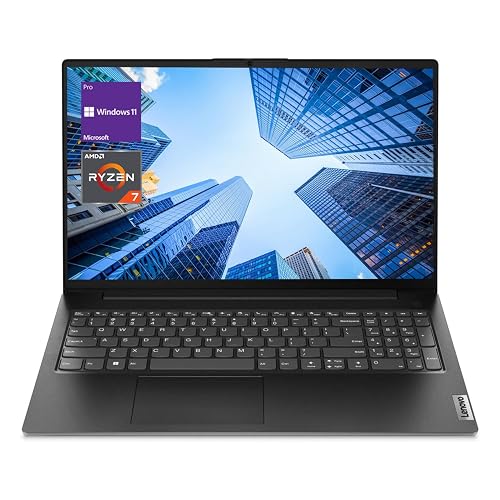 | Best Business Workhorse | Operating System: Windows 11 Pro | Processor: Ryzen 7 7730U | Memory: 40 GB | VIEW LATEST PRICE | Read Our Analysis |
| HP 14-inch Ultra Light Laptop with Office 365 AI Copilot | 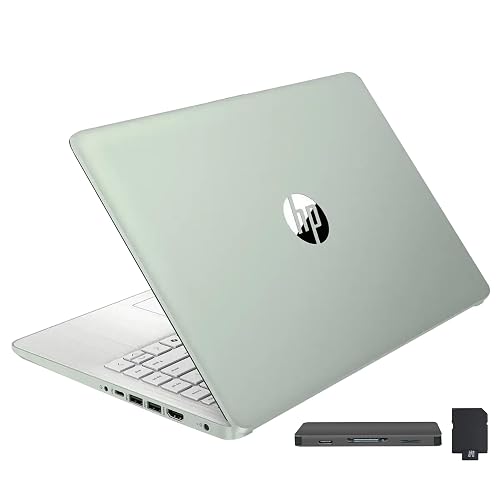 | Budget-Friendly Pick | Operating System: Windows 11 S | Processor: Intel N150 | Memory: 16 GB | VIEW LATEST PRICE | Read Our Analysis |
| HP 15.6″ Business Laptop with Office 365 AI | 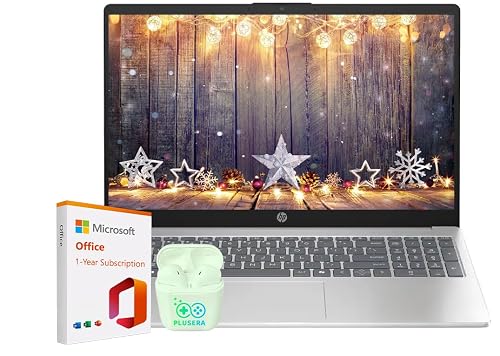 | Best Budget Business Laptop | Operating System: Windows 11 | Processor: Intel N100 | Memory: 16 GB | VIEW LATEST PRICE | Read Our Analysis |
More Details on Our Top Picks
Microsoft Surface Pro 2-in-1 Copilot+ PC (2024)
If you want a lightweight 2-in-1 that is easy to carry between client meetings, the Microsoft Surface Pro Copilot+ PC makes a strong case for consultants who value portability and flexibility. You get a 13-inch OLED touchscreen, a sharp 2560 x 1600 resolution, and a detachable design that works with a keyboard, mouse, and USB devices. The Snapdragon X Elite chip, 16 GB of memory, and a 256 GB SSD handle everyday consulting tasks smoothly. You also get Wi-Fi 7, up to 14 hours of battery life, fast charging, and an 895 g build. The separate keyboard is a downside.
- Operating System:Windows 11 Copilot+ PC
- Processor:Snapdragon X Elite
- Memory:16 GB
- Storage:256 GB SSD
- Display Size:13-inch
- Webcam:Yes
- Additional Feature:OLED PixelSense display
- Additional Feature:Wi‑Fi 7
- Additional Feature:1-year warranty
Microsoft Surface Pro 2-in-1 Laptop/Tablet (2024)
The Microsoft Surface Pro 2-in-1 Laptop/Tablet (2024) is a strong fit for consultants who want a lightweight, flexible device that can handle client work, travel, and presentations without slowing them down. It runs Windows 11 on a Copilot+ PC with Snapdragon X Elite or X Plus performance, and includes a powerful NPU for faster AI tasks. The 13″ OLED touchscreen delivers rich contrast and cinematic color, while 16 GB of RAM and a 1 TB SSD keep your work smooth. Expect up to 14 hours of battery life and fast 65W charging via Surface Connect or USB-C.
- Operating System:Windows 11 Copilot+ PC
- Processor:Snapdragon X Elite / X Plus
- Memory:16 GB
- Storage:1 TB SSD
- Display Size:13-inch
- Webcam:Yes
- Additional Feature:Snapdragon X Elite
- Additional Feature:Cinematic color range
- Additional Feature:Fast charging support
Microsoft Surface Laptop (2024) Copilot+ PC 32GB/1TB Black
Microsoft Surface Laptop (2024) Copilot+ PC in Black gives consultants a polished, portable workhorse with serious multitasking power, thanks to its Snapdragon X Elite processor, 32GB of memory, and 1TB SSD. You will move easily with its 2.96 pound frame, 13.8 inch PixelSense Flow touchscreen, and slim black chassis. Windows 11 Home, Wi‑Fi 7, and Bluetooth 5.4 keep you connected, while the backlit keyboard and haptic touchpad speed up work. Copilot+ features can streamline research and meetings, and the battery lasts up to 20 hours. Use USB-C for displays, storage, and fast charging.
- Operating System:Windows 11 Home
- Processor:Snapdragon X Elite
- Memory:32 GB
- Storage:1 TB SSD
- Display Size:13.8-inch
- Webcam:Yes
- Additional Feature:600-nit brightness
- Additional Feature:Omnisonic speakers
- Additional Feature:54.12Wh battery
Lenovo V-Series V15 Business Laptop Ryzen 7 1TB SSD
For consultants who need a reliable workhorse with serious multitasking power, the Lenovo V-Series V15 Business Laptop stands out with its Ryzen 7 7730U processor, 40 GB of RAM, and 1 TB SSD. You get 8 cores, 16 threads, and AMD Radeon Graphics for smooth spreadsheets, calls, and research. The 15.6-inch FHD display gives you a clear workspace, and the numeric keypad speeds up data entry. You can connect easily through USB-C, USB-A, HDMI, RJ45, and Wi-Fi. Windows 11 Pro adds business-focused navigation and collaboration tools, presented in a clean black design.
- Operating System:Windows 11 Pro
- Processor:Ryzen 7 7730U
- Memory:40 GB
- Storage:1 TB SSD
- Display Size:15.6-inch
- Webcam:Yes
- Additional Feature:Numeric keypad
- Additional Feature:RJ45 Ethernet port
- Additional Feature:Windows 11 Pro
HP 14-inch Ultra Light Laptop with Office 365 AI Copilot
If you need a lightweight, travel-friendly machine that still handles everyday consulting work, the HP 14-inch Ultra Light Laptop fits the bill. It weighs 3.2 pounds in a clamshell design, runs Windows 11 S, and includes Microsoft 365 with Copilot access. You get an Intel N150 processor, 16 GB DDR4 RAM, and 416 GB of combined storage for documents, decks, and meeting files. The 14-inch anti-glare HD display, HD webcam, Wi-Fi 6, and a full selection of ports make client calls and presentations easier. Fast Charge and long battery life help you stay productive on the move.
- Operating System:Windows 11 S
- Processor:Intel N150
- Memory:16 GB
- Storage:416 GB total
- Display Size:14-inch
- Webcam:Yes
- Additional Feature:Anti-glare display
- Additional Feature:Office 365 included
- Additional Feature:HP Fast Charge
HP 15.6″ Business Laptop with Office 365 AI
The HP 15.6″ Business Laptop with Office 365 AI is a smart pick for consultants who need dependable performance and built-in productivity tools on the go. It features an Intel N100 processor, 16 GB of DDR4 RAM, and an SSD for quick multitasking and fast startups. The 15.6-inch anti-glare display and HD stereo audio help you work comfortably. Wi-Fi 6, Bluetooth 5.4, and versatile ports keep you connected. A 720p camera with privacy shutter, a numeric keypad, and Windows 11 support your workflow. Office 365 with Copilot AI adds real value. Battery life reaches 11.75 hours.
- Operating System:Windows 11
- Processor:Intel N100
- Memory:16 GB
- Storage:SSD
- Display Size:15.6-inch
- Webcam:Yes
- Additional Feature:Camera privacy shutter
- Additional Feature:Wi‑Fi 6
- Additional Feature:PLUSERA earphones
Factors to Consider When Choosing Laptops For Consultants
When choosing a laptop for consulting work, balance performance, portability, and display quality so you can work efficiently anywhere. You will also want strong battery life to get through long days, and the right connectivity options for meetings, presentations, and fast data transfers. The best choice fits your workflow without weighing you down or slowing you down.
Performance Needs
For consulting work, performance should focus on how well a laptop handles real multitasking, not just headline specs. You will want a CPU with 6 to 12 cores, or a modern high IPC chip, because that keeps spreadsheets, video calls, and client decks responsive while you analyze data or run virtual machines. Aim for at least 16 GB of fast RAM, and step up to 32 GB if you juggle heavy VMs or large datasets. Choose an NVMe SSD of 512 GB or more so boot times, file loads, and exports stay quick. If you use on device AI or GPU accelerated analytics, look for NPU or dedicated graphics support. Finally, check cooling and power delivery, since sustained performance matters more than short bursts during long consulting sessions.
Portability Priorities
Portability matters just as much as speed when you move frequently between home, office, and client sites. Aim for a laptop under about 1.2 kg and slimmer than 18 mm, so it slips into a bag easily and will not wear you down during long commutes. Choose a 13- to 14-inch model for a smart balance of usable workspace and mobility; go bigger only if the extra bulk is worth it to you. Look for 10 or more hours of real-world battery life and fast charging, so you can top up quickly between meetings. Ensure you have USB-C with power delivery and display output, plus USB-A or HDMI support. A sturdy chassis, spill-resistant keyboard, and solid warranty coverage help the device survive constant travel and client-site use.
Display Quality
Display quality can make or break how useful a laptop feels in client work. Aim for at least a 13 to 14 inch IPS or OLED panel with 1920×1200 resolution or higher to keep spreadsheets, presentations, and code readable without sacrificing workspace. If you review marketing assets, photos, or video, look for 400 nit brightness and near 100 percent sRGB or strong DCI-P3 coverage. For client deliverables that need deep blacks and shadow detail, OLED or high-contrast VA panels with HDR help a lot. In bright meeting rooms or onsite, matte or low-reflectivity coatings reduce glare and eye strain, and extra brightness keeps content visible. Choose touch or stylus support only if you actually annotate or whiteboard, and check that multitouch feels responsive and that palm rejection works well.
Battery Longevity
Battery life matters just as much as performance when you are moving between client sites, airports, and hotel rooms. Look past “up to” claims and focus on mixed-use tests that deliver 10+ hours, since those numbers better match meetings, travel, and light multitasking. Check the battery’s watt-hours, because a higher Wh rating usually means longer runtime under similar workloads. You will also want fast charging that can hit 50 to 80 percent quickly with a USB-C PD charger, so a short layover actually helps. Pay attention to processor efficiency and integrated NPUs, because video calls, spreadsheets, and virtual machines can drain weaker chips fast. Finally, make sure the laptop can charge and power accessories without losing runtime when you are using docks or multiple monitors.
Connectivity Options
When you move between offices, airports, and client sites, connectivity can matter as much as raw speed. Look for at least one high-bandwidth USB-C, USB4, or Thunderbolt port for quick transfers, docking, and external displays. Check how many USB-A and USB-C ports you get, and whether any can charge devices or deliver power, so you can skip adapters. Make sure the laptop includes HDMI, DisplayPort, or USB-C video alt mode for client presentations and dual-monitor setups at native resolution. For wireless work, prioritize Wi-Fi 6, 6E, or 7 and Bluetooth 5.x for stable, low-latency connections. If you often work in spotty networks, verify Ethernet support, a USB adapter option, or SIM, eSIM, or WWAN for dependable wired or cellular access.
Security Features
Security should be a top priority, because consultants often handle sensitive client data on the move. Choose a laptop with hardware-based encryption, such as TPM 2.0, so disk keys stay protected and full-disk encryption runs with little slowdown. Look for secure boot and measured boot to help verify firmware and OS integrity. This reduces the risk of persistent malware. Strong sign-in options matter too, so favor fingerprint readers, IR cameras, or FIDO2 security keys to cut phishing and credential theft. Confirm clear firmware update cadences and enterprise management support, like MDM or Intune, so you can patch quickly. Finally, built-in privacy controls, such as camera and microphone kill switches, plus VPN and per-app network controls, help keep client work confidential.
Storage Capacity
Storage capacity can make or break your day-to-day workflow, especially if you juggle large datasets, project archives, or multiple virtual machines. Aim for at least 1 TB of SSD storage if you handle heavy files, so you are not constantly reaching for external drives. Choose an NVMe PCIe SSD over eMMC or SATA, because it will speed up file transfers, indexing, and application launches. If your active work fits in 256 to 512 GB, pair that fast internal drive with encrypted external or cloud storage for backups and deliverables. Also prioritize durability, including strong TBW ratings or enterprise-grade parts, and keep full-disk encryption enabled. Leave 20 to 30 percent of the SSD free, especially with virtual machines or large datasets, to preserve performance.
Business Software
To keep your workflow smooth, make sure the laptop runs your core business apps, such as accounting, CRM, BI, and project management tools, without compatibility issues. Check OS support, minimum CPU and RAM specs, and any runtimes or frameworks each app needs. If you juggle virtual machines, huge spreadsheets, or analytics, choose at least 16 GB of RAM and an NVMe SSD so you do not face lag or long waits. Also confirm BitLocker, TPM, secure boot, and MDM support for compliance and remote setup. Test video calls, screen sharing, and live document editing on the system, and verify the webcam, mic, and Wi-Fi adapter perform reliably. If you use local AI tools, pick hardware with an NPU or accelerator that your software can actually use.
Frequently Asked Questions
Which Laptop Has the Best Battery Life for Travel?
You’ll get the best travel battery life from Apple’s MacBook Air, which runs all day, charges quickly, and remains lightweight. If you need Windows, choose a Snapdragon X Elite ultraportable instead.
Are These Laptops Good for Frequent Video Calls?
Absolutely, if you choose models with strong webcams, microphones, and CPUs you’re set. Why settle for choppy calls? You will get clear video, reliable audio, and smooth multitasking for frequent meetings.
Which Model Is Easiest to Carry Daily?
The lightest model will be the easiest to carry daily, especially if it weighs under three pounds. Choose the smallest chassis, and you will move it effortlessly between meetings, commutes, and coffee shops every day.
Do Any of These Support Two External Monitors?
Yes, if you choose a laptop with Thunderbolt, USB4, or HDMI 2.1, you can usually drive two external monitors. Check each model’s specs because some thin laptops support only one.
Which Laptop Offers the Best Security Features?
If security is your priority, choose the Lenovo ThinkPad X1 Carbon. It includes fingerprint login, a webcam shutter, TPM, and robust BIOS protection, so your data stays locked down while you work anywhere.




