


Most PS5 owners do not realize that a few small accessories can improve image stability, comfort, and even how cool the console runs.
When you choose the right gear, you can reduce cable clutter, avoid dead controllers, and make long sessions easier on your hands and eyes.
From a 48Gbps HDMI 2.1 cable to a smart charging dock, each pick solves a real problem, and one of them may fix the issue that has been bothering you most.
| 8K Fiber Optic HDMI Cable 100ft 48Gbps |  | Best Long-Range Cable | Compatibility: PS5, PS4, Xbox, PC | Function: HDMI video cable | Power: No power needed | VIEW LATEST PRICE | Read Our Analysis |
| Premium Silicone Thumb Grips for PS4/PS5/Xbox Controllers | 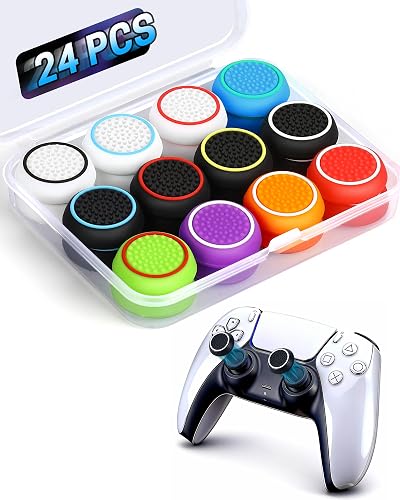 | Best Grip Upgrade | Compatibility: PS5, PS4, Xbox | Function: Thumb grip caps | Power: No power needed | VIEW LATEST PRICE | Read Our Analysis |
| SteelSeries Arctis Nova 7P Wireless Gaming Headset | 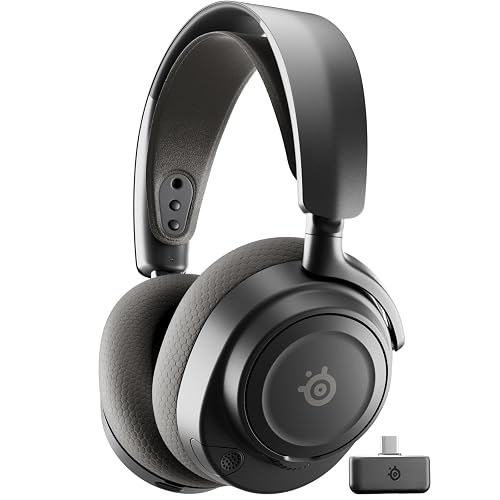 | Best Premium Headset | Compatibility: PS5, PS4, PC, Switch, mobile | Function: Wireless gaming headset | Power: Rechargeable battery | VIEW LATEST PRICE | Read Our Analysis |
| FASTSNAIL LED Battery Pack for PS5 Controller | 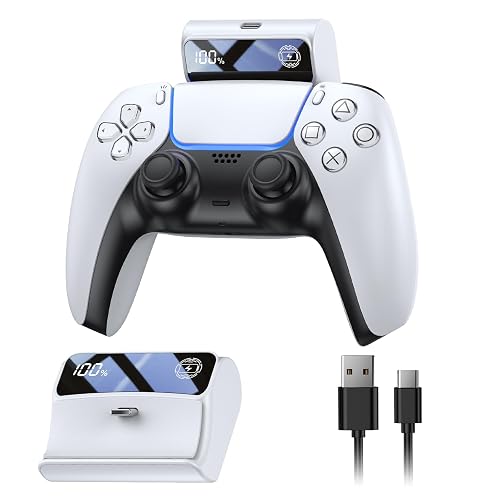 | Best Battery Boost | Compatibility: PS5 DualSense | Function: Battery pack | Power: Rechargeable battery | VIEW LATEST PRICE | Read Our Analysis |
| PS5/Slim/Pro Stand and Cooling Station with LED Charging Dock | 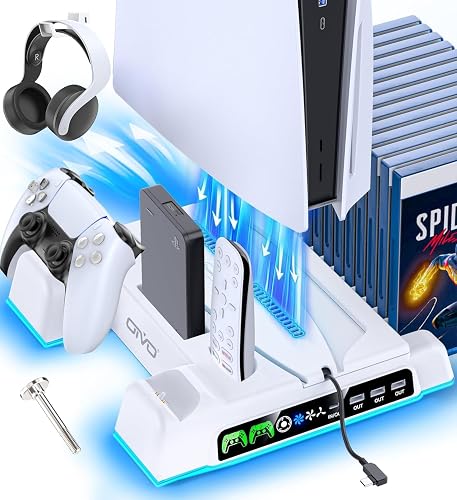 | Best PS5 Stand | Compatibility: PS5, PS5 Slim, PS5 Pro | Function: Console stand/cooling dock | Power: AC-powered | VIEW LATEST PRICE | Read Our Analysis |
| Playstation Media Remote | 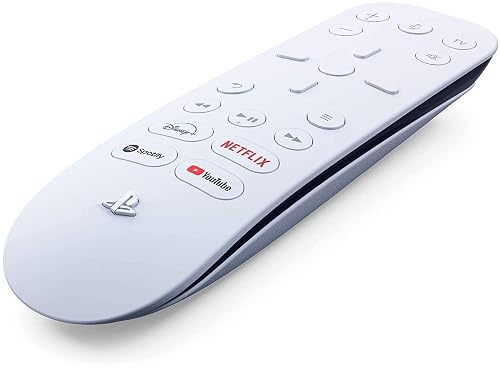 | Best Media Remote | Compatibility: PS5 | Function: Media remote | Power: AA batteries | VIEW LATEST PRICE | Read Our Analysis |
| PowerA Twin Charging Station for DualSense Controllers | 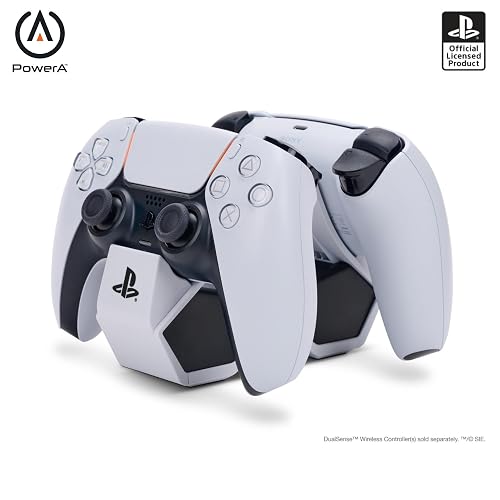 | Best Dual Charger | Compatibility: DualSense controllers, PS5 | Function: Charging station | Power: AC adapter | VIEW LATEST PRICE | Read Our Analysis |
More Details on Our Top Picks
8K Fiber Optic HDMI Cable 100ft 48Gbps
If you need your PS5 setup to cover long distances without losing picture quality, the K Fiber Optic HDMI Cable 100ft, 48Gbps is designed for that. It supports 8K at 60Hz and 4K at 120Hz, and it also supports VRR, ALLM, and HDR for smoother gameplay. Because it uses fiber optics, the signal stays clean over long runs and resists EMI from crowded power cords and routers. You also get Dolby Atmos and DTS:X for rich audio. Plug the marked SOURCE end into your console, and plug the DISPLAY end into your TV.
- Compatibility:PS5, PS4, Xbox, PC
- Function:HDMI video cable
- Power:No power needed
- Charging:No
- Material:Fiber optic
- Color:Black
- Additional Feature:48Gbps HDMI 2.1
- Additional Feature:EMI/RFI noise immunity
- Additional Feature:360° bendable design
Premium Silicone Thumb Grips for PS4/PS5/Xbox Controllers
Premium silicone thumb grips are a practical choice for players who want a steadier hold without significantly altering the controller feel. You receive 24 grips, in 12 color pairs, so you can outfit multiple controllers or keep spares on hand. They stretch on easily and do not require removing the existing thumbsticks. Compatible with PS5 DualSense, PS4 DualShock, Xbox One, and Xbox 360 controllers, they can be swapped between devices with ease. The non slip texture helps keep your thumbs planted, and the silicone protects against scratches, shine, grime, and everyday wear.
- Compatibility:PS5, PS4, Xbox
- Function:Thumb grip caps
- Power:No power needed
- Charging:No
- Material:Silicone
- Color:Multicolor
- Additional Feature:Stretch-to-fit installation
- Additional Feature:Non-slip textured grip
- Additional Feature:Reversible residue-free mod
SteelSeries Arctis Nova 7P Wireless Gaming Headset
The SteelSeries Arctis Nova 7P Wireless Gaming Headset fits PS5 players who want great sound, easy switching, and all-day comfort without the hassle of cords. You hear crisp detail from custom neodymium drivers, plus 360° spatial audio that helps you track every step. With 2.4 GHz wireless and Bluetooth at the same time, you can game and take calls together. The ClearCast Gen 2 mic cuts background noise, and the steel frame, memory foam cushions, and 50-hour battery keep you comfy and ready. USB-C charging makes recharging quick and easy.
- Compatibility:PS5, PS4, PC, Switch, mobile
- Function:Wireless gaming headset
- Power:Rechargeable battery
- Charging:USB-C fast charge
- Material:Steel frame
- Color:Multiple colorways
- Additional Feature:360° Spatial Audio
- Additional Feature:200+ audio presets
- Additional Feature:ClearCast Gen 2 mic
FASTSNAIL LED Battery Pack for PS5 Controller
FASTSNAIL’s LED battery pack is a smart pick for PS5 players who dislike their controller dying at a critical moment. You clip it on, plug it in, and keep playing with no fuss. Its 7,400 mWh capacity can add up to eight more hours, and the LED display shows your charge so you are not guessing. It recharges in about three hours, which helps between sessions. At just 3.35 oz, it feels light in your hands. Built-in protection also helps keep your DualSense safe while you game.
- Compatibility:PS5 DualSense
- Function:Battery pack
- Power:Rechargeable battery
- Charging:Yes
- Material:Plastic
- Color:Black
- Additional Feature:7400mWh capacity
- Additional Feature:LED battery display
- Additional Feature:Over-current protection
PS5/Slim/Pro Stand and Cooling Station with LED Charging Dock
If you want one PS5 accessory that cleans up your setup and makes daily play easier, this stand and cooling station with LED charging dock is built for you. You can park your PS5, PS5 Slim, or PS5 Pro in one neat spot, and charge two DualSense controllers at once. The built-in fan pulls hot air from below, and three cooling settings help you match your room. You also get storage for discs, a headset, remote, and hard drive, so your space feels calmer and your gear stays ready.
- Compatibility:PS5, PS5 Slim, PS5 Pro
- Function:Console stand/cooling dock
- Power:AC-powered
- Charging:Dual controller charging
- Material:Plastic
- Color:White
- Additional Feature:Holds 14 discs
- Additional Feature:Three-level fan settings
- Additional Feature:Built-in turbo fan
Playstation Media Remote
PlayStation Media Remote is the best PS5 accessory for anyone who uses their console as a true entertainment hub, because it makes streaming feel smooth, simple, and far less fussy. You can power on your PS5, navigate menus, and control playback with play, pause, fast forward, and reverse buttons. Its 15-button layout is easy to learn, so you will not hunt through screens. The built-in IR transmitter can raise volume or turn on a compatible TV. Setup is quick, though some services require internet access, a PSN account, and a subscription.
- Compatibility:PS5
- Function:Media remote
- Power:AA batteries
- Charging:No
- Material:Plastic
- Color:White
- Additional Feature:Built-in IR transmitter
- Additional Feature:15-button layout
- Additional Feature:10-meter range
PowerA Twin Charging Station for DualSense Controllers
The PowerA Twin Charging Station for DualSense Controllers is a practical choice for PS5 players who want a neat, easy way to keep two controllers ready at once. You place your DualSense pads on the tabletop dock, and the AC adapter handles charging. It is officially licensed for PlayStation 5, so it integrates with your setup. An LED on each controller indicates when charging is complete, removing guesswork. Because it uses wired power, you can avoid battery anxiety and continue gaming. Its light plastic construction keeps your space tidy without taking up much room.
- Compatibility:DualSense controllers, PS5
- Function:Charging station
- Power:AC adapter
- Charging:Dual controller charging
- Material:Plastic
- Color:White
- Additional Feature:Dual controller dock
- Additional Feature:Two-year limited warranty
- Additional Feature:Charging indicator light
Factors to Consider When Choosing PS5 Accessories
When choosing PS5 accessories, first verify compatibility to ensure all items work properly with your console and controllers. Next consider charging and power options, storage and organization, audio and communication, and cable length and quality; these details can make daily use of your setup much easier. Selecting the right accessories reduces hassle and increases comfort, improving your overall gaming experience.
Compatibility With PS5
Before you buy any PS5 accessory, check that it truly fits your console and your setup, because a great-looking device can still act flaky if the match is not right. First, confirm it works with your PS5, PS5 Slim, or PS5 Pro, since firmware and hardware changes can affect features such as media navigation and controller pairing. Next, make sure the accessory uses the correct connection, such as USB-C, USB-A, Bluetooth, 2.4 GHz wireless, or IR. Also check for software requirements, including system updates, media app accounts, or HDCP support. If you are choosing a wireless device, verify that it supports the console’s accepted bands and audio formats. This helps keep everything smooth, simple, and frustration free.
Charging And Power
Power matters fast with PS5 accessories, because a weak battery or slow charger can cut a good session short and kill the mood. When you pick a battery pack or charging dock, check its capacity in mAh or mWh so you know how much extra play time you will get. Next, look at the charge time and the charging protocol, such as USB-C fast charge, so you are not waiting forever between matches. You should also confirm safety features, including overcharge, overcurrent, overvoltage, and short-circuit protection, because your controller deserves better than drama. If you share gear, choose a charger that powers multiple controllers at once, and check each port’s amperage. Finally, make sure you can see LED or display indicators, so you know battery levels before a surprise blackout hits.
Storage And Organization
A smart storage setup can turn a messy PS5 area into a calm, ready-to-play corner. Pick a stand or dock that gives each controller, headset, and up to 10 to 14 discs its own place, because that cuts clutter quickly. Look for built-in charging ports with at least two controller bays and clear LED lights, so you always know what is powered without extra cable tangles. Choose compartments or removable trays for cables, thumb grips, and batteries, since small items tend to vanish at the worst times. Prefer vertical or multi-tier designs to save floor space and improve airflow around the console. Finally, use sturdy materials, anti-slip bases, or screw mounts to keep everything steady even when your setup gets active.
Audio And Communication
Good audio gear can make your PS5 feel sharper, calmer, and more connected. Start with a headset that keeps sound in sync, so low-latency wireless or Bluetooth game audio does not leave your shots or footsteps behind. Next, choose wide drivers and virtual or 360° spatial audio, because they help you hear where danger comes from and pull you deeper into the game. After that, check the mic. A clear pickup pattern and strong noise reduction, around -20 dB or better, keep your voice steady even when your room gets noisy. Make sure the battery lasts 40 hours or more. Finally, confirm PS5 support for chat mix, game balance, and formats such as Dolby Atmos or DTS:X.
Cable Length And Quality
When you run a long cable from your PS5 to your display, think beyond simple reach and get the right signal path in place. Use fiber optic or active cables for long runs, because they keep the picture clean over tens or even hundreds of feet. Next, check the bandwidth rating. For HDMI 2.1 you need 48 Gbps if you want 4K at 120 Hz or 8K at 60 Hz without laggy tradeoffs. Also make sure the cable still supports VRR, ALLM, HDR, and the audio features you use, since some long options trim extras. Then look at the cable itself. A thinner, flexible cable with a tight bend radius makes routing easier, and strong EMI shielding helps block noise from nearby power cords and devices.
Durability And Build
Durability matters more than people often expect, because a PS5 accessory that feels solid today should still hold up after months of daily use. Look for reinforced plastics, metal frames, and braided cables, since these resist bending and wear better than flimsy parts. Check charging gear for over-charge, over-current, short-circuit, and thermal protection, because safety also protects the product itself. Pay attention to design details like strain relief at connector joints, flexible low-profile builds, and sturdy snap-fit mounts, since these reduce stress where damage starts. If you plan to use gear outside or in bright setups, choose IP-rated items and UV-resistant materials. Finally, compare cycle counts, bend limits, MTBF, and warranty length to identify accessories built to last.
Frequently Asked Questions
Do PS5 Accessories Affect Game Performance or Just Convenience?
PS5 accessories primarily enhance convenience, but they can also improve performance in specific ways. Faster storage and better cooling reduce load times and thermal throttling; more responsive controllers lower input lag. Accessories will not directly increase frame rates, though they can improve overall responsiveness and consistency.
Are Third-Party PS5 Accessories Safe for Long-Term Use?
Yes, third-party PS5 accessories can be safe long term if you choose reputable brands, follow Sony compatibility guidance, and avoid cheap knockoffs. You will reduce risks by checking reviews, warranties, and update support before buying.
Which Accessories Work Best for Competitive Online Gaming?
You’ll do best with a low-latency headset, a wired controller, and a fast SSD. Hear every footstep, react quicker, and load matches faster. Add a cooling stand, and you’ll stay sharp through long ranked sessions.
How Often Should PS5 Controllers and Accessories Be Cleaned?
Clean your PS5 controller and accessories weekly, and wipe them after sweaty or dusty sessions. Regular, gentle maintenance prevents grime buildup, keeps buttons responsive, and extends their lifespan.
Can PS5 Accessories Help Reduce Setup Clutter?
Yes. PS5 accessories can reduce setup clutter. Charging docks, wall mounts, compact stands, and cable organizers free up space. They keep your gear neat, accessible, and less tangled.




