


Picking the right Intel Core i5 tower in 2026 can feel like finding the steady engine in a crowded garage, and that choice matters when you want work to run without drama.
You will see renewed Dell OptiPlex models that still hold up well, compact picks like the GEEKOM IT12, and newer towers with stronger i5 chips that handle heavier multitasking with ease.
The real difference shows up when you compare speed, memory, storage, ports, and upgrade room, because those details decide whether your PC feels calm today and ready for tomorrow.
| Dell OptiPlex 5060 Windows 11 Desktop PC (Renewed) | 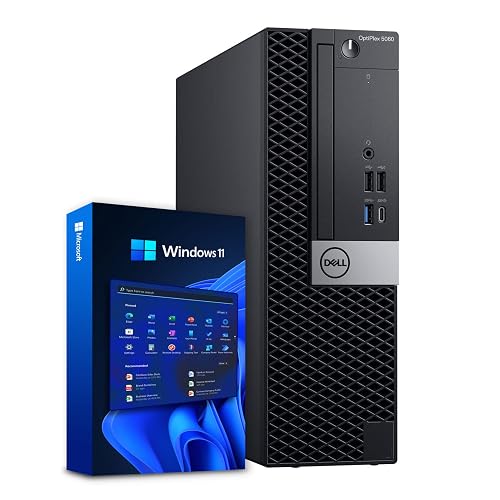 | Budget-Friendly Pick | Processor: Intel Core i5-8500 | Memory: 16GB DDR4 | Storage: 500GB SSD + 1TB HDD | VIEW LATEST PRICE | Read Our Analysis |
| Dell OptiPlex 7050 Desktop PC i5 16GB 512GB SSD |  | Reliable Refurbished Choice | Processor: Intel Core i5-7500 | Memory: 16GB DDR4 | Storage: 512GB SSD | VIEW LATEST PRICE | Read Our Analysis |
| GEEKOM IT12 Mini PC (i5-12450H 16GB/512GB Windows 11) | 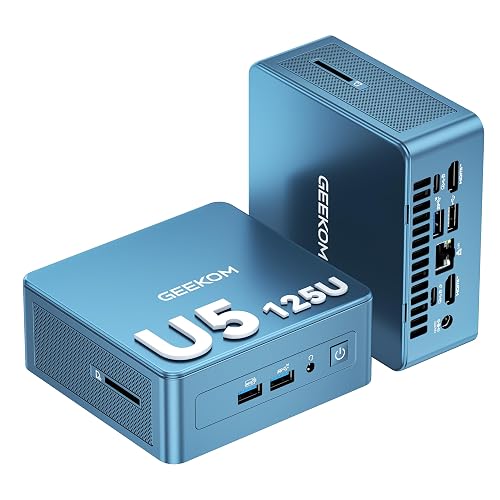 | Best Performance | Processor: Intel i5-12450H | Memory: 16GB RAM | Storage: 512GB NVMe SSD | VIEW LATEST PRICE | Read Our Analysis |
| Dell Tower Desktop ECT1250 with Core Ultra 7-265 | 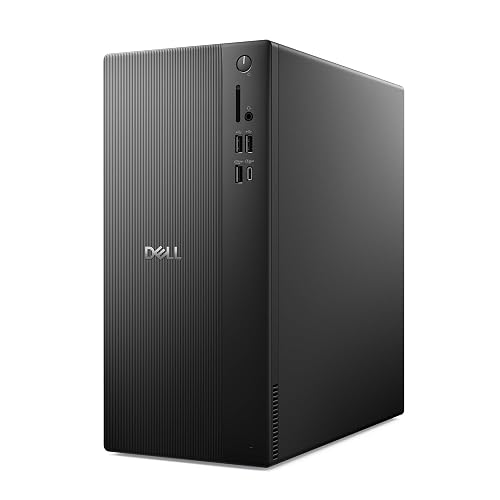 | Best Premium Tower | Processor: Intel Core Ultra 7-265 | Memory: 32GB DDR5 | Storage: 1TB M.2 SSD | VIEW LATEST PRICE | Read Our Analysis |
| Dell OptiPlex Tower Desktop with Intel Core i5-14500 |  | Best Business Tower | Processor: Intel Core i5-14500 vPro | Memory: 32GB DDR5 | Storage: 1TB NVMe SSD | VIEW LATEST PRICE | Read Our Analysis |
More Details on Our Top Picks
Dell OptiPlex 5060 Windows 11 Desktop PC (Renewed)
The Dell OptiPlex 5060 Windows 11 Desktop PC is a reliable tower that performs consistently. It features a six-core Intel Core i5-8500 that can boost up to 4.3 GHz for responsive everyday work. With 16 GB of DDR4 RAM you can keep multiple apps open without the usual slowdowns. A 500 GB SSD provides quick startup and load times, while a 1 TB HDD offers ample space for files. Wi Fi, Bluetooth, and wired LAN keep you connected, and Intel UHD Graphics 630 delivers clear video playback. The slim black tower fits neatly on home or office desks.
- Processor:Intel Core i5-8500
- Memory:16GB DDR4
- Storage:500GB SSD + 1TB HDD
- Operating System:Windows 11
- Graphics:Intel UHD Graphics 630
- Wireless:WiFi + Bluetooth
- Additional Feature:1TB HDD included
- Additional Feature:Slim-profile tower design
- Additional Feature:Intel UHD 630 graphics
Dell OptiPlex 7050 Desktop PC i5 16GB 512GB SSD
The Dell OptiPlex 7050 Desktop PC i5 16GB 512GB SSD is a solid choice if you want a renewed tower that feels sturdy, runs quickly, and keeps everyday work simple. It includes an Intel Core i5-7500, 16 GB DDR4 RAM, and a 512 GB SSD, so applications open quickly and multitasking stays smooth. Windows 11 Pro comes ready to use. As a Microsoft Authorized Refurbisher unit, it supports quality remanufacturing and reduces e-waste. The system adds Wi-Fi, Bluetooth, numerous USB ports, DisplayPort, HDMI, and 4K support. Note that the TPM 1.2 limit may restrict some Windows 11 security features.
- Processor:Intel Core i5-7500
- Memory:16GB DDR4
- Storage:512GB SSD
- Operating System:Windows 11 Pro
- Graphics:Intel HD Graphics 630
- Wireless:WiFi + Bluetooth
- Additional Feature:Microsoft Authorized Refurbisher
- Additional Feature:HDMI 1.4 output
- Additional Feature:TPM 1.2 only
GEEKOM IT12 Mini PC (i5-12450H 16GB/512GB Windows 11)
If you want a compact PC that can still handle serious daily work, the GEEKOM IT12 Mini PC is a smart fit for home office users, small teams, and anyone who needs steady performance without the bulk of a full tower. Windows 11 Pro comes preinstalled, so setup is simple and fast. The i5-12450H keeps multitasking smooth, and Intel Quick Sync helps with 4K transcoding and Plex tasks. Quiet Ice-Burst cooling, 16GB of RAM, and a 512GB SSD keep the system responsive. With USB4, dual HDMI ports, WiFi 6E, and three years of support, you are covered.
- Processor:Intel i5-12450H
- Memory:16GB RAM
- Storage:512GB NVMe SSD
- Operating System:Windows 11 Pro
- Graphics:Intel Quick Sync UHD graphics
- Wireless:WiFi 6E + Bluetooth 5.2
- Additional Feature:3-year coverage
- Additional Feature:Dual USB4 ports
- Additional Feature:Four-screen output
Dell Tower Desktop ECT1250 with Core Ultra 7-265
Built for busy workdays, the Dell Tower Desktop ECT1250 with Core Ultra 7-265 delivers a strong mix of speed, storage, and simple expandability, making it well suited for office users, students, and home teams who need a desktop that performs under daily demands. It features 20 cores, 32 GB of fast DDR5 memory, and a 1 TB SSD, so apps open quickly and files remain close at hand. Built-in AI and Intel UHD Graphics support smooth everyday tasks. With Wi-Fi, Bluetooth, seven USB ports, and support for multiple monitors, you stay productive.
- Processor:Intel Core Ultra 7-265
- Memory:32GB DDR5
- Storage:1TB M.2 SSD
- Operating System:Windows 11 Home
- Graphics:Intel UHD Graphics
- Wireless:Wi‑Fi + Bluetooth
- Additional Feature:Built-in AI features
- Additional Feature:Tool-less side panel
- Additional Feature:1-year onsite service
Dell OptiPlex Tower Desktop with Intel Core i5-14500
At the center of the Dell OptiPlex Tower Desktop with Intel Core i5-14500 is steady performance that suits people who need a PC to keep up without drama. The processor delivers 14 cores, 20 threads and vPro management, so your work stays responsive. With 32GB of DDR5 memory and a 1TB NVMe SSD, you can open files quickly and juggle tasks with ease. Intel UHD Graphics 770 supports dual 4K displays for clean, roomy workspaces. Windows 11 Pro, BitLocker and convenient front and rear ports keep you set for business every day.
- Processor:Intel Core i5-14500 vPro
- Memory:32GB DDR5
- Storage:1TB NVMe SSD
- Operating System:Windows 11 Pro 64-bit
- Graphics:Intel UHD Graphics 770
- Wireless:Wireless connectivity included
- Additional Feature:Intel vPro platform
- Additional Feature:BitLocker encryption
- Additional Feature:180W Bronze PSU
Factors to Consider When Choosing Intel Core i5 Tower Computers
When choosing an Intel Core i5 tower computer, begin with processor speed, memory capacity, and storage type, since these determine everyday performance and responsiveness. Also verify connectivity options so peripherals plug in easily and network connections remain reliable. If you plan to do light creative work or gaming, confirm that the graphics capability matches your needs.
Processor Speed
Processor speed plays a major role in how fast an Intel Core i5 tower feels day to day, but you should look beyond the GHz number on the box. Check both base and turbo speeds, since turbo can provide a useful burst when apps open or when tasks spike. A chip with a base clock around 2.6 to 3.4 GHz and turbo speeds up to 5.0 to 5.3 GHz typically offers a good balance of steady efficiency and quick peak power. Also review core and thread counts, since higher counts help keep multitasking smooth. If you handle data analysis, video calls, or CAD, newer CPUs with strong boost clocks help reduce slowdowns and keep your tower responsive.
Memory Capacity
Memory size can make a big difference in how smooth your Intel Core i5 tower feels, especially if you keep several things open at once. For everyday home or office work, 16 GB of DDR4 is a solid baseline and usually keeps apps and browser tabs moving well. If you handle large spreadsheets, many documents, or heavy multitasking, 32 GB gives you more breathing room and helps reduce slowdowns. Also look for a system that lets you add more later, since some towers can grow from 16 GB to 96 GB. Memory type matters as well, and DDR5 at 5600 MHz can feel faster than DDR4. Finally, check whether the memory listed is the maximum supported amount or just the amount installed.
Storage Type
Storage affects how fast your Intel Core i5 tower feels day to day, even after you have the right amount of memory. For quick boots and fast app launches, choose an SSD instead of a hard drive. A 512 GB or 1 TB SSD provides speedy access for work files, large installs, and everyday tasks, keeping your system snappy. When you need more room for media, backups, or archives, use a hybrid setup, with an SSD for Windows and a larger hard drive for storage. Also check the interface. PCIe NVMe SSDs usually outperform older SATA drives by a wide margin. If speed matters most, prioritize SSD type, then size.
Connectivity Options
Just as important as speed and storage, connectivity can shape how easy your Intel Core i5 tower is to live with every day. You will want built-in Wi-Fi 6E, Wi-Fi 6, or 802.11ac if you prefer cable-free internet, and Bluetooth helps you pair headphones, keyboards, and mice quickly. Next, check the wired port; Gigabit Ethernet or 2.5Gb Ethernet can give you steadier transfers and less lag. Also look closely at USB options, such as USB-C, USB 3.0, USB 3.2, and USB 2.0, so you can plug in drives, docks, and accessories without hunting for adapters. Finally, review video outputs like HDMI and DisplayPort, and check for audio jacks or an SD card reader so your daily setup feels simple and complete.
Graphics Support
When evaluating graphics support in an Intel Core i5 tower, start with what you actually do each day. The right choice should feel easy, not complicated. For email, web work, and office apps, Intel UHD Graphics 630 or 770 usually provides smooth, clear video and sharp text. If you juggle multiple screens, check for dual 4K output over HDMI and DisplayPort, or for four FHD monitors using DisplayPort daisy chaining. That level of support can make your desk feel calm instead of crowded. If you watch a lot of media or edit short clips, look for Intel Quick Sync because it speeds transcoding. For CAD, video editing, or heavy multitasking, choose stronger 4K output support so your tower keeps up without fuss.
Frequently Asked Questions
Are Intel Core i5 Tower Computers Good for Light Gaming?
Yes, you can game lightly on an Intel Core i5 tower, and it is a reliable bridge between work and play. Pair it with adequate RAM and a modest GPU, and you will handle esports and indie titles smoothly.
Can I Upgrade the RAM Later on These Towers?
Yes. You can usually upgrade the RAM later on these towers. Check the motherboard’s RAM slots, supported memory type, and maximum capacity before buying anything to ensure the upgrade will work.
Do These Desktops Support Dual Monitors?
Yes. You can usually run dual monitors if your desktop has two video outputs or a compatible graphics card. Connect both displays, then adjust the settings in Windows or your operating system.
How Much Electricity Do Core i5 Tower PCS Usually Use?
Typically, a Core i5 tower PC consumes about 50 to 150 watts, but actual use depends on the components and workload. Gaming or rendering can cause much higher spikes. Check the power supply rating and monitor real-world power draw to be sure.
Are Renewed Dell Towers Reliable for Everyday Office Work?
Yes, renewed Dell towers can be reliable for everyday office work if purchased from a reputable seller, you verify warranty terms, and you confirm the specifications. They will handle email, documents, and web browsing smoothly with minimal hassle.




