


If you need a tower PC that will not slow you down, picture this: you open a large spreadsheet, stream music, and still have room for a dozen browser tabs.
The HP OmniDesk with an Intel Core i7-14700 is built for that kind of day. Renewed Dell OptiPlex 7060 and 7050 models offer solid value for work and home.
The real question is which one best fits your space, budget, and performance requirements.
| HP OmniDesk Desktop PC Intel Core i7-14700 1TB SSD |  | Best Overall | Processor: Intel Core i7-14700 | Form Factor: Desktop PC | Operating System: Windows 11 Home | VIEW LATEST PRICE | Read Our Analysis |
| DELL Optiplex 7060 SFF Desktop PC i7-8700 32GB 512GB SSD | 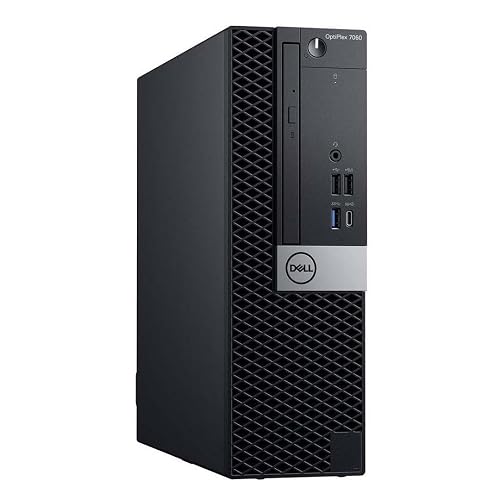 | Best for Business | Processor: Intel Core i7-8700 | Form Factor: Small form factor | Operating System: Windows 11 Pro | VIEW LATEST PRICE | Read Our Analysis |
| DELL Optiplex 7060 SFF Desktop PC i7-8700 Renewed | | Budget-Friendly Pick | Processor: Intel Core i7-8700 | Form Factor: Small form factor | Operating System: Windows 11 Pro | VIEW LATEST PRICE | Read Our Analysis |
| DELL Optiplex 7060 SFF Desktop PC i7-8700 16GB 512GB SSD | | Best Renewed Value | Processor: Intel Core i7-8700 | Form Factor: Small form factor | Operating System: Windows 11 Pro | VIEW LATEST PRICE | Read Our Analysis |
| Dell Optiplex 7050 SFF Desktop PC i7-7700 32GB 1TB SSD | 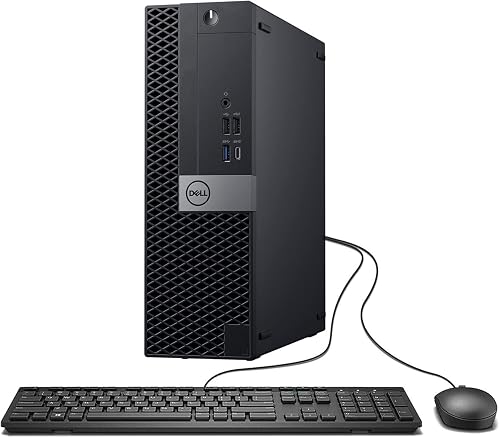 | Best Storage Capacity | Processor: Intel Core i7-7700 | Form Factor: Small form factor | Operating System: Windows 11 Pro | VIEW LATEST PRICE | Read Our Analysis |
More Details on Our Top Picks
HP OmniDesk Desktop PC Intel Core i7-14700 1TB SSD
The HP OmniDesk Desktop PC with the Intel Core i7-14700 and 1TB SSD is a solid choice for a tower that feels fast, stable, and convenient for everyday use. It includes 16GB of DDR5 RAM, so applications open smoothly, and the Intel UHD Graphics 770 handles everyday visuals without trouble. The 1TB PCIe Gen4 SSD loads files quickly, so you spend less time waiting. Windows 11 Home and Microsoft Copilot help you stay organized, and MyHP tools let you customize, optimize, and secure the system with minimal fuss.
- Processor:Intel Core i7-14700
- Form Factor:Desktop PC
- Operating System:Windows 11 Home
- Memory:16 GB DDR5
- Storage:1 TB SSD
- Wireless:Wi‑Fi 6 / Bluetooth 5.4
- Additional Feature:Dual display support
- Additional Feature:4K streaming support
- Additional Feature:EPEAT Gold certified
DELL Optiplex 7060 SFF Desktop PC i7-8700 32GB 512GB SSD
Built for busy users who need strong everyday power in a compact footprint, the Dell OptiPlex 7060 SFF Desktop PC delivers a smart mix of speed, space savings, and reliability. It is powered by an Intel Core i7-8700 with 6 cores and up to 4.60 GHz, so your apps stay responsive when you juggle tasks. Thirty-two gigabytes of DDR4 RAM and a 512GB M.2 NVMe SSD help files open quickly and the system starts fast. With Windows 11 Pro, built-in WiFi and Bluetooth, dual DisplayPort support, and a wireless keyboard and mouse, it fits smoothly into your workday.
- Processor:Intel Core i7-8700
- Form Factor:Small form factor
- Operating System:Windows 11 Pro
- Memory:32 GB DDR4
- Storage:512 GB SSD
- Wireless:Wi‑Fi / Bluetooth
- Additional Feature:5 USB 3.0 ports
- Additional Feature:2 DisplayPort ports
- Additional Feature:Keyboard and mouse included
DELL Optiplex 7060 SFF Desktop PC i7-8700 Renewed
If you want a compact business PC that still feels quick and dependable in 2026, the renewed Dell OptiPlex 7060 SFF with an Intel Core i7-8700 is a smart pick. You get 6 cores, 16 GB DDR4 RAM, and a fast 256 GB NVMe SSD, so Windows 11 Pro boots quickly and apps stay responsive. Built-in Wi-Fi, Bluetooth, six USB ports, HDMI, and DisplayPort make setup easy. Because it is renewed, you can save money without giving up solid everyday performance. The small frame fits tight desks, and the 90-day warranty gives you extra peace of mind.
- Processor:Intel Core i7-8700
- Form Factor:Small form factor
- Operating System:Windows 11 Pro
- Memory:16 GB DDR4
- Storage:256 GB SSD
- Wireless:Wi‑Fi / Bluetooth
- Additional Feature:DVD+RW optical drive
- Additional Feature:4 RAM slots
- Additional Feature:90-day warranty
DELL Optiplex 7060 SFF Desktop PC i7-8700 16GB 512GB SSD
Dell’s Optiplex 7060 SFF offers a compact i7 tower that feels fast, steady, and ready for daily work. It includes an Intel Core i7-8700 with six cores, 16GB of DDR4 memory, and a 512GB NVMe SSD, so apps open quickly and multitasking stays smooth. Windows 11 Pro provides a familiar, secure setup. WiFi, Bluetooth, HDMI, and DisplayPort make building your workspace easy. Because this unit is renewed, you can save money without sacrificing solid business performance.
- Processor:Intel Core i7-8700
- Form Factor:Small form factor
- Operating System:Windows 11 Pro
- Memory:16 GB DDR4
- Storage:512 GB SSD
- Wireless:Wi‑Fi / Bluetooth
- Additional Feature:Windows Hello security
- Additional Feature:HDMI and DisplayPort
- Additional Feature:DVD+RW optical drive
Dell Optiplex 7050 SFF Desktop PC i7-7700 32GB 1TB SSD
The Dell OptiPlex 7050 SFF is ideal if you want a compact Intel Core i7 tower that handles everyday work with ease. It includes an i7-7700 processor, 32 GB of DDR4 memory, and a 1 TB SSD, so applications open quickly and your files are immediately accessible. The small black case saves desk space, and it still provides HDMI, DisplayPort, USB ports, Wi Fi, Bluetooth, and Ethernet. You can run dual monitors and enjoy Windows 11 Pro. This unit is professionally renewed and inspected, and it comes with a 90-day warranty for added value.
- Processor:Intel Core i7-7700
- Form Factor:Small form factor
- Operating System:Windows 11 Pro
- Memory:32 GB DDR4
- Storage:1 TB SSD
- Wireless:Wi‑Fi / Bluetooth
- Additional Feature:Dual monitor support
- Additional Feature:Professionally renewed
- Additional Feature:90-day seller warranty
Factors to Consider When Choosing Intel Core i7 Tower Computers
When you choose an Intel Core i7 tower computer, begin by considering the processor generation, because newer chips generally provide better speed and efficiency for everyday tasks and heavier workloads. Also evaluate core and thread counts, memory capacity, and storage type, since these determine how smoothly the PC handles multitasking, file access, and application launches. Finally, assess graphics performance, as it is important for photo editing, gaming, or other visual work; you do not want a tower that falters when you need it most.
Processor Generation
Processor generation is one of the first things you should check because it can change how fast and smooth your tower feels every day. A newer Intel Core i7, such as a 14th Gen model, usually gives you better speed, stronger efficiency, and a more responsive feel than older chips. If you compare an i7-8700 with an i7-7700, you will see why generation matters: the 8th Gen chip is newer, handles more work, and can boost to 4.6 GHz. You also get more modern platform support, like DDR5 on some newer systems, while many older towers still use DDR4. Older generations can still handle basic tasks, but newer ones give you more breathing room for tomorrow’s apps and upgrades, which improves long-term usability.
Core And Thread Count
Core and thread count can change how your Intel Core i7 tower feels in everyday use, especially now that newer generations offer more ways to split up work. Choosing a model with more cores generally yields smoother multitasking and better handling of parallel tasks. More threads help the CPU juggle several jobs at once, so your system stays snappy under heavy load. For most productivity and content creation workloads, a 6-core, 12-thread i7 often makes more sense than a 4-core chip with fewer threads. When comparing towers, check cores and threads together, not just clock speed. A higher core and thread count can reduce slowdowns when you run multiple apps, and that can make your day feel far less chaotic.
Memory Capacity
A generous amount of RAM can make your Intel Core i7 tower feel calm and capable, even on a busy day. You will notice the difference when you keep many apps and browser tabs open at once. For everyday work, 16 GB usually feels smooth and reliable. If you juggle spreadsheets, meetings, photos, or team tools, 32 GB gives you more breathing room and fewer slowdowns. Also check the top supported memory size, because it shapes how far you can grow later. A system that supports 64 GB or more can stay useful longer. More RAM slots help too, since you can upgrade in smaller steps instead of swapping everything. Compare what is installed now with what the tower can handle later.
Storage Type
Storage can change how your Intel Core i7 tower feels every day. If you want fast starts and quick app launches, choose an SSD instead of a hard drive. NVMe M.2 and PCIe Gen4 drives move data much faster, so your system feels snappy when you open files or switch tasks. A 512 GB SSD fits Windows, common apps, and daily documents well. If you keep large media files or install many programs, 1 TB gives you breathing room. Also, NVMe usually beats SATA SSDs because it has lower latency and a faster path for data. Since solid-state storage has no moving parts, it runs quietly, uses less power, and can help your tower feel reliable for longer. Check the storage label closely before you buy.
Graphics Performance
Graphics performance can determine how smooth your Intel Core i7 tower feels every day, even if you are not a gamer. Check the integrated graphics version first. Intel UHD Graphics 630 is adequate for office work, web browsing, and simple media, but it will not handle tougher 3D tasks well. Newer UHD Graphics 770 provides a noticeable boost, with smoother 4K streaming and light 720p gaming. Also review display support, since dual displays and resolutions up to 3840 × 2160 can make multitasking and video look sharper. If a system lists only 128 MB of shared graphics memory, it relies on system RAM, so set modest expectations. That small detail can save you from a surprisingly sluggish screen.
Form Factor Size
Now that you’ve looked at graphics performance, consider where the tower will actually live. If your desk feels tight, a smaller Intel Core i7 tower can save you real space and reduce stress. Many compact models measure about 11 to 18 inches, so you can tuck them beside a monitor or slide them under a desk. That makes everyday setup easier, especially in a home office or a shared room. At the same time, larger towers provide more room for airflow, expansion slots, and future upgrades. Balance that extra breathing room against the space you give up. Compact cases can still support dual monitors and multiple USB ports, so you do not always need a large chassis to get strong everyday performance.
Connectivity Options
A strong tower is more useful when it plugs into your life without fuss. Start with built-in Wi-Fi and Bluetooth, as they let you connect to networks, earbuds, and other gear without hunting for adapters. Next, check the USB layout. A mix of USB 3.0 and USB 2.0 ports helps you run a keyboard, mouse, drive, and printer together without swapping cables like a game of musical chairs. Then look at video outputs such as HDMI and DisplayPort. If you want dual monitors or sharp 3840 x 2160 viewing, those ports matter a lot. Also make sure the tower supports wireless keyboard and mouse use, or offers compatible input connections. That small detail can make your desk feel calmer and more open.
Operating System Choices
Which operating system fits your day-to-day needs? If you use your Intel Core i7 tower for work, choose Windows 11 Pro. It provides business tools for management, security, and smoother control. For home use, Windows 11 Home can work well, but it may lack features you will want later. Check whether the system comes preinstalled, because that saves setup time and gets you working faster. Confirm software support before you buy, since your apps and security tools need to run without trouble. Features like Windows Defender, Secure Boot, and Windows Hello can add peace of mind. When two towers look similar, the operating system can influence your choice more than you might expect.
Frequently Asked Questions
What Makes a Tower Computer Better Than a Small Form Factor PC?
Like a cathedral beside a cottage, a tower computer offers more room for stronger cooling, easier upgrades, larger graphics cards, and quieter performance. A small form factor PC trades that capacity for compact convenience.
Can Intel Core i7 Towers Handle Modern Gaming in 2026?
Yes, you can game well on an Intel Core i7 tower in 2026, especially with a strong GPU and enough RAM. You will get smooth 1080p performance and solid 1440p performance in many modern titles.
How Long Should an i7 Desktop Typically Last Before Upgrading?
You should typically keep an i7 desktop for 5 to 7 years before upgrading, although this depends on your workload and individual components. If you game heavily or do video editing, plan to upgrade sooner.
Is Integrated Graphics Enough for Everyday Intel Core i7 Tower Use?
About 80% of everyday users never need a discrete GPU, so yes, you will usually be fine with integrated graphics for browsing, office work, streaming, and light photo editing. You will want a dedicated card for gaming.
What Ports Should I Look for on an Intel Core i7 Tower?
Look for USB-C, multiple USB-A ports, HDMI or DisplayPort, Ethernet, and audio jacks, and consider Thunderbolt for high-speed connectivity. Make sure there is both front and rear access, and provide enough expansion slots for current peripherals and future upgrades.




