


Like a quiet engine room behind a busy city, the best Intel servers for 2026 keep your home lab, Plex setup, or small business running with less stress and more control.
You can choose a tiny ZimaBoard 2 or GEEKOM IT12 for low-power nonstop work, step up to the TERRAMASTER F4-425 Plus for smart NAS storage, or go with a Dell PowerEdge R630 or R730xd when you need real rack muscle.
Add the right Intel I210 or 10Gtek network card, and the whole setup starts to make a lot more sense.
| ZimaBoard 2 1664 Home Server with ZimaOS | 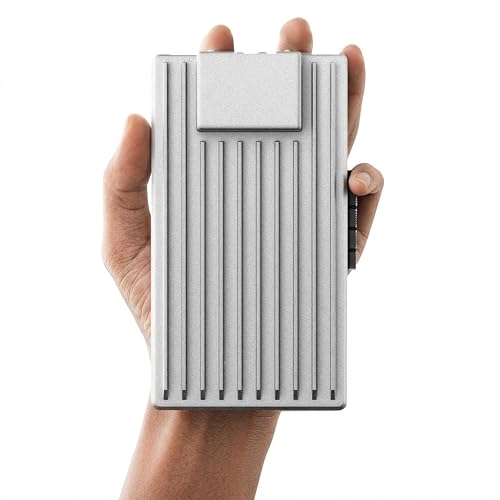 | Best Compact Server | Processor: Intel N150 quad-core | Memory: 16 GB DDR5 | Storage: 64 GB eMMC | VIEW LATEST PRICE | Read Our Analysis |
| 10Gtek 10Gb PCI-E Dual RJ45 Network Card |  | Best 10GbE Upgrade | Processor: Intel X550-AT2 controller | Memory: N/A | Storage: N/A | VIEW LATEST PRICE | Read Our Analysis |
| Dell PowerEdge R630 Server with 28 Cores 128GB RAM | 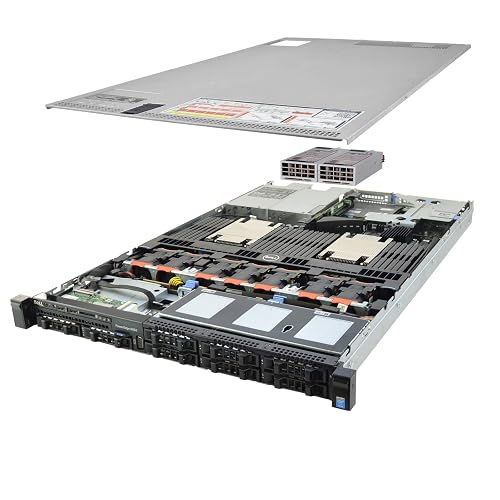 | Best Refurbished Rack Server | Processor: 2x Intel Xeon E5-2690 v4 | Memory: 128 GB DDR4 | Storage: 2x 1 TB SATA SSD | VIEW LATEST PRICE | Read Our Analysis |
| Dell PowerEdge R730xd Server (Renewed) | 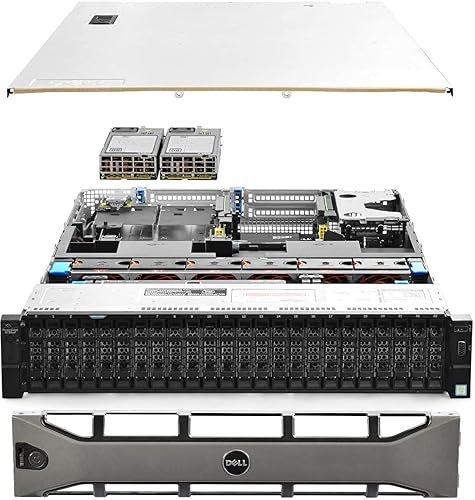 | Best Enterprise Rack Server | Processor: 2x Intel Xeon E5-2690 v4 | Memory: 128 GB DDR4 | Storage: 4x 1.2 TB SAS HDD | VIEW LATEST PRICE | Read Our Analysis |
| TERRAMASTER F4-425 Plus 4-Bay NAS Storage (Diskless) |  | Best NAS for Creators | Processor: Intel N150 quad-core | Memory: 16 GB DDR5 | Storage: 4-bay + 3 M.2 | VIEW LATEST PRICE | Read Our Analysis |
| Intel Ethernet Server Adapter I210T1 | 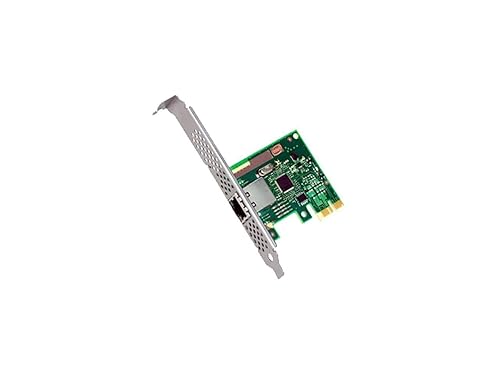 | Best Gigabit Adapter | Processor: Intel I210T1 Gigabit adapter | Memory: N/A | Storage: N/A | VIEW LATEST PRICE | Read Our Analysis |
| GEEKOM IT12 Mini PC for Home Office & Plex | 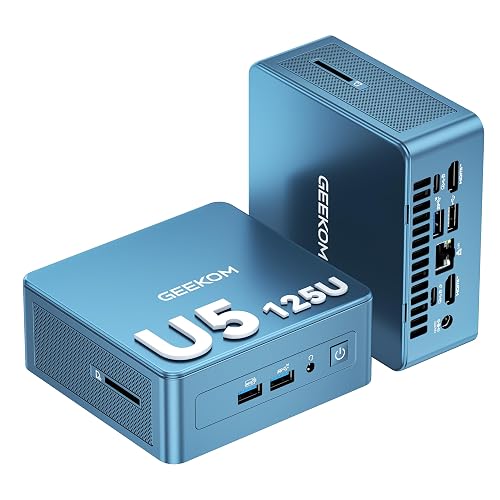 | Best Mini PC Server | Processor: Intel Core i5-12450H | Memory: 16 GB DDR4 | Storage: 512 GB NVMe SSD | VIEW LATEST PRICE | Read Our Analysis |
More Details on Our Top Picks
ZimaBoard 2 1664 Home Server with ZimaOS
If you want a tiny server that can do real work without turning your desk into a space heater, the ZimaBoard 2 1664 stands out fast. It includes a quad-core N150 chip, 16 GB of DDR5, and 64 GB of eMMC in a pocket-sized, fanless board that can run all day. You can expand via PCIe 3.0 x4, dual SATA ports, and dual 2.5 GbE ports. ZimaOS provides private cloud tools, backups, file sharing, and plug-ins, and support for TrueNAS, Proxmox, and pfSense keeps your deployment options wide.
- Processor:Intel N150 quad-core
- Memory:16 GB DDR5
- Storage:64 GB eMMC
- Networking:Dual 2.5 GbE
- Form Factor:Pocket-sized board
- Operating System:ZimaOS
- Additional Feature:PCIe 3.0 x4 slot
- Additional Feature:Dual SATA3 ports
- Additional Feature:Private cloud plug-ins
10Gtek 10Gb PCI-E Dual RJ45 Network Card
The Gtek 10Gb PCI-E Dual RJ45 Network Card is a practical choice when you need fast Ethernet without moving to fiber or replacing your entire setup. It uses the Intel X550-AT2 chip, providing reliable 10G performance with dual copper ports and support for 100M, 1G, 2.5G, 5G, and 10G speeds. Install it in PCIe 3.0, 2.0, or 1.1 slots. It fits full-height or low-profile cases, is compatible with many servers and systems, and includes solid warranty support to keep your upgrade simple.
- Processor:Intel X550-AT2 controller
- Memory:N/A
- Storage:N/A
- Networking:Dual 10Gb RJ45
- Form Factor:PCIe NIC
- Operating System:Driver-based; no OS
- Additional Feature:Intel X550-AT2 controller
- Additional Feature:Dual RJ45 ports
- Additional Feature:Low-profile bracket included
Dell PowerEdge R630 Server with 28 Cores 128GB RAM
Dell PowerEdge R630 Server with 28 cores and 128GB RAM fits best for teams that need solid, steady performance in a compact rack setup. It includes dual Intel Xeon E5-2690 v4 processors, so workloads stay responsive even when demand rises. The 1U chassis saves space. The 8-bay 2.5-inch design provides room for fast SATA SSD storage. With the Dell PERC H730 controller and iDRAC 8 Express, you can manage storage and remote access with confidence. Two platinum PSUs help keep the system running reliably.
- Processor:2x Intel Xeon E5-2690 v4
- Memory:128 GB DDR4
- Storage:2x 1 TB SATA SSD
- Networking:LAN
- Form Factor:1U rackmount
- Operating System:Not included
- Additional Feature:iDRAC 8 Express
- Additional Feature:PERC H730 RAID
- Additional Feature:90-day hardware warranty
Dell PowerEdge R730xd Server (Renewed)
Ready to spin up dependable performance without paying brand-new-server prices, the renewed PowerEdge R730xd is ideal for teams that need serious storage, solid Xeon processing power, and room to grow. This 2U rack server includes 24 small form factor bays, a bezel, and vetted renewed hardware with a 90-day warranty. Two Intel Xeon E5-2690 v4 CPUs deliver a total of 28 cores, and 128 GB of DDR4 memory keeps applications responsive. The system also includes four 1.2 TB 10K SAS drives, a Dell H730P RAID controller, dual 10 Gb SFP+ ports, dual 1 Gb Ethernet ports, and redundant Platinum 750 W power supplies.
- Processor:2x Intel Xeon E5-2690 v4
- Memory:128 GB DDR4
- Storage:4x 1.2 TB SAS HDD
- Networking:2x 10 Gb SFP+ + 2x 1 Gb RJ45
- Form Factor:2U rackmount
- Operating System:Not included
- Additional Feature:24-bay SFF chassis
- Additional Feature:10Gb SFP+ ports
- Additional Feature:Bezel included
TERRAMASTER F4-425 Plus 4-Bay NAS Storage (Diskless)
If you want a compact Intel-powered NAS that is built for real work, the TERRAMASTER F4-425 Plus makes a strong case for your setup. It includes an Intel N150 quad-core chip, 16 GB of DDR5, and four bays for HDDs or SSDs. You can also add three M.2 drives for cache or for separate pools. Dual 5GbE ports help you push fast transfers, especially with aggregation. With TOS 6, TRAID, snapshots, and 4K or 8K media support, it is suitable for editing, backups, Docker, and home storage.
- Processor:Intel N150 quad-core
- Memory:16 GB DDR5
- Storage:4-bay + 3 M.2
- Networking:Dual 5GbE
- Form Factor:4-bay NAS
- Operating System:TOS 6
- Additional Feature:Triple M.2 slots
- Additional Feature:TRAID protection
- Additional Feature:Direct Data Mounting
Intel Ethernet Server Adapter I210T1
The Intel Ethernet Server Adapter I210T1 is a compact, reliable server network card designed to perform without complication. It provides a single-port Gigabit Ethernet connection with PCI Express 2.1 support, fitting neatly into space-constrained systems. Its low-halogen construction and ultra-compact form factor help maintain a clean, simple setup. A ventilated bracket improves cooling and reduces power consumption. The adapter also supports Energy Efficient Ethernet, DMA Coalescing, and AVB for smooth, synchronized media traffic. It is steady, practical, and ready for deployment.
- Processor:Intel I210T1 Gigabit adapter
- Memory:N/A
- Storage:N/A
- Networking:1 GbE
- Form Factor:PCIe adapter
- Operating System:No OS
- Additional Feature:Energy Efficient Ethernet
- Additional Feature:AVB support
- Additional Feature:Ventilated bracket
GEEKOM IT12 Mini PC for Home Office & Plex
GEEKOM’s IT12 Mini PC is ideal when you want a small machine that can pull double duty without fuss, especially for a home office and a Plex server. It comes with Windows 11 Pro, a Core i5-12450H, and Intel Quick Sync, so your streams and transcodes stay smooth. With 16 GB DDR4 and a 512 GB NVMe SSD, it handles daily work quickly. Dual USB4, dual HDMI, and 2.5 Gb Ethernet make setup straightforward. It also runs quietly, uses about 28 watts, and supports 24/7 operation.
- Processor:Intel Core i5-12450H
- Memory:16 GB DDR4
- Storage:512 GB NVMe SSD
- Networking:2.5 GbE + Wi‑Fi 6E
- Form Factor:Mini PC
- Operating System:Windows 11 Pro
- Additional Feature:Dual USB4 ports
- Additional Feature:Near-silent 38 dB
- Additional Feature:VESA mount supported
Factors to Consider When Choosing Intel Servers
When choosing an Intel server, begin with CPU performance because it determines how quickly your workloads run and how well the system handles peak demand. Also evaluate memory capacity and storage expandability, since these determine how much data and how many applications you can support as needs grow. Finally, consider network throughput and form factor; the right combination helps you move data efficiently and fit the server into your space without operational issues.
CPU Performance
CPU performance is one of the biggest reasons an Intel server feels fast or frustrating, so look past the headline GHz number and check how the whole chip behaves under real work. Start with core and thread count. More of both helps when you run virtual machines or databases, while higher single-core boost helps when one task needs quick replies. Then compare base, turbo, and sustained turbo speeds; short bursts can look great, but heat and power limits decide the long run. Next, check cache size and inter-core latency, since bigger caches cut trips to memory and keep cache-hungry apps moving. Finally, check PCIe lanes, AVX support, and virtualization features, because they shape I/O speed and accelerated workloads.
Memory Capacity
Memory capacity can make an Intel server feel calm under pressure or shaky during a busy day, so size it with care. First, match RAM to your workload. Sixteen to thirty-two gigabytes can suit light file or web services, but virtualization and in-memory databases often need 128 GB or more. Next, check the platform’s DDR4 or DDR5 support and its rated speed, since faster memory can cut wait times for memory-intensive applications. Then fill all memory channels and follow DIMM rules to achieve full bandwidth. Also, leave 20 to 30 percent headroom for growth and peak demand. Finally, choose ECC and registered or buffered DIMMs to protect data and keep production steady.
Storage Expandability
Beyond raw drive count, storage expandability shapes how long an Intel server can grow with your business, so examine the chassis, slots, and controller options closely. Check the mix of 2.5 inch and 3.5 inch bays, plus SATA III, SAS, and NVMe support, so you do not box yourself in later. Next, verify PCIe lane counts and slot sizes, because x4, x8, and x16 cards let you add NVMe adapters or RAID and HBA controllers with ease. Also confirm M.2 support and whether those lanes share bandwidth with SATA ports. Then compare RAID features, cache, and battery backed protection. If you plan external JBOD or SAN growth, make sure the server’s storage links can keep up without choking your future plans.
Network Throughput
Network throughput often determines whether an Intel server feels fast or frustrating, so size it around real traffic rather than a shiny port label. Start by adding up peak upstream and downstream needs for each application. A few 4K streams can consume bandwidth quickly. Match the NIC to the job: 1 GbE is adequate for light file sharing, 2.5 or 5 GbE suits heavier media use, and 10 GbE or higher benefits virtualization, large backups, and busy databases. Also leave 20 to 30 percent headroom for SMB, NFS, RDMA, and encryption overhead. Check PCIe lane limits as well. Finally, ensure link aggregation, your switch, and storage can all keep up, because one weak link will drag everything down.
Form Factor
When you choose an Intel server form factor, you are deciding how the machine will live, breathe, and grow in your space. If you need dense storage or many expansion cards, rack units give you more room and easier scaling. A 1U chassis saves space, but it can limit cooler size and GPU fit. Move up to 2U or 4U, and you gain airflow, larger heatsinks, and space for full-height cards. Towers are more suitable for office environments, with quieter operation and easier local access. Blade systems fit high-density deployments, though they require the appropriate enclosure. Also check drive bay type, since 2.5-inch and 3.5-inch options affect storage capacity and RAID planning. Finally, confirm the chassis depth and that rails or feet match your room.
Power Efficiency
Power efficiency often determines whether your Intel server is a smart investment or a steady energy drain. Check TDP and the typical watts each core uses, because lower numbers usually mean less continuous power draw during 24/7 operation. Also choose CPUs and platforms that support deep C states and Turbo Boost policies, since they help the server reduce power use when demand falls. Next, review integrated power management, efficient VRMs, and memory speeds that match your workload, because faster RAM can increase energy consumption. Evaluate performance per watt using metrics like SPECpower, not raw speed alone. Finally, better cooling and unobstructed airflow can reduce fan power and keep your rack quieter.
OS Compatibility
After you have weighed power efficiency, the next big question is whether your Intel server will actually run the OS stack you trust. Start by checking kernel and driver support for your exact Linux or Windows version, because NICs and RAID cards often need in-kernel drivers or DKMS packages. Then verify that your hypervisor and management tools support SR-IOV, PCI passthrough, and hardware offload. Next, look at firmware and BIOS or UEFI requirements, since NVMe boot, power states, and PCIe bifurcation can depend on specific updates. Also make sure the OS handles your storage mix, including RAID, NVMe, AHCI, and SAS, with useful health tools. Finally, choose a release with long-term security updates so your server stays stable, patched, and ready for real work.
Warranty Support
A solid warranty can save you a lot of stress later, so do not treat it like fine print you will “deal with eventually.” Start by checking how long the warranty lasts and what it truly covers, because a 1-year plan that only covers parts is very different from a 3-year plan that includes labor and on-site service. Confirm support hours and ask whether critical issues receive 24/7 help with clear response times. Make sure firmware, drivers, and security updates remain available for as long as you need the server. Check local parts stock, advance replacement options, or loaner programs, since downtime becomes costly. Finally, read the exclusions and any registration or maintenance requirements so you do not lose coverage by accident.
Frequently Asked Questions
Which Intel Server Suits Small Businesses Best?
You’ll likely want an Intel Xeon E-2300 server for a small business. It is affordable, efficient, and handles everyday applications, file sharing, and light virtualization well. If you need room to grow, choose a scalable Xeon-based tower.
Are Refurbished Intel Servers Reliable for 2026?
Yes. You can rely on refurbished Intel servers in 2026 if you buy from reputable sellers, check warranty coverage, and verify component health. You will save money, but do not skip testing or support plans.
How Much Power Do Intel Servers Typically Consume?
You’ll usually see Intel servers draw about 100 to 500 watts each, though heavy dual-socket systems can exceed 1,000 watts. Think of a city’s pulse; rack power use increases with the number of CPUs, drives, and the workload.
Can Intel Servers Run Virtualization and Plex Together?
Yes. You can run virtualization and Plex together on Intel servers if you provision sufficient CPU cores, RAM, and fast storage. Enable hardware transcoding for smoother performance, and keep workloads balanced.
What Intel Server Supports Future Upgrade Expansion?
Select an Intel Xeon tower or rack system with a roomy chassis and a scalable motherboard, similar to a house with spare rooms. Choose models that offer extra DIMM slots, abundant PCIe lanes, and multiple drive bays so you can upgrade processors, memory, expansion cards, and storage as needed.




