


When your laptop sounds like a small jet during a long work or gaming session, the right cooling pad can feel like a breath of relief.
In 2026, you have smarter choices, from slim portable pads to high airflow models with RGB flair and adaptive fan control.
Compare cooling power, noise, stand angle, USB-C support, and hub friendly ports, because the best match for your setup can keep your desk tidy and your machine calm in ways you might not expect.
| KYOLLY Slim Laptop Cooling Pad with Adjustable Stand | 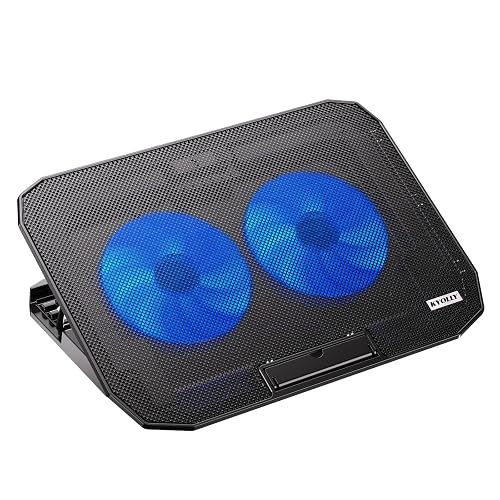 | Best Budget Stand | Fan Count: 2 fans | Laptop Size: 10–15.6 in | Height Adjustment: 5 levels | VIEW LATEST PRICE | Read Our Analysis |
| llano V10 Gaming Laptop Cooling Pad with RGB Fan | 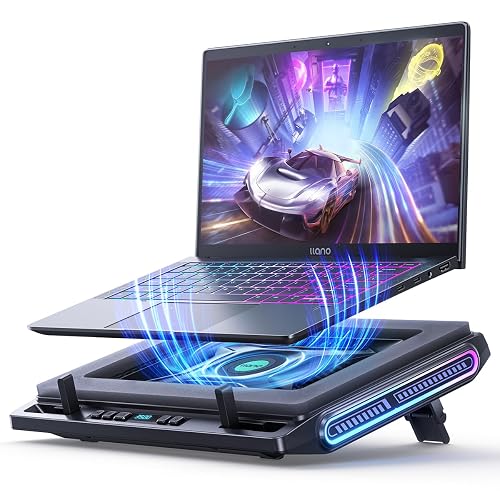 | Best Turbo Cooling | Fan Count: 1 turbo fan | Laptop Size: 13–17.3 in | Height Adjustment: 3 levels | VIEW LATEST PRICE | Read Our Analysis |
| Razer Laptop Cooling Pad with Adaptive Smart Fan Control | 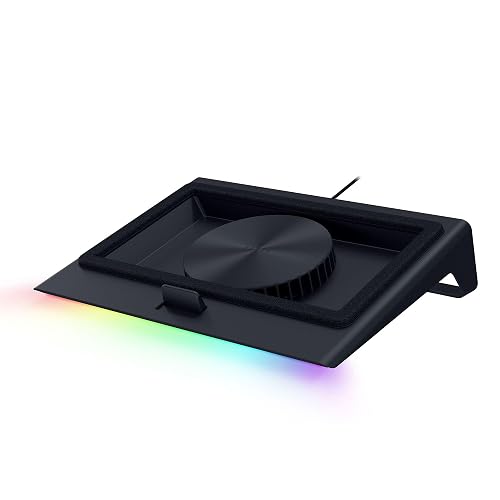 | Best Smart Cooling | Fan Count: 1 fan | Laptop Size: 14–18 in | Height Adjustment: Adjustable stand | VIEW LATEST PRICE | Read Our Analysis |
| AICHESON Gaming Laptop Cooling Pad with 8 Fans | 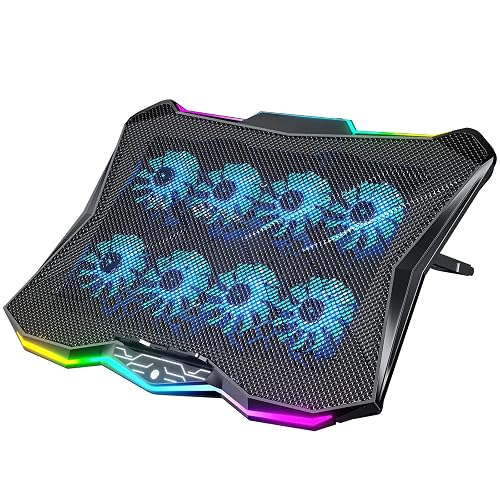 | Best Multi-Fan | Fan Count: 8 fans | Laptop Size: 14–17.3 in | Height Adjustment: 7 positions | VIEW LATEST PRICE | Read Our Analysis |
| KLIM Turbofrost Gaming Laptop Cooling Pad with RGB | 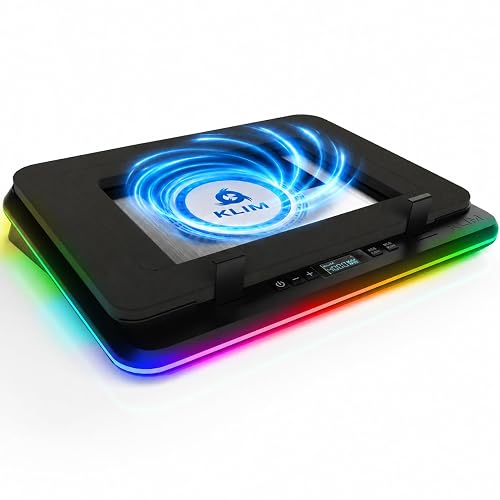 | Best Premium Pick | Fan Count: 4 fans | Laptop Size: Up to 17.3 in | Height Adjustment: Stand included | VIEW LATEST PRICE | Read Our Analysis |
| Targus Chill Mat for up to 16-Inch Laptop Black (PA248U5) | 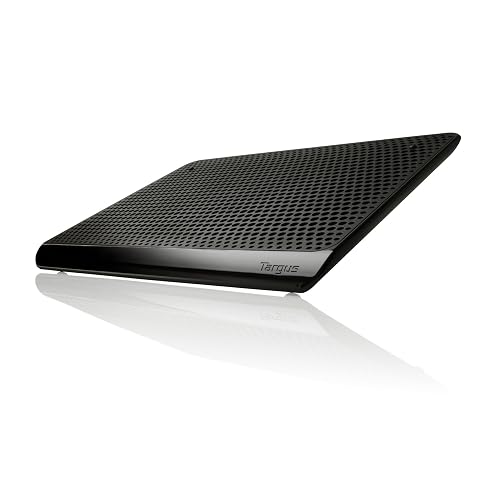 | Best Portable Option | Fan Count: 2 fans | Laptop Size: Up to 16 in | Height Adjustment: Fixed height | VIEW LATEST PRICE | Read Our Analysis |
| Laptop Cooling Pad with 3 Quiet Fans | 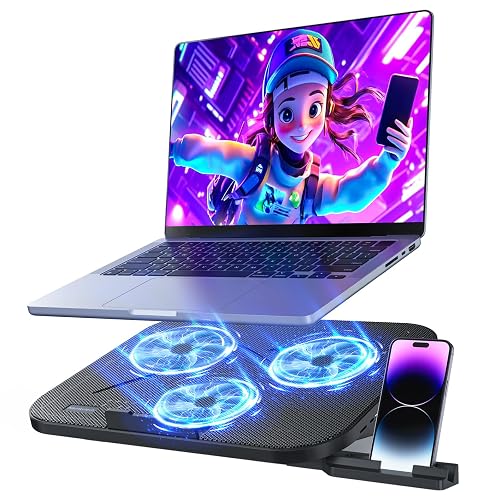 | Best Quiet Cooler | Fan Count: 3 fans | Laptop Size: 12–17 in | Height Adjustment: 5 levels | VIEW LATEST PRICE | Read Our Analysis |
More Details on Our Top Picks
KYOLLY Slim Laptop Cooling Pad with Adjustable Stand
If you spend hours gaming, working, or juggling multiple tasks, the KYOLLY Slim Laptop Cooling Pad with Adjustable Stand is designed to keep your laptop steady and cooler when it heats up. It has two quiet, large fans, strong airflow, and a metal mesh top that moves heat away quickly. Five height settings lift your screen for easier typing and better viewing. The slim, lightweight frame travels well, and anti slip baffles hold your laptop firmly. Two USB ports and smooth speed control make daily use simple.
- Fan Count:2 fans
- Laptop Size:10–15.6 in
- Height Adjustment:5 levels
- USB Ports:2 ports
- Lighting:Blue LED
- Warranty:1 year
- Additional Feature:Precision metal mesh
- Additional Feature:Blue LED indicator
- Additional Feature:Rolling wheel speed control
llano V10 Gaming Laptop Cooling Pad with RGB Fan
The llano V10 Gaming Laptop Cooling Pad with RGB Fan is a smart pick for anyone whose laptop runs hot during gaming, editing, or long work sessions. Its 4.72-inch turbo fan and pure copper motor can drop temperatures by up to 38°C in just minutes. You get up to 3500 RPM, which helps cut thermal throttling, lag, and screen flicker quickly. The 12 RGB modes add a customizable glow, and the memory function saves your last setting. Physical buttons keep control simple. It fits 13 to 17.3-inch laptops, offers a three-level stand, includes anti-slip baffles, and provides extra USB ports.
- Fan Count:1 turbo fan
- Laptop Size:13–17.3 in
- Height Adjustment:3 levels
- USB Ports:4-port setup
- Lighting:RGB
- Warranty:Not stated
- Additional Feature:External turbo fan
- Additional Feature:Pure copper motor
- Additional Feature:Memory lighting function
Razer Laptop Cooling Pad with Adaptive Smart Fan Control
Razer’s Laptop Cooling Pad with Adaptive Smart Fan Control is a smart pick if you want strong cooling without constant guesswork, especially when your laptop runs hot during gaming, editing, or long work sessions. Its smart fan speed changes with heat; you can set presets or build custom curves in Razer Synapse. The airtight chamber and foam seals help stop air leaks, and the 140 mm brushless fan reaches 3000 RPM. It fits 14-inch to 18-inch laptops and MacBooks. You also get a USB hub, remappable buttons, and better sustained performance.
- Fan Count:1 fan
- Laptop Size:14–18 in
- Height Adjustment:Adjustable stand
- USB Ports:3-port hub
- Lighting:Chroma RGB
- Warranty:2 years
- Additional Feature:Adaptive smart cooling
- Additional Feature:Airtight pressure chamber
- Additional Feature:Remappable multi-function buttons
AICHESON Gaming Laptop Cooling Pad with 8 Fans
AICHESON’s Gaming Laptop Cooling Pad with 8 fans is a smart choice when your laptop runs hot during long gaming sessions, school work, or heavy multitasking. Its eight high-speed fans spin at 2600 to 3000 RPM, providing strong airflow to reduce overheating. Fan speed is adjustable with a roll switch, making control simple. Seven height settings and angles from 10 to 30 degrees help reduce neck and shoulder strain. A sturdy base, anti-slip pad, RGB lights, and two USB ports add comfort, style, and convenience for 14 to 17.3 inch laptops.
- Fan Count:8 fans
- Laptop Size:14–17.3 in
- Height Adjustment:7 positions
- USB Ports:2 ports
- Lighting:RGB
- Warranty:Not stated
- Additional Feature:Hidden anti-slip pad
- Additional Feature:Fingerprint touch control
- Additional Feature:Side RGB lights
KLIM Turbofrost Gaming Laptop Cooling Pad with RGB
KLIM’s Turbofrost Gaming Laptop Cooling Pad with RGB is a smart pick if your laptop runs hot during long gaming sessions. Its four turbo fans spin at 4,000 RPM each for a powerful 16,000 RPM combined airflow. You get fast air cooling, sealed foam control, and an anti-dust system, so heat moves out while your laptop stays cleaner. It fits laptops up to 17.3 inches and runs quietly with adaptive noise-canceling foam. You also get 360° RGB lighting, 64 effects, auto-save settings, and the option to use USB-C or wall power. The aluminum build adds solid cooling.
- Fan Count:4 fans
- Laptop Size:Up to 17.3 in
- Height Adjustment:Stand included
- USB Ports:4 ports
- Lighting:RGB
- Warranty:5 years
- Additional Feature:Sealed foam airflow
- Additional Feature:Anti-dust system
- Additional Feature:Dual power modes
Targus Chill Mat for up to 16-Inch Laptop Black (PA248U5)
If you want a simple cooling pad for a laptop up to 16 inches, the Targus Chill Mat PA248U5 is a strong fit. It provides dual-fan air cooling, steady support, and easy USB-A power in a black, no-fuss design. Plug it into your laptop and it starts helping keep heat down without extra adapters. The rubber surface grips well, so your device stays put while you work or stream. It also helps protect your lap and furniture from warm spots. At 1.04 pounds, it feels light, sturdy, and easy to carry.
- Fan Count:2 fans
- Laptop Size:Up to 16 in
- Height Adjustment:Fixed height
- USB Ports:USB-A powered
- Lighting:No lighting
- Warranty:1 year
- Additional Feature:Protects furniture heat
- Additional Feature:Protects lap heat
- Additional Feature:Rubber grips surface
Laptop Cooling Pad with 3 Quiet Fans
The AISUNKUTECH F3 Ultra is a smart pick when you needs strong cooling without the loud fan buzz that can wreck your focus, because its three ultra-silent fans move heat fast while staying around 40 dB. You can adjust fan speed with the top wheel switch, so you stay in control during work, gaming, or class. Its five-level stand and angled metal bar help ease neck and shoulder strain. The ABS body, steel mesh, and anti-slip pads feel solid, and the phone holder plus two USB ports add handy everyday support.
- Fan Count:3 fans
- Laptop Size:12–17 in
- Height Adjustment:5 levels
- USB Ports:2 ports
- Lighting:No lighting
- Warranty:2 years
- Additional Feature:Built-in phone holder
- Additional Feature:Stainless steel mesh
- Additional Feature:Wear-resistant materials
Factors to Consider When Choosing Laptop Cooling Pads
When choosing a laptop cooling pad, start with fan performance, because stronger airflow helps keep your laptop steady under pressure. Check that it fits your laptop size, offers comfortable angle adjustments, and remains light enough to carry without hassle. Also look at USB ports and power consumption, since a good pad should support your setup without using all your connections.
Cooling Fan Performance
How well does a laptop cooling pad really move air? You will want a pad that uses enough fan power to matter. More fans, or a larger 140 mm fan, can spread airflow better. Eight-fan systems and two-fan designs can both work well if the layout is smart. Speed helps too, because higher RPM usually pushes more air. Some pads spin around 2,600 to 3,000 RPM, while stronger ones reach 4,000 RPM per fan. That extra push can lower laptop temperatures by up to 38 degrees Celsius and help stop thermal throttling. Still, do not chase power alone. Quiet models around 40 dB can cool effectively, especially when they use sealed foam, metal mesh, or turbo style fan placement to focus airflow where it counts.
Laptop Size Compatibility
Start with the size label, because a cooling pad only works well if your laptop actually fits it. Check the supported range first, since many pads cover about 10 to 18 inches. If you go outside that range, the laptop can wobble and miss airflow.
Next, match the pad to your screen class, such as 13, 14, 15.6, 16, or 17.3 inches. Many pads are built for those brackets, so the fit feels more secure.
If you use a smaller 13 to 14 inch laptop, look for foam inserts or similar size adjustments. These help keep the machine steady.
For larger laptops, compare the maximum size and the pad’s actual width and depth. Also check your laptop’s full chassis footprint, not just the diagonal screen, so you do not end up buying a very stylish mismatch.
Ergonomic Adjustment Options
A cooling pad can fit your laptop’s size and still feel wrong if it forces your wrists, neck, or shoulders into a bad position, so ergonomic adjustment options matter just as much as airflow. Look for 3, 5, or 7 height settings, because each level helps you match the screen angle to your posture. A good stand raises your laptop enough to make typing and viewing easier, and it can reduce neck and shoulder strain during long work sessions. Choose models with anti-slip baffles, rubber grips, or front pads so the laptop stays put when you tilt it. Adjustable angles from 10 degrees to 30 degrees provide more comfort. Support bars and reinforced bases make higher positions feel steadier and safer.
Portability And Weight
When you move your laptop between home, the office, and travel spots, weight becomes just as important as cooling power. You will notice the difference quickly when a pad stays near 0.83 kg instead of climbing above 1.5 kg. Lighter models slip into your bag with less strain, and ultra-slim designs also save space, so you can pack them beside chargers and notebooks without a fight. Compact sizes, like 14 x 10 x 1.25 inches, help too because they stay travel-friendly while still supporting your laptop well. If you shift your setup often, pick a pad that feels easy to carry but still sturdy on a desk. That balance keeps your gear simple, stable, and ready wherever you work.
USB Ports And Power
Just as important as cooling itself, the power setup on a laptop cooling pad can make your daily routine easier or more frustrating. Check whether it runs from your laptop USB-A port, USB-C, or a wall plug, because each choice affects convenience. Next, count the extra USB ports on the pad. Many provide two to four, which helps you keep your mouse, keyboard, flash drive, or phone connected without a mess. Then match the port types to your gear. If you use Type-C devices, verify direct support, not just an adapter. Also consider how many laptop ports you still need free for charging and other accessories. A smart hub keeps your desk calm and your workflow smooth.
Frequently Asked Questions
Do Cooling Pads Work With Laptops Over 17 Inches?
Yes, you can use larger pads with larger laptops; you will get better airflow and improved support. Some models for 17 inches and up fit well, but check pad dimensions, fan placement, and weight limits first.
Can a Cooling Pad Damage My Laptop’s Battery?
Usually no, a cooling pad will not damage your laptop battery. You will actually help the battery by lowering operating temperature. Avoid extreme cold, moisture, blocked vents, and do not use a faulty pad.
Are RGB Cooling Pads Louder Than Non-Rgb Models?
Not usually. RGB lights do not make your pad roar like a jet engine. You will hear more from fan size, speed, and build quality. If you want quieter cooling, check airflow specs, not the glow.
Do I Need a Cooling Pad for a Macbook?
Usually you do not need a cooling pad for a MacBook. You will benefit only if it runs hot during heavy tasks, sits on soft surfaces, or experiences thermal throttling. A stand often helps more than fans.
Can I Use a Cooling Pad on My Bed or Couch?
Yes, you can, but do not block airflow. Cooling pads work better on hard surfaces; beds and couches can trap heat, wobble, and clog vents. Use a tray or lap desk.




