

Finding the right 4K monitor can feel like tuning a camera lens until every detail snaps into place.
You want sharp text, smooth motion, and a screen that fits how you work or play, but not every display delivers the same mix of color, speed, and comfort.
From Dell’s 27 Plus models to Acer’s gaming pick and ultrawide options from Alienware, the differences start to matter fast.
| Acer Nitro 27″ QHD IPS Gaming Monitor (KG271U N3bmiipx) | 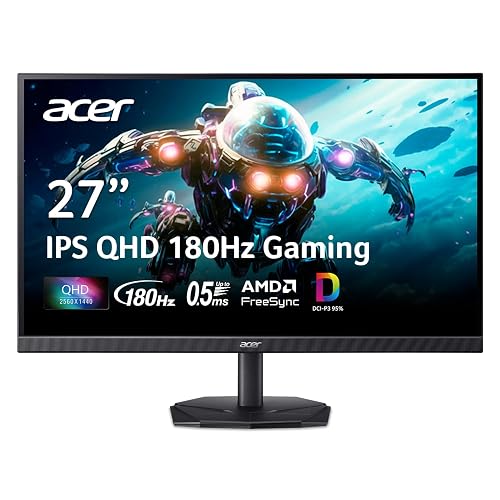 | Best Gaming Pick | Screen Size: 27-inch | Resolution: QHD 2560 x 1440 | Refresh Rate: Up to 180Hz | VIEW LATEST PRICE | Read Our Analysis |
| ViewSonic VX3276-4K-MHD 32″ 4K IPS Monitor | 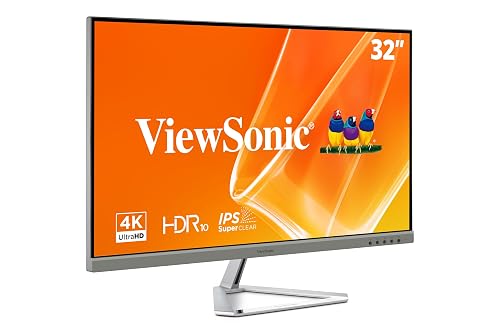 | Best Big Screen | Screen Size: 32-inch | Resolution: 4K UHD 3840 x 2160 | Refresh Rate: 60Hz | VIEW LATEST PRICE | Read Our Analysis |
| Dell 27 Plus 4K Monitor (S2725QS) | 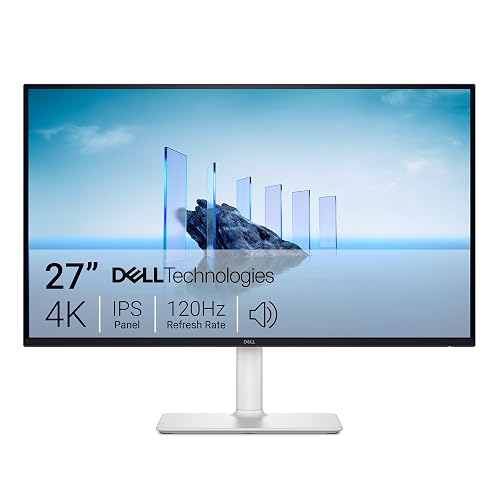 | Best Overall | Screen Size: 27-inch | Resolution: 4K UHD 3840 x 2160 | Refresh Rate: 120Hz | VIEW LATEST PRICE | Read Our Analysis |
| Dell 27 Plus 4K USB-C Monitor (S2725QC) |  | Best USB-C | Screen Size: 27-inch | Resolution: 4K UHD 3840 x 2160 | Refresh Rate: 120Hz | VIEW LATEST PRICE | Read Our Analysis |
| Alienware 34 Curved Gaming Monitor AW3425DWM 180Hz WQHD |  | Best Curved Display | Screen Size: 34-inch | Resolution: WQHD | Refresh Rate: 180Hz | VIEW LATEST PRICE | Read Our Analysis |
| LG 32UR500K-B 32-inch 4K UHD Monitor |  | Best Budget 4K | Screen Size: 32-inch | Resolution: 4K UHD 3840 x 2160 | Refresh Rate: 60Hz | VIEW LATEST PRICE | Read Our Analysis |
More Details on Our Top Picks
Acer Nitro 27″ QHD IPS Gaming Monitor (KG271U N3bmiipx)
If you want a fast, color-accurate 27-inch display for gaming, design, or editing, the Acer Nitro KG271U N3bmiipx is a strong pick. You get a QHD 2560 x 1440 IPS panel with 95% DCI-P3 coverage, HDR10 support, and a matte zero-frame design that looks clean on any desk. The 180Hz refresh rate and 0.5ms GTG response keep motion smooth and sharp, while AMD FreeSync reduces tearing. You also get DisplayPort and HDMI inputs, built-in speakers, tilt adjustment, and wall-mount support, so it fits your setup easily.
- Screen Size:27-inch
- Resolution:QHD 2560 x 1440
- Refresh Rate:Up to 180Hz
- Panel Type:IPS
- HDR Support:HDR10
- Built-in Audio:Built-in speakers
- Additional Feature:Zero-frame design
- Additional Feature:Up to 0.5ms GTG
- Additional Feature:95% DCI-P3 color
ViewSonic VX3276-4K-MHD 32″ 4K IPS Monitor
The ViewSonic VX3276-4K-MHD is a strong pick if you want a large 32-inch 4K monitor that blends sharp detail with an easy-on-the-eyes design. It offers 3840 x 2160 resolution, wide 178 degree viewing angles, and rich 118% color coverage for crisp, vivid images. Its matte, anti-glare screen and Flicker-Free plus Blue Light Filter technology help reduce fatigue during long sessions. HDMI, DisplayPort, and Mini DisplayPort inputs make it flexible for PCs, Macs, and laptops. You also get FreeSync, HDR10 support, and a three year warranty.
- Screen Size:32-inch
- Resolution:4K UHD 3840 x 2160
- Refresh Rate:60Hz
- Panel Type:MVA/IPS-style
- HDR Support:HDR10
- Built-in Audio:Built-in media support
- Additional Feature:80M:1 dynamic contrast
- Additional Feature:Blue Light Filter
- Additional Feature:Frameless bezels
Dell 27 Plus 4K Monitor (S2725QS)
With its 27-inch 4K IPS panel and 120 Hz refresh rate, the Dell 27 Plus 4K Monitor (S2725QS) is a strong pick if you want sharp visuals that remain smooth for everyday work, business tasks, and photo or video editing. It delivers vivid 99% sRGB color, HDR readiness, and 350 nits of brightness, along with ComfortView Plus and anti-glare protection. Adaptive Sync and AMD FreeSync Premium help keep motion tear-free. The minimalist Ash White design and built-in speakers make it easy to fit into your setup, and height, tilt, swivel, and pivot adjustments plus HDMI and DisplayPort connectivity add flexibility.
- Screen Size:27-inch
- Resolution:4K UHD 3840 x 2160
- Refresh Rate:120Hz
- Panel Type:IPS
- HDR Support:HDR ready
- Built-in Audio:Integrated speakers
- Additional Feature:ComfortView Plus
- Additional Feature:Premium Panel Exchange
- Additional Feature:Height adjustment
Dell 27 Plus 4K USB-C Monitor (S2725QC)
Dell’s 27-inch S2725QC is a strong pick for anyone who wants a sharp 4K display that can handle both productivity and casual gaming. It offers 3840 x 2160 resolution, IPS viewing, HDR readiness, and 99% sRGB for vivid, accurate color. The 120Hz refresh rate, AMD FreeSync Premium, and 0.03 ms response time keep motion smooth and tear-free. ComfortView Plus helps reduce blue light without dulling color. Built-in speakers improve the setup, and a single USB-C cable delivers up to 65 W so you can keep your desk clean and connected.
- Screen Size:27-inch
- Resolution:4K UHD 3840 x 2160
- Refresh Rate:120Hz
- Panel Type:IPS
- HDR Support:HDR ready
- Built-in Audio:Integrated speakers
- Additional Feature:USB-C cable setup
- Additional Feature:65W power delivery
- Additional Feature:Color accuracy preserved
Alienware 34 Curved Gaming Monitor AW3425DWM 180Hz WQHD
If you want an immersive ultrawide setup for open-world games, the Alienware 34 Curved Gaming Monitor AW3425DWM stands out with its 34-inch 1500R curved WQHD panel. You get a wider view that helps you spot details across sprawling landscapes. Its 180Hz refresh rate and 1ms gray-to-gray response keep motion fluid and sharp, while AMD FreeSync Premium and VESA AdaptiveSync help cut tearing. With 95% DCI-P3 coverage and DisplayHDR 400, you will see rich colors and strong contrast. The low blue light mode eases long sessions, and Alienware’s design feels premium.
- Screen Size:34-inch
- Resolution:WQHD
- Refresh Rate:180Hz
- Panel Type:Curved ultrawide
- HDR Support:DisplayHDR 400
- Built-in Audio:Not listed
- Additional Feature:1500R curved design
- Additional Feature:Dedicated console mode
- Additional Feature:Hardware-based low blue light
LG 32UR500K-B 32-inch 4K UHD Monitor
The LG 32UR500K-B is a strong pick if you want a large 32-inch 4K monitor for everyday work, streaming, and casual gaming without paying for premium extras. You get sharp 3840 x 2160 detail, HDR10, and a VA panel with up to 90% DCI-P3 for rich color. The 60Hz refresh rate, 4 ms response time, FreeSync, and Dynamic Action Sync keep motion smooth enough. You also get two HDMI ports, DisplayPort, built-in speakers, Flicker Safe, Reader Mode, and an ergonomic tilt stand, all in a matte, borderless design.
- Screen Size:32-inch
- Resolution:4K UHD 3840 x 2160
- Refresh Rate:60Hz
- Panel Type:VA
- HDR Support:HDR10
- Built-in Audio:Built-in stereo speakers
- Additional Feature:Reader Mode
- Additional Feature:Black Stabilizer
- Additional Feature:OnScreen Control
Factors to Consider When Choosing a 4K Monitor
When choosing a 4K monitor, begin with the right balance of resolution and screen size so text appears sharp and the display fits your desk. Check the panel type, refresh rate, color accuracy, and color gamut, since each factor influences how the monitor looks and performs in daily use. Also verify connectivity and available ports, because the correct inputs simplify setup and keep the monitor compatible with your devices.
Resolution And Screen Size
A 4K monitor uses a 3840 × 2160 resolution, providing four times the pixel count of 1080p for sharper text and more detailed images. Screen size changes pixel density and how those pixels appear. At 27 inches, pixel density is very high and detail is crisp, which works well if you sit close and want maximum clarity. At 32 inches, you still get sharpness, but the larger display provides more room for multitasking and makes on-screen elements easier to read without as much scaling. Most 4K monitors use a 16:9 aspect ratio, and the best choice depends on how you work and watch. Choose a smaller screen for finer detail; choose a larger screen for more workspace.
Panel Type Matters
Beyond resolution and screen size, panel type plays a big role in how a 4K monitor looks and feels in daily use. If you edit photos, design graphics, or just want reliable everyday color, an IPS panel usually suits you best. You get wide 178° viewing angles and strong color accuracy, so the image stays consistent even when you lean back or share your screen. If you care more about contrast, a VA panel can give you deeper blacks and stronger depth, often around 2500:1 versus roughly 1000:1 on many IPS displays. You should also look for a matte, anti-glare finish, which cuts reflections and keeps long sessions more comfortable. Some panels even pair with adaptive sync and fast refresh options.
Refresh Rate Needs
Refresh rate plays a big role in how smooth a 4K monitor feels, and 60 Hz is usually fine for everyday work and video playback. If you mostly browse, write, or stream, you will likely be happy with that. But if you move windows often, scroll long documents, or play fast-paced games, 120 Hz or higher can make a clear difference. At 120 Hz, your display refreshes twice as often as a 60 Hz screen, so cursor movement and animations feel more responsive, and motion blur drops. For mixed use, 120 Hz gives you more headroom for gaming and everyday fluidity. Make sure your computer can output 4K at the monitor’s native refresh rate; otherwise, you will not get the full smoothness benefit, even if the screen supports it.
Color Accuracy And Gamut
After considering refresh rate, pay close attention to color accuracy and gamut, especially if you work with photos, video, or any content where realistic tones matter. Choose a wide color gamut, such as 95% DCI-P3 or 99% sRGB, because it allows your monitor to show richer, more lifelike colors. For editing, strong gamut coverage and stable reproduction matter more than fast motion, since they help preserve tones and smooth gradients. HDR can improve highlights and shadows, but it will not guarantee accuracy unless the panel’s gamut and calibration are solid. Do not assume a higher percentage always looks better, because poorly controlled colors can seem oversaturated. Also check color consistency across wide viewing angles, so your image stays stable and accurate from different positions.
Connectivity And Ports
When choosing a 4K monitor, do not overlook the ports and connections because they determine whether you can actually run 4K at the refresh rate you want. Check that the monitor matches your device’s HDMI, DisplayPort, Mini DisplayPort, or USB-C output, and verify the version supports full 3840 × 2160 performance. A monitor with HDMI 2.0 or DisplayPort 1.2 may work, but it can limit bandwidth. For a tidier setup, choose USB-C with power delivery, ideally up to 65W, so you can charge a laptop through a single cable. Also count video inputs if you switch between devices often. Finally, make sure the monitor includes speaker support or a headphone jack if you plan to use audio through the display.
Ergonomics And Eye Comfort
Once you have checked the ports and connectivity, focus on ergonomics and eye comfort, since a 4K monitor should feel good to use for hours at a time. You will want height, tilt, swivel, and pivot adjustments so you can align the screen with your posture and reduce neck and shoulder strain. A matte or anti-glare panel helps reduce reflections in bright rooms or under office lights, making long sessions easier. Look for low blue light modes and flicker-free backlighting to limit eye fatigue. Aim for around 300 to 350 nits of brightness and 1000:1 to 1500:1 contrast so text and images remain clear. Built-in eye comfort modes are preferable when they preserve color accuracy while easing strain.
Frequently Asked Questions
What Refresh Rate Is Best for 4K Productivity?
For 4K productivity, 60 Hz or 75 Hz are best; they keep text smooth, reduce eye strain, and avoid wasting power. If you edit video or multitask heavily, 120 Hz feels nicer, but it is not necessary.
Do 4K Monitors Need Special Cables?
Yes. You need the right cable for 4K, especially at higher refresh rates. Use HDMI 2.0 or HDMI 2.1, DisplayPort, or USB-C with DisplayPort Alt Mode. Cheap, older cables often will not handle the required bandwidth.
Is HDR Worth It on a 4K Monitor?
Absolutely, HDR can make your 4K monitor look like a window to another world, but you will notice it most on good panels and HDR content. If your monitor is dim or cheap, you probably will not love it.
Can a 4K Monitor Improve Text Clarity?
Yes, you will usually notice sharper text on a 4K monitor because it packs more pixels into the same space. You will get cleaner edges, smoother fonts, and less blur, especially if you sit close.
How Much Desk Space Does a 32-Inch 4K Monitor Need?
A 32-inch 4K monitor requires about 28 inches of width and 10 to 14 inches of depth, similar to a wide window on your desk. Allow extra room for speakers, cables, and your keyboard.




