

If you are shopping for a 4K monitor under $500, you do not have to settle for basic specs or bland image quality.
You can find models that deliver sharp detail, strong color, and gaming-friendly features without stretching your budget too far. Some options lean toward productivity, while others aim to handle both work and play well. The real question is which one provides the best mix for your setup.
| ViewSonic VX3276-4K-MHD 32 Inch 4K Monitor | 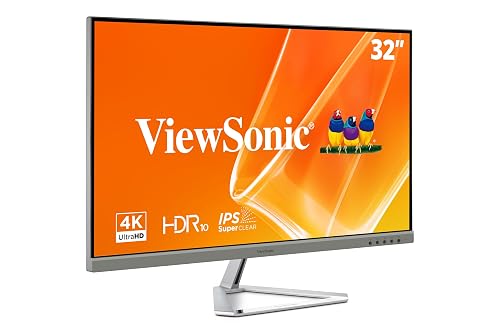 | Best for Home Office | Screen Size: 32-inch | Resolution: 3840 x 2160 | Panel Type: MVA | VIEW LATEST PRICE | Read Our Analysis |
| Dell 27 Plus 4K Monitor (S2725QS) | 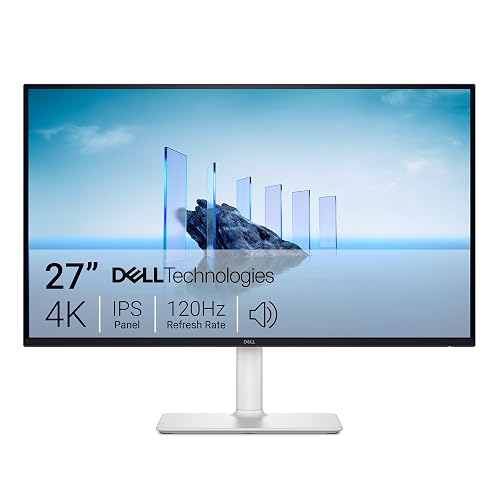 | Best Overall | Screen Size: 27-inch | Resolution: 3840 x 2160 | Panel Type: IPS | VIEW LATEST PRICE | Read Our Analysis |
| Gawfolk 32 Inch 4K UHD Computer Monitor | 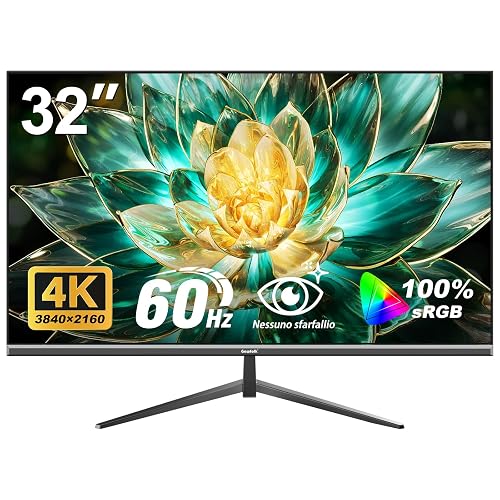 | Best Budget Pick | Screen Size: 32-inch | Resolution: 3840 × 2160 | Panel Type: VA | VIEW LATEST PRICE | Read Our Analysis |
| CRUA 27″ 4K Gaming Monitor 160Hz Dual Mode | 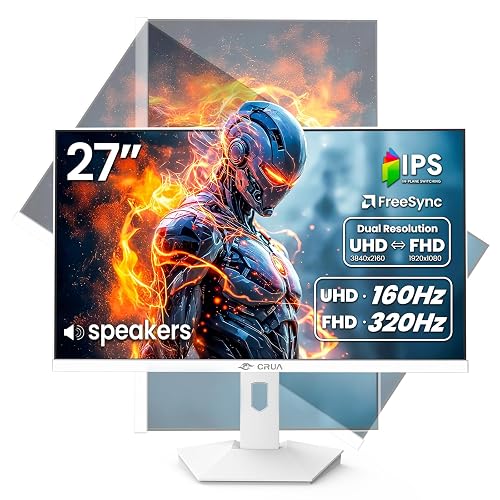 | Best for Gamers | Screen Size: 27-inch | Resolution: 3840 x 2160 | Panel Type: IPS | VIEW LATEST PRICE | Read Our Analysis |
| ZZA 32 Inch 4K UHD Gaming Monitor | 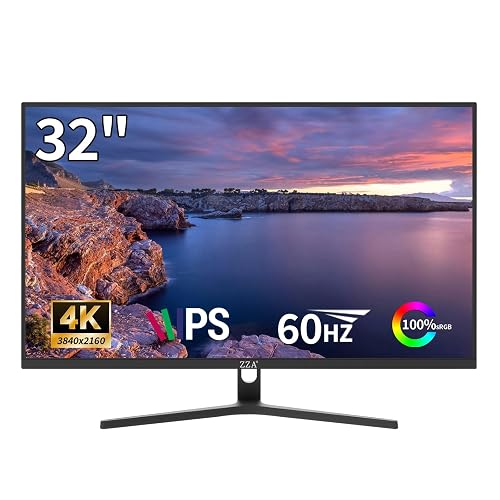 | Best Color Accuracy | Screen Size: 32-inch | Resolution: 3840 × 2160 | Panel Type: IPS | VIEW LATEST PRICE | Read Our Analysis |
| LG 32UR500K-B 32-inch 4K UHD Computer Monitor |  | Best for Multimedia | Screen Size: 32-inch | Resolution: 3840 x 2160 | Panel Type: Not specified | VIEW LATEST PRICE | Read Our Analysis |
More Details on Our Top Picks
ViewSonic VX3276-4K-MHD 32 Inch 4K Monitor
The ViewSonic VX3276-4K-MHD is a strong pick if you want a large, budget-friendly 4K monitor for everyday work, media, and light gaming. It features a 32-inch 3840 x 2160 MVA panel with 60Hz, HDR10, 118% color gamut, and wide 178° viewing angles. Its matte, anti-glare screen helps cut reflections, and Flicker-Free technology plus a Blue Light Filter reduce eye strain. You can connect via HDMI, DisplayPort, or Mini DisplayPort. FreeSync helps smooth play. The frameless, minimalist design looks sharp, and the three-year warranty adds peace of mind.
- Screen Size:32-inch
- Resolution:3840 x 2160
- Panel Type:MVA
- Refresh Rate:60 Hz
- Connectivity:HDMI, DisplayPort, Mini DisplayPort
- VESA Mount:Wall-mount compatible
- Additional Feature:HDR10 support
- Additional Feature:Flicker-Free technology
- Additional Feature:Blue Light Filter
Dell 27 Plus 4K Monitor (S2725QS)
With its 27-inch 4K IPS panel, 120 Hz refresh rate, and 99% sRGB coverage, the Dell 27 Plus 4K Monitor (S2725QS) is a strong pick if you want a sharp, color-accurate display for business work, photo editing, or everyday desktop use without spending over $500. You will get smooth, tear-free motion thanks to AMD FreeSync Premium and Adaptive Sync, and a 0.03 ms response time. ComfortView Plus helps cut blue light, while the matte, anti-glare screen keeps reflections down. Dual HDMI ports, DisplayPort, built-in speakers, and ergonomic adjustments make it easy to fit your setup.
- Screen Size:27-inch
- Resolution:3840 x 2160
- Panel Type:IPS
- Refresh Rate:120Hz
- Connectivity:2 HDMI ports, DisplayPort
- VESA Mount:Desk mount support
- Additional Feature:120Hz refresh rate
- Additional Feature:Integrated speakers
- Additional Feature:ComfortView Plus
Gawfolk 32 Inch 4K UHD Computer Monitor
If you want a large, budget-friendly 4K display for everyday work, entertainment, or casual gaming, the Gawfolk 32 inch 4K UHD monitor makes a strong case. You get 3840 x 2160 resolution on a VA panel, 100% sRGB coverage, 3500:1 contrast, and vivid 16.7 million color output. The matte screen, 178 degree viewing angles, flicker-free lighting, low blue light mode, and DC dimming help keep viewing comfortable. It includes DisplayPort, HDMI, and audio out. The monitor supports VESA mounting and comes with a one year warranty and after-sales support.
- Screen Size:32-inch
- Resolution:3840 × 2160
- Panel Type:VA
- Refresh Rate:60 Hz
- Connectivity:HDMI, DisplayPort, 3.5 mm audio
- VESA Mount:VESA 100 × 100 mm
- Additional Feature:3500:1 contrast ratio
- Additional Feature:2ms response time
- Additional Feature:Low blue light
CRUA 27″ 4K Gaming Monitor 160Hz Dual Mode
CRUA’s 27-inch CR270FU targets gamers who want true 4K performance without sacrificing high refresh rates. You can switch between 4K UHD at 160Hz and FHD at 320Hz depending on the game. The monitor uses a matte IPS panel, offers 1ms response, FreeSync, and Adaptive Sync for smooth, tear-free play. Color coverage reaches 120% sRGB and 92% DCI-P3 for vivid reproduction, while 300 nits of brightness keep details clear. With HDMI 2.1, DisplayPort 1.4, built-in speakers, and full ergonomic adjustment, it suits gaming, work, and multitasking.
- Screen Size:27-inch
- Resolution:3840 x 2160
- Panel Type:IPS
- Refresh Rate:160Hz / 320Hz dual mode
- Connectivity:2x HDMI 2.1, DisplayPort 1.4, 3.5mm audio
- VESA Mount:75×75mm wall mount
- Additional Feature:Dual mode display
- Additional Feature:320Hz FHD mode
- Additional Feature:PIP/PBP multitasking
ZZA 32 Inch 4K UHD Gaming Monitor
The ZZA 32 Inch 4K UHD Gaming Monitor is a strong pick if you want a large, budget-friendly 4K display for both work and play. It features a 32-inch IPS panel with 3840 × 2160 resolution, 100% sRGB, 95% DCI-P3, HDR10, and a 3000:1 contrast ratio, so images look rich and detailed. Its 60 Hz refresh rate, AMD FreeSync, and ultra-low response time help keep motion smooth. HDMI 2.0 and DisplayPort 1.4 support PCs and consoles. The 75 × 75 mm mount fits clean setups.
- Screen Size:32-inch
- Resolution:3840 × 2160
- Panel Type:IPS
- Refresh Rate:60Hz
- Connectivity:HDMI 2.0, DP 1.4
- VESA Mount:75 × 75 mm wall-mount support
- Additional Feature:95% DCI-P3
- Additional Feature:HDR10 support
- Additional Feature:Matte aluminum base
LG 32UR500K-B 32-inch 4K UHD Computer Monitor
With its 32-inch 4K UHD panel, 90% DCI-P3 color coverage, and HDR10 support, the LG 32UR500K-B is a strong option for anyone who wants a roomy monitor for movies, creative work, and everyday multitasking without spending over $500. You get sharp detail, rich color, and a borderless design that feels immersive. The ergonomic stand tilts for comfort, and OnScreen Control lets you manage split views and settings quickly. Built-in stereo speakers with Waves MaxxAudio add punch. Dynamic Action Sync, Black Stabilizer, HDMI, DisplayPort, Flicker Safe, and Reader Mode round out the package.
- Screen Size:32-inch
- Resolution:3840 x 2160
- Panel Type:Not specified
- Refresh Rate:Not specified
- Connectivity:2x HDMI, DisplayPort
- VESA Mount:Not specified
- Additional Feature:Built-in stereo speakers
- Additional Feature:OnScreen Control
- Additional Feature:Black Stabilizer
Factors to Consider When Choosing 4k Monitors Under 500
When choosing a 4K monitor under $500, match the screen size to your desk space and viewing distance. Compare panel types, refresh rate, color accuracy, and HDR performance, because each factor affects how the display looks and feels. Find the right balance to get the best value without overspending.
Screen Size Options
Screen size shapes how a 4K monitor feels on your desk as much as resolution. If you sit close, a 27-inch model usually makes sense. At 4K it gives about 163 pixels per inch, so text and icons look extremely sharp and individual pixels are harder to spot. If you want more space, a 32-inch display can feel better. You will get a larger workspace, bigger elements, and a more comfortable layout for multitasking or long work sessions. Both sizes still look detailed, but your viewing distance matters. Choose 27 inches for a tighter setup and crisp detail. Pick 32 inches if you prefer to spread out windows, enjoy a wider view, or make movies and games feel more immersive.
Panel Type Differences
Panel type matters because it changes how a 4K monitor looks and feels day to day. If you want wide viewing angles and steady color, IPS is usually your best bet. You will get about 178° viewing, so the image stays consistent when you are not centered, which helps for shared screens and color sensitive tasks. Many IPS panels also cover around 99% sRGB or 92% DCI-P3, giving richer, more reliable color. VA panels, by contrast, often deliver contrast ratios around 2500:1 to 3500:1, so blacks look deeper and scenes feel more dimensional. You may notice a little less off-angle color stability, but darker content can look more dramatic. For 4K monitors under 500, choose IPS for accuracy, or VA for stronger contrast and deeper blacks.
Refresh Rate Needs
After choosing the right panel, refresh rate is the next specification that shapes how a 4K monitor feels in daily use. If you mainly work, stream, or browse, a 60 Hz 4K display can be sufficient, but motion will not feel as fluid. If you scroll constantly, play fast games, or want a snappier desktop, aim for 120 Hz or higher. That upgrade reduces blur and makes movement look smoother. Make sure your PC or console can deliver the frames; a 160 Hz screen will not look better with a 60 fps signal. Lower response times, such as 1 ms or 0.03 ms, also help reduce ghosting. For mixed use, match the refresh rate to your real priorities, not the resolution alone.
Color Accuracy Levels
Color accuracy matters as soon as you start doing more than casual viewing, because the right 4K monitor should show colors you can trust, not just colors that look bright. If you edit photos or video, choose a display with at least 99% sRGB coverage; 100% sRGB is even better for standard web work. Some pricier models also mention 90% or higher DCI-P3, which gives you a wider, more saturated palette. Don’t rely on vague terms like “vivid” or “enhanced” color, look for exact percentages instead. IPS panels usually keep colors steadier across the screen and at wider angles than VA panels, so they are easier to judge accurately. Also, HDR branding alone will not guarantee faithful color reproduction, so always check the stated color space first.
HDR Performance
Once you’ve narrowed down color accuracy, HDR is the next spec to check if you want a 4K monitor under $500 that can handle movies, games, and creative work more convincingly. Look for true support like HDR10, not just “HDR ready,” since that usually means better compatibility with HDR content. Brightness matters too. A panel around 300 to 350 nits will show stronger highlights than one stuck near 200 to 260 nits. You should also weigh contrast ratio, because 2500:1 to 3500:1 gives you deeper blacks and better shadow detail than 1500:1 panels. Wider gamuts, such as 95% DCI-P3, add richer color. For the best results, pair HDR with an IPS or VA panel, which keeps tones consistent and viewing angles steady.
Connectivity Ports
When it comes to connectivity ports, the biggest question is whether the monitor has the right inputs for your setup today. Look for at least two digital video inputs so you can hook up a computer and a second device at once. HDMI, DisplayPort, and sometimes Mini DisplayPort are the common choices. If you want 4K at higher refresh rates, HDMI 2.0 or newer matters. For a PC, DisplayPort is often your best bet because it usually supports full resolution and adaptive sync. If you use a laptop, multiple HDMI ports plus a DisplayPort make switching between work, gaming, and media easy. A 3.5 mm audio output can also help if the speakers are weak. VESA support and included cables are useful extras.
Ergonomic Adjustments
Ergonomic adjustments matter just as much as image quality, because a great 4K panel can still feel uncomfortable if it does not fit your desk and posture. Look for height, tilt, swivel, and pivot so you can keep the top of the screen near eye level and reduce neck strain during long sessions. A height range of about 110 mm and tilt from roughly 7 degrees forward to 16 degrees backward usually gives you enough room to match different desks and sitting positions. Pivot support of 90 degrees helps when you switch to portrait mode for reading, coding, or document work. VESA mounting, such as 75 x 75 mm or 100 x 100 mm, also lets you use an arm or wall mount for better positioning and more desk space.
Eye Comfort Features
After you set up a comfortable viewing position, eye comfort features become the next big factor in choosing a 4K monitor under $500. Look for flicker-free backlighting, because it can reduce eye fatigue during long work or gaming sessions. A low blue light or reader mode can help when you use the screen at night, since it lowers exposure to harsher wavelengths. If you work near windows or in bright rooms, a matte, anti-glare panel will make text and images easier to see by limiting reflections. Aim for around 300 cd/m² brightness and solid contrast, ideally 1500:1 to 2500:1, so you do not have to squint. Preset modes like Text, Web, or Movie can further balance color and clarity for different tasks.
Frequently Asked Questions
Which 4K Monitor Under $500 Is Best for Console Gaming?
You should choose the Gigabyte M28U. It is an excellent console gaming option under $500, offering 4K, 144Hz, HDMI 2.1, and low input lag. If you play PS5 or Xbox, you will appreciate its smooth performance.
Do These Monitors Support HDR, and Is It Actually Useful?
Yes, many do, but you will usually get basic HDR rather than truly eye-popping quality. You will notice somewhat better highlights and contrast, though the effect is often subtle unless the monitor offers high brightness and effective local dimming.
Are 4K Monitors Under $500 Good for Photo and Video Editing?
Yes, 4K monitors under $500 can be good for photo and video editing. If you need sharper detail, that works in your favor. Look for solid color accuracy, IPS panels, and calibration support.
What Cables Are Included With Budget 4K Monitors?
You will usually get an HDMI cable, sometimes a DisplayPort cable, and occasionally a USB-C cable or power cable. Do not assume they are premium; check the box, because bundled accessories vary by brand and model.
Can a Laptop Easily Run a 4K Monitor at 60HZ?
Yes. If your laptop has HDMI 2.0, DisplayPort, or USB-C with DisplayPort Alt Mode, it can drive a 4K monitor at 60 Hz. You also need sufficient graphics performance and the correct cable.




