

Nearly half of gamers now say laptop performance matters more than portability, and you are probably in that camp too. If you are sorting through Asus ROG options, the lineup can look repetitive at first.
The differences between a Strix G16 and a SCAR 18 can shape everything from frame rates to cooling. The right pick may surprise you once you compare what each model actually gives you.
| ASUS ROG Strix G16 Gaming Laptop (2025) |  | Best Mid-Range | Processor: Intel Core i7-14650HX | Graphics: RTX 5060 Laptop GPU | Memory: 16GB DDR5 | VIEW LATEST PRICE | Read Our Analysis |
| ASUS ROG Strix G16 Gaming Laptop (2025) | 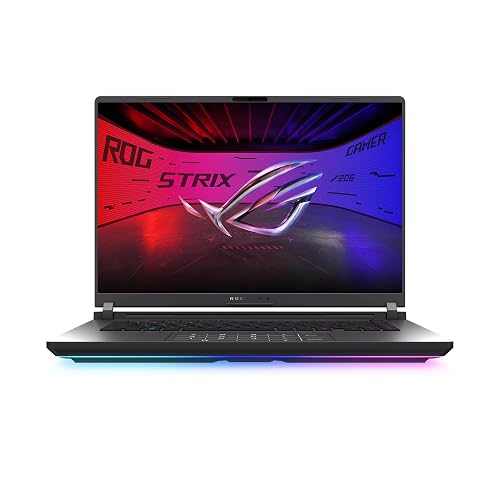 | Best Performance | Processor: Intel Core Ultra 9 275HX | Graphics: RTX 5070 Ti Laptop GPU | Memory: 32GB DDR5 | VIEW LATEST PRICE | Read Our Analysis |
| ASUS ROG Strix G16 Gaming Laptop (G615LW-AS96) | | Best Premium | Processor: Intel Core Ultra 9 275HX | Graphics: RTX 5080 Laptop GPU | Memory: 32GB DDR5 | VIEW LATEST PRICE | Read Our Analysis |
| ASUS ROG Strix G16 Gaming Laptop (2025) | 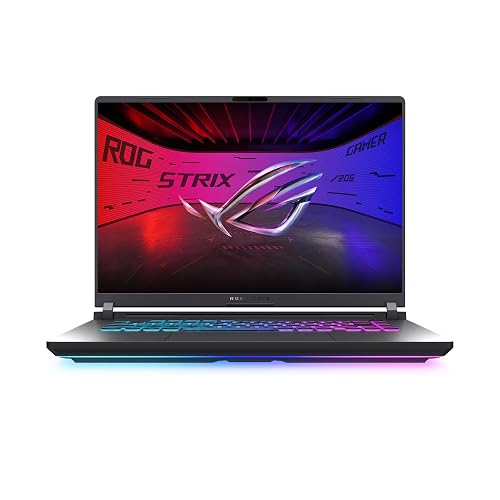 | Best Budget | Processor: Intel Core i7-14650HX | Graphics: RTX 5050 Laptop GPU | Memory: 16GB DDR5 | VIEW LATEST PRICE | Read Our Analysis |
| ASUS ROG Strix SCAR 18 Gaming Laptop | 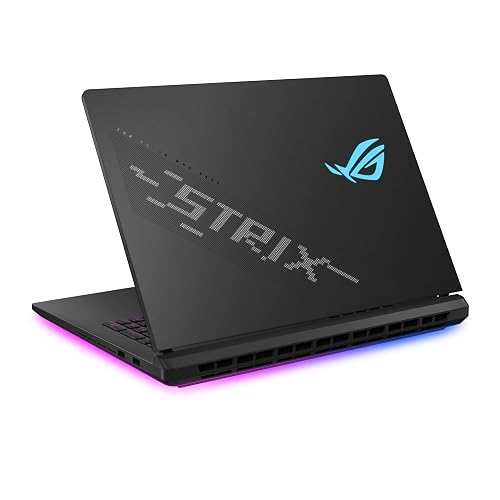 | Best Ultra-Premium | Processor: Intel Core Ultra 9 275HX | Graphics: RTX 5080 Laptop GPU | Memory: 32GB DDR5 | VIEW LATEST PRICE | Read Our Analysis |
| ASUS ROG Strix G16 Gaming Laptop (2025) | 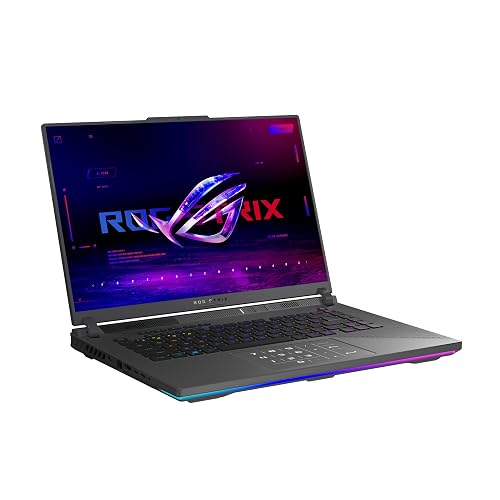 | Best AMD Pick | Processor: AMD Ryzen 9 9955HX3D | Graphics: RTX 5070 Ti Laptop GPU | Memory: 32GB DDR5 | VIEW LATEST PRICE | Read Our Analysis |
More Details on Our Top Picks
ASUS ROG Strix G16 Gaming Laptop (2025)
If you want a high-performance gaming laptop that balances speed, portability, and modern features, the 2025 ASUS ROG Strix G16 is a strong pick. It includes an Intel Core i7-14650HX, an RTX 5060 Laptop GPU, 16 GB of DDR5 RAM, and a 1 TB PCIe Gen 4 SSD for fast gaming and multitasking. The 16-inch FHD+ 165 Hz display keeps motion smooth, and ROG Intelligent Cooling helps maintain performance. You also get Wi-Fi 7, Dolby Atmos, a 90 Wh battery, and tool-free upgrade access.
- Processor:Intel Core i7-14650HX
- Graphics:RTX 5060 Laptop GPU
- Memory:16GB DDR5
- Storage:1TB SSD
- Display:16″ FHD+ 165Hz
- Cooling:Vapor chamber
- Additional Feature:Wi-Fi 7 support
- Additional Feature:360° RGB light bar
- Additional Feature:Tool-free RAM access
ASUS ROG Strix G16 Gaming Laptop (2025)
The ASUS ROG Strix G16 Gaming Laptop (2025) is a strong pick if you want a high-performance gaming machine that can also handle demanding creative work, thanks to its Intel Core Ultra 9 275HX processor, GeForce RTX 5070 Ti Laptop GPU, and 32GB of DDR5 memory. You will also get a 16-inch Nebula display with 2.5K resolution, 240Hz refresh, and 3ms response time for smooth, sharp play. ROG Intelligent Cooling, a vapor chamber, and a tri-fan design help keep temperatures in check. Connectivity includes Wi-Fi 7 and Thunderbolt, and a 90Wh battery helps provide extended runtime.
- Processor:Intel Core Ultra 9 275HX
- Graphics:RTX 5070 Ti Laptop GPU
- Memory:32GB DDR5
- Storage:1TB SSD
- Display:16″ 2.5K 240Hz
- Cooling:Vapor chamber
- Additional Feature:1-year warranty
- Additional Feature:Full-surround RGB light bar
- Additional Feature:802.11be wireless
ASUS ROG Strix G16 Gaming Laptop (G615LW-AS96)
Powered by Windows 11 Home, an Intel Core Ultra 9 275HX processor, and an NVIDIA GeForce RTX 5080 Laptop GPU, the ASUS ROG Strix G16 Gaming Laptop (G615LW-AS96) is built for gamers and creators who want top-tier speed, smooth 2.5K/240Hz visuals, and serious multitasking power in one machine. It includes 32GB DDR5 memory, a 1TB PCIe Gen 4 SSD, and NVIDIA Blackwell performance with DLSS 4 and Max-Q technology. The 16-inch Nebula display delivers a sharp 3 ms response. ROG cooling, tri-fan support, and a vapor chamber help keep sessions stable, cool, and fast.
- Processor:Intel Core Ultra 9 275HX
- Graphics:RTX 5080 Laptop GPU
- Memory:32GB DDR5
- Storage:1TB SSD
- Display:16″ 2.5K 240Hz
- Cooling:Vapor chamber
- Additional Feature:Up to 7,000MB/s throughput
- Additional Feature:Full-surround RGB lightbar
- Additional Feature:Sync with peripherals
ASUS ROG Strix G16 Gaming Laptop (2025)
For gamers and creators who want a fast, responsive laptop that can also handle everyday multitasking, the ASUS ROG Strix G16 Gaming Laptop (2025) stands out with its Intel Core i7 14650HX, NVIDIA GeForce RTX 5050 GPU, and 16GB of DDR5 memory. You get Windows 11 Home, DLSS 4, and Max-Q efficiency for smooth, modern performance. Its 1TB PCIe Gen 4 SSD keeps your games and files ready, and the 16-inch FHD+ 165Hz display with 3ms response looks sharp and fluid. ROG cooling, a tri-fan design, and liquid metal help it stay quiet and fast.
- Processor:Intel Core i7-14650HX
- Graphics:RTX 5050 Laptop GPU
- Memory:16GB DDR5
- Storage:1TB SSD
- Display:16″ FHD+ 165Hz
- Cooling:Vapor chamber
- Additional Feature:360° RGB light bar
- Additional Feature:Keyboard sync support
- Additional Feature:Stealth Mode lighting off
ASUS ROG Strix SCAR 18 Gaming Laptop
If you want a no-compromise ROG machine built for elite gaming and heavy multitasking, the ASUS ROG Strix SCAR 18 stands out fast. You get Windows 11 Pro, an Intel Core Ultra 9 275HX, and an NVIDIA GeForce RTX 5080 Laptop GPU for top-tier speed. The 18-inch Nebula HDR mini LED display delivers 2.5K resolution at 240 Hz, with vivid 100% DCI-P3 color. With 32 GB DDR5 memory, a 2 TB Gen 4 SSD, and tool-free upgrades, you are set. ROG cooling keeps the system quiet, and Wi-Fi 7, AniMe Vision, and Game Pass add extra value.
- Processor:Intel Core Ultra 9 275HX
- Graphics:RTX 5080 Laptop GPU
- Memory:32GB DDR5
- Storage:2TB SSD
- Display:18″ 2.5K 240Hz
- Cooling:Vapor chamber
- Additional Feature:18-inch Mini LED
- Additional Feature:AniMe Vision lid
- Additional Feature:Tool-free hardware access
ASUS ROG Strix G16 Gaming Laptop (2025)
The ASUS ROG Strix G16 (2025) is a strong pick for serious gamers who want desktop-class performance in a portable 16-inch notebook. It is powered by an AMD Ryzen 9 9955HX3D with 16 cores and 32 threads, paired with an NVIDIA GeForce RTX 5070 Ti built on Blackwell and supporting DLSS 4. The 2.5K 240Hz Nebula display looks sharp and fast. With 32GB of DDR5 memory and a 1TB SSD, everything stays snappy. ROG Intelligent Cooling, tri-fan technology, and liquid metal help sustain performance. Wi-Fi 6E, HDMI, Thunderbolt, and RGB lighting round out the package.
- Processor:AMD Ryzen 9 9955HX3D
- Graphics:RTX 5070 Ti Laptop GPU
- Memory:32GB DDR5
- Storage:1TB SSD
- Display:16″ 2.5K 240Hz
- Cooling:Vapor chamber
- Additional Feature:5.5 lb weight
- Additional Feature:No webcam included
- Additional Feature:Wi-Fi 6E support
Factors to Consider When Choosing Asus Rog Gaming Laptops
When choosing an Asus ROG gaming laptop, match its performance to the games and tasks you actually run. Check the GPU tier, display quality, cooling efficiency, and how much memory and storage you need. These factors determine how fast, smooth, and future ready your laptop will be.
Performance Needs
To choose the right ASUS ROG gaming laptop for your needs, start with the CPU and GPU, because performance varies widely between models. You will want more CPU cores and higher boost speeds if you stream, edit, or run heavy apps. Options range from 14 cores at up to 5.2 GHz to 24 cores at up to 5.4 GHz. Select enough RAM for your workflow; 16 GB suits basic gaming, while 32 GB is better when you multitask. Check storage as well, since a 1 TB PCIe Gen 4 SSD fills quickly and some drives reach 7,000 MB/s. For smoother high frame rate play, look for DLSS 4, Max-Q tuning, and a 240 Hz display paired with strong hardware.
GPU Tier
GPU tier can make or break an ASUS ROG gaming laptop’s real-world performance, so match the graphics chip to how you play. If you mostly game at 1080p or 1200p, a mid-tier GPU usually gives the best balance of speed and value. If you want 1440p or 1600p at high refresh rates, step up to an upper-tier GPU for smoother results and better ray tracing. Don’t ignore VRAM, either; more memory helps with high-resolution textures, big open-world games, and demanding creative work. Features like DLSS and Max-Q can boost efficiency, so model names alone do not tell the whole story. Choose the tier that fits your target resolution, settings, and refresh rate, and avoid overbuying power you will not use.
Display Quality
A great display can be as important as raw performance on an ASUS ROG gaming laptop. When choosing one, look closely at resolution first. A 2560 x 1600 panel gives sharper text, cleaner visuals, and extra room for maps, menus, and multitasking compared with 1920 x 1200. Next, check refresh rate. A 240 Hz screen can feel noticeably smoother and more responsive than 165 Hz, especially in fast-paced games. Aim for a 3 ms response time to reduce motion blur and ghosting. Features such as ACR film, enhanced contrast, and glare reduction help you see deeper blacks and fewer reflections. Finally, panel type and color coverage matter. Mini LED and wide-gamut displays typically deliver better brightness, contrast, and overall image quality than basic LED screens.
Cooling Efficiency
When you choose an ASUS ROG gaming laptop, cooling efficiency matters as much as raw specs, because strong thermal design keeps performance steady during long gaming sessions. Look for vapor chamber cooling and tri-fan systems, as they move heat away more effectively when games push the CPU and GPU hard. Liquid metal thermal compound can also improve heat transfer from those components into the cooling hardware. A robust design should let your laptop run at full power without constant thermal throttling, while also keeping fan noise and surface temperatures more manageable. That balance matters when you game for hours. Tool-free access is another plus, because you can clear dust more easily and maintain cooling performance over time.
Memory And Storage
Memory and storage shape how well an ASUS ROG gaming laptop keeps up with your games and multitasking. Treat 16GB of DDR5-5600 as the minimum sweet spot for smooth play; 32GB gives you more breathing room for demanding AAA titles, streaming, and background apps. If you like keeping lots of browser tabs and chat tools open, the extra capacity can make the laptop feel faster for longer. For storage, start with a 1TB PCIe Gen 4 SSD so you get quick load times and room for a growing game library. That matters because many modern games can use over 100GB each. If the laptop lets you upgrade RAM or SSD easily, you will protect your investment as your needs change.
Port Selection
After you have sorted out RAM and storage, the next thing to check is the port layout, since it affects how easily you can connect your gear day to day. Check the total count first; Asus ROG models can give you anywhere from 5 to 9 ports, depending on the setup. Then make sure the laptop includes the connections you actually need, like HDMI, Thunderbolt, USB, DisplayPort, and Ethernet. If you juggle multiple peripherals, aim for at least 3 USB ports so you can plug in a mouse, headset, and storage drive at once. A Thunderbolt port is especially handy for fast accessories and external displays. Also verify Wi-Fi 7 or Wi-Fi 6E support, since strong wireless can reduce how often you rely on physical connections.
Battery Life
Battery life is an area where you should set realistic expectations with Asus ROG gaming laptops, since powerful CPUs and discrete GPUs can drain a battery quickly. Some models may last only about two hours on a charge. Look for a larger battery pack, such as 90 Wh, if you want more unplugged time. Battery-saving graphics switching helps by using integrated graphics for lighter tasks and reserving the discrete GPU for gaming. Lowering the refresh rate and brightness can also stretch runtime noticeably. If you mostly browse, stream, or work away from the charger, standby can be impressive too, with some systems lasting around 50 hours when idle. For true portability, balance performance and endurance carefully.
Frequently Asked Questions
Are ASUS ROG Gaming Laptops Good for Video Editing?
Yes. Asus ROG gaming laptops handle video editing well because they offer strong CPUs, powerful GPUs, and fast displays. You will edit smoothly, but choose sufficient RAM and fast storage for larger projects.
Can ASUS ROG Laptops Handle Virtual Reality Games?
Many Asus ROG laptops can run VR games, provided they have a powerful GPU, sufficient RAM, and the necessary ports. Capable models deliver smooth, immersive gameplay.
How Long Do ASUS ROG Laptop Batteries Usually Last?
You can typically expect 3 to 7 hours of battery life from an ASUS ROG laptop, depending on screen brightness, game load, and power settings. If you are gaming heavily, battery life will be significantly shorter. For casual tasks, expect longer runtimes.
Do ASUS ROG Laptops Support Easy RAM Upgrades?
Yes, you can often upgrade your Asus ROG laptop’s RAM, but it depends on the model. Many models have accessible RAM slots, however some have memory soldered to the motherboard. Check your exact model specifications before buying upgrades.
Which ASUS ROG Model Is Best for Travel?
Choose the ROG Zephyrus G14 for travel. It is light and compact, yet still delivers strong gaming performance. You can carry it easily, enjoy excellent battery life, and maintain high performance on the road.




