


You may not realize how much a cooling pad can affect frame rates, not just laptop temperature.
When choosing one for 2026, the best models do more than move air; they balance fan power, noise, comfort, and fit for your machine.
Some add RGB, stands, and USB pass-through ports, while others focus on raw cooling.
The right choice is not always obvious, and that is where things get interesting.
| Gaming Laptop Cooler with 13 Quiet Fans RGB Phone Holder | 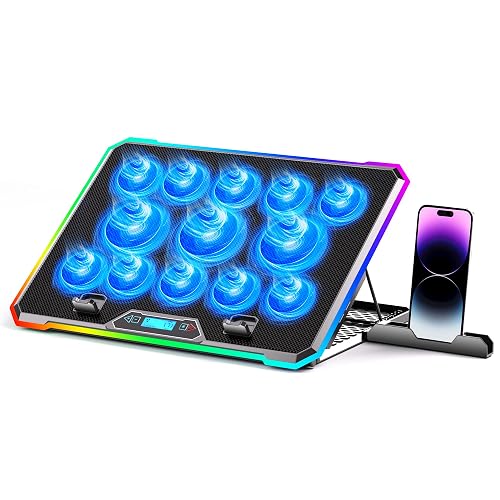 | Best for RGB | Cooling Fans: 13 fans | RGB Lighting: 10 modes | Laptop Size: 15–21 in | VIEW LATEST PRICE | Read Our Analysis |
| llano V10 Gaming Laptop Cooling Pad RGB Turbo Fan | 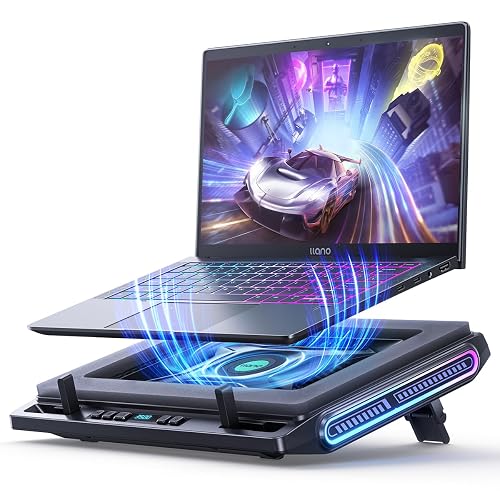 | Best Turbo Cooling | Cooling Fans: 1 turbo fan | RGB Lighting: 12 modes | Laptop Size: 13–17.3 in | VIEW LATEST PRICE | Read Our Analysis |
| Razer Laptop Cooling Pad with Smart Fan Control | 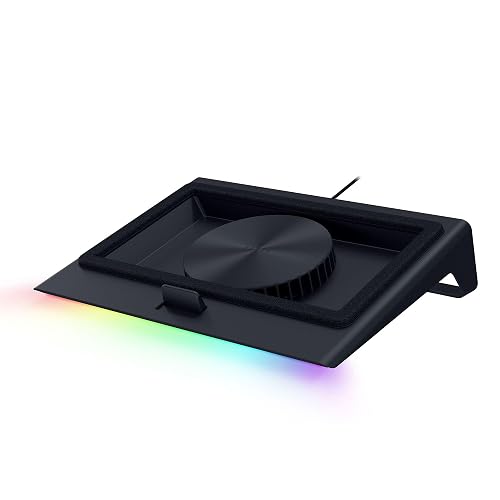 | Smart Cooling Pro | Cooling Fans: 1 smart fan | RGB Lighting: Chroma RGB | Laptop Size: 14–18 in | VIEW LATEST PRICE | Read Our Analysis |
| AICHESON Gaming Laptop Cooling Pad with 8 Fans | 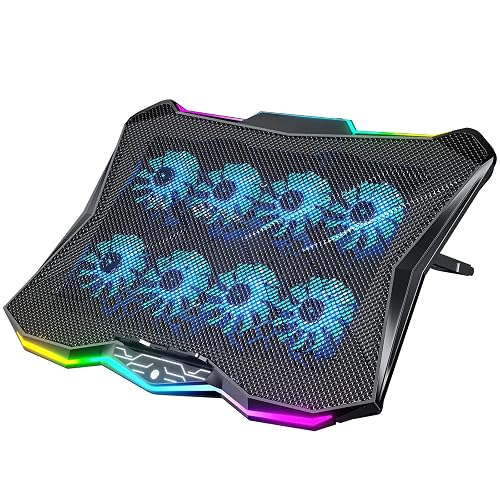 | Best 8-Fan Pad | Cooling Fans: 8 fans | RGB Lighting: 10 modes | Laptop Size: 14–17.3 in | VIEW LATEST PRICE | Read Our Analysis |
| llano V12 Ultra Laptop Cooling Pad with RGB Fan | 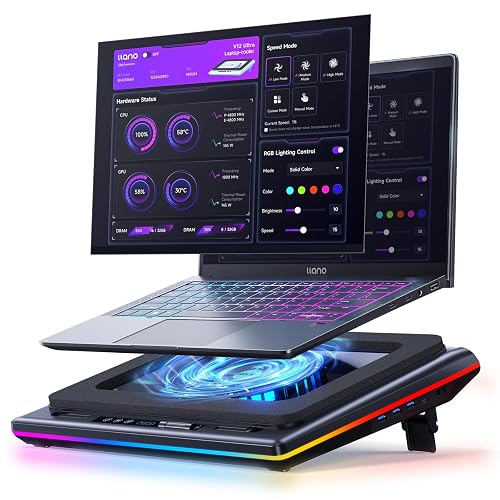 | Best for Large Laptops | Cooling Fans: 1 turbo fan | RGB Lighting: 4 effects | Laptop Size: 15.6–19 in | VIEW LATEST PRICE | Read Our Analysis |
| Laptop Cooling Pad with 3 Quiet Fans Adjustable Stand | 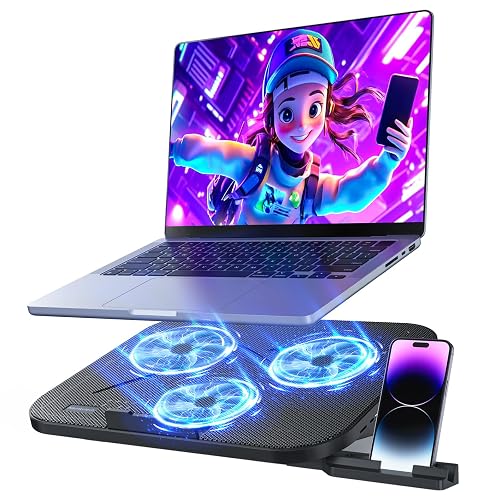 | Best Budget Pick | Cooling Fans: 3 fans | RGB Lighting: RGB lighting | Laptop Size: 12–17 in | VIEW LATEST PRICE | Read Our Analysis |
| KLIM Turbofrost MAX RGB Laptop Cooling Pad |  | Premium Performance | Cooling Fans: 1 turbo fan | RGB Lighting: 64 effects | Laptop Size: up to 17.3 in | VIEW LATEST PRICE | Read Our Analysis |
More Details on Our Top Picks
Gaming Laptop Cooler with 13 Quiet Fans RGB Phone Holder
If you need a cooling pad that keeps up with long gaming sessions, this model delivers 13 ultra-quiet fans that push strong airflow to help control overheating. You can monitor fan speed on the LCD screen and adjust settings without guessing. Ten RGB modes add style, and you can save your last configuration with memory or turn the lights off with one touch. Nine height angles, from 10° to 45°, help reduce neck strain. Two USB ports, a silicone phone holder, and a non-slip base keep your setup steady on laps, beds, sofas, or desks.
- Cooling Fans:13 fans
- RGB Lighting:10 modes
- Laptop Size:15–21 in
- Height Adjustment:9 angles
- USB Ports:2 ports
- Fan Control:LCD control
- Additional Feature:13-fan cooling array
- Additional Feature:LCD speed display
- Additional Feature:Built-in phone holder
llano V10 Gaming Laptop Cooling Pad RGB Turbo Fan
The llano V10 Gaming Laptop Cooling Pad RGB Turbo Fan is a strong choice if your laptop runs hot during long gaming sessions or heavy workloads. Its 4.72-inch external turbo fan and pure copper motor can lower temperatures by up to 38°C in minutes. You can reach 3500 RPM to reduce throttling and minimize lag or flicker. It fits 13 to 17.3-inch laptops, including Dell, HP, ASUS, Lenovo, and Alienware models. The unit offers 12 RGB modes, physical controls, a three-level stand, four USB ports, and a removable dust filter.
- Cooling Fans:1 turbo fan
- RGB Lighting:12 modes
- Laptop Size:13–17.3 in
- Height Adjustment:3 levels
- USB Ports:4 ports
- Fan Control:Button control
- Additional Feature:3500 RPM turbo fan
- Additional Feature:Copper motor core
- Additional Feature:Removable dust filter
Razer Laptop Cooling Pad with Smart Fan Control
Razer’s Laptop Cooling Pad with Smart Fan Control is a smart pick if you want automatic, temperature-based cooling that adapts from idle to full load. Its 140 mm brushless fan spins up to 3000 RPM, and an airtight pressure chamber with foam seals helps cut leakage and lower CPU, GPU, and surface temperatures. You can tune preset or custom curves in Razer Synapse, and remappable buttons let you adjust fan speed, audio, or apps on the fly. It fits most 14-inch to 18-inch laptops and adds a three-port USB Type-A hub.
- Cooling Fans:1 smart fan
- RGB Lighting:Chroma RGB
- Laptop Size:14–18 in
- Height Adjustment:Adjustable stand
- USB Ports:3-port hub
- Fan Control:Synapse control
- Additional Feature:Automatic thermal detection
- Additional Feature:Razer Synapse curves
- Additional Feature:2-year warranty
AICHESON Gaming Laptop Cooling Pad with 8 Fans
AICHESON’s AA3 cooling pad suits gamers who want aggressive airflow without giving up comfort, thanks to its 8 high-speed fans, 7 height settings, and RGB lighting. You can tune the fans from 2600 to 3000 RPM with the roll switch, so you will keep heat in check during long sessions. The 10 degree to 30 degree angles raise your screen and ease neck strain. A stable kickstand and a hidden anti-slip pad help keep your laptop steady. You also get fingerprint touch controls, 10 light modes, 2 USB ports, and support for 14 to 17.3 inch laptops.
- Cooling Fans:8 fans
- RGB Lighting:10 modes
- Laptop Size:14–17.3 in
- Height Adjustment:7 slots
- USB Ports:2 ports
- Fan Control:Touch control
- Additional Feature:Fingerprint touch control
- Additional Feature:Hidden anti-slip pad
- Additional Feature:1-year warranty
llano V12 Ultra Laptop Cooling Pad with RGB Fan
If you use a large gaming laptop and need stronger cooling during heavy multitasking or intense sessions, the llano V12 Ultra stands out with its 5.5-inch turbo fan, smart Myth.cool control, and a lab-tested temperature drop of up to 22°C in 90 seconds. You can choose Low, Medium, or High mode, or let it adjust automatically for efficient, low-noise cooling. Its 36W output, 2800 RPM fan, and 360° airflow help prevent overheating. It fits 15.6-inch to 19-inch laptops, adds RGB flair, offers USB 3.0 hub ports, and includes adjustable angles for better posture.
- Cooling Fans:1 turbo fan
- RGB Lighting:4 effects
- Laptop Size:15.6–19 in
- Height Adjustment:3 heights
- USB Ports:1-in-3 hub
- Fan Control:Software/scroller
- Additional Feature:Myth.cool software
- Additional Feature:5Gbps USB hub
- Additional Feature:Tool-free dust mesh
Laptop Cooling Pad with 3 Quiet Fans Adjustable Stand
The AISUNKUTECH F3 Ultra is a smart pick if you want a gaming laptop cooling pad that stays quiet while still moving serious air, thanks to its three ultra-silent fans and simple top-wheel speed control. You can cool your laptop fast without dealing with distracting noise, which tops out around 40 dB. Its five-level adjustable stand helps you find a better viewing angle, and it eases shoulder and neck strain. The sturdy ABS body and stainless steel mesh boost durability and heat dissipation. You also get two USB ports, a phone holder, and stable support for 12 to 17 inch laptops.
- Cooling Fans:3 fans
- RGB Lighting:RGB lighting
- Laptop Size:12–17 in
- Height Adjustment:5 levels
- USB Ports:2 extra ports
- Fan Control:Top wheel switch
- Additional Feature:Metal support bar
- Additional Feature:40 dB max
- Additional Feature:Built-in phone holder
KLIM Turbofrost MAX RGB Laptop Cooling Pad
KLIM’s Turbofrost MAX RGB cooling pad is a strong pick if you want aggressive airflow for a gaming laptop up to 17.3 inches, especially since its single TurboFan concentrates air directly beneath your machine for faster cooling. You get a smart inlay system with adaptive sealing foam, so airflow stays focused where your laptop needs it most. You can power it with a wall plug or USB-C, and you still get three USB-A ports. The 360° RGB lighting offers 64 effects, and the LCD and speed settings save automatically.
- Cooling Fans:1 turbo fan
- RGB Lighting:64 effects
- Laptop Size:up to 17.3 in
- Height Adjustment:Adjustable speed/tilt
- USB Ports:3 USB-A ports
- Fan Control:LCD screen
- Additional Feature:Patented TurboFan
- Additional Feature:Adaptive sealing foam
- Additional Feature:5-year warranty
Factors to Consider When Choosing Gaming Laptop Cooling Pads
When choosing a gaming laptop cooling pad, prioritize cooling power, since it must keep your system steady during long sessions. Also check fan noise, laptop size compatibility, and adjustable ergonomics, so the pad feels right and works well with your setup. If style matters, consider RGB lighting options, as they can add flair without sacrificing performance.
Cooling Power
Cooling power is the main factor to consider if you want a gaming laptop cooling pad that actually makes a difference under load. Look for higher airflow capacity, faster fan speeds, or turbo style fans; these pull heat away faster and help prevent thermal throttling during long sessions. If your laptop runs hot in specific spots, a single high pressure fan can focus airflow there, while multiple fans can spread cooling across the whole base. The best pads lower CPU and GPU temperatures quickly enough to keep performance steady. Adjustable fan speed matters too, since you can boost cooling for gaming or scale it back for lighter tasks. Also check airflow sealing and fan placement, because less leakage means better cooling efficiency overall.
Fan Noise
Fan noise can matter just as much as raw cooling power, especially if you game for hours in a quiet room. You will find some cooling pads stay near 40 dB, while turbo fan models can get much louder at full blast. Do not assume more fans means less noise; even a pad with 13 fans can sound busy if airflow is aggressive. Look for adjustable speed controls so you can keep noise low during light play and ramp up only when needed. Smart auto modes help too, because they react to temperature instead of running hard all the time. Brushless motors, balanced airflow chambers, and foam sealing can also improve efficiency, allowing better cooling without extra sound.
Laptop Size Fit
Laptop size fit matters because a pad that matches your machine keeps airflow aligned under the chassis and prevents awkward overhang at the edges. Check the pad’s supported screen-size range, which often covers 12 to 17 inches, 13 to 17.3 inches, 14 to 18 inches, or 15.6 to 19 inches. Then match it to your laptop class: compact 13 to 14 inch models, standard 15.6 inch notebooks, or larger 17 to 18 inch gaming rigs. If you use a smaller laptop, choose a pad with foam inserts or adjustable contact points so it will not slide. If you use a larger system, confirm the platform and support width handle at least 17.3 inches. Some pads extend to 18 or 19 inches.
Adjustable Ergonomics
When you use a gaming laptop cooling pad, adjustable ergonomics can make a bigger difference than you might expect. Look for models with multiple height settings, such as 3, 5, 7, or 9 angles, so you can find a position that feels natural for typing and viewing. A wider tilt range, for example 10° to 45° or 10° to 30°, helps ease neck and shoulder strain during long gaming or work sessions. Stable support matters too, so choose pads with anti-slip feet, baffles, or a solid kickstand base to keep your laptop secure at different angles. Good ergonomics can also improve airflow by lifting your laptop higher, and larger laptops need balanced support across the full surface, especially on soft or uneven spots.
RGB Lighting Options
RGB lighting can add more than style to a gaming laptop cooling pad, so it is worth comparing both the look and the controls. You can choose from simple single-color glow, breathing effects, color-cycling patterns, or full 360° RGB illumination. Some pads offer 4, 10, 12, or even 64 lighting presets. If you like consistency, look for a memory function that restores your last effect when you turn the pad back on. It also helps when RGB controls stay separate from fan controls, since you will not change cooling by mistake. One-touch on/off switches and physical buttons let you tweak lighting fast during play. In the end, pick a pad whose lighting matches your style without adding hassle.
USB Connectivity
After you choose the lighting style you prefer, check the cooling pad’s USB configuration so it works with the rest of your gear. If you connect a mouse, keyboard, flash drive, or controller, choose a pad with multiple pass-through ports so you do not lose laptop connectivity. Some coolers offer two USB ports, while others provide three or four, so extra capacity can simplify setup. USB-powered models plug directly into your laptop, which keeps things simple, but you still need enough ports for your devices. A mix of USB-A and USB-C helps you pair older accessories with newer hardware. If you run several peripherals at once, a built-in USB hub with fast data support can keep your desk organized and your workflow smooth.
Build Quality
Build quality matters because a gaming laptop cooling pad needs to stay steady under pressure, especially during long sessions. You should look for a rigid frame with reinforced materials, such as metal bars, aluminum, or durable ABS plastic, since they keep the stand stable under your laptop’s weight. A non-slip base, anti-slip pads, or front baffles also help prevent sliding when you are typing, gaming, or tilting the stand. Check that fans, buttons, and other moving parts feel solid and responsive, because higher-quality components usually last longer. Dust filters, sealed airflow channels, and removable mesh covers can make maintenance easier and protect performance. If the pad has adjustable height, choose one with strong locking points and smooth angle changes, not loose joints or weak hinges.
Frequently Asked Questions
Which Cooling Pad Works Best for Laptops Over 17 Inches?
Choose a large, high-airflow pad with an adjustable fan layout and a wide platform. It will best support your 17-inch-plus laptop, improve cooling, and keep vents unobstructed during intense gaming or heavy workloads.
Can a Cooling Pad Reduce Thermal Throttling During Long Gaming Sessions?
Yes, a cooling pad can reduce thermal throttling during long gaming sessions. It typically lowers temperatures enough to improve sustained performance, but it will not fully compensate for poor internal cooling or dust buildup.
Do RGB Lighting Effects Affect Cooling Pad Performance?
No, RGB lighting usually does not affect your cooling pad’s performance, because it primarily adds aesthetics. You might notice a difference only if the lights increase power draw slightly, but that rarely impacts airflow or cooling enough.
Are Gaming Laptop Cooling Pads Compatible With USB-C Charging?
Yes, many cooling pads support USB-C charging, but you must check the power delivery specifications. Do not assume every pad handles passthrough charging, because some use USB-C only for power input.
How Often Should I Clean the Fans on a Cooling Pad?
Clean the cooling pad fans every 1 to 3 months, and clean them more often if you game daily or notice dust buildup. Wipe and vacuum the fans regularly to maintain strong airflow and prevent overheating.




