

Apex Legends can feel like a sprint on a frozen track, one stutter and you are out.
If you want smooth fights in 2026, choose a laptop that keeps pace without overheating or dropping frames.
The ASUS ROG Strix G16, TUF F16, Acer Nitro V models, and HP Victus 15 each bring different strengths.
The real question is which one fits your style and budget best.




More Details on Our Top Picks
ASUS ROG Strix G16 Gaming Laptop (2025)
If you want a gaming laptop that can keep Apex Legends running smoothly at high settings, the ASUS ROG Strix G16 (2025) is a strong fit thanks to its Intel Core i7-14650HX and NVIDIA GeForce RTX 5060 Laptop GPU. You get 16GB of DDR5-5600MHz RAM, a 1TB PCIe Gen 4 SSD, and Windows 11 Home for fast load times and responsive play. Its 16-inch FHD+ 165Hz ROG Nebula Display helps you track fast movement clearly. ROG Intelligent Cooling includes a vapor chamber, a tri-fan design, and liquid metal to keep performance steady.
- GPU:RTX 5060
- Processor:Intel Core i7-14650HX
- RAM:16GB DDR5
- Storage:1TB SSD
- Display:16-inch FHD+
- Refresh Rate:165Hz
- Additional Feature:Wi‑Fi 7 support
- Additional Feature:90Wh battery
- Additional Feature:360° RGB light bar
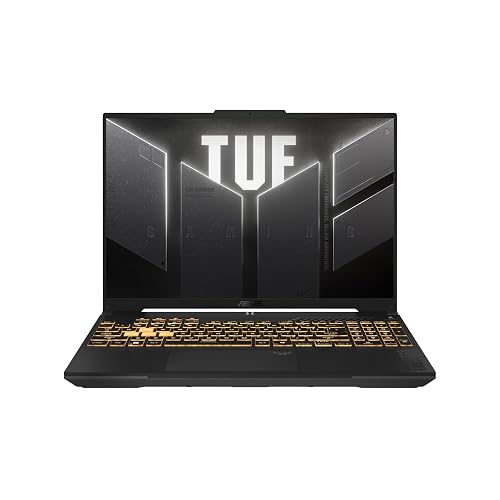
ASUS TUF Gaming F16 2024 Laptop RTX 4050
The ASUS TUF Gaming F16 2024 with an RTX 4050 is a strong pick for Apex Legends players who want smooth 1080p gameplay in a tougher, more affordable 16-inch gaming laptop. It is powered by an Intel Core 5 210H, 8 GB of DDR5 memory, and a 115 W RTX 4050 that can keep Apex responsive at 144 Hz. The 16-inch 1920 x 1200 display adds extra vertical space, and Adaptive-Sync helps cut tearing. You also get Wi-Fi 6, Thunderbolt, HDMI, and a durable MIL-STD-810H build. The 512 GB SSD and the lack of a webcam keep the configuration simple.
- GPU:RTX 4050
- Processor:Intel Core 5 210H
- RAM:8GB DDR5
- Storage:512GB SSD
- Display:16-inch FHD+
- Refresh Rate:144Hz
- Additional Feature:Military Grade durability
- Additional Feature:Arc Flow Fans
- Additional Feature:No webcam
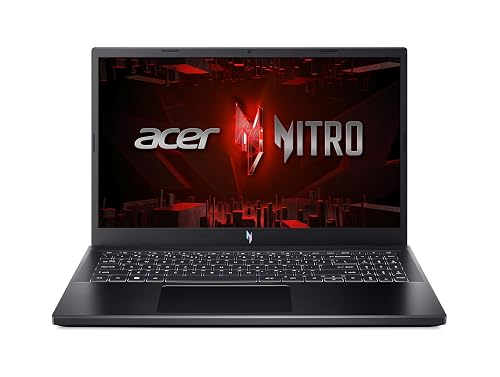
Acer Nitro V Gaming Laptop (ANV15-51-73B9)
Packing an Intel Core i7-13620H and an RTX 4050 with DLSS 3 support, the Acer Nitro V (ANV15-51-73B9) is a strong fit for Apex Legends players who want smooth 144Hz gameplay without overspending. You get 16GB of DDR5 memory and a 512GB Gen 4 SSD, so matches load fast and multitasking stays snappy. The 15.6-inch Full HD IPS screen helps reduce ghosting, and WiFi 6, Gigabit Ethernet, and Thunderbolt 4 keep you connected. NitroSense lets you manage thermals, and the backlit keyboard helps you stay ready.
- GPU:RTX 4050
- Processor:Intel Core i7-13620H
- RAM:16GB DDR5
- Storage:512GB SSD
- Display:15.6-inch FHD
- Refresh Rate:144Hz
- Additional Feature:Thunderbolt 4 port
- Additional Feature:NitroSense controls
- Additional Feature:PC Game Pass
Acer Nitro V Gaming Laptop (ANV15-51-51H9)
For Apex Legends players who want smooth, responsive performance without overspending, the Acer Nitro V Gaming Laptop (ANV15-51-51H9) makes a strong case with its 13th Gen Intel Core i5-13420H and NVIDIA GeForce RTX 4050 Laptop GPU. You get DLSS 3, 194 AI TOPS, and solid headroom for gaming, multitasking, and creative work. The 15.6-inch Full HD IPS panel runs at 144Hz, reduces ghosting, and keeps motion sharp. With 8GB DDR5, a 512GB Gen 4 SSD, WiFi 6, Thunderbolt 4, dual fans, and NitroSense, you can stay cool and tuned.
- GPU:RTX 4050
- Processor:Intel Core i5-13420H
- RAM:8GB DDR5
- Storage:512GB SSD
- Display:15.6-inch FHD
- Refresh Rate:144Hz
- Additional Feature:Dual fans
- Additional Feature:NitroSense software
- Additional Feature:Numeric keypad
HP Victus 15 Gaming Laptop Ryzen 5 RTX 2050
If you want a budget-friendly Apex Legends laptop that still gives you smooth 1080p play, the HP Victus 15 is a strong pick. It ships with an AMD Ryzen 5 7535HS, which has 6 cores and 12 threads, and an NVIDIA GeForce RTX 2050 4GB GPU for solid entry-level gaming. The 16GB DDR5 RAM and 1TB PCIe SSD help the system boot fast and load matches quickly. The 15.6-inch FHD 144Hz anti-glare display keeps action crisp. You also get Wi Fi 6, HDMI 2.1, USB-C, a backlit keyboard, a webcam, and Windows 11 Home.
- GPU:RTX 2050
- Processor:AMD Ryzen 5 7535HS
- RAM:16GB DDR5
- Storage:1TB SSD
- Display:15.6-inch FHD
- Refresh Rate:144Hz
- Additional Feature:HDMI 2.1
- Additional Feature:Mouse included
- Additional Feature:Numeric keypad
Acer Nitro V Gaming Laptop (ANV15-52-586Z)
The Acer Nitro V Gaming Laptop (ANV15-52-586Z) is a solid choice for Apex Legends players seeking smooth 1080p gameplay without overspending. It pairs an Intel Core i5-13420H with RTX 4050 graphics and DLSS 3.5, and features a 165Hz Full HD display. You will get responsive aim, fast motion clarity, and enough AI horsepower for modern effects. It ships with 8GB DDR5 RAM, upgradeable to 32GB, and includes a 512GB PCIe Gen 4 SSD to keep load times short. With Wi-Fi 6, Killer Ethernet, Thunderbolt 4, and seven total ports, it integrates into your setup easily.
- GPU:RTX 4050
- Processor:Intel Core i5-13420H
- RAM:8GB DDR5
- Storage:512GB SSD
- Display:15.6-inch FHD
- Refresh Rate:165Hz
- Additional Feature:32GB max RAM
- Additional Feature:4 USB ports
- Additional Feature:Protective sleeve included
Acer Nitro V Gaming Laptop (ANV15-52-76NK)
Acer’s Nitro V Gaming Laptop (ANV15-52-76NK) is a strong pick if you want smooth Apex Legends play with room to multitask, thanks to its Intel Core i7-13620H and NVIDIA GeForce RTX 4050 GPU. You can stream, record, and edit video, music, or photos without slowing down. Its 15.6-inch Full HD IPS panel runs at 165Hz, so you will track targets with less ghosting and enjoy better shot accuracy. With 16GB DDR5, a 1TB PCIe Gen 4 SSD, Wi-Fi 6, Killer Ethernet, and Thunderbolt 4, it stays fast and flexible.
- GPU:RTX 4050
- Processor:Intel Core i7-13620H
- RAM:16GB DDR5
- Storage:1TB SSD
- Display:15.6-inch FHD
- Refresh Rate:165Hz
- Additional Feature:32GB max RAM
- Additional Feature:Killer Ethernet E2600
- Additional Feature:Two DDR5 slots
Factors to Consider When Choosing Gaming Laptops For Apex Legends
When choosing a gaming laptop for Apex Legends, prioritize a high display refresh rate so you can track fast action smoothly. You will also want strong GPU performance and a fast CPU to keep frame rates steady, and solid cooling so the laptop will not throttle under pressure. Do not overlook port selection, since the right connections make it easier to use your headset, mouse, and external display.
Display Refresh Rate
For Apex Legends, a 120 Hz to 144 Hz display is a practical minimum for competitive play, and 165 Hz or higher can make motion look smoother, reduce visible blur, and help you track enemies more easily during fast turns. You will notice the difference most during strafes, slides, and quick target switches, where faster refresh rates make aiming feel more immediate and less smeared. If your laptop can consistently deliver frame rates above the panel’s refresh rate, a 165 Hz screen lets you spot enemy movement and fine aim adjustments more clearly. Match the display to the performance you expect; a high-refresh panel only pays off when your system can feed it enough frames.
GPU Performance
A capable GPU is one of the biggest factors in how well a gaming laptop handles Apex Legends, and you should prioritize steady frame rates at 1920 × 1080 or 1920 × 1200 over chasing higher resolutions. Aim for a card with at least 6GB to 8GB of dedicated VRAM, so modern textures, effects, and crowded fights stay smooth. Newer upscaling or frame generation features can help, but raw shader throughput and ray tracing strength still matter most for consistent gameplay. You should also check GPU power limits and cooling, because a chip that runs hot or gets throttled will not hold its advertised speed in long matches. If two GPUs sit in the same class, pick the one with higher graphics power and stronger real time rendering output for steadier, lower latency performance.
CPU Speed
CPU speed matters a lot in Apex Legends because the game leans heavily on strong single-core performance during fast fights and high frame-rate play. You should look for a CPU that can boost around 4.6 GHz to 5.2 GHz, since that range helps cut bottlenecks when you are aiming for 144 Hz or 165 Hz gameplay. An 8-core processor is usually the safer pick, especially if you plan to voice chat, record clips, or keep background apps open while you play. Newer 13th and 14th generation mobile chips often feel more responsive in competitive shooters than older models. Still, do not judge a laptop by peak clocks alone. You will get steadier frame times when the CPU can sustain speed under load during actual matches.
Cooling Efficiency
When you choose a gaming laptop for Apex Legends, cooling efficiency is as important as raw performance, because a strong CPU and GPU will not help much if heat forces them to slow down mid-match. Look for models with multiple fans, vapor chambers, and several heat pipes, since they help keep temperatures steady during long, high-FPS sessions. Good airflow matters more than loud fan speed, so prioritize dedicated exhaust vents and smart internal airflow paths. Better cooling also reduces thermal throttling, which can cause frame drops in intense firefights. Features such as liquid-metal thermal material, anti-dust filters, and tool-free maintenance help the system stay effective over time. A well-cooled laptop should remain comfortable to touch and quiet enough for competitive play.
Port Selection
Ports can make or break your Apex Legends setup, especially if you are juggling a mouse, headset receiver, external storage, and a monitor at the same time. Prioritize at least one high-speed USB-C or Thunderbolt port so you can plug in fast peripherals, a dock, or external storage without slowing things down. Multiple USB-A ports matter too, since you may need a mouse, headset receiver, capture device, and other wired gear connected at once. An HDMI output lets you hook up an external monitor for better visibility and quicker reactions. Ethernet support also helps you maintain a steadier, lower-latency connection than Wi-Fi. Aim for four or more total ports so you will not waste time swapping devices mid-match.
Frequently Asked Questions
Can Apex Legends Run Well on Integrated Graphics?
Yes, you can run Apex Legends on integrated graphics, but expect modest results. You will get playable frame rates only on low settings and reduced resolution, especially on newer iGPUs, and performance will not feel smooth.
Is 16GB RAM Enough for Apex Legends and Multitasking?
Yes, 16GB RAM is sufficient for Apex Legends and light multitasking, so performance should remain smooth. If you stream, keep many tabs open, or run multiple background apps, you will benefit from 32GB instead.
Do High Refresh Rate Displays Improve Apex Legends Aiming?
Absolutely, yes, high refresh rate displays can make your aiming feel almost laser-guided. You will see motion smoother, track targets faster, and react sooner, but skill still matters more than the screen alone.
How Important Is Battery Life for Gaming Laptops?
Battery life matters less than performance when you are gaming while plugged in, but you will want a strong battery if you travel, study, or play casually. You should not expect long gaming sessions on battery alone.
Should I Prioritize Cooling Over GPU Performance?
Yes. Prioritize cooling first, because a cooler laptop sustains performance better. You will experience fewer throttling issues, steadier FPS, and longer hardware life. Do not ignore the GPU; balance both when possible.




