

You probably do not know that the best streaming laptop in 2026 is not always the one with the biggest GPU; it is the one that keeps frame rates steady while handling encoding, heat, and multitasking without slowing down.
If you are choosing between the ASUS ROG Strix G16, TUF models, and Acer Nitro V options, the real difference comes down to the details that matter most when your stream goes live.
| ASUS ROG Strix G16 Gaming Laptop (2025) |  | Best Overall | Processor: Intel Core i7-14650HX | Graphics: NVIDIA RTX 5060 | Display Size: 16-inch | VIEW LATEST PRICE | Read Our Analysis |
| ASUS TUF Gaming F16 Laptop with RTX 5050 | 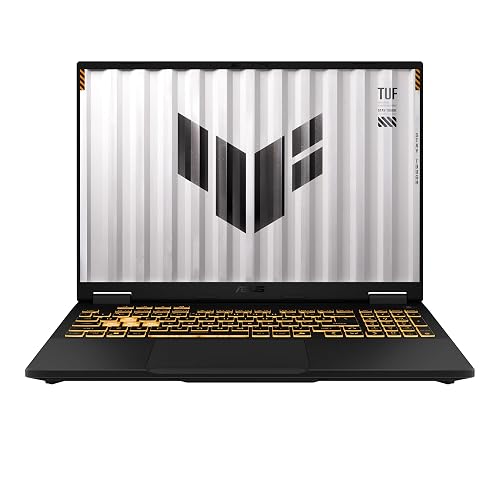 | Best Value | Processor: Intel Core i5-13450HX | Graphics: NVIDIA RTX 5050 | Display Size: 16-inch | VIEW LATEST PRICE | Read Our Analysis |
| ASUS ROG Strix G16 Gaming Laptop (2025) | 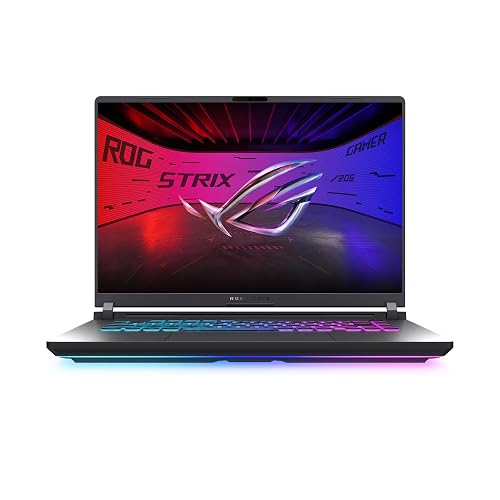 | Best Mid-Range | Processor: Intel Core i7-14650HX | Graphics: NVIDIA RTX 5050 | Display Size: 16-inch | VIEW LATEST PRICE | Read Our Analysis |
| ASUS TUF Gaming A17 Laptop (FA706NF-RS51) | 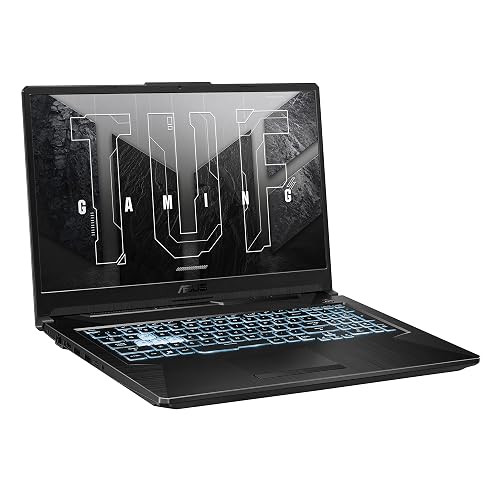 | Best Budget | Processor: AMD Ryzen 5 7535HS | Graphics: NVIDIA RTX 2050 | Display Size: 17.3-inch | VIEW LATEST PRICE | Read Our Analysis |
| Acer Nitro V Gaming Laptop (ANV15-52-586Z) |  | Best Entry-Level | Processor: Intel Core i5-13420H | Graphics: NVIDIA RTX 4050 | Display Size: 15.6-inch | VIEW LATEST PRICE | Read Our Analysis |
| Coolby 15.6-Inch Laptop with 12GB RAM 256GB SSD |  | Ultra Portable | Processor: Intel N95 | Graphics: Integrated UHD | Display Size: 15.6-inch | VIEW LATEST PRICE | Read Our Analysis |
| Acer Nitro V Gaming Laptop (ANV15-52-76NK) |  | Best For Streaming | Processor: Intel Core i7-13620H | Graphics: NVIDIA RTX 4050 | Display Size: 15.6-inch | VIEW LATEST PRICE | Read Our Analysis |
More Details on Our Top Picks
ASUS ROG Strix G16 Gaming Laptop (2025)
If you want a gaming laptop that can handle streaming, the ASUS ROG Strix G16 (2025) is a strong pick, featuring an Intel Core i7-14650HX processor, NVIDIA GeForce RTX 5060 GPU, and a fast 165 Hz 16-inch display. You get 16 GB of DDR5 RAM, a 1 TB PCIe Gen 4 SSD, and Windows 11 Home for smooth multitasking. ASUS also includes ROG Intelligent Cooling, a vapor chamber, and tri-fan technology to manage heat. With Wi-Fi 7, Thunderbolt, HDMI, Dolby Atmos, and a 90 Wh battery, you can stream, game, and connect with confidence.
- Processor:Intel Core i7-14650HX
- Graphics:NVIDIA RTX 5060
- Display Size:16-inch
- Refresh Rate:165Hz
- RAM:16GB DDR5
- Storage:1TB SSD
- Additional Feature:Wi-Fi 7 support
- Additional Feature:Vapor chamber cooling
- Additional Feature:360° RGB light bar
ASUS TUF Gaming F16 Laptop with RTX 5050
The ASUS TUF Gaming F16 (2025) is a strong pick for streamers who want solid gaming performance without jumping into a high-end price tier, thanks to its Intel Core i5-13450HX, RTX 5050 GPU, and 16GB of DDR5 RAM. You get a 16-inch FHD+ 165Hz display with Adaptive-Sync, so gameplay looks smooth and stays responsive. Its 115W GPU, Advanced Optimus, and 512GB Gen4 SSD help you stream and game efficiently. You also get MIL-STD-810H durability, quieter Arc Flow cooling, Dolby Atmos audio, Wi-Fi 6E, and a 90Wh battery.
- Processor:Intel Core i5-13450HX
- Graphics:NVIDIA RTX 5050
- Display Size:16-inch
- Refresh Rate:165Hz
- RAM:16GB DDR5
- Storage:512GB SSD
- Additional Feature:Military-grade durability
- Additional Feature:NVIDIA Advanced Optimus
- Additional Feature:100% sRGB color
ASUS ROG Strix G16 Gaming Laptop (2025)
With its Intel Core i7-14650HX, RTX 5050 graphics, and 16GB of DDR5 memory, the ASUS ROG Strix G16 Gaming Laptop (2025) is a strong fit for streamers who want smooth gameplay and reliable multitasking in one machine. You get Windows 11 Home, DLSS 4, and Max-Q efficiency for responsive performance. The 1TB PCIe Gen 4 SSD gives you plenty of room for games and recordings. Its 16-inch FHD+ 165Hz display with 3ms response and ACR film keeps visuals sharp. ROG cooling, including a vapor chamber, tri-fan design, and liquid metal, helps it stay quiet and fast.
- Processor:Intel Core i7-14650HX
- Graphics:NVIDIA RTX 5050
- Display Size:16-inch
- Refresh Rate:165Hz
- RAM:16GB DDR5
- Storage:1TB SSD
- Additional Feature:Vapor chamber cooling
- Additional Feature:Tri-fan technology
- Additional Feature:Stealth Mode lighting
ASUS TUF Gaming A17 Laptop (FA706NF-RS51)
ASUS TUF Gaming A17 (FA706NF-RS51) suits streamers who want a large 17.3-inch 1080p display and dependable entry-level gaming performance in a durable chassis. It includes a 144Hz IPS panel with Adaptive-Sync, so gameplay looks smoother and screen tearing is reduced while you stream. The Ryzen 5 7535HS, RTX 2050, and 8GB of DDR5 memory handle lighter titles and multitasking well. ASUS also provides a 512GB PCIe 4.0 SSD, Wi-Fi 6, and three USB ports. Military-grade testing, 84-blade fans, and a 48Wh battery complete the package.
- Processor:AMD Ryzen 5 7535HS
- Graphics:NVIDIA RTX 2050
- Display Size:17.3-inch
- Refresh Rate:144Hz
- RAM:8GB DDR5
- Storage:512GB SSD
- Additional Feature:Military-grade testing
- Additional Feature:84-blade Arc Flow Fans
- Additional Feature:Xbox Game Pass pass
Acer Nitro V Gaming Laptop (ANV15-52-586Z)
If you want a budget-friendly streaming machine that can still handle gaming, recording, and multitasking, the Acer Nitro V Gaming Laptop (ANV15-52-586Z) makes a strong case. It includes a 13th Gen Intel Core i5-13420H with eight cores, and an RTX 4050 GPU with DLSS 3.5 and 6 GB of GDDR6 VRAM. The 15.6-inch Full HD IPS display runs at 165 Hz, so gameplay looks smooth. You should upgrade the 8 GB of DDR5 RAM, but the 512 GB Gen 4 SSD, Thunderbolt 4, Wi-Fi 6, and a 4.7 pound design keep it practical.
- Processor:Intel Core i5-13420H
- Graphics:NVIDIA RTX 4050
- Display Size:15.6-inch
- Refresh Rate:165Hz
- RAM:8GB DDR5
- Storage:512GB SSD
- Additional Feature:Thunderbolt 4 port
- Additional Feature:Killer Ethernet E2600
- Additional Feature:Backlit keyboard
Coolby 15.6-Inch Laptop with 12GB RAM 256GB SSD
The Coolby 15.6-inch laptop is a smart pick if you want an affordable streaming setup that can also handle everyday gaming and content work. Its Intel N95 chip, 12GB of RAM, and 256GB NVMe SSD keep Windows 11 Pro, Photoshop, and light editing running smoothly. You get a 15.6-inch FHD IPS touch display, 4K video decoding, and support for three monitors at 4K@60Hz. It is portable at 3.53 pounds and includes Wi-Fi 5, Bluetooth, Ethernet, USB-C, HDMI, a numeric keypad, a fingerprint reader, and a privacy shutter.
- Processor:Intel N95
- Graphics:Integrated UHD
- Display Size:15.6-inch
- Refresh Rate:Not stated
- RAM:12GB DDR4
- Storage:256GB SSD
- Additional Feature:Windows 11 Pro
- Additional Feature:Fingerprint reader
- Additional Feature:Privacy shutter slider
Acer Nitro V Gaming Laptop (ANV15-52-76NK)
Acer’s Nitro V Gaming Laptop (ANV15-52-76NK) is a strong pick for streamers who want solid gaming performance and smooth multitasking in one machine. You get an Intel Core i7-13620H, so you can game, record, stream, and edit video or photos without slowing down. Its RTX 4050 adds DLSS 3.5, ray tracing, and 194 AI TOPS for sharper visuals and smarter performance. The 15.6-inch Full HD IPS screen runs at 165Hz, reducing ghosting and improving motion clarity. With 16GB DDR5 RAM, a 1TB Gen 4 SSD, Wi-Fi 6, Ethernet, and Thunderbolt 4, you are well covered.
- Processor:Intel Core i7-13620H
- Graphics:NVIDIA RTX 4050
- Display Size:15.6-inch
- Refresh Rate:165Hz
- RAM:16GB DDR5
- Storage:1TB SSD
- Additional Feature:16GB DDR5 memory
- Additional Feature:Thunderbolt 4 port
- Additional Feature:Killer Ethernet E2600
Factors to Consider When Choosing Gaming Laptops For Streaming
When you choose a gaming laptop for streaming, prioritize a high CPU core count and strong GPU support for encoding, so gameplay and broadcasts remain smooth. Also ensure sufficient RAM capacity and SSD storage, which keep the system fast and responsive. A higher display refresh rate makes play feel more fluid, especially during fast paced streams.
CPU Core Count
A higher CPU core count can make a big difference when you are gaming and streaming at the same time, because it helps divide game processing, encoding, and background apps more smoothly to reduce stutter. You can get by with a six-core CPU for basic gaming and light streaming, but eight cores or more usually give you steadier performance. That extra headroom helps when you are running voice chat, overlays, recording software, browser tabs, chat clients, music, and capture tools together. Do not look at core count alone, though; thread count and clock speed matter too, since you need both parallel work and fast single-core responsiveness. If you will stream demanding games at high settings, a 10- to 16-core CPU gives you more breathing room and fewer drops over long sessions.
GPU Streaming Support
For smooth game streaming, you need a GPU that can keep your frame rates up while it handles real-time encoding in the background. Look for modern hardware encoder support so your laptop can stream without hammering gameplay performance. A strong GPU with AI-assisted upscaling, dedicated ray tracing, and DLSS can help you hold steadier visuals while broadcasting. If you stream at 1080p, aim for a chip that can keep 60+ FPS in-game and still leave room for capture software, browser overlays, and chat tools. At least 6 GB of dedicated graphics memory is a smart baseline, since it handles textures, overlays, and encoding buffers better. Also pay attention to GPU power limits, since a higher TGP often lets your graphics chip sustain performance more reliably under combined gaming and encoding loads.
RAM Capacity
Even with a strong GPU handling gameplay and encoding, your system still needs enough memory to keep everything running smoothly. For most gaming laptops used for streaming, 16GB is the practical minimum, because it lets your game, broadcast software, and background apps run together without major slowdowns. If you plan to stream while juggling recording, editing, browser tabs, and chat tools, step up to 32GB so you are less likely to see stuttering. Faster memory like DDR5-5600MHz can also improve responsiveness, especially when your streaming workload leans heavily on the CPU. An 8GB laptop can work for lighter use, but modern games and streaming tasks quickly consume that amount. Also check the maximum supported RAM so you can upgrade later if your needs grow.
SSD Storage Size
Storage space matters more than many streamers expect, because your game installs, recorded clips, cached assets, and editing files can fill a drive fast. If you stream often, a 1TB SSD gives you far more breathing room than 512GB. It lets you keep modern games, local recordings, and project files on one drive without constantly shuffling data around. That matters even more if you save high-quality sessions, since long recordings can eat storage quickly. A 512GB SSD can still work for lighter use, but it will fill up fast once you install several games and save clips. For convenience, choose the largest SSD your budget allows, so you are not always deleting files or depending on external drives while you play and stream.
Display Refresh Rate
A higher display refresh rate, such as 144 Hz or 165 Hz, makes motion look smoother and helps fast-moving gameplay appear clearer while you stream. If you play fast-paced shooters, racers, or action games, you will notice that 60 Hz looks less fluid than 120 Hz, 144 Hz, or 165 Hz. For streaming, 165 Hz panels are a smart pick because they can reduce visible blur and make gameplay feel more responsive on camera and in real time. You should also match the refresh rate with a strong enough GPU and CPU, since high numbers only help when your laptop can sustain them. If you edit or preview footage on the same screen, a higher refresh rate can also make timeline scrubbing and scene changes feel smoother and more responsive overall.
Cooling System Efficiency
When you stream and game at the same time, cooling system efficiency becomes a major buying factor. Look for laptops with vapor chambers, multiple fans, and full-width heatsinks, since they move heat away quickly during long sessions. Strong airflow matters, so large intake and exhaust vents help keep temperatures down and frame rates steady while you record or stream. Because high-wattage CPUs and GPUs run hot, the system needs enough thermal headroom to avoid throttling under load. Liquid metal thermal interfaces and optimized heat pipes can boost heat transfer from the processor, which helps when gaming and encoding never stop. Quieter cooling is important as well, since low fan noise is less likely to reach your microphone and distract your audience.
Port Selection
How many ports do you really need for smooth streaming? You will want enough high-speed connections to handle your whole setup without constant swapping. Aim for at least one HDMI output, plus multiple USB ports and a fast USB-C or Thunderbolt connection for capture cards, cameras, and audio gear. Thunderbolt 4 is especially valuable because it can carry power, data, and video through one port while supporting demanding peripherals. Three to four USB ports usually let you plug in a mic, webcam, external storage, and a controller or lighting gear without a hub. If you prefer wired networking for steadier streams, make sure your laptop includes an Ethernet port as well. Extra display support also helps, especially if you want multiple monitors or 4K at 60 Hz output.
Battery Life Needs
If you plan to stream on the go, battery life matters more than it does for a typical gaming laptop. Look for a battery around 90 Wh, since high-performance CPUs, GPUs, and 165 Hz displays can drain power quickly during long streams. If you are away from an outlet, do not expect all-day use; some powerful models last only about two hours under load. Lower-power processors and integrated graphics can extend unplugged time, but they usually sacrifice the speed needed for smooth gameplay and streaming. Faster wireless radios and extra background apps can also increase power draw, so evaluate battery life during actual streaming sessions rather than idle use. If you stay plugged in, prioritize performance. If you travel often, favor capacity and efficiency.
Frequently Asked Questions
Can Gaming Laptops Stream and Record Simultaneously Without Frame Drops?
You can stream and record simultaneously without frame drops if your laptop CPU, GPU, and SSD are strong enough, and you use efficient encoder settings. If they are not, you will notice stutters. Test your workload carefully.
Do Gaming Laptops Need External Cooling for Long Streaming Sessions?
Usually you do not need external cooling, but you will benefit from it during long streams. Boost airflow because hot hardware reduces performance; a cooling pad can keep temperatures down and streams smoother.
Is Wi-Fi 6E Important for Stable Game Streaming?
Yes, you will benefit from Wi‑Fi 6E for stable game streaming, especially on crowded networks. You will see less interference, lower latency, and smoother uploads, but your router and ISP also need to support it.
How Much Battery Life Is Realistic While Streaming on a Laptop?
You will usually get 1.5 to 4 hours while streaming, depending on brightness, game load, and power settings. Want more? Lower settings, cap frame rates, and plug in when you can. Battery drain is fast during streaming.
Can a Gaming Laptop Replace a Desktop for Professional Streaming?
Yes, you can replace a desktop with a gaming laptop for professional streaming if you choose a high-end model, use strong cooling, and accept slightly less upgradeability. You will still want external peripherals.




