

Like a studio rig in a backpack, the right gaming laptop can turn long edits into smooth sessions.
If you are choosing one for 2026, you need more than raw GPU muscle; you need cooling that keeps up, a display you can trust, and ports that do not slow you down.
The seven models ahead cover premium speed, balanced value, and budget options.
One of them may surprise you.
| ASUS ROG Strix G16 Gaming Laptop (2025) |  | Best Overall | Processor: Intel Core i7-14650HX | Graphics: NVIDIA GeForce RTX 5060 | Display Size: 16-inch | VIEW LATEST PRICE | Read Our Analysis |
| ASUS ROG Strix G16 Gaming Laptop (2025) | 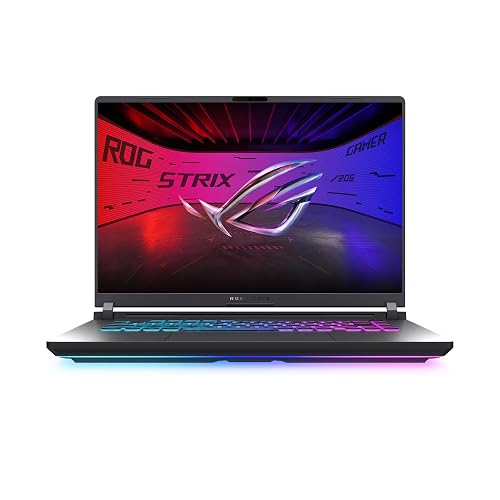 | Best Connectivity | Processor: Intel Core i7-14650HX | Graphics: NVIDIA GeForce RTX 5050 | Display Size: 16-inch | VIEW LATEST PRICE | Read Our Analysis |
| Acer Nitro V Gaming Laptop (ANV15-52-586Z) |  | Budget-Friendly Pick | Processor: Intel Core i5-13420H | Graphics: NVIDIA GeForce RTX 4050 | Display Size: 15.6-inch | VIEW LATEST PRICE | Read Our Analysis |
| MSI Katana 15 HX Gaming Laptop (B14WGK-016US) | 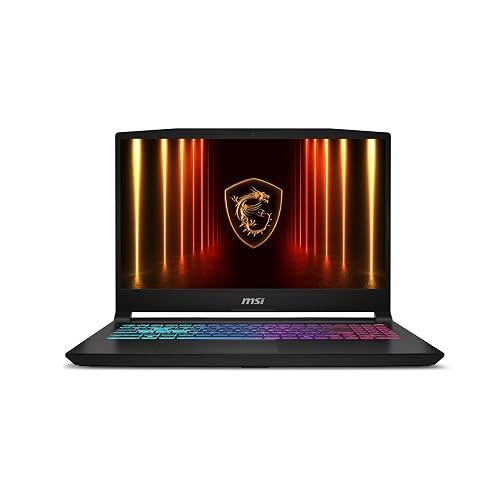 | Powerhouse Performer | Processor: Intel Core i9-14900HX | Graphics: NVIDIA GeForce RTX 5070 | Display Size: 15.6-inch | VIEW LATEST PRICE | Read Our Analysis |
| Acer Nitro V Gaming Laptop (ANV15-52-76NK) |  | Best Value | Processor: Intel Core i7-13620H | Graphics: NVIDIA GeForce RTX 4050 | Display Size: 15.6-inch | VIEW LATEST PRICE | Read Our Analysis |
| ASUS TUF Gaming A15 Laptop (FA506NC-ES51) |  | Rugged Option | Processor: AMD Ryzen 5 7535HS | Graphics: NVIDIA GeForce RTX 3050 | Display Size: 15.6-inch | VIEW LATEST PRICE | Read Our Analysis |
| Acer Nitro V 16S AI Gaming Laptop (ANV16S-41-R2AJ) | 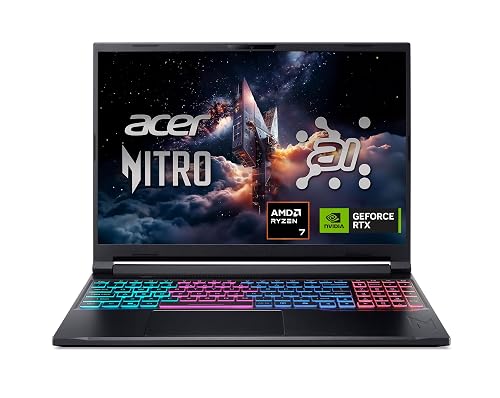 | Best For Creators | Processor: AMD Ryzen 7 260 | Graphics: NVIDIA GeForce RTX 5060 | Display Size: 16-inch | VIEW LATEST PRICE | Read Our Analysis |
More Details on Our Top Picks
ASUS ROG Strix G16 Gaming Laptop (2025)
If you want a gaming laptop that can handle video editing without slowing down your playtime, the ASUS ROG Strix G16 Gaming Laptop (2025) is a strong fit. It comes with Windows 11 Home, an Intel Core i7-14650HX, and an NVIDIA GeForce RTX 5060 with Blackwell, DLSS 4, and Max-Q efficiency. Its 16 GB DDR5-5600 MHz memory and 1 TB PCIe Gen 4 SSD keep multitasking smooth and storage roomy. The 16-inch FHD+ 165 Hz display looks sharp and fluid. ROG intelligent cooling, including a vapor chamber, tri-fan technology, and liquid metal, keeps performance steady.
- Processor:Intel Core i7-14650HX
- Graphics:NVIDIA GeForce RTX 5060
- Display Size:16-inch
- Refresh Rate:165Hz
- Memory:16GB DDR5
- Storage:1TB SSD
- Additional Feature:ACR contrast film
- Additional Feature:3ms response time
- Additional Feature:360° RGB light bar
ASUS ROG Strix G16 Gaming Laptop (2025)
The ASUS ROG Strix G16 Gaming Laptop (2025) is a strong pick for video editors who need a fast Intel Core i7-14650HX CPU, RTX 5050 graphics, and a 16-inch 16:10 display that provides more vertical workspace for timelines and previews. It includes 16GB of DDR5-5600MHz RAM, a 1TB PCIe Gen 4 SSD, and tool-free access for easy upgrades. The 1920 x 1200 panel covers 100% of the color gamut, and a 165Hz refresh rate keeps motion smooth. ROG Intelligent Cooling, Wi-Fi 7, Thunderbolt support, and a 90Wh battery round out a capable creator and gaming machine.
- Processor:Intel Core i7-14650HX
- Graphics:NVIDIA GeForce RTX 5050
- Display Size:16-inch
- Refresh Rate:165Hz
- Memory:16GB DDR5
- Storage:1TB SSD
- Additional Feature:Wi-Fi 7
- Additional Feature:Thunderbolt port
- Additional Feature:90Wh battery
Acer Nitro V Gaming Laptop (ANV15-52-586Z)
Built for editors who want solid 1080p performance without stretching their budget, the Acer Nitro V Gaming Laptop (ANV15-52-586Z) pairs an Intel Core i5-13420H with an RTX 4050 GPU, providing enough power for timeline editing, effects work, and lighter 3D tasks. It includes 8GB of DDR5 RAM, a 512GB PCIe Gen 4 SSD, and room to upgrade to 32GB later. The 15.6-inch Full HD IPS display runs at 165Hz. Wi-Fi 6, Thunderbolt 4, and seven ports keep your workflow flexible.
- Processor:Intel Core i5-13420H
- Graphics:NVIDIA GeForce RTX 4050
- Display Size:15.6-inch
- Refresh Rate:165Hz
- Memory:8GB DDR5
- Storage:512GB SSD
- Additional Feature:Thunderbolt 4
- Additional Feature:Numeric keypad
- Additional Feature:Protective sleeve included
MSI Katana 15 HX Gaming Laptop (B14WGK-016US)
With its Intel Core i9-14900HX and RTX 5070 graphics, the MSI Katana 15 HX (B14WGK-016US) is a strong pick for editors who also want serious gaming performance in one machine. You will get fast load times, smooth multitasking, and high FPS thanks to its 24-core hybrid CPU. NVIDIA Blackwell graphics provide ray tracing, DLSS 4, and faster AI upscaling. The 15.6-inch QHD+ 165Hz display covers 100% DCI-P3 for sharp, accurate visuals. Cooler Boost 5 keeps the CPU and GPU steady. You also get 32GB DDR5, a 1TB SSD, Wi-Fi 6E, and an RGB keyboard.
- Processor:Intel Core i9-14900HX
- Graphics:NVIDIA GeForce RTX 5070
- Display Size:15.6-inch
- Refresh Rate:165Hz
- Memory:32GB DDR5
- Storage:1TB SSD
- Additional Feature:QHD+ display
- Additional Feature:100% DCI-P3
- Additional Feature:4-zone RGB keyboard
Acer Nitro V Gaming Laptop (ANV15-52-76NK)
Acer’s Nitro V Gaming Laptop (ANV15-52-76NK) is a solid pick if you want an affordable machine that can handle both gaming and video editing, thanks to its Intel Core i7-13620H CPU and NVIDIA GeForce RTX 4050 GPU. You get 16GB of DDR5 RAM, a 1TB PCIe Gen 4 SSD, and support for up to 32GB, so multitasking stays smooth. Its 15.6-inch Full HD IPS display runs at 165Hz. Thunderbolt 4, Wi-Fi 6, and Killer Ethernet keep you connected. At 4.7 pounds it is portable, though battery life tops out around five hours.
- Processor:Intel Core i7-13620H
- Graphics:NVIDIA GeForce RTX 4050
- Display Size:15.6-inch
- Refresh Rate:165Hz
- Memory:16GB DDR5
- Storage:1TB SSD
- Additional Feature:5-hour battery life
- Additional Feature:Thunderbolt 4
- Additional Feature:Backlit keyboard
ASUS TUF Gaming A15 Laptop (FA506NC-ES51)
The ASUS TUF Gaming A15 Laptop (FA506NC-ES51) is a solid choice if you want a budget-friendly video editing laptop that can also handle gaming, featuring a Ryzen 5 7535HS CPU, RTX 3050 GPU, and a 512GB PCIe Gen4 SSD. It includes 8GB of DDR5-5600 memory, a 15.6-inch 1080p 144Hz anti-glare display, and Wi-Fi 6 for smoother multitasking. Its 84-blade cooling system helps keep temperatures down, and MIL-STD-810H testing adds durability. You can also connect two external monitors for a more efficient editing setup.
- Processor:AMD Ryzen 5 7535HS
- Graphics:NVIDIA GeForce RTX 3050
- Display Size:15.6-inch
- Refresh Rate:144Hz
- Memory:8GB DDR5
- Storage:512GB SSD
- Additional Feature:Military-grade toughness
- Additional Feature:Spill-resistant build
- Additional Feature:Up to 11 hours
Acer Nitro V 16S AI Gaming Laptop (ANV16S-41-R2AJ)
If you want a gaming laptop that can also handle video editing without feeling overbuilt, the Acer Nitro V 16S AI Gaming Laptop (ANV16S-41-R2AJ) is a strong fit, with its Ryzen 7 7600 processor, RTX 4060 graphics, and 32GB of DDR5 RAM. You will get smooth timeline scrubbing on the 16-inch 180Hz WUXGA display, and fast exports from the 1TB PCIe Gen 4 SSD. Its dual-fan cooling helps keep performance steady, and USB4, HDMI 2.1, Wi-Fi 6, and Ethernet provide flexible connectivity. At 4.6 pounds, it remains portable.
- Processor:AMD Ryzen 7 260
- Graphics:NVIDIA GeForce RTX 5060
- Display Size:16-inch
- Refresh Rate:180Hz
- Memory:32GB DDR5
- Storage:1TB SSD
- Additional Feature:572 AI TOPS
- Additional Feature:USB4 port
- Additional Feature:PurifiedVoice 2.0
Factors to Consider When Choosing Gaming Laptops for Video Editing
When choosing a gaming laptop for video editing, prioritize strong GPU acceleration and a high CPU core count to speed up rendering and exports. Also choose plenty of RAM and fast storage so your timeline stays smooth and your files load quickly. Do not overlook display color accuracy, since reliable color is essential for editing and final review.
GPU Acceleration
GPU acceleration can significantly improve video editing because a stronger GPU handles more of the workload in hardware. This speeds up timeline playback, effects processing, and export rendering. Prioritize modern GPU architectures with dedicated AI or ray tracing cores, since they can improve preview smoothness and make hardware-accelerated effects feel more responsive. More VRAM also matters, because it provides space for high-resolution footage, complex color grades, and layered timelines without slowing down. If you work with 4K clips, heavy filters, or real-time previews, choose a GPU that supports current acceleration standards and delivers strong performance. Remember that GPU acceleration provides the most benefit when your editing software uses it effectively, so pair a fast GPU with sufficient system memory for the best results.
CPU Core Count
Beyond graphics power, the CPU core count also has a big impact on video editing performance. You will notice smoother timeline rendering, faster encoding, and less waiting when the CPU can split tasks across more cores. A 6-core chip can handle light edits, but 8 cores or more is a smarter pick if you want smoother playback and quicker exports with effects or multiple layers. If you work in 4K or juggle projects while rendering, 10 to 16 cores can keep your laptop responsive. Still, core count is not everything; it works best when paired with solid clock speed and efficient software support. If you edit often, choose the highest core count your budget allows.
RAM Capacity
RAM capacity is one of the biggest factors in video editing performance, and 16GB is the practical minimum you should look for. If you want smoother multitasking, larger timelines, and fewer slowdowns with background apps, 32GB is a smarter choice. You can edit lighter projects with 8GB, but high-resolution footage and multiple effects will push it quickly. Look for a laptop with two RAM slots when possible, since it usually makes upgrades easier as your workload grows. Faster memory like DDR5 5600 MHz can improve responsiveness, but you should prioritize capacity over speed for demanding edits. Also avoid models capped at 16GB, because they can become a bottleneck sooner than systems that can expand to 32GB or more for 4K work.
Storage Speed
When it comes to storage speed, choose a gaming laptop with a PCIe Gen 4 SSD, because it moves footage, loads projects, and caches exports much faster than older drives. That speed helps you import large files quickly, open timelines sooner, and scrub through high-bitrate clips with less lag, especially in 4K edits. Aim for at least a 1TB drive so you have room for source media, proxies, previews, and software caches. If you juggle multiple projects, pick a model with an extra M.2 slot or easy upgrade access so you can add another SSD later. Keep in mind that fast storage works best when your laptop also has enough RAM, because the system will not need to keep swapping editing data to disk.
Display Color Accuracy
Color accuracy is one of the most important display factors to consider if you edit on a gaming laptop. Choose a screen with 100% color gamut coverage so your grades and previews remain consistent. Aim for 100% sRGB or, when possible, 100% DCI-P3 if you edit video or other rich digital content. A higher native resolution, such as 1920 x 1200 or 2560 x 1600, helps you spot fine details and work more precisely on timelines and clips. IPS panels generally provide steadier colors and better viewing angles, making it easier to judge consistency. Anti-glare coatings and contrast-enhancing film can reduce reflections, so you can see subtle tonal shifts more clearly while you edit.
Cooling Performance
Even a powerful gaming laptop can slow down if its cooling system cannot handle long editing workloads, so choose a design built for sustained heat. Look for an end-to-end vapor chamber or another advanced heat-spreading setup, because it helps prevent thermal throttling when you are rendering for hours. Dual-fan or tri-fan cooling, with strong intake and exhaust paths, usually keeps performance steadier during exports and scrubbing. You should also check for liquid metal or other premium thermal compounds, since they improve heat transfer from the CPU and GPU during heavy 4K work. Just as important, choose a system rated for higher-power chips so it can handle long editing sessions without getting noisy or unstable. Quiet, well-controlled fans make color grading and audio editing far more comfortable.
Port Selection
For a video editing laptop, port selection can make as much difference as raw power. You will want at least one fast video output, such as HDMI 2.1 or DisplayPort, so you can drive an external monitor for timeline work and full screen previews. A Thunderbolt or USB4 port is even more helpful because it can move media from fast external drives and connect docks or high bandwidth peripherals through a single cable. Look for several USB-A and USB-C ports so you can plug in card readers, storage, audio interfaces, and backup drives without constant swapping. An Ethernet port is useful when you are uploading large files or working in a studio. If you use multiple displays or capture gear, make sure the USB-C ports also support display output.
Battery Life
Battery life matters once you move away from the desk, especially after considering ports and connectivity. When you edit video on the go, you need enough power for previewing, rough cuts, and file management without hunting for an outlet. Gaming laptops often prioritize performance, so they usually sacrifice endurance for strong CPUs and discrete GPUs. That means real-world runtime is often far shorter than the specs suggest, especially with high-refresh displays that draw extra power. If you travel, check for larger batteries such as 57Wh, 65Wh, 48Wh, or 90Wh, because bigger capacities usually last longer unplugged. You should also look for efficient power management, plus brightness and performance controls that help stretch battery life when you are organizing footage or making quick exports.
Frequently Asked Questions
How Much RAM Is Ideal for 4K Video Editing?
You should have 32 GB of RAM for smooth 4K video editing. Sixteen GB can work for lighter projects, but you will notice slowdowns. If you use many effects, 64 GB provides more headroom and better multitasking.
Do Gaming Laptops Overheat During Long Editing Sessions?
Yes, they can, but you can usually manage it. Monitor temperatures, clean vents, and use a cooling pad to test the setup. During long editing sessions you will typically see thermal throttling before a serious failure occurs.
Is Color Accuracy Important for Video Editing Laptops?
Yes, you need strong color accuracy because you must trust what you see while you edit. If your screen is off, you will make incorrect color and exposure choices, and the final video may look worse.
Can I Edit Videos Smoothly on Battery Power?
Yes, you can, but battery power often reduces performance. You will notice slower exports and choppier playback. You will edit smoothly only if your laptop maintains strong performance unplugged and you lower settings.
How Long Should a Gaming Laptop Last for Editing Work?
You should expect a good gaming laptop to last 4 to 6 years for editing work, if you maintain it well and upgrade storage when needed. Higher end models can stay useful longer, especially for lighter projects.




