

If you’re choosing a gaming laptop for VR in 2026, you need more than a fast GPU and a sharp display. You’ll want steady cooling, enough ports for your headset, and hardware that won’t struggle after long sessions.
The seven models below cover different budgets and performance levels, and one or two stand out in ways you might not expect.
| ASUS ROG Strix G16 Gaming Laptop (2025) |  | Best Overall | Processor: Intel Core i7-14650HX | Graphics: NVIDIA GeForce RTX 5060 | Screen Size: 16-inch | VIEW LATEST PRICE | Read Our Analysis |
| ASUS TUF Gaming A17 Laptop (FA706NF-RS51) | 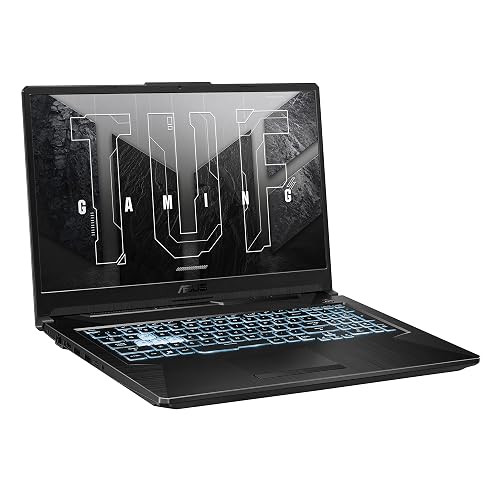 | Best Budget | Processor: AMD Ryzen 5 7535HS | Graphics: NVIDIA GeForce RTX 2050 | Screen Size: 17.3-inch | VIEW LATEST PRICE | Read Our Analysis |
| Acer Nitro V Gaming Laptop (ANV15-52-586Z) |  | Entry-Level Pick | Processor: Intel Core i5-13420H | Graphics: NVIDIA GeForce RTX 4050 | Screen Size: 15.6-inch | VIEW LATEST PRICE | Read Our Analysis |
| Acer Nitro V Gaming Laptop (ANV15-52-76NK) |  | Best Midrange | Processor: Intel Core i7-13620H | Graphics: NVIDIA GeForce RTX 4050 | Screen Size: 15.6-inch | VIEW LATEST PRICE | Read Our Analysis |
| Alienware 16 Aurora Gaming Laptop AC16250 (Blue) |  | Premium Choice | Processor: Intel Core 7-240H | Graphics: NVIDIA GeForce RTX 5050 | Screen Size: 16-inch | VIEW LATEST PRICE | Read Our Analysis |
| Acer Nitro V 16S AI Gaming Laptop (ANV16S-41-R2AJ) | 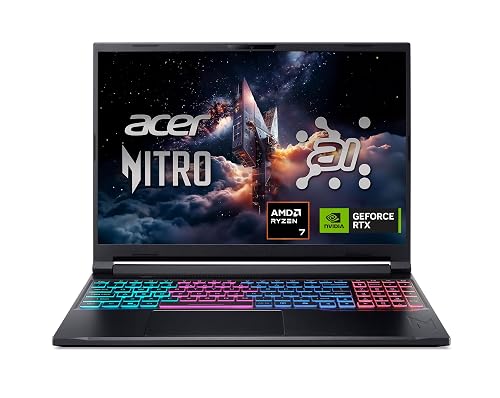 | Best For VR | Processor: AMD Ryzen 7 260 | Graphics: NVIDIA GeForce RTX 5060 | Screen Size: 16-inch | VIEW LATEST PRICE | Read Our Analysis |
| ASUS TUF Gaming F16 Laptop (FX607VU-SS53) | 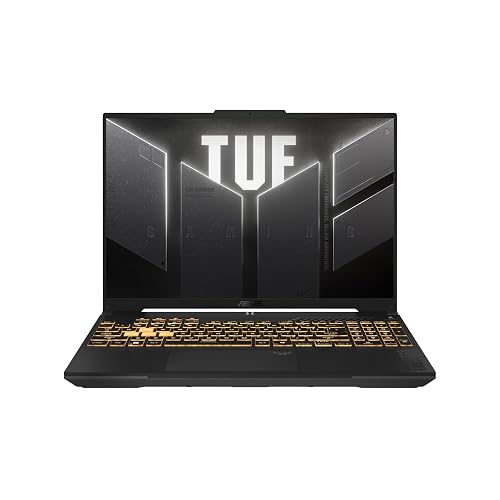 | Best Portable | Processor: Intel Core 5 210H | Graphics: NVIDIA GeForce RTX 4050 | Screen Size: 16-inch | VIEW LATEST PRICE | Read Our Analysis |
More Details on Our Top Picks
ASUS ROG Strix G16 Gaming Laptop (2025)
If you want a VR-ready laptop that balances strong performance with a sharp, fast display, the ASUS ROG Strix G16 Gaming Laptop (2025) is a solid pick. You get an Intel Core i7-14650HX with 16 cores, an RTX 5060 Laptop GPU, and 16GB of DDR5 RAM for smooth play. The 16-inch 165Hz ROG Nebula display adds crisp motion, and the 1TB Gen 4 SSD keeps loads quick. ROG Intelligent Cooling, a vapor chamber, and Tri-Fan tech help maintain performance. Wi-Fi 7, Thunderbolt, and HDMI expand your setup.
- Processor:Intel Core i7-14650HX
- Graphics:NVIDIA GeForce RTX 5060
- Screen Size:16-inch
- Refresh Rate:165Hz
- Memory:16GB DDR5
- Storage:1TB SSD
- Additional Feature:Wi-Fi 7 support
- Additional Feature:Vapor chamber cooling
- Additional Feature:360° RGB light bar
ASUS TUF Gaming A17 Laptop (FA706NF-RS51)
The ASUS TUF Gaming A17 (FA706NF-RS51) is a solid pick if you want a budget-friendly VR-ready laptop with a 17.3-inch 144Hz display, Ryzen 5 7535HS CPU, and RTX 2050 graphics. You get an 8-core Zen 4 processor, 8 GB DDR5 RAM, and a 512 GB PCIe 4.0 SSD, plus upgrade options for future storage. Its Adaptive-Sync IPS screen helps cut tearing, while Wi-Fi 6 and HDMI 2.0b keep your setup flexible. You will also appreciate the MIL-STD-810H build, Arc Flow fans, and included Game Pass trial for extra value.
- Processor:AMD Ryzen 5 7535HS
- Graphics:NVIDIA GeForce RTX 2050
- Screen Size:17.3-inch
- Refresh Rate:144Hz
- Memory:8GB DDR5
- Storage:512GB SSD
- Additional Feature:MIL-STD-810H tested
- Additional Feature:Additional SSD slots
- Additional Feature:Xbox Game Pass included
Acer Nitro V Gaming Laptop (ANV15-52-586Z)
With its Intel Core i5-13420H, RTX 4050 GPU and 165 Hz 1080p display, the Acer Nitro V Gaming Laptop (ANV15-52-586Z) suits VR gamers who want a budget-friendly machine that can handle modern games without jumping to a pricier tier. It ships with 8 GB of DDR5 RAM, a 512 GB PCIe Gen 4 SSD, and room to upgrade to 32 GB so you can expand later. Wi-Fi 6, Thunderbolt 4 and HDMI ports let you connect headsets and accessories. At 4.66 pounds, it is portable enough to move between setups without feeling bulky.
- Processor:Intel Core i5-13420H
- Graphics:NVIDIA GeForce RTX 4050
- Screen Size:15.6-inch
- Refresh Rate:165Hz
- Memory:8GB DDR5
- Storage:512GB SSD
- Additional Feature:Thunderbolt 4 port
- Additional Feature:300-nit brightness
- Additional Feature:Protective sleeve included
Acer Nitro V Gaming Laptop (ANV15-52-76NK)
Acer’s Nitro V Gaming Laptop (ANV15-52-76NK) is a solid pick for VR gamers who want strong performance without moving into ultra-premium pricing. It includes an Intel Core i7-13620H for smooth multitasking, so you can play, record, and stream simultaneously. The RTX 4050 provides DLSS 3.5, AI-enhanced ray tracing, and 194 AI TOPS for sharper, more immersive visuals. Its 15.6-inch Full HD IPS display runs at 165Hz, reducing ghosting. With 16GB DDR5, a 1TB Gen 4 SSD, Wi-Fi 6, Thunderbolt 4, and Ethernet, it is ready for demanding VR sessions.
- Processor:Intel Core i7-13620H
- Graphics:NVIDIA GeForce RTX 4050
- Screen Size:15.6-inch
- Refresh Rate:165Hz
- Memory:16GB DDR5
- Storage:1TB SSD
- Additional Feature:16GB DDR5 memory
- Additional Feature:AI-enhanced ray tracing
- Additional Feature:1TB PCIe SSD
Alienware 16 Aurora Gaming Laptop AC16250 (Blue)
Alienware 16 Aurora Gaming Laptop AC16250 is a strong pick if you want a VR-ready machine that balances power and portability, thanks to its Intel Core 7-240H processor, NVIDIA GeForce RTX 5050 Laptop GPU, and 16-inch 120Hz WQXGA display. You also get 16GB DDR5 RAM, 1TB SSD storage, Wi Fi 7, and Bluetooth 5.4 for smooth multitasking and fast downloads. Its Cryo-Chamber cooling helps keep performance steady, and the sleek blue aluminum chassis and 5.5 pound weight make it easy to carry. Windows 11 Home, Dolby Audio, and a backlit keyboard round out the package.
- Processor:Intel Core 7-240H
- Graphics:NVIDIA GeForce RTX 5050
- Screen Size:16-inch
- Refresh Rate:120Hz
- Memory:16GB DDR5
- Storage:1TB SSD
- Additional Feature:Cryo-Chamber cooling
- Additional Feature:Wi-Fi 7 support
- Additional Feature:Onsite service warranty
Acer Nitro V 16S AI Gaming Laptop (ANV16S-41-R2AJ)
The Acer Nitro V 16S AI Gaming Laptop (ANV16S-41-R2AJ) is a smart pick for VR gamers who want strong performance without overpaying, thanks to its AMD Ryzen 7 260 CPU and NVIDIA GeForce RTX 5060 Laptop GPU. You also get Blackwell AI features, including DLSS 4, Multi Frame Generation, and Ray Reconstruction, for smoother headset gameplay. Its 16-inch WUXGA IPS panel runs at 180 Hz with 100% sRGB, so visuals stay sharp. With 32 GB DDR5 memory, a 1 TB PCIe Gen 4 SSD, dual-fan cooling, USB4, and Wi-Fi 6, you are well set.
- Processor:AMD Ryzen 7 260
- Graphics:NVIDIA GeForce RTX 5060
- Screen Size:16-inch
- Refresh Rate:180Hz
- Memory:32GB DDR5
- Storage:1TB SSD
- Additional Feature:572 AI TOPS
- Additional Feature:USB4 port
- Additional Feature:PC Game Pass included
ASUS TUF Gaming F16 Laptop (FX607VU-SS53)
If you want a VR-ready laptop that balances portability with solid 1080p-class performance, the ASUS TUF Gaming F16 (FX607VU-SS53) is a strong fit. You get an Intel Core i5-12450H and an RTX 4050 Laptop GPU with 6 GB VRAM, plus a 115 W TGP for dependable gaming headroom. Its 16-inch 144 Hz 1920 x 1200 IPS display, 100% sRGB coverage, and Adaptive-Sync help deliver smooth visuals. At 2.2 kg it is easy to carry. The MIL-STD-810H build, Arc Flow cooling, Wi-Fi 6, and USB and HDMI 2.1 ports round out the package.
- Processor:Intel Core 5 210H
- Graphics:NVIDIA GeForce RTX 4050
- Screen Size:16-inch
- Refresh Rate:144Hz
- Memory:16GB DDR5
- Storage:512GB SSD
- Additional Feature:115W max TGP
- Additional Feature:Military Grade testing
- Additional Feature:Dolby Atmos audio
Factors to Consider When Choosing Gaming Laptops for VR Gaming
When choosing a gaming laptop for VR, prioritize a powerful GPU and a reliable CPU to keep gameplay smooth. Ensure you have sufficient RAM to run demanding applications without lag. A high display refresh rate and sharp resolution improve visual clarity and comfort in VR.
GPU Power
For VR gaming, you’ll want a laptop GPU with at least midrange dedicated graphics power, because VR has to render two high-resolution views at once and that demands more than entry-level hardware can deliver. Aim for at least an RTX 4050-class chip; an RTX 5060-class GPU gives you more room for higher frame rates and cleaner headset rendering. You should also check VRAM, 6GB can work but 8GB is safer for newer headsets and heavier games. Newer GPUs with DLSS 3.5 or DLSS 4 can boost smoothness without depending only on raw performance. Also, prefer higher TGP versions, since a 115W GPU usually sustains better VR results. Features like ray reconstruction, multi-frame generation, and high-bandwidth output help keep demanding VR sessions stable.
CPU Performance
A strong GPU is only half the story; your CPU also has to keep VR running smoothly. Aim for a modern chip with 8 to 16 cores and boost clocks around 5.0 to 5.2 GHz, because that combination handles game logic, physics, and background tasks without stutter. Newer CPU generations usually deliver better per core speed and efficiency, which helps keep frame times steady and VR motion smooth. If you stream, record, or run chat tools while gaming, choose a processor with stronger multicore performance so those extras do not drag down your play. Also, make sure the laptop’s cooling can hold boost speeds under load, otherwise performance will dip. For demanding titles, fast storage and ample memory bandwidth help the CPU keep up with the GPU.
RAM Capacity
Memory capacity plays a big role in how smooth VR feels. Sixteen GB of DDR5 is the practical minimum for most gamers, while 32 GB gives you more breathing room for demanding titles and background apps. You will notice fewer stutters when the game, headset software, and streaming or recording tools all run together. Choose a laptop with two RAM slots, so you can upgrade from 8 GB or 16 GB to 32 GB later. DDR5 at 5600 MHz provides more bandwidth than slower memory, which helps with data-heavy VR workloads. Also check the listed maximum RAM support; if a system tops out at 8 GB or 16 GB, it is less future-proof than one that supports 32 GB and can handle newer VR demands.
Display Refresh Rate
Refresh rate matters a lot in VR because a faster panel can make head movement look smoother and reduce motion blur. You should aim for at least 120Hz, since lower rates can make quick scene changes feel laggy and less comfortable. If you can get 144Hz, 165Hz, or even 180Hz, you will have more headroom for fluid motion when a game pushes rapid updates. Still, do not chase the highest number alone. Match the panel refresh rate with the game’s stable frame output, because uneven pacing at 144Hz or 165Hz can still feel rough if performance dips. In VR, a higher refresh rate helps reduce motion judder, and it works best when your laptop can keep frames steady and consistent.
Resolution Clarity
Along with a fast refresh rate, resolution clarity affects how easy your VR setup is to manage on a gaming laptop. A higher native display resolution, such as 2560 x 1600, makes the headset setup screen and mirrored view look sharper, although the headset panel still matters most. A 1920 x 1200 or 1920 x 1080 display can work, but text and fine details will not look as crisp. Choosing a 16:10 screen provides more vertical space, which helps when you are adjusting menus and desktop tools. IPS-style panels usually deliver steadier clarity, and a matte finish can reduce reflections, so you can read small text and judge sharpness more easily.
Cooling Efficiency
Cooling matters a lot in VR, because your laptop must hold high CPU and GPU loads for long stretches without throttling. Prioritize laptops with vapor chambers, multiple heat pipes, or quad intake and quad exhaust layouts, since these designs move heat away from the CPU and GPU more effectively. Dual fan and tri fan systems also help keep temperatures steady during long headset sessions. If the laptop uses liquid metal or another high conductivity thermal solution, you will usually get better heat transfer and less throttling under heavy VR demand. Also check the chassis, since dedicated exhaust vents and clear intake paths support consistent airflow. Strong cooling often enables higher sustained power limits, so choose a design built to run hard without overheating.
Port Selection
Port selection matters just as much as raw power for VR gaming, because you need the right mix of speed, video output, and convenience to keep your setup smooth. Prioritize at least one high-speed USB-C or Thunderbolt-class port, since many headsets and link cables depend on fast data and video. An HDMI 2.1 port, or an equivalent output, helps you connect high-resolution VR displays and headset docks without compromise. Multiple USB ports also matter, because you may need the headset, sensors, controllers, and a mouse or keyboard plugged in at once. Look for USB-C ports that support display output and charging, too, since they can cut clutter and simplify setup. Ethernet support is a smart bonus for stable downloads and online VR features.
Battery Life
Battery life matters most if you plan to game untethered, because VR can drain a laptop fast. If you want real freedom from the charger, look for larger batteries, like 90Wh or 96Wh, since they can stretch play time farther than 48Wh to 57Wh packs. Even then, do not expect miracles. Some VR-ready systems still last only about two hours in active gaming. That is enough for a quick session, but not a marathon. If you will stay plugged in at a desk, battery life matters less, yet it still affects portability. Remember that powerful GPUs and high-refresh displays pull more power, so VR drains faster than light work. Always compare watt-hours and stated standby time before you buy.
Frequently Asked Questions
Which VR Headsets Work Best With Gaming Laptops?
You’ll get the best results with the Meta Quest 3, Valve Index, and HTC Vive Pro 2. They pair well with gaming laptops if your laptop has a strong GPU, enough USB ports, and DisplayPort support.
Do VR Gaming Laptops Need External Cooling Pads?
Yes, use an external cooling pad if your laptop runs hot during VR. It reduces throttling, keeps frame rates steadier, and extends hardware life, especially during long, demanding gaming sessions.
How Much Storage Is Ideal for VR Game Libraries?
You should have at least 1 TB of storage for VR game libraries because games are large and updates accumulate quickly. If possible, opt for 2 TB so you have room for future titles as well.
Can These Laptops Handle Wireless VR Streaming Smoothly?
Yes, if you have an RTX 4070 laptop with Wi-Fi 6E, you can stream wireless VR smoothly. You will notice stutter only when your router is weak or congested. Keep your laptop plugged in for best performance.
Is Battery Life Important During Plugged-In VR Gaming?
Not much. You will mostly rely on wall power for plugged-in VR gaming. You should still care about battery health, because heat and constant charging can wear it down, but runtime itself will not affect your session.




