

If you are shopping for a gaming laptop under $2,500 in 2026, you have more strong options than ever, but not all of them are equal.
Compare CPU performance, RTX graphics, cooling, battery life, and display quality before you buy.
The right choice will handle modern games smoothly and remain practical for everyday use.
A few models stand out for different reasons, and they can narrow your shortlist quickly.
| ASUS ROG Strix G16 Gaming Laptop (2025) |  | Best Overall | Processor: Intel Core i7-14650HX | Graphics: NVIDIA RTX 5060 | Display Size: 16-inch | VIEW LATEST PRICE | Read Our Analysis |
| ASUS TUF Gaming A17 Laptop (FA706NF-RS51) | 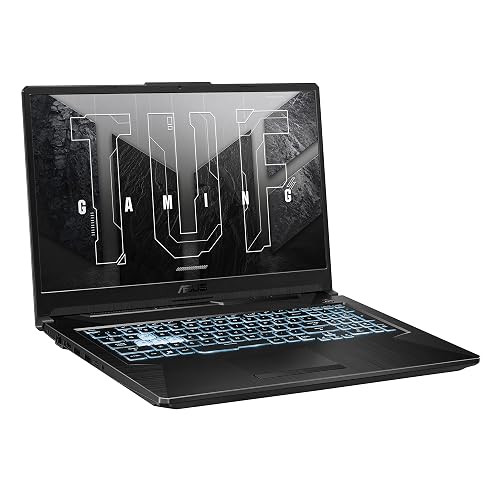 | Best Budget | Processor: AMD Ryzen 5 7535HS | Graphics: NVIDIA RTX 2050 | Display Size: 17.3-inch | VIEW LATEST PRICE | Read Our Analysis |
| HP Victus 15 Gaming Laptop (15-fa0025nr 2022) | 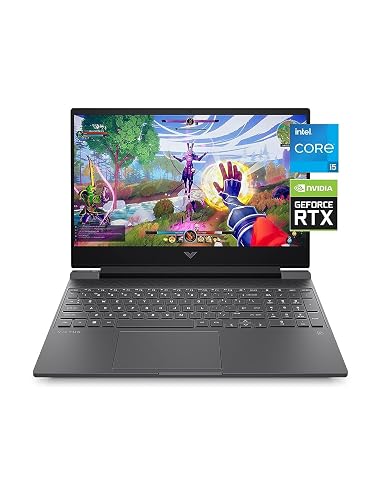 | Best Entry-Level | Processor: Intel Core i5-12500H | Graphics: NVIDIA RTX 3050 | Display Size: 15.6-inch | VIEW LATEST PRICE | Read Our Analysis |
| Acer Nitro V Gaming Laptop (ANV15-52-586Z) |  | Best Midrange | Processor: Intel Core i5-13420H | Graphics: NVIDIA RTX 4050 | Display Size: 15.6-inch | VIEW LATEST PRICE | Read Our Analysis |
| Acer Nitro V Gaming Laptop (i7-13620H RTX 4050) |  | Best Performance | Processor: Intel Core i7-13620H | Graphics: NVIDIA RTX 4050 | Display Size: 15.6-inch | VIEW LATEST PRICE | Read Our Analysis |
| MSI GF63 Thin Gaming Laptop 15.6″ FHD 144Hz |  | Best Value | Processor: Intel Core i5-11400H | Graphics: NVIDIA RTX 3050 | Display Size: 15.6-inch | VIEW LATEST PRICE | Read Our Analysis |
| Alienware 16 Aurora Gaming Laptop (AC16250) |  | Best Premium | Processor: Intel Core 7-240H | Graphics: NVIDIA RTX 5050 | Display Size: 16-inch | VIEW LATEST PRICE | Read Our Analysis |
More Details on Our Top Picks
ASUS ROG Strix G16 Gaming Laptop (2025)
If you want a gaming laptop under 2500 that balances strong 2025-level performance with a premium display, the ASUS ROG Strix G16 stands out. It features an Intel Core i7-14650HX, RTX 5060 graphics, and a 16-inch 165Hz Nebula display. You get 16GB of DDR5 RAM, a 1TB PCIe Gen 4 SSD, and tool-free access for future upgrades. The ROG Intelligent Cooling system uses a vapor chamber, Tri-Fan tech, and liquid metal to keep temps in check. With Wi-Fi 7, Thunderbolt, Dolby Atmos, and a 90Wh battery, it is a sharp all-rounder.
- Processor:Intel Core i7-14650HX
- Graphics:NVIDIA RTX 5060
- Display Size:16-inch
- Refresh Rate:165Hz
- Memory:16GB DDR5
- Storage:1TB SSD
- Additional Feature:Wi-Fi 7 support
- Additional Feature:360° RGB light bar
- Additional Feature:90Wh battery
ASUS TUF Gaming A17 Laptop (FA706NF-RS51)
The ASUS TUF Gaming A17 (FA706NF-RS51) is a strong pick if you want a large 17.3-inch gaming laptop that balances everyday performance with solid 1080p gaming. It includes an AMD Ryzen 5 7535HS, 8GB DDR5-5600 RAM, and a 512GB PCIe 4.0 SSD, so Windows 11 and your apps should feel quick. The RTX 2050 with 4GB VRAM and a 60W TGP handles esports and lighter AAA games well. Its FHD 144Hz IPS display, Wi-Fi 6, USB-C, HDMI 2.0b, and MIL-STD-810H build round out a practical, durable setup.
- Processor:AMD Ryzen 5 7535HS
- Graphics:NVIDIA RTX 2050
- Display Size:17.3-inch
- Refresh Rate:144Hz
- Memory:8GB DDR5
- Storage:512GB SSD
- Additional Feature:MIL-STD-810H tested
- Additional Feature:84-blade Arc Flow Fans
- Additional Feature:No webcam
HP Victus 15 Gaming Laptop (15-fa0025nr 2022)
HP Victus 15 Gaming Laptop (15-fa0025nr, 2022) is a smart pick for you if you want a budget-friendly gaming laptop that still delivers solid everyday performance. It includes Windows 11 Home, a 12th Gen Intel Core i5-12500H, and NVIDIA GeForce RTX 3050 graphics, so it can handle gaming and multitasking well. The 15.6-inch Full HD IPS display provides sharp visuals and wide viewing angles. With 8 GB of RAM, a 512 GB SSD, a backlit keyboard, and improved thermals, you will enjoy responsive use and cooler sessions.
- Processor:Intel Core i5-12500H
- Graphics:NVIDIA RTX 3050
- Display Size:15.6-inch
- Refresh Rate:Not listed
- Memory:8GB RAM
- Storage:512GB SSD
- Additional Feature:Backlit keyboard
- Additional Feature:Enhanced thermals
- Additional Feature:2022 model
Acer Nitro V Gaming Laptop (ANV15-52-586Z)
With its Intel Core i5-13420H and RTX 4050 combo, the Acer Nitro V Gaming Laptop (ANV15-52-586Z) is a strong pick if you want a budget-friendly machine that can handle gaming, streaming, recording, and everyday creative work without slowing down. You also get DLSS 3.5, 194 AI TOPS, and smoother ray tracing for better visuals. Its 15.6-inch Full HD IPS screen runs at 165 Hz, so motion feels crisp and responsive. With 8 GB DDR5, up to 32 GB support, a 512 GB Gen 4 SSD, Wi-Fi 6, Thunderbolt 4, and a backlit keyboard, it is well equipped.
- Processor:Intel Core i5-13420H
- Graphics:NVIDIA RTX 4050
- Display Size:15.6-inch
- Refresh Rate:165Hz
- Memory:8GB DDR5
- Storage:512GB SSD
- Additional Feature:Thunderbolt 4 port
- Additional Feature:Killer Ethernet E2600
- Additional Feature:Up to 32GB RAM
Acer Nitro V Gaming Laptop (i7-13620H RTX 4050)
If you want a capable 1080p gaming laptop that balances speed, display quality, and upgrade room, the Acer Nitro V makes a strong case. It packs a 13th Gen Core i7-13620H and RTX 4050 graphics, plus DLSS 3.5 and 194 AI TOPS for smooth play and fast creative work. The 15.6-inch IPS screen runs at 165Hz, so motion looks sharp and responsive. With 16GB DDR5 RAM, a 1TB PCIe Gen 4 SSD, Wi-Fi 6, Thunderbolt 4, and seven ports, you will not feel limited. It is light enough to carry, and you can upgrade memory later.
- Processor:Intel Core i7-13620H
- Graphics:NVIDIA RTX 4050
- Display Size:15.6-inch
- Refresh Rate:165Hz
- Memory:16GB DDR5
- Storage:1TB SSD
- Additional Feature:300 nit brightness
- Additional Feature:Numeric keypad
- Additional Feature:57Wh battery
MSI GF63 Thin Gaming Laptop 15.6″ FHD 144Hz
The MSI GF63 Thin is a strong pick if you want a budget-friendly gaming laptop that still feels quick and responsive for everyday play and multitasking. You get a 15.6-inch Full HD display with a 144Hz refresh rate, so motion looks smoother and details stay sharp. Its 11th Gen Intel Core i5-11400H and RTX 3050 with 4GB GDDR6 give you solid gaming power, and 16GB DDR4 RAM keeps apps and tabs running smoothly. The 512GB PCIe NVMe SSD helps you load games fast, save files quickly, and store plenty for daily use.
- Processor:Intel Core i5-11400H
- Graphics:NVIDIA RTX 3050
- Display Size:15.6-inch
- Refresh Rate:144Hz
- Memory:16GB DDR4
- Storage:512GB SSD
- Additional Feature:16GB DDR4 RAM
- Additional Feature:4GB GDDR6 VRAM
- Additional Feature:PCIe Gen 4.0
Alienware 16 Aurora Gaming Laptop (AC16250)
The Alienware 16 Aurora Gaming Laptop (AC16250) is a strong pick if you want a sleek 16-inch gaming machine that balances speed, cooling, and portability. You get a WQXGA display with a 120 Hz refresh rate and 300 nits of brightness, so games look sharp and smooth. The Intel Core 7-240H, 16 GB of DDR5 RAM, and 1 TB SSD keep performance responsive. NVIDIA GeForce RTX 5050 8 GB GPU uses Blackwell architecture and AI acceleration for improved visuals. Cryo-Chamber airflow, Windows 11 Home, and onsite service complete the package.
- Processor:Intel Core 7-240H
- Graphics:NVIDIA RTX 5050
- Display Size:16-inch
- Refresh Rate:120Hz
- Memory:16GB DDR5
- Storage:1TB SSD
- Additional Feature:Cryo-Chamber airflow design
- Additional Feature:1 Year Onsite Service
- Additional Feature:300 nits brightness
Factors to Consider When Choosing Gaming Laptops Under 2500
When shopping for gaming laptops under $2500, prioritize performance and graphics so your games run smoothly. Also evaluate display quality, memory and storage, cooling and thermals, and the ports and connectivity you need. These factors help you choose a laptop that performs well now and remains useful over time.
Performance And Graphics
Performance matters most when you are choosing a gaming laptop under $2500. The right balance of CPU, GPU, and cooling can make a huge difference. Look for a newer processor with at least eight cores and boost clocks around 4.5 GHz or higher, because that helps keep frame rates steady in demanding games. For graphics, choose a laptop GPU with a modern architecture and support for DLSS 3.5 or DLSS 4, since those features can improve performance without sacrificing image quality. More VRAM matters as well, so 8 GB is far better than 4 GB for modern titles. Finally, select a model with higher power limits and a strong thermal design, because sustained cooling keeps performance consistent during long gaming sessions.
Display Quality Matters
Display quality can make a gaming laptop feel much more premium, and you will notice the difference right away in both games and everyday use. Look for a sharper panel, such as 1920 x 1200 or 2560 x 1600, because it delivers more detail and extra vertical space compared with a standard 1920 x 1080 screen. A 120 Hz, 144 Hz, or 165 Hz refresh rate keeps motion smooth. A 3 ms response time reduces blur and ghosting in fast action. The 16:10 aspect ratio also helps by showing more on screen than 16:9. IPS or LED panels, anti-glare coatings, and strong contrast improve color accuracy, viewing angles, and visibility when you game in bright rooms.
Memory And Storage
Memory and storage matter a lot in a gaming laptop under $2500 because they affect how smoothly your system runs and how much you can keep installed. Aim for at least 16 GB of RAM, since modern games, browser tabs, and chat apps can consume memory quickly. If possible, choose DDR5, ideally around 5600 MHz, because it can feel snappier than older RAM. For storage, a 1 TB SSD provides room for several large games plus updates and media without constant cleanup. PCIe Gen 4 SSDs also reduce loading and transfer times. Extra RAM slots or an additional SSD bay are a smart choice because they let you upgrade later when your needs grow.
Cooling And Thermals
Cooling matters just as much as raw specs when you are choosing a gaming laptop under $2500. Look for vapor chambers, multiple fans, or dedicated airflow channels, because they help keep temperatures down during long gaming sessions. Liquid metal, high-contact heat spreaders, and wide heatsink coverage move heat away from the CPU and GPU faster. A well-ventilated chassis with several exhaust paths also helps prevent heat buildup, especially when you are running high-wattage graphics hardware. Thicker laptops often provide more room for cooling components and better airflow, while thinner models may rely on louder fan curves. Strong thermals matter because they reduce throttling, allowing you to sustain higher clock speeds more consistently while gaming, streaming, or multitasking.
Ports And Connectivity
Once you have checked thermals, the next thing to evaluate is ports and connectivity, because they determine how easily you can use your gaming laptop every day. You will want a mix of fast USB-A ports, a USB-C or Thunderbolt port, and HDMI so you can plug in drives, accessories, and an external monitor without hunting for adapters. If you play online, choose Wi‑Fi 6 or Wi‑Fi 7 for steadier performance and less lag. Bluetooth also helps when you use wireless headsets, controllers, mice, or keyboards. For competitive play, an Ethernet port still provides the most consistent low-latency connection. If you plan to run a second screen, make sure USB-C or DisplayPort supports video output, not just charging.
Frequently Asked Questions
How Long Do Gaming Laptop Batteries Last?
Usually you will get 2 to 6 hours, but the real answer depends on your settings. If you push the GPU hard the battery drops quickly, while lighter tasks can stretch battery life surprisingly far.
Can These Laptops Handle VR Gaming?
Yes. These laptops can run VR games if they have a strong GPU, sufficient RAM, and the necessary ports. Check headset compatibility and cooling too, to ensure smooth performance.
Are Gaming Laptops Good for School and Work?
Yes, you can use gaming laptops for school and work. They are powerful, handle multitasking well, and run demanding applications easily. Expect trade offs in battery life, weight, and noise compared with thinner laptops.
Do They Support External Monitors?
Yes. You can connect them, extend your desktop, and enhance productivity. Most models offer HDMI, USB-C, or DisplayPort, so you can attach one or multiple external monitors to expand your workspace.
How Often Should I Upgrade RAM?
You should upgrade RAM only when you notice slowdowns, multitasking bottlenecks, or game stutter. Otherwise, you do not need to rush. For most gamers, upgrading every 3 to 5 years is sufficient, unless your workload grows.




