

If you are looking for an RTX 5080 gaming laptop in 2026, you have a small group of serious contenders that push speed, cooling, and display quality in different directions.
From ASUS ROG Strix models to Alienware Area 51, each one brings a different trade-off in power, size, and value.
The real question is not just which one is fastest, but which one fits how you actually play.
One pick may surprise you.
| ASUS ROG Strix G16 Gaming Laptop (G615LW-AS96) | 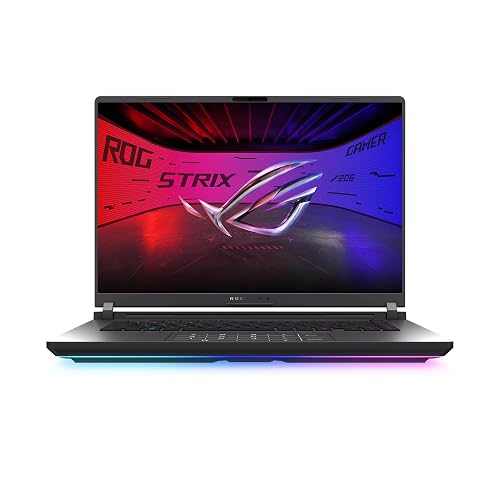 | Best Overall | Processor: Intel Core Ultra 9 275HX | Graphics: NVIDIA GeForce RTX 5080 | Memory: 32GB DDR5-5600MHz | VIEW LATEST PRICE | Read Our Analysis |
| ASUS ROG Strix SCAR 18 Gaming Laptop | 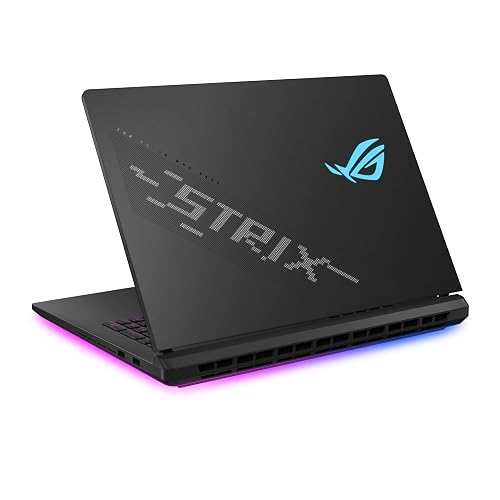 | Best Big-Screen | Processor: Intel Core Ultra 9 275HX | Graphics: NVIDIA GeForce RTX 5080 | Memory: 32GB DDR5-5600MHz | VIEW LATEST PRICE | Read Our Analysis |
| ASUS ROG Strix SCAR 16 Gaming Laptop (G635LW-XS97) |  | Best Premium 16-Inch | Processor: Intel Core Ultra 9 275HX | Graphics: NVIDIA GeForce RTX 5080 | Memory: 32GB DDR5-5600MHz | VIEW LATEST PRICE | Read Our Analysis |
| ASUS ROG Strix G18 Gaming Laptop RTX 5080 |  | Best Performance | Processor: Intel Core Ultra 9 275HX | Graphics: NVIDIA GeForce RTX 5080 | Memory: 64GB DDR5 | VIEW LATEST PRICE | Read Our Analysis |
| ASUS ROG Strix G16 Gaming Laptop RTX 5060 |  | Best Midrange | Processor: Intel Core i7-14650HX | Graphics: NVIDIA GeForce RTX 5060 | Memory: 16GB DDR5-5600MHz | VIEW LATEST PRICE | Read Our Analysis |
| Lenovo Legion 5i Gaming Laptop i7-14700HX RTX 5070 | 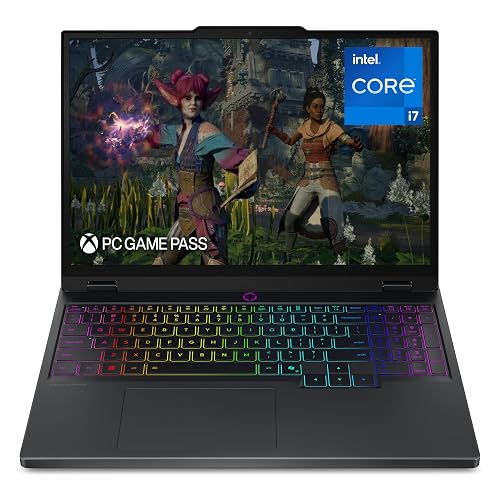 | Best Lightweight | Processor: Intel Core i7-14700HX | Graphics: NVIDIA GeForce RTX 5070 | Memory: 16GB DDR5 | VIEW LATEST PRICE | Read Our Analysis |
| Alienware Area-51 Gaming Laptop AA18250 (RTX 5080) | 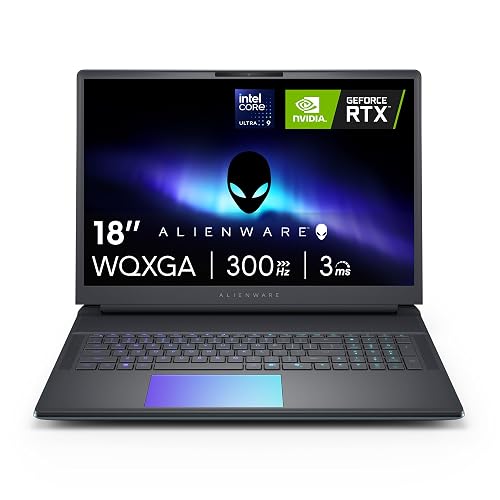 | Best For Enthusiasts | Processor: Intel Core Ultra 9 275HX | Graphics: NVIDIA GeForce RTX 5080 | Memory: 32GB DDR5 | VIEW LATEST PRICE | Read Our Analysis |
More Details on Our Top Picks
ASUS ROG Strix G16 Gaming Laptop (G615LW-AS96)
The ASUS ROG Strix G16 Gaming Laptop (G615LW-AS96) is a strong pick if you want a high-end RTX 5080 machine that balances raw performance with a sharp 16-inch 240Hz Nebula display. It is powered by an Intel Core Ultra 9 275HX, equipped with 32GB of DDR5-5600MHz RAM, and includes a 1TB PCIe Gen 4 SSD that can reach 7,000 MB/s. The 2.5K, 16:10 panel delivers 3 ms response times, and an ACR film reduces glare. ROG Intelligent Cooling, a vapor chamber, a tri-fan design, and liquid metal help sustain performance. You also get Wi-Fi 7, Thunderbolt, RGB lighting, and a 90 Wh battery.
- Processor:Intel Core Ultra 9 275HX
- Graphics:NVIDIA GeForce RTX 5080
- Memory:32GB DDR5-5600MHz
- Storage:1TB PCIe Gen 4 SSD
- Display:16″ 240Hz
- Operating System:Windows 11 Home
- Additional Feature:90Wh battery
- Additional Feature:Full-surround RGB light bar
- Additional Feature:No webcam
ASUS ROG Strix SCAR 18 Gaming Laptop
If you want a no-compromise 18-inch gaming machine with RTX 5080 power, the ASUS ROG Strix SCAR 18 is built for you. It ships with Windows 11 Pro, an Intel Core Ultra 9 275HX, and an RTX 5080 Laptop GPU for top-tier gaming. The MUX Switch can lift frame rates 5 to 10 percent, and Advanced Optimus helps improve battery life. Its 18-inch Nebula HDR mini LED display delivers 2.5K resolution, 240 Hz, and 100 percent DCI-P3. With 32 GB DDR5, a 2 TB SSD, vapor chamber cooling, Wi-Fi 7, and customizable AniMe Vision, it is built to impress.
- Processor:Intel Core Ultra 9 275HX
- Graphics:NVIDIA GeForce RTX 5080
- Memory:32GB DDR5-5600MHz
- Storage:2TB PCIe Gen 4 SSD
- Display:18″ 240Hz
- Operating System:Windows 11 Pro
- Additional Feature:Mini LED display
- Additional Feature:AniMe Vision customization
- Additional Feature:Tool-free access
ASUS ROG Strix SCAR 16 Gaming Laptop (G635LW-XS97)
With its Intel Core Ultra 9 275HX and RTX 5080 Laptop GPU, the ASUS ROG Strix SCAR 16 (G635LW-XS97) is an excellent choice if you want a high-end 16-inch gaming laptop that handles demanding AAA titles and heavy multitasking with ease. It includes 32 GB of DDR5 memory, a 2 TB PCIe Gen 4 SSD, and a 240 Hz Mini LED Nebula HDR display with 2.5K resolution. ROG Intelligent Cooling, a vapor chamber, and tri-fan technology help sustain performance. Wi-Fi 7, a MUX Switch, and Advanced Optimus keep your experience smooth and responsive.
- Processor:Intel Core Ultra 9 275HX
- Graphics:NVIDIA GeForce RTX 5080
- Memory:32GB DDR5-5600MHz
- Storage:2TB PCIe Gen 4 SSD
- Display:16″ 240Hz
- Operating System:Windows 11 Pro
- Additional Feature:AniMe Vision lid
- Additional Feature:90Wh battery
- Additional Feature:No webcam
ASUS ROG Strix G18 Gaming Laptop RTX 5080
ASUS ROG Strix G18 (2025) is a top pick for gamers who want desktop-class power in a laptop, thanks to its Intel Core Ultra 9 275HX and RTX 5080 combo. You get 24 cores, 64GB DDR5, and a 2TB PCIe SSD for smooth multitasking and fast load times. The 18-inch 2.5K ROG Nebula panel runs at 240Hz with 3ms response, 500 nits brightness, and Pantone validation. You will also enjoy Wi-Fi 7, Thunderbolt 5, vapor chamber cooling, DLSS 4, ray tracing, and Advanced Optimus. At 7.54 pounds, it is powerful, but still portable.
- Processor:Intel Core Ultra 9 275HX
- Graphics:NVIDIA GeForce RTX 5080
- Memory:64GB DDR5
- Storage:2TB PCIe SSD
- Display:18″ 240Hz
- Operating System:Windows 11 Pro
- Additional Feature:64GB DDR5 RAM
- Additional Feature:Thunderbolt 5 port
- Additional Feature:1080p webcam
ASUS ROG Strix G16 Gaming Laptop RTX 5060
The ROG Strix G16 is a strong choice for gamers who want solid RTX 5060 performance in a balanced, everyday-ready laptop. It runs Windows 11 Home and is powered by an Intel Core i7-14650HX with NVIDIA’s Blackwell-based RTX 5060, featuring DLSS 4 and Max-Q efficiency. Sixteen gigabytes of DDR5-5600 memory and a 1TB PCIe Gen 4 SSD keep apps and games responsive. The 16-inch FHD+ 165Hz panel delivers sharp, smooth gameplay. Vapor chamber cooling, a tri-fan layout, and liquid metal help it maintain low temperatures. A 360° RGB light bar adds visual flair, while Stealth Mode provides a more understated appearance.
- Processor:Intel Core i7-14650HX
- Graphics:NVIDIA GeForce RTX 5060
- Memory:16GB DDR5-5600MHz
- Storage:1TB PCIe Gen 4 SSD
- Display:16″ 165Hz
- Operating System:Windows 11 Home
- Additional Feature:360° RGB light bar
- Additional Feature:Stealth Mode lighting
- Additional Feature:ACR film display
Lenovo Legion 5i Gaming Laptop i7-14700HX RTX 5070
If you want a high-performance gaming laptop that feels more portable than most big RTX rigs, the Lenovo Legion 5i is a smart pick. You get an Intel Core i7-14700HX, RTX 5070 graphics, and 16GB DDR5 RAM for strong modern gaming. Its 15.1-inch PureSight OLED display delivers 2560 x 1600 resolution, 165Hz refresh, and 500-nit brightness with accurate color. You will also enjoy Nahimic audio, four speakers, Legion Coldfront cooling, and a 4.4 pound chassis. With 1TB SSD storage, Wi Fi 7, and nine-hour battery life, it is well rounded.
- Processor:Intel Core i7-14700HX
- Graphics:NVIDIA GeForce RTX 5070
- Memory:16GB DDR5
- Storage:1TB SSD
- Display:15.1″ 165Hz
- Operating System:Windows 11 Home
- Additional Feature:9-hour battery life
- Additional Feature:Fast 70% charge
- Additional Feature:24-zone RGB lighting
Alienware Area-51 Gaming Laptop AA18250 (RTX 5080)
Alienware’s Area-51 Gaming Laptop AA18250 is a strong pick if you want a desktop-class RTX 5080 machine built for maxed-out gaming and high-refresh play. It comes with an Intel Core Ultra 9 275HX, 32GB of DDR5 memory, and a 2TB SSD, so demanding games and multitasking feel smooth. The 18-inch WQXGA panel runs at 300Hz with 3ms response, giving you fast, sharp motion. Alienware’s Cryo-Chamber cooling, larger air intakes, and higher power limits help sustain performance. AlienFX lighting and onsite service add polish.
- Processor:Intel Core Ultra 9 275HX
- Graphics:NVIDIA GeForce RTX 5080
- Memory:32GB DDR5
- Storage:2TB SSD
- Display:18″ 300Hz
- Operating System:Windows 11 Home
- Additional Feature:Cryo-Chamber design
- Additional Feature:Clear Gorilla Glass
- Additional Feature:Onsite service support
Factors to Consider When Choosing Gaming Laptops With RTX 5080
When choosing a gaming laptop with an RTX 5080, start with GPU performance so you know how well it will handle demanding games and high settings. Also check display quality, cooling systems, memory and storage, and port selection, since each one affects how smooth and practical your setup will be. Focus on balancing raw power and everyday usability, and you will end up with a laptop that fits your gaming needs.
GPU Performance
GPU performance on an RTX 5080 laptop is not just about the chip itself, it also depends on how much power the system allows it to draw, how well the cooling keeps it running fast, and whether the rest of the hardware can keep up. Look for strong graphics and processor power limits, since higher wattage often means better sustained performance in games. Good cooling matters just as much, because if the laptop sheds heat efficiently the GPU can hold higher clocks instead of throttling. Pair the RTX 5080 with a fast CPU and at least 32 GB of DDR5 so you do not bottleneck it in demanding titles. Features like DLSS 4 and Max-Q can also boost frame rates and efficiency. High-refresh panels help you notice those gains.
Display Quality
For an RTX 5080 gaming laptop, the display should keep up with the GPU’s speed, so choose a sharp 16:10 panel such as 2560 x 1600 for clearer detail and extra vertical space in games and menus. Aim for a 240 Hz refresh rate and about 3 ms response time so motion stays smooth in fast shooters and racing games. Mini LED or HDR screens with 2,000 plus dimming zones and roughly 500 nits of brightness provide deeper blacks, stronger highlights, and better contrast. Also check for 100% DCI-P3 coverage and factory calibration for accurate, vivid color. Finally, select an anti-glare finish or ACR film so you can see clearly in bright rooms without distracting reflections.
Cooling Systems
Cooling is the backbone of an RTX 5080 gaming laptop, because sustained performance depends on how well the chassis can move heat away from the CPU and GPU. Prioritize end-to-end vapor chamber and tri-fan cooling, since these systems are built to handle heavy heat during long gaming sessions. If the laptop uses liquid metal on the chipset, such as Conductonaut Extreme, expect better thermal transfer and steadier boost behavior. A larger chassis also helps, providing more airflow, bigger intakes, and room for higher power limits. If you want quieter operation, check for stealth or quiet modes, but be aware they may reduce peak cooling. Strong thermal design matters most when you are gaming at 240 Hz or higher, because throttling appears quickly.
Memory And Storage
When it comes to memory and storage, 32 GB of DDR5-5600 is the sweet spot for most RTX 5080 gaming laptops, giving you plenty of headroom for modern games, background apps, and multitasking. If you also create content or want extra longevity, 64 GB can be worth it, but check the laptop’s RAM ceiling first, since some models stop at 32 GB. For storage, aim for at least a 1 TB PCIe Gen 4 SSD; 2 TB is better if you install big AAA games or keep lots of media. Faster drives, especially up to 7,000 MB/s, can cut load times and speed transfers. You should also value upgrade-friendly designs, because easy access to RAM and SSDs makes future expansion simpler.
Port Selection
Port selection matters more than it first appears, because the right mix of connections lets you use external displays, storage, and peripherals without a mess of adapters. Look for at least one high-speed USB-C or Thunderbolt port and one HDMI output so you can hook up monitors and accessories easily. Multiple USB-A ports still matter, since your mouse, keyboard, headset, storage drive, and dongles may all need them. If you game online through a cable, an Ethernet port can cut latency and improve stability. For multi-monitor or docking setups, prefer laptops that support display output over Thunderbolt or USB-C in addition to HDMI. Finally, count the total usable ports, not just the types, because four or five well placed ports can make your setup much smoother.
Frequently Asked Questions
How Much Should I Budget for an RTX 5080 Gaming Laptop in 2026?
You should budget about $2,200 to $3,500 for an RTX 5080 gaming laptop in 2026, depending on the screen, cooling, and CPU. Expect premium models to cost more. Sales and promotions can reduce the price.
Do RTX 5080 Laptops Run Too Hot for Long Gaming Sessions?
Not if you manage airflow well. You will feel warmth, but good RTX 5080 laptops usually stay within safe limits. Game on a hard surface, since that is how effective cooling works.
Is Battery Life Good on RTX 5080 Gaming Laptops?
Not really. You will usually get only a few hours, because RTX 5080 gaming laptops prioritize performance over endurance. You can stretch battery life with hybrid mode, lower brightness, and GPU switching, but gaming still drains it fast.
Can RTX 5080 Laptops Handle 4K Gaming Smoothly?
Yes, you can game in 4K smoothly on RTX 5080 laptops, especially with DLSS and tuned settings. You will still see stellar performance; the toughest titles may require a few tweaks to maintain silky frame rates.
Which RTX 5080 Laptop Is Best for Portability?
Choose the thinnest RTX 5080 laptop with strong battery life. An 18 inch model is likely too bulky, so opt for a lighter 16 inch chassis with efficient cooling. It will balance portability, performance, and everyday usability best.




