

If you’re shopping for a gaming monitor under $300 in 2026, you’ll find a market that finally gives you real speed without giving up much image quality.
From 240Hz curved panels to sharp 1440p IPS options, the best picks now cover both competitive play and everyday use.
The tricky part isn’t finding a fast screen, it’s knowing which features actually matter most, and that’s where things get interesting.
| SANSUI 32 Inch Curved 240Hz Gaming Monitor | 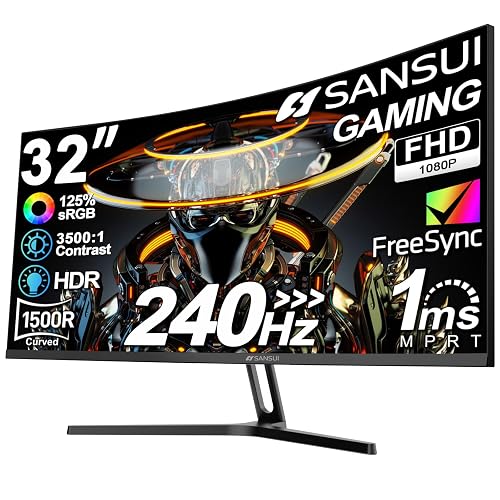 | Best 240Hz Curved | Screen Size: 32-inch | Resolution: FHD 1920 x 1080 | Refresh Rate: 240Hz | VIEW LATEST PRICE | Read Our Analysis |
| Acer Nitro 27″ WQHD Gaming Monitor (XV272U W2bmiiprx) | 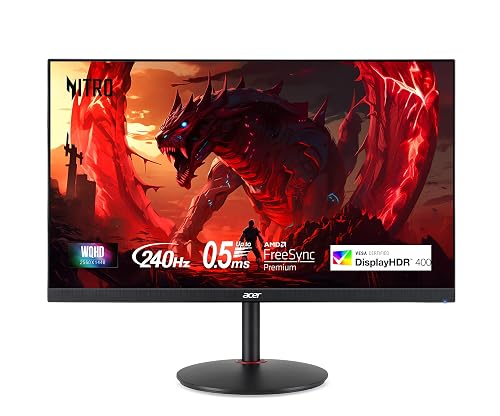 | Best QHD Upgrade | Screen Size: 27-inch | Resolution: WQHD 2560 x 1440 | Refresh Rate: 240Hz | VIEW LATEST PRICE | Read Our Analysis |
| Gawfolk 24.5″ 200Hz FHD Gaming Monitor with Speakers | 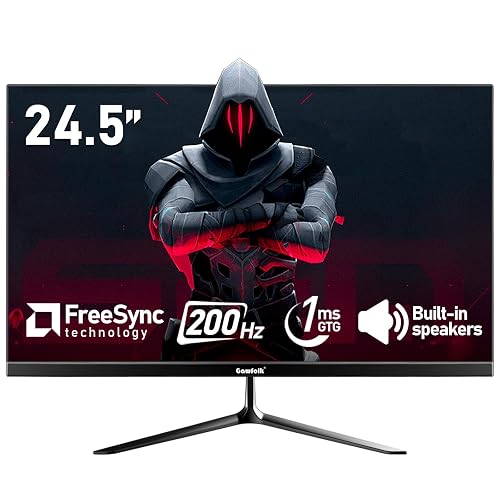 | Best 200Hz Value | Screen Size: 24.5-inch | Resolution: FHD 1920 x 1080 | Refresh Rate: 200Hz | VIEW LATEST PRICE | Read Our Analysis |
| SANSUI 24 Inch 200Hz Gaming Monitor (ES-G24F4L) |  | Best 24-Inch | Screen Size: 24-inch | Resolution: FHD 1920 x 1080 | Refresh Rate: 200Hz | VIEW LATEST PRICE | Read Our Analysis |
| Gawfolk 24.5 Inch Curved Gaming Monitor 120Hz HD |  | Best Curved Budget | Screen Size: 24.5-inch | Resolution: FHD 1920 x 1080 | Refresh Rate: 120Hz | VIEW LATEST PRICE | Read Our Analysis |
| Sceptre 22-Inch Gaming Monitor FHD 1080p 144Hz (E225W-FW144) | 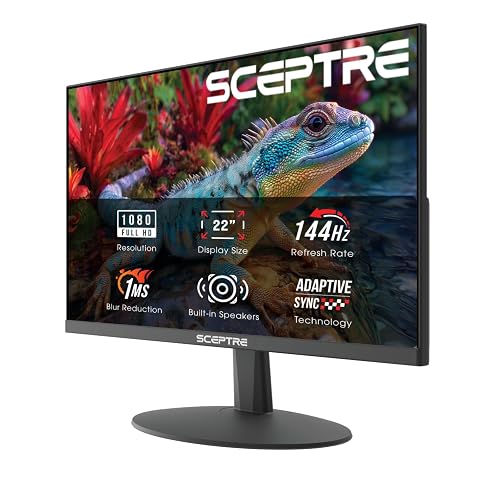 | Best Compact Pick | Screen Size: 22-inch | Resolution: FHD 1920 x 1080 | Refresh Rate: 144Hz | VIEW LATEST PRICE | Read Our Analysis |
| SANSUI 24 Inch Curved 160Hz Gaming Monitor |  | Best Midrange Curved | Screen Size: 24-inch | Resolution: FHD 1920 x 1080 | Refresh Rate: 160Hz | VIEW LATEST PRICE | Read Our Analysis |
More Details on Our Top Picks
SANSUI 32 Inch Curved 240Hz Gaming Monitor
If you want a big-screen gaming monitor that prioritizes speed and stays under $300, the SANSUI 32 Inch Curved 240Hz Gaming Monitor is a strong choice. It has a 32-inch 1500R curved FHD display with a matte finish, 125% sRGB coverage, HDR, and 300 nits brightness. The 240Hz refresh rate and 1ms MPRT help you track fast action smoothly. FreeSync, anti-flicker, and low blue light features reduce eye strain. You can connect via HDMI or DisplayPort 1.4, and the included stand, VESA support, and 1-year warranty add value.
- Screen Size:32-inch
- Resolution:FHD 1920 x 1080
- Refresh Rate:240Hz
- Panel Type:LCD/LED
- Curvature:1500R curved
- Built-in Audio:No speakers
- Additional Feature:1500R curvature
- Additional Feature:125% sRGB gamut
- Additional Feature:DP cable included
Acer Nitro 27″ WQHD Gaming Monitor (XV272U W2bmiiprx)
The Acer Nitro 27″ WQHD Gaming Monitor (XV272U W2bmiiprx) is a strong pick if you want a sharp 1440p display with esports-grade speed, thanks to its 240Hz refresh rate over DisplayPort and 1 ms response time. You get a 27-inch IPS panel with 2560 x 1440 resolution, 99% sRGB, and DisplayHDR 400 for vivid, accurate visuals. FreeSync Premium and Adaptive Sync help keep gameplay smooth. You can also use HDMI at 144 Hz, plus DisplayPort, USB ports, built-in speakers, and ergonomic tilt, height, swivel, and pivot adjustments.
- Screen Size:27-inch
- Resolution:WQHD 2560 x 1440
- Refresh Rate:240Hz
- Panel Type:IPS
- Curvature:Flat
- Built-in Audio:2 speakers
- Additional Feature:1440p WQHD resolution
- Additional Feature:DisplayHDR 400
- Additional Feature:Height-adjustable stand
Gawfolk 24.5″ 200Hz FHD Gaming Monitor with Speakers
With a 200Hz refresh rate, 1ms GTG response time, and AMD FreeSync support, the Gawfolk 24.5-inch FHD gaming monitor delivers smoother motion for fast-paced competitive play without exceeding a $300 budget. It uses a 24.5-inch 1080p VA panel with a matte finish, offers roughly 98% to 99% sRGB coverage, and provides 178 degree viewing angles. DisplayPort enables the full 200Hz, while HDMI is limited to 120Hz. Built-in speakers, low blue light modes, flicker-free dimming, and 75x75mm wall-mount support make it practical for everyday gaming.
- Screen Size:24.5-inch
- Resolution:FHD 1920 x 1080
- Refresh Rate:200Hz
- Panel Type:VA
- Curvature:Flat
- Built-in Audio:Dual speakers
- Additional Feature:200Hz over DisplayPort
- Additional Feature:DC global dimming
- Additional Feature:2 component outputs
SANSUI 24 Inch 200Hz Gaming Monitor (ES-G24F4L)
SANSUI’s 24-inch ES-G24F4L is a strong pick for competitive players who want a fast 200Hz display without spending much. You get FHD 1080p clarity, 1ms MPRT, FreeSync, and handy tools like CrossHair, a timer, and Black level adjust. Its HDR support, 110% sRGB, 4000:1 contrast ratio, and 300 nit brightness help images pop. Anti-flicker, low blue light, and anti-glare features reduce eye strain. HDMI and DisplayPort 1.4 support 200Hz. The frameless, VESA-ready stand tilts easily. You will miss built-in speakers, but the monitor comes with solid warranty support.
- Screen Size:24-inch
- Resolution:FHD 1920 x 1080
- Refresh Rate:200Hz
- Panel Type:VA
- Curvature:Flat
- Built-in Audio:No speakers
- Additional Feature:4000:1 contrast ratio
- Additional Feature:CrossHair mode
- Additional Feature:30-day money-back
Gawfolk 24.5 Inch Curved Gaming Monitor 120Hz HD
If you want a budget-friendly curved gaming monitor that still feels responsive, the Gawfolk 24.5-inch model is a solid pick. It uses a 3000R curved VA panel with Full HD 1920 × 1080 resolution, 98% sRGB coverage, 8-bit color, and a 3500:1 contrast ratio for rich, punchy images. The 120Hz refresh rate and 1ms GTG response deliver smoother motion and reduced streaking. HDMI supports 120Hz, while VGA tops out at 60Hz. You also get eye care features, tilt adjustment, built-in speakers, and 75 × 75mm wall mount support.
- Screen Size:24.5-inch
- Resolution:FHD 1920 x 1080
- Refresh Rate:120Hz
- Panel Type:VA
- Curvature:3000R curved
- Built-in Audio:Built-in speakers
- Additional Feature:3000R curvature
- Additional Feature:3500:1 contrast ratio
- Additional Feature:VGA connectivity
Sceptre 22-Inch Gaming Monitor FHD 1080p 144Hz (E225W-FW144)
The Sceptre 22-inch Gaming Monitor (E225W-FW144) is a solid pick if you want a compact 1080p display with up to 144Hz for smoother gameplay. You get crisp Full HD visuals on a 22-inch screen, plus HDMI and DisplayPort inputs for easy hookup. Built-in speakers deliver rich sound, so you can keep your desk cleaner without extra gear. Blue-Light Shift helps cut eye strain during longer sessions. Its Machine Black finish and nearly bezel-free design also make it look sleek and work well in dual-monitor setups, giving you a wider, distraction-free view.
- Screen Size:22-inch
- Resolution:FHD 1920 x 1080
- Refresh Rate:144Hz
- Panel Type:LCD
- Curvature:Flat
- Built-in Audio:Built-in speakers
- Additional Feature:Blue-Light Shift
- Additional Feature:Nearly bezel-free
- Additional Feature:Minimal bezel design
SANSUI 24 Inch Curved 160Hz Gaming Monitor
With its 24-inch 1500R curved VA panel and 160Hz refresh rate, this SANSUI monitor is a strong pick for gamers who want smoother motion and a more immersive view without spending over $300. It delivers 1080p clarity, 1ms MPRT, and FreeSync support for responsive play. The 3000:1 contrast, 300 nits brightness, and 110% sRGB coverage help images look vivid, and HDR adds extra pop. HDMI 2.0 and DisplayPort 1.4 both reach 160Hz. The VESA mount, tilt adjustment, crosshair, and game timer increase flexibility.
- Screen Size:24-inch
- Resolution:FHD 1920 x 1080
- Refresh Rate:160Hz
- Panel Type:VA
- Curvature:1500R curved
- Built-in Audio:No speakers
- Additional Feature:1500R curvature
- Additional Feature:Black level adjustment
- Additional Feature:FPS game mode
Factors to Consider When Choosing Gaming Monitors Under 300
When choosing a gaming monitor under $300, balance refresh rate, response time, and panel type for smooth, clear gameplay. Match resolution and screen size to your setup so the image looks sharp without overloading your budget. Adaptive sync can reduce screen tearing and make games feel more fluid.
Refresh Rate
Refresh rate, measured in Hertz (Hz), tells you how often a monitor updates the image each second, and a higher number usually means smoother motion in fast-paced games. For gaming under $300, 144Hz is a solid baseline. 160Hz, 200Hz, or 240Hz can feel even smoother in competitive matches. You will notice the biggest gains in FPS, racing, and other quick-action genres, where higher refresh rates can make motion look cleaner and reduce perceived input delay. Check the port support too, because some monitors only reach their top refresh rate over DisplayPort; HDMI may limit you. To benefit fully, your PC or console needs to push enough frames per second to match the panel’s rate.
Response Time
Response time is how fast a monitor’s pixels shift from one color to another, and lower numbers help cut down on motion blur, ghosting, and trailing in fast games. When you are shopping for gaming monitors under 300, aim for about 1 ms MPRT or 1 ms GTG if you want sharp competitive play. Do not assume every 1 ms claim means the same thing, because MPRT and GTG measure different things. Faster refresh rates only look their best when pixel shifts keep up, so a high Hz screen can still seem smeared if response time is slow. For smoother action, you will usually want a monitor in the 1 ms to 5 ms range rather than much higher values.
Panel Type
Panel type matters a lot because it shapes how your games look and feel, more than many shoppers expect. In this budget, you will mostly choose between IPS and VA LCD panels, since OLED is usually out of reach. If you want wide viewing angles and accurate, consistent colors, IPS is the safer pick, especially for games where clarity matters. If you prefer richer blacks and stronger contrast, VA can make dark scenes look deeper and more dramatic. Flat panels usually suit competitive play and multi-monitor setups because they avoid distortion. Curved panels can feel more immersive, particularly on larger screens; 1500R or 3000R designs gently wrap the image around your view.
Resolution And Size
When you’re shopping for a gaming monitor under $300, size and resolution should work together, not compete with each other. For most games, 24 to 27 inches hits the sweet spot, since you can see the whole screen without constant head movement. If you want a budget-friendly pick, 1920 × 1080 is common on smaller monitors, and looks sharp enough on 24-inch displays for fast-paced play. On a 27-inch screen, 2560 × 1440 gives you noticeably better detail and clarity. That said, the same 1080p resolution can look stretched on a 32-inch panel. As screen size rises, pixel density drops, so you should match the resolution to the size. Under $300, 24 to 25 inch 1080p or 27 inch 1440p usually makes the most sense.
Adaptive Sync
Once you’ve narrowed down the right size and resolution, Adaptive Sync is the next feature worth checking. You want it because it matches the monitor’s refresh rate to your GPU’s frame output, which helps cut screen tearing, stuttering, and uneven input feel during fast gameplay. It matters most when your frame rate bounces around the monitor’s refresh range, so don’t just see that it’s listed, confirm it works where you actually play. This feature is especially valuable on 144Hz, 160Hz, 200Hz, or 240Hz displays, where pacing issues stand out more. If you use AMD or compatible GPUs, FreeSync or general Adaptive Sync support can make motion look cleaner and smoother without forcing you to cap FPS as tightly.
Connectivity Options
For the best gaming monitor under $300, connectivity matters more than it first seems. Make sure you get at least HDMI and DisplayPort, since some monitors only reach their top refresh rates through DisplayPort while HDMI may be capped lower. Check the maximum refresh rate for each port, because one input might support 240Hz or 200Hz while another tops out at 144Hz or 120Hz. An audio out or 3.5 mm jack helps if the monitor lacks speakers or if you want to use headphones or external speakers. USB ports can make your setup cleaner, but treat them as a bonus. If you will wall-mount the monitor or build a multi-monitor rig, verify port access and confirm the monitor includes the cables you need.
Frequently Asked Questions
Are Curved Monitors Better for Competitive Gaming?
Not usually. Do you need immersion or split-second precision? You will often prefer flat monitors for competitive gaming because they reduce distortion, keep edges uniform, and help you track targets more consistently during fast, high-stakes matches.
Do These Monitors Support Console Gaming at 120HZ?
Yes, you can game at 120Hz on some of these monitors, provided both your console and the monitor support HDMI 2.1 or the appropriate HDMI 2.0 mode. You will also need compatible settings and cables.
Is HDR Worth It Under $300?
No, HDR is usually more shimmer than shine under $300. You will see better contrast and color if you choose a strong panel first; mediocre HDR cannot rescue washed-out blacks or weak brightness.
Can I Mount These Monitors on a VESA Arm?
Yes, you can mount them on a VESA arm if the monitor has VESA holes, usually 75×75 or 100×100. Check the exact model, as some budget monitors do not include VESA support.
Which Monitor Has the Best Color Accuracy?
You’ll usually get the best color accuracy from an IPS monitor with factory calibration and wide sRGB coverage. If you need precise colors, choose that model and verify it is calibrated before you game.




