

If you are shopping for a gaming monitor under $500 in 2026, you have more strong options than ever.
You can aim for higher refresh rates, sharper QHD detail, or curved VA panels with extra features like speakers and VESA mounts.
The right choice depends on how you play, and the tradeoffs are not always obvious.
Here is where the best seven start to separate themselves.
| KTC 24 Inch 240Hz Gaming Monitor H24F7 |  | Best 240Hz Pick | Screen Size: 24-inch | Resolution: 1920 x 1080 FHD | Refresh Rate: 240Hz | VIEW LATEST PRICE | Read Our Analysis |
| KTC 27M1 27″ Gaming Monitor 1440P 210Hz |  | Best 1440p Pick | Screen Size: 27-inch | Resolution: 2560 x 1440 QHD | Refresh Rate: 210Hz | VIEW LATEST PRICE | Read Our Analysis |
| Gawfolk 24.5″ 200Hz FHD Gaming Monitor Black | 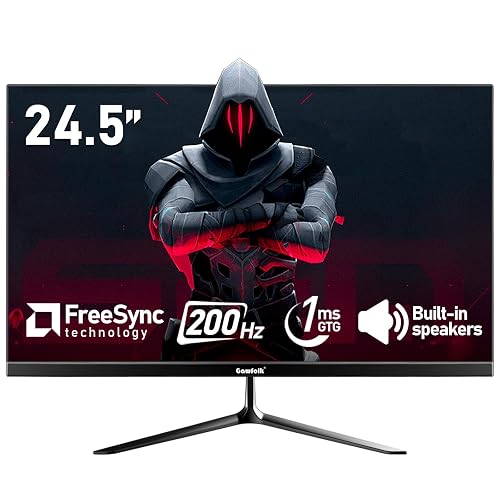 | Best Budget 200Hz | Screen Size: 24.5-inch | Resolution: 1920 x 1080 FHD | Refresh Rate: 200Hz | VIEW LATEST PRICE | Read Our Analysis |
| SANSUI 24 Inch 200Hz Gaming Monitor (ES-G24F4L) |  | Best Feature-Rich | Screen Size: 24-inch | Resolution: 1920 x 1080 FHD | Refresh Rate: 200Hz | VIEW LATEST PRICE | Read Our Analysis |
| Gawfolk 24.5-Inch Curved Gaming Monitor with Speakers |  | Best Curved Value | Screen Size: 24.5-inch | Resolution: 1920 x 1080 FHD | Refresh Rate: 120Hz | VIEW LATEST PRICE | Read Our Analysis |
| SANSUI 27 Inch Curved 160Hz Gaming Monitor | 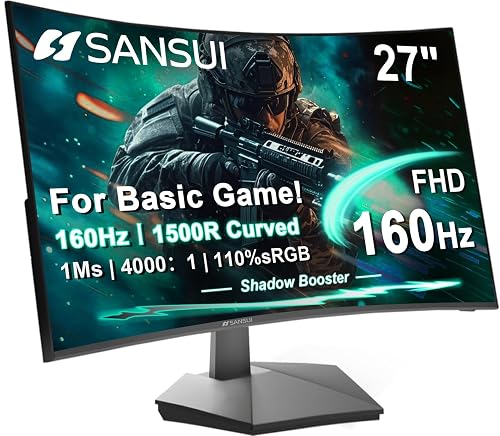 | Best Curved 160Hz | Screen Size: 27-inch | Resolution: 1920 x 1080 FHD | Refresh Rate: 160Hz | VIEW LATEST PRICE | Read Our Analysis |
| Sceptre 22-Inch Gaming Monitor 1080p 144Hz (E225W-FW144) | 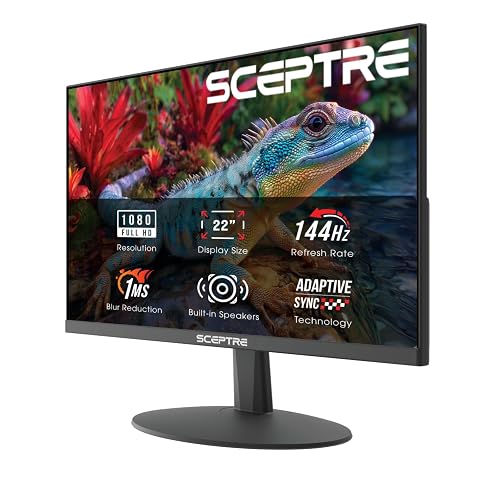 | Best Compact Pick | Screen Size: 22-inch | Resolution: 1920 x 1080 FHD | Refresh Rate: 144Hz | VIEW LATEST PRICE | Read Our Analysis |
More Details on Our Top Picks
KTC 24 Inch 240Hz Gaming Monitor H24F7
If you want a fast, budget-friendly gaming monitor that still feels premium, the KTC H24F7 is a strong pick, especially for competitive players who need smooth motion and quick response times. It has a 24-inch Fast IPS panel, a 240Hz refresh rate, and 1ms MPRT, so fast shooters and racing games stay sharp. Adaptive Sync, FreeSync, and G-Sync support help cut tearing. Its 1080p image looks vivid with 116% sRGB, HDR 400, and 400 nits brightness. You can connect it easily, adjust tilt, and mount it with VESA.
- Screen Size:24-inch
- Resolution:1920 x 1080 FHD
- Refresh Rate:240Hz
- Response Time:1ms MPRT
- Panel Type:Fast IPS
- Adaptive Sync:Yes
- Additional Feature:HDR 400 support
- Additional Feature:116% sRGB gamut
- Additional Feature:VESA 100×100 mount
KTC 27M1 27″ Gaming Monitor 1440P 210Hz
The KTC 27M1 is a strong pick for gamers who want a fast 27-inch 1440p display without pushing past the $500 mark. You get a flat Fast IPS panel with sharp QHD detail, 450 nits of brightness, and vivid 130% sRGB color. Its 210Hz refresh rate, 1 ms response time, Adaptive Sync, and FreeSync and G-Sync support help you stay smooth in competitive play. You can also use the height, tilt, swivel, and pivot adjustments to fit your setup. Dual HDMI, DisplayPort, built-in speakers, and a 3 year warranty round it out.
- Screen Size:27-inch
- Resolution:2560 x 1440 QHD
- Refresh Rate:210Hz
- Response Time:1ms MPRT
- Panel Type:Fast IPS
- Adaptive Sync:Yes
- Additional Feature:130% sRGB gamut
- Additional Feature:Built-in dual speakers
- Additional Feature:Height-adjustable stand
Gawfolk 24.5″ 200Hz FHD Gaming Monitor Black
Gawfolk’s 24.5-inch GF240A is a smart pick if you want a budget gaming monitor that still delivers fast, smooth play, thanks to a 200Hz refresh rate, 1ms GTG response time, and Adaptive Sync support. It also supports FreeSync to help keep tearing and stutter in check. The 1080p VA panel offers solid contrast, 99% sRGB color, and wide viewing angles. HDMI tops out at 120Hz. DisplayPort reveals the full 200Hz. Built-in speakers, VESA mounting, and a near bezel-less black design make it easy to fit your setup.
- Screen Size:24.5-inch
- Resolution:1920 x 1080 FHD
- Refresh Rate:200Hz
- Response Time:1ms GTG
- Panel Type:VA
- Adaptive Sync:Yes
- Additional Feature:99% sRGB gamut
- Additional Feature:Built-in dual speakers
- Additional Feature:Near bezel-less design
SANSUI 24 Inch 200Hz Gaming Monitor (ES-G24F4L)
For fast-paced gamers who want smooth motion without spending much, the SANSUI ES-G24F4L stands out with a 200Hz refresh rate, 1ms MPRT response time, and FreeSync support. You get a 24-inch FHD display with a frameless design and 178° viewing angles, so your image stays sharp from almost anywhere. The 110% sRGB gamut, 4000:1 contrast ratio, 300 nits brightness, and HDR help colors pop. You can fine-tune play with Over Drive, CrossHair, Timer, Blacklevel Adjust, and FPS, RTS, or Racing modes. HDMI and DisplayPort 1.4 ports, VESA mount support, and eye-care features make the monitor versatile.
- Screen Size:24-inch
- Resolution:1920 x 1080 FHD
- Refresh Rate:200Hz
- Response Time:1ms MPRT
- Panel Type:Not specified
- Adaptive Sync:FreeSync
- Additional Feature:4000:1 contrast ratio
- Additional Feature:CrossHair aiming tool
- Additional Feature:30-day money-back
Gawfolk 24.5-Inch Curved Gaming Monitor with Speakers
If you want a budget-friendly curved monitor that can handle gaming and everyday use, the Gawfolk 24.5-inch model is an easy pick. You get a 24.5-inch 3000R VA panel with Full HD resolution, 98% sRGB, and a strong 3500:1 contrast ratio for punchy visuals. Its 120Hz refresh rate and 1ms GTG response keep motion smooth and lag low. You can connect via HDMI or VGA; HDMI supports 120Hz. Built-in speakers, eye-care tech, tilt adjustment, and 75 x 75 mm wall-mount support make it practical.
- Screen Size:24.5-inch
- Resolution:1920 x 1080 FHD
- Refresh Rate:120Hz
- Response Time:1ms GTG
- Panel Type:VA
- Adaptive Sync:Not specified
- Additional Feature:3000R curvature
- Additional Feature:Built-in speakers
- Additional Feature:Ultra-thin frame
SANSUI 27 Inch Curved 160Hz Gaming Monitor
The SANSUI 27-inch curved gaming monitor is a strong fit if you want fast, immersive gameplay without spending over $500. Its 1500R curve and 27-inch FHD 1080p panel help reduce distortion and eye strain, so you can stay locked in longer. You will get 160Hz refresh, 1ms MPRT, FreeSync, and HDR for smoother action. Game Assistant tools, including Crosshair, Timer, and Black Level Adjustment, give you an edge. With 4000:1 contrast, 110% sRGB, HDMI 2.0, DisplayPort 1.4, and VESA mounting, it is versatile too.
- Screen Size:27-inch
- Resolution:1920 x 1080 FHD
- Refresh Rate:160Hz
- Response Time:1ms MPRT
- Panel Type:Not specified
- Adaptive Sync:FreeSync
- Additional Feature:1500R curvature
- Additional Feature:Shadow Booster
- Additional Feature:Preset game modes
Sceptre 22-Inch Gaming Monitor 1080p 144Hz (E225W-FW144)
Sceptre’s 22-inch E225W-FW144G is a strong pick if you want a compact, budget-friendly gaming monitor with real speed, since its 144Hz refresh rate and 1ms response time help keep fast-paced games feeling smooth and responsive. You get sharp 1080p clarity, FreeSync support, and adaptive sync for steadier play. The matte screen and blue-light shift help reduce strain, and built-in speakers add convenient desk audio. HDMI and DisplayPort connectivity make setup easy, and the nearly bezel-free design works well for dual-monitor rigs. It is also wall-mountable, and it is backed by a 1-year warranty.
- Screen Size:22-inch
- Resolution:1920 x 1080 FHD
- Refresh Rate:144Hz
- Response Time:1ms
- Panel Type:LED
- Adaptive Sync:FreeSync
- Additional Feature:2000:1 contrast ratio
- Additional Feature:Built-in speakers
- Additional Feature:Blue-Light Shift
Factors to Consider When Choosing Gaming Monitors Under 500
When choosing a gaming monitor under $500, prioritize refresh rate and response time first, since they determine how smooth and responsive games feel. Also compare panel type, resolution clarity, and color accuracy to find the best balance for your setup. The right mix depends on whether you value fast-paced performance more, or sharper, richer visuals.
Refresh Rate
Refresh rate is a major factor in how smooth a gaming monitor feels. If you play fast-paced games, 144 Hz or higher can make a clear difference in motion clarity, aiming, and scrolling. Higher Hz means smoother movement; 120 Hz to 240 Hz are common picks for competitive play. At 144 Hz and above you will usually notice less blur and more responsive tracking in esports-style games. For an even silkier feel, 200 Hz, 210 Hz, or 240 Hz can improve fluidity further. Make sure your PC can push enough frames to match the monitor, or you will not get the full benefit. Also check the ports carefully, since HDMI and DisplayPort do not always support the same maximum refresh rate.
Response Time
Response time measures how quickly a monitor’s pixels change. In gaming, lower numbers like 1 ms MPRT or 1 ms GTG help reduce motion blur and ghosting. You will notice the biggest difference in fast-paced games, where quick camera pans and intense action can make slow pixels look smeared. When comparing models, check whether the spec uses MPRT or GTG, since they are different tests and do not always match up directly. Even with a high refresh rate, you still want fast response time because both specs help motion look smoother and more responsive. For gaming monitors under $500, about 1 ms is ideal, but a slower rating can be acceptable if you prioritize other features.
Panel Type
Panel type shapes how a gaming monitor looks and feels just as much as refresh rate or response time. You will usually choose between fast IPS and VA. Fast IPS gives you wide 178° viewing angles and better color accuracy, so it is great if you want sharp visuals for competitive play and everyday use. VA panels deliver higher contrast, often 3000:1 to 4000:1, so dark scenes look richer and more immersive. Both can pair well with 144Hz to 240Hz refresh rates and 1 ms response times, so motion stays smooth. For the best all around pick, look for adaptive sync and at least FHD 1080p or QHD support. A matte finish, low blue light, and a flicker free design can also help your eyes during long sessions.
Resolution Clarity
When it comes to resolution clarity, higher native resolution usually means sharper images and cleaner text, so 1440p looks more detailed than 1080p at the same screen size. If you are choosing between them, consider screen size and viewing distance. A 24-inch 1080p monitor can still look crisp, but a larger 1080p panel may reveal more visible pixels. By contrast, a 27-inch 1440p display delivers roughly 109 PPI, compared with about 92 PPI on a 24-inch 1080p, so you will notice finer detail. You should also consider panel quality and color depth, because better gradients can make details seem smoother. If you game in bright rooms, a matte finish can cut glare and reflections, helping the image look clearer.
Color Accuracy
Color accuracy matters because it affects how lifelike games look, from skin tones and skies to dark shadows and bright effects. Look for a wide color gamut, ideally around 110% to 130% sRGB, because it renders richer, more realistic hues than panels that sit near 99% sRGB. Higher color depth also helps: 8-bit panels show about 16.7 million colors, while 1.07 billion colors create smoother gradients and subtler shifts. Native panel quality counts too, and Fast IPS screens usually deliver more consistent color and better viewing stability than basic gaming panels. Do not ignore brightness and contrast, since 300 to 450 cd/m² and 1000:1 to 4000:1 change punch and shadow detail. HDR can enhance range, but it will not fix weak gamut coverage or poor panel consistency.
Adaptive Sync
Adaptive Sync is one of the biggest features to check, because it matches the monitor’s refresh rate to your GPU’s frame output, which reduces screen tearing, stutter, and input lag during fast-paced gaming. You should also look for support across a wide refresh range, such as 144Hz, 160Hz, 200Hz, 210Hz, or 240Hz, so it remains effective when frame rates climb. Monitors that support both FreeSync and G-Sync offer more flexibility if you switch between graphics cards. It is especially valuable on high-refresh panels with 1 ms-class response times, where smooth motion matters most. Finally, make sure Adaptive Sync works over the port you will actually use, since DisplayPort often enables higher refresh rates and better sync performance than HDMI.
Ergonomic Adjustments
Beyond smooth sync and high refresh rates, also pay attention to ergonomic adjustments so the monitor fits your setup and posture. Look for height adjustment, ideally around 150 mm, so you can raise the screen and keep the top near eye level. Tilt matters too; a range of -5° to 35° helps reduce neck strain and lets you fine-tune your viewing angle. Swivel and pivot support add flexibility when you share a desk or want portrait orientation, especially if the panel can rotate left and right or turn 90° vertically. If you plan to use an arm or wall mount, check VESA compatibility, usually 75 x 75 mm or 100 x 100 mm. On larger screens, a sturdy, adjustable stand will help you stay comfortable during long sessions.
Connectivity Options
Ports and plugs matter more than many buyers think, especially when you want a monitor that works smoothly with your PC, console, or laptop. Check for HDMI, DisplayPort, and, if you need them, USB ports or a 3.5 mm audio jack so you can connect everything without adapters. If you play fast-paced games, make sure the monitor’s highest refresh rate works over DisplayPort or the latest HDMI standard, since some screens limit HDMI performance. For multiple devices, two HDMI ports or a mix of HDMI and DisplayPort saves you from swapping cables. Built-in speakers can keep your setup simple. Also verify that the port layout and included cables fit your desk, wall mount, or VESA setup so your installation stays clean and practical.
Frequently Asked Questions
Which Monitor Is Best for Both Gaming and Content Creation?
You get the best balance from a 27-inch 4K IPS monitor with a wide color gamut, 144 Hz, and HDR support. It handles gaming smoothly and keeps your edits accurate, like a futuristic canvas at your desk.
Are Curved Monitors Better for Competitive Gaming?
Not usually. You will often prefer a flat monitor for competitive gaming because it keeps aim consistent and reduces distortion. Choose a curved screen only if you value immersion more than pure speed and precision.
How Important Is Response Time Versus Refresh Rate?
Response time is crucial for image clarity, especially in fast-paced games. Refresh rate, however, governs smoothness and typically has a larger impact on aiming, motion perception, and overall feel.
Do These Monitors Support Console Gaming Features?
Yes. You will usually get console-friendly features like HDMI 2.0 or 2.1, variable refresh rate, and low input lag. Check each model’s specs; some also support 120 Hz on PS5 and Xbox Series X.
What Ports Should I Look for in a Gaming Monitor?
Look for HDMI 2.1, DisplayPort 1.4, and USB-C for versatile gaming and easy device hookups. You will also benefit from an audio out, USB hub ports, and an Ethernet port for smoother setups.




