

You might not know that the best gaming PC company in 2026 is not just about raw frame rates anymore.
You need to weigh upgrade paths, cooling, warranty support, and the extras that actually matter once the box arrives. ASUS ROG, CyberPowerPC, and Skytech each take a different approach.
The gap between a smart buy and a costly mistake can be thinner than you think.
| ASUS ROG G700 Gaming Desktop PC (G700TF-AB776) |  | Best Overall | Processor: Intel Core Ultra 7 265KF | Graphics: NVIDIA GeForce RTX 5070 | Memory: 32GB DDR5 | VIEW LATEST PRICE | Read Our Analysis |
| CyberPowerPC Gamer Master Gaming PC (GMA2900A3) |  | Best Value | Processor: AMD Ryzen 7 8700F | Graphics: NVIDIA GeForce RTX 5060 Ti 8GB | Memory: 16GB DDR5 | VIEW LATEST PRICE | Read Our Analysis |
| Skytech Archangel 5 Gaming PC with RTX 5060 Ti | 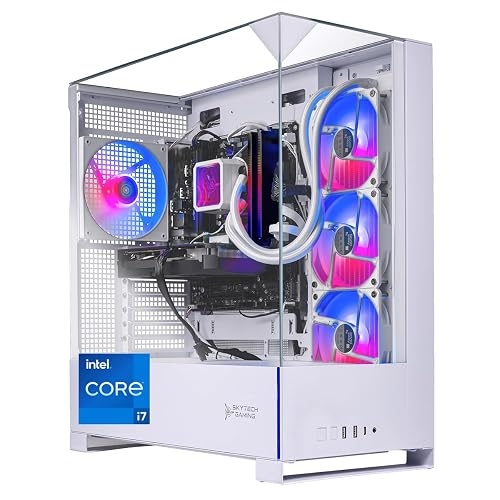 | Best For Performance | Processor: Intel Core i7-14700F | Graphics: NVIDIA GeForce RTX 5060 Ti 16GB | Memory: 32GB DDR5 | VIEW LATEST PRICE | Read Our Analysis |
| Dell Gaming OptiPlex Desktop PC with Monitor | 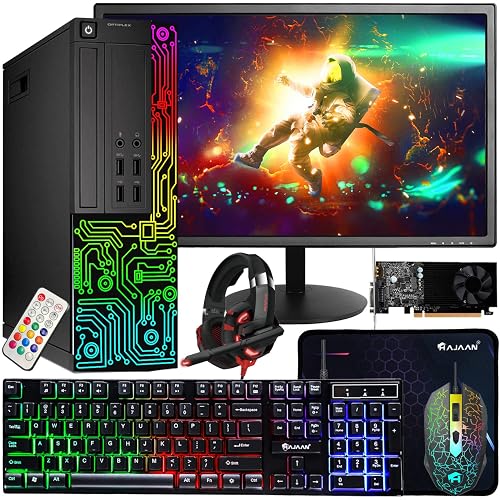 | Best Budget Bundle | Processor: Intel Core i7 Quad Core 3.40 GHz | Graphics: GeForce GT 1030 2GB | Memory: 16GB RAM | VIEW LATEST PRICE | Read Our Analysis |
| STGAubron Prebuilt Gaming PC Desktop with RX 550 | 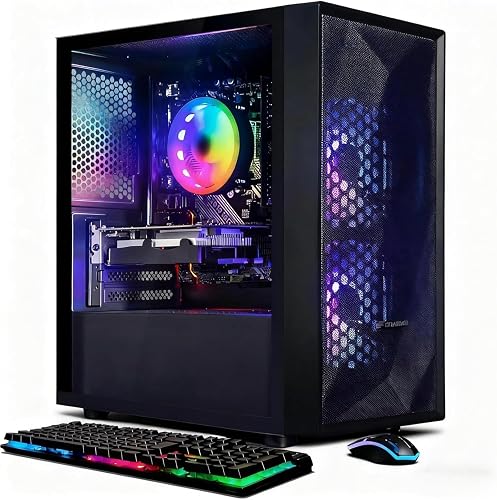 | Budget-Friendly Pick | Processor: Intel Core i5 up to 3.6GHz | Graphics: AMD Radeon RX 550 4G | Memory: 16GB memory | VIEW LATEST PRICE | Read Our Analysis |
| Skytech Azure 3 Gaming PC Ryzen 7 9700X |  | Best For Upgraders | Processor: AMD Ryzen 7 9700X | Graphics: NVIDIA GeForce RTX 5060 8GB | Memory: 16GB DDR5 | VIEW LATEST PRICE | Read Our Analysis |
| Skytech Archangel 5 Gaming PC (i5-14400F RTX 5060) | 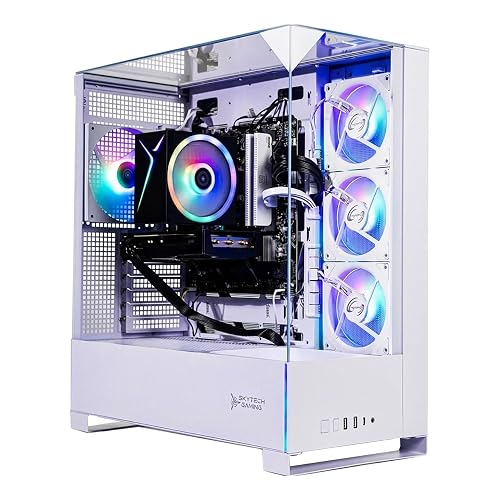 | Best Mid-Range Pick | Processor: Intel Core i5-14400F | Graphics: NVIDIA GeForce RTX 5060 8GB | Memory: 16GB DDR5 | VIEW LATEST PRICE | Read Our Analysis |
More Details on Our Top Picks
ASUS ROG G700 Gaming Desktop PC (G700TF-AB776)
If you want a gaming desktop that balances high-end performance with easy future upgrades, the ASUS ROG G700 Gaming Desktop PC (G700TF-AB776) is a strong fit. It includes an Intel Core Ultra 7 265KF, an RTX 5070, 32GB of DDR5, and a 1TB PCIe 4.0 SSD for fast gameplay and quick load times. The dual-glass ROG chassis, Slash accents, and Aura Sync RGB provide a sharp appearance, and the 58L case accommodates triple-slot GPUs. The quad-fan layout, 240mm liquid cooler, and dust filters help keep temperatures down. You also get WiFi 6, 2.5Gbps Ethernet, Dolby Atmos, and tool-less upgrades.
- Processor:Intel Core Ultra 7 265KF
- Graphics:NVIDIA GeForce RTX 5070
- Memory:32GB DDR5
- Storage:1TB NVMe SSD
- Operating System:Windows 11 Home
- Included Peripherals:Keyboard and mouse
- Additional Feature:Dual-glass chassis
- Additional Feature:Quad-fan cooling
- Additional Feature:Tool-less access
CyberPowerPC Gamer Master Gaming PC (GMA2900A3)
The CyberPowerPC Gamer Master Gaming PC (GMA2900A3) is a strong fit for gamers who want a ready-to-play desktop with modern AMD and NVIDIA hardware. It pairs a Ryzen 7 8700F processor with an RTX 5060 Ti 8GB graphics card, 16GB of DDR5 memory, and a 1TB PCIe 4.0 NVMe SSD. You also get Windows 11 Home, WiFi 6, Bluetooth 5.3, and plenty of ports for your gear. The black case features tempered glass and custom RGB lighting. The system includes a keyboard, mouse, power cord, a one-year warranty, and lifetime tech support to simplify setup.
- Processor:AMD Ryzen 7 8700F
- Graphics:NVIDIA GeForce RTX 5060 Ti 8GB
- Memory:16GB DDR5
- Storage:1TB PCIe 4.0 NVMe SSD
- Operating System:Windows 11 Home
- Included Peripherals:Keyboard, mouse, power cord
- Additional Feature:AMD B850 chipset
- Additional Feature:Tempered side panel
- Additional Feature:Free lifetime support
Skytech Archangel 5 Gaming PC with RTX 5060 Ti
Skytech’s Archangel 5 Gaming PC stands out for players who want smooth 1080p gaming with strong headroom, featuring the Intel Core i7-14700F, RTX 5060 Ti 16GB, and 32GB of DDR5 RAM. You can push ultra settings in games like Fortnite, Warzone, and Baldur’s Gate 3 while maintaining steady 60+ FPS. The 1TB Gen4 SSD keeps load times short, and the 360mm AIO cooler helps prevent thermal throttling. You also get Wi-Fi, Ethernet, modern USB ports, Windows 11 Home, and a free keyboard and mouse.
- Processor:Intel Core i7-14700F
- Graphics:NVIDIA GeForce RTX 5060 Ti 16GB
- Memory:32GB DDR5
- Storage:1TB Gen4 NVMe M.2 SSD
- Operating System:Windows 11 Home 64-bit
- Included Peripherals:Keyboard and mouse
- Additional Feature:360mm AIO cooler
- Additional Feature:750W Gold PSU
- Additional Feature:Assembled in USA
Dell Gaming OptiPlex Desktop PC with Monitor
Dell’s Gaming OptiPlex Desktop PC with Monitor is a solid pick if you want an affordable, ready-to-use setup that balances everyday work and casual gaming. You receive a professionally inspected, verified, and cleaned system with a minimum 90-day warranty, so you can buy with more confidence. Its Intel Core i7 quad-core processor, 16 GB of RAM, and 512 GB SSD help you boot quickly and run apps smoothly. The GeForce GT 1030 handles CS:GO, DOTA 2, and GTA V at medium settings. The package also includes a 24-inch monitor, keyboard, mouse, headset, WiFi, and Windows 11 Pro.
- Processor:Intel Core i7 Quad Core 3.40 GHz
- Graphics:GeForce GT 1030 2GB
- Memory:16GB RAM
- Storage:512GB SSD
- Operating System:Windows 11 Pro
- Included Peripherals:Keyboard, mouse, headset, monitor
- Additional Feature:RGB LED front panel
- Additional Feature:24-inch monitor included
- Additional Feature:Professional refurbishment
STGAubron Prebuilt Gaming PC Desktop with RX 550
STGAubron’s Prebuilt Gaming PC Desktop with RX 550 is a smart pick if you want an affordable all-in-one setup for gaming, school, home use, or light creative work. It includes an Intel Core i5 running up to 3.6 GHz, 16 GB of memory, a 512 GB SSD, and Windows 11 Home for smooth everyday use. The RX 550 4 GB handles popular games like Fortnite, Valorant, GTA V, and Roblox with 60+ FPS support. You also get Wi-Fi 6, Bluetooth 5.0, RGB fans, a gaming mouse and keyboard, and lifetime tech support.
- Processor:Intel Core i5 up to 3.6GHz
- Graphics:AMD Radeon RX 550 4G
- Memory:16GB memory
- Storage:512GB SSD
- Operating System:Windows 11 Home 64-bit
- Included Peripherals:Keyboard and mouse
- Additional Feature:Wi-Fi 6
- Additional Feature:Bluetooth 5.0
- Additional Feature:Dual RGB fans
Skytech Azure 3 Gaming PC Ryzen 7 9700X
With its Ryzen 7 9700X CPU, RTX 5060 graphics, and 16 GB of DDR5 memory, the Skytech Azure 3 Gaming PC is a strong pick if you want smooth 1080p gaming without building a system yourself. You will get fast load times from the 1 TB NVMe SSD, and the 360 mm AIO cooler helps keep temperatures in check. The 850 W Gold ATX 3 power supply adds solid headroom, and Wi-Fi, HDMI, DisplayPort, and multiple USB ports cover everyday use. It also includes Windows 11, a free keyboard and mouse, no bloatware, and support for popular games.
- Processor:AMD Ryzen 7 9700X
- Graphics:NVIDIA GeForce RTX 5060 8GB
- Memory:16GB DDR5
- Storage:1TB NVMe M.2 SSD
- Operating System:Windows 11 Home 64-bit
- Included Peripherals:Keyboard and mouse
- Additional Feature:360mm AIO cooler
- Additional Feature:850W Gold PSU
- Additional Feature:No bloatware
Skytech Archangel 5 Gaming PC (i5-14400F RTX 5060)
If you want a ready-to-play 1080p gaming desktop that balances price, speed, and simplicity, the Skytech Archangel 5 is a strong pick. It comes with an Intel Core i5-14400F with 10 cores and boost speeds up to 4.7 GHz, and an RTX 5060 with 8 GB GDDR7 for smooth 60+ FPS in games like Fortnite, Apex Legends, and Baldur’s Gate 3. It also includes 16 GB DDR5 RAM, a 1 TB NVMe SSD, Wi-Fi, Windows 11 Home, no bloatware, and useful extras such as a keyboard, mouse, and lifetime technical support.
- Processor:Intel Core i5-14400F
- Graphics:NVIDIA GeForce RTX 5060 8GB
- Memory:16GB DDR5
- Storage:1TB NVMe M.2 SSD
- Operating System:Windows 11 Home 64-bit
- Included Peripherals:Keyboard and mouse
- Additional Feature:High-performance air cooler
- Additional Feature:750W Gold PSU
- Additional Feature:No bloatware
Factors to Consider When Choosing Gaming PC Companies
When comparing gaming PC companies, focus on hardware performance, cooling systems, and upgrade options, so your rig can handle demanding games and future parts. Also check warranty coverage to protect your purchase if something goes wrong. Don’t forget to review included accessories, since extras like a quality keyboard, mouse, or Wi Fi adapter can add meaningful value.
Hardware Performance
Hardware performance should be a top priority. The right gaming PC builder will assemble a system that keeps up with modern games without bottlenecks. Choose a CPU with enough cores and strong boost speeds, since an 8 core or a 20 core chip can handle gaming, background tasks, and streaming at once. Pick a dedicated GPU with the appropriate VRAM for your resolution; 8 GB is sufficient for 1080p, while 16 GB provides more room for higher textures and newer titles. You should have at least 16 GB of RAM, though 32 GB of DDR5 at 6000 MHz can reduce stutter. A fast 1 TB PCIe 4.0 SSD improves load times and responsiveness. Verify that the PSU and cooling are matched to the hardware.
Cooling Systems
Cooling systems matter just as much as raw performance. The right gaming PC company should build a system that can handle heat without throttling. Match cooling to the system’s heat output, since a powerful build needs more than a basic fan. Look for multi-fan airflow designs and liquid CPU cooling when the processor runs hot. A 240 mm or 360 mm radiator usually removes heat better than smaller coolers, especially during long gaming sessions. Multiple case fans and smart airflow paths help keep internal temperatures down and reduce throttling. Dust filters also matter, because they limit buildup that can choke airflow. Choose a company whose cooling setup can handle stronger processors and higher wattage GPUs without running hot.
Upgrade Options
Once you’ve checked cooling, evaluate how easy the system will be to upgrade later. Favor gaming PC companies that make upgrades straightforward with tool-less access, roomy chassis designs, and standard connectors. Make sure the case can fit larger components, including triple-slot GPUs, and that the layout leaves space for cleaner swaps. Check for modern headroom too: a strong power supply, multiple drive bays or M.2 slots, and platforms such as AM5 or LGA that can support newer processors. You will also want room to expand memory beyond the base 16GB or 32GB, plus clear compatibility information for graphics, RAM, and storage changes. Good airflow, liquid cooling, and dust filters help upgraded parts remain stable over time.
Warranty Coverage
Warranty coverage can greatly affect how much confidence you have in a gaming PC company, so check the length first; terms can range from 90 days to a year or more. Verify what the warranty actually protects: parts, labor, and replacement of defective components. Also confirm whether the company only tests basic functionality or whether it covers hardware failures that appear after purchase. Some brands include free technical support for the full warranty period, which can save time when problems arise. Finally, read the fine print for conditions that could limit coverage, such as refurbished systems, changed packaging, or missing accessories. By comparing these details carefully, you will know which company stands behind your system best.
Included Accessories
Included accessories can make a big difference in how ready your gaming PC is to use right away. Check whether the system comes with essentials like a keyboard, mouse, and power cord. Some companies bundle all three, while others leave you to buy them separately. If you want a simpler setup, look for extras like a monitor or headset that can turn delivery day into play day. Also judge whether the included gear is standard or gaming focused, since RGB keyboards and mice can boost value and convenience. Do not forget setup materials, such as a quick start guide, because they can make first time installation easier. Compare the accessory package with the warranty and support offer too, so you can avoid unnecessary purchases after delivery.
Connectivity Features
After checking the accessories a gaming PC company includes, take a close look at its connectivity features, since they affect how easily you can play, stream, and add peripherals. Look for Wi-Fi 6 or 802.11ac if you want lower latency and steadier wireless gaming. If you prefer the most reliable online play, choose a system with 2.5 Gbps Ethernet or a standard LAN port. Make sure you get enough fast USB ports, including USB-C 3.2, USB-A 3.2, or USB 3.2 Gen 1, so your headset, controller, and other gear stay connected. Also confirm HDMI and DisplayPort support for your monitor setup. If you use wireless accessories, check for Bluetooth 5.3 or Bluetooth 5.0.
Frequently Asked Questions
Which Gaming PC Companies Offer the Best Warranty Coverage in 2026?
You will generally get the strongest warranty coverage from Corsair, Dell/Alienware, and Lenovo, as well as from some boutique builders such as Maingear and Origin. Compare warranty length, accidental-damage options, and support responsiveness before you buy.
How Often Should I Upgrade Components in a Prebuilt Gaming PC?
Upgrade parts roughly every 2 to 4 years, depending on the games you play and your budget. Typically you will replace the GPU first, then add RAM or storage when performance no longer meets your needs.
Do Gaming PC Companies Include Support for Custom RGB Lighting?
Yes, many gaming PC companies include custom RGB lighting support, and you can usually control it through included software or motherboard apps. Check each brand for compatibility before buying, as implementations and supported devices vary.
Are Financing Options Available When Buying From Top Gaming PC Brands?
Yes. Top gaming PC brands often offer financing, including monthly payment plans or partner credit programs. You can spread costs over time, but you will usually need to qualify and may pay interest.
Which Companies Provide the Quietest Gaming PCS for Streaming?
Fractal, Corsair, and be quiet! provide some of the quietest gaming PCs for streaming. These builds are often whisper quiet, so you can stay focused and capture clear microphone audio without fan noise interfering.




