

If you are choosing a gaming PC for streaming in 2026, you will want more than raw frame rates. The right system needs a fast CPU, dependable GPU encoding, enough RAM, and cooling that will not fall apart under pressure.
From strong midrange prebuilts to budget entry points, the best options each handle a different kind of stream. The key differences may surprise you, especially once you compare what each one gives up.
| Skytech Archangel 5 Gaming PC with Ryzen 7 | 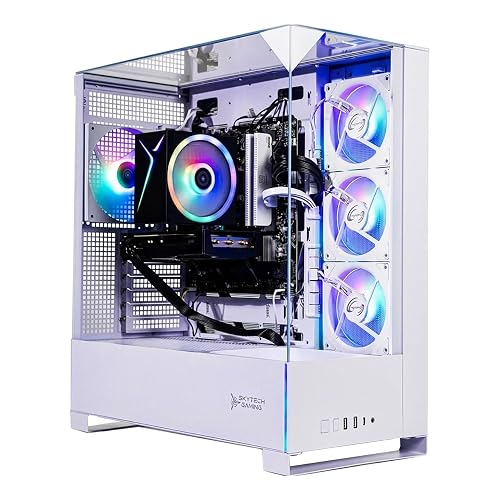 | Best Value | Processor: Ryzen 7 7700 | Graphics: RTX 5060 8GB | Memory: 32GB DDR5 | VIEW LATEST PRICE | Read Our Analysis |
| CyberPowerPC Gamer Master Gaming PC (GMA2900A3) |  | Best Mid-Range | Processor: Ryzen 7 8700F | Graphics: RTX 5060 Ti 8GB | Memory: 16GB DDR5 | VIEW LATEST PRICE | Read Our Analysis |
| Skytech Archangel 5 Gaming PC i7 RTX 5060 Ti | 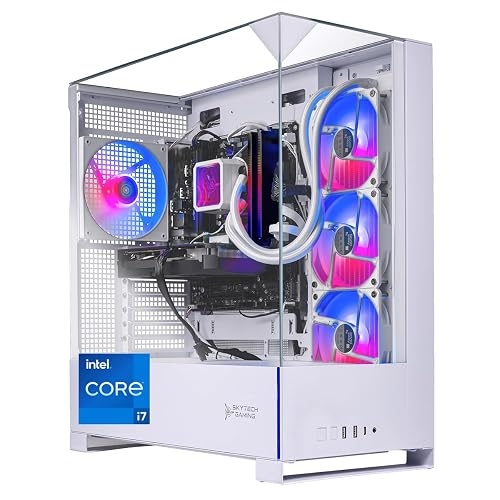 | Best for Streaming | Processor: Core i7-14700F | Graphics: RTX 5060 Ti 16GB | Memory: 32GB DDR5 | VIEW LATEST PRICE | Read Our Analysis |
| Dell Gaming OptiPlex Desktop PC with Monitor | 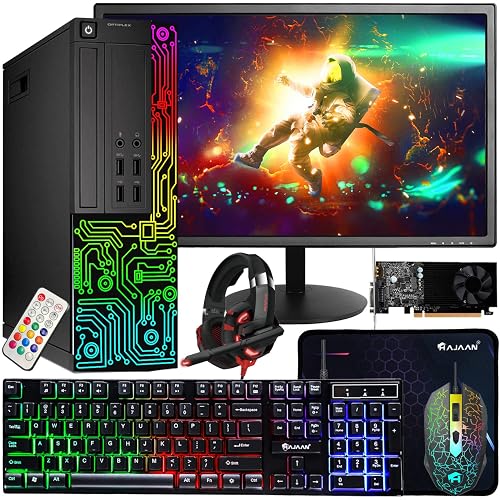 | Budget Pick | Processor: Core i7-4770 | Graphics: GT 1030 2GB | Memory: 16GB DDR3 | VIEW LATEST PRICE | Read Our Analysis |
| STGAubron Prebuilt Gaming PC Desktop RX 550 4G | 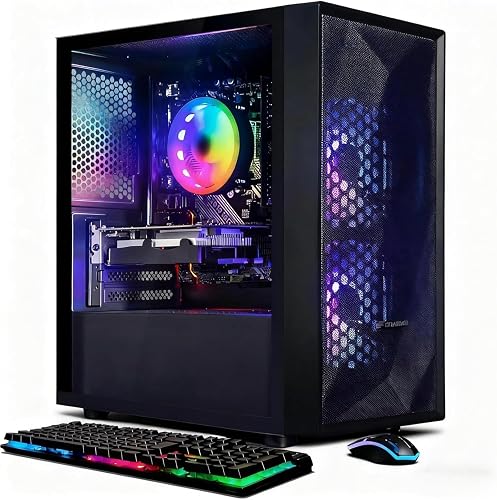 | Entry-Level Pick | Processor: Core i5 | Graphics: RX 550 4GB | Memory: 16GB DDR3 | VIEW LATEST PRICE | Read Our Analysis |
| MSI Codex Z2 Gaming Desktop (A8NVP-436US) |  | Best Performance | Processor: Ryzen 7 8700F | Graphics: RTX 5070 12GB | Memory: 32GB DDR5 | VIEW LATEST PRICE | Read Our Analysis |
| Skytech Crystal Gaming PC with Ryzen 7 RTX 5060 | 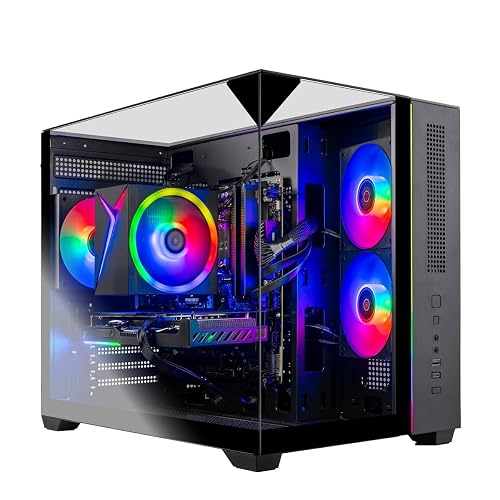 | Best Budget AM4 | Processor: Ryzen 7 5700 | Graphics: RTX 5060 8GB | Memory: 32GB DDR4 | VIEW LATEST PRICE | Read Our Analysis |
More Details on Our Top Picks
Skytech Archangel 5 Gaming PC with Ryzen 7
If you want a streaming-ready gaming PC that balances strong performance with easy setup, the Skytech Archangel 5 stands out. It includes an AMD Ryzen 7 7700 CPU, an NVIDIA GeForce RTX 5060 8GB GPU, and 32GB of DDR5 6000 RGB memory, so you can game and stream without hiccups. The 1TB NVMe SSD speeds loading. The air cooler and 750W Gold PSU keep the system stable. You also get Wi-Fi, plenty of ports, a free keyboard and mouse, Windows 11 Home, and a clean white case with ARGB fans.
- Processor:Ryzen 7 7700
- Graphics:RTX 5060 8GB
- Memory:32GB DDR5
- Storage:1TB NVMe SSD
- Operating System:Windows 11 Home
- Warranty:1 year
- Additional Feature:White tempered glass case
- Additional Feature:ARGB fans
- Additional Feature:Free gaming keyboard/mouse
CyberPowerPC Gamer Master Gaming PC (GMA2900A3)
The CyberPowerPC Gamer Master Gaming PC (GMA2900A3) is a strong pick for streamers who want a modern AMD Ryzen 7 8700F processor and NVIDIA GeForce RTX 5060 Ti graphics in a ready-to-use desktop. You get 8 cores, 16 GB of DDR5 memory, and a fast 1 TB PCIe 4.0 NVMe SSD, so your games and broadcasts load quickly. Its RTX 5060 Ti 8 GB handles crisp visuals, while Windows 11 Home keeps setup simple. You also get WiFi 6, Bluetooth 5.3, multiple USB ports, RGB lighting, and free lifetime tech support.
- Processor:Ryzen 7 8700F
- Graphics:RTX 5060 Ti 8GB
- Memory:16GB DDR5
- Storage:1TB PCIe 4.0 NVMe SSD
- Operating System:Windows 11 Home
- Warranty:1 year
- Additional Feature:WiFi 6 connectivity
- Additional Feature:Bluetooth 5.3
- Additional Feature:Custom RGB lighting
Skytech Archangel 5 Gaming PC i7 RTX 5060 Ti
With an Intel Core i7-14700F and 32GB of DDR5 RAM, the Skytech Archangel 5 Gaming PC i7 RTX 5060 Ti is a strong pick for streamers who want smooth gameplay and reliable multitasking at the same time. It includes an RTX 5060 Ti 16GB graphics card, a 1TB Gen4 NVMe SSD, and a 750W Gold PSU, so you can stream and game without feeling held back. Its 360mm AIO cooler and ARGB fans help keep temperatures in check. Windows 11 Home, Wi-Fi, Ethernet, and included peripherals make setup straightforward.
- Processor:Core i7-14700F
- Graphics:RTX 5060 Ti 16GB
- Memory:32GB DDR5
- Storage:1TB Gen4 NVMe SSD
- Operating System:Windows 11 Home
- Warranty:1 year
- Additional Feature:360mm AIO liquid cooler
- Additional Feature:White tempered glass case
- Additional Feature:Includes start guide
Dell Gaming OptiPlex Desktop PC with Monitor
Dell’s renewed OptiPlex gaming desktop is a solid pick for streamers who want an affordable all-in-one setup, especially if you are playing lighter titles while chatting or recording. It includes an Intel Core i7-4770, 16 GB of RAM, and a 512 GB SSD, so Windows 11 Pro boots fast and multitasking feels smooth. The GeForce GT 1030 handles CS:GO, DOTA 2, and GTA V at medium settings with decent FPS. You also get a 24-inch 1080p monitor, keyboard, mouse, headset, Wi Fi, and RGB lighting. The system is inspected and cleaned, and it is backed by a 90-day warranty.
- Processor:Core i7-4770
- Graphics:GT 1030 2GB
- Memory:16GB DDR3
- Storage:512GB SSD
- Operating System:Windows 11 Pro
- Warranty:90 days minimum
- Additional Feature:24-inch HDMI monitor
- Additional Feature:RGB front panel
- Additional Feature:Included headset
STGAubron Prebuilt Gaming PC Desktop RX 550 4G
If you need an affordable starter rig for streaming and everyday gaming, consider the STGAubron Prebuilt Gaming PC Desktop. It includes an Intel Core i5 processor, 16 GB of DDR3 RAM, and a 512 GB SSD, so Windows 11 Home boots quickly and multitasking stays smooth. The RX 550 4 GB graphics card can drive 1080p visuals and handle esports titles, lighter AAA games, and basic streaming. Wi‑Fi 6, Bluetooth 5.0, six USB ports, and an RGB keyboard and mouse add convenience. It is a solid entry-level tower with lifetime tech support.
- Processor:Core i5
- Graphics:RX 550 4GB
- Memory:16GB DDR3
- Storage:512GB SSD
- Operating System:Windows 11 Home
- Warranty:1 year
- Additional Feature:Wi-Fi 6 support
- Additional Feature:Bluetooth 5.0
- Additional Feature:RGB gaming mouse
MSI Codex Z2 Gaming Desktop (A8NVP-436US)
The MSI Codex Z2 Gaming Desktop (A8NVP-436US) is a strong pick for streamers who want smooth 1440p or 4K gameplay while keeping background tasks under control. It features an AMD Ryzen 7 8700F CPU, 32GB of fast DDR5 memory, and an NVIDIA GeForce RTX 5070 graphics card. You get 8 cores and 16 threads, plus a 2TB NVMe SSD for quick loads and four cooling fans to help sustain performance. Its 12GB Blackwell GPU handles AAA games and streaming well. With Wi-Fi 6, Bluetooth, 10 USB ports, and Windows 11 Home, it is ready for a clean setup.
- Processor:Ryzen 7 8700F
- Graphics:RTX 5070 12GB
- Memory:32GB DDR5
- Storage:2TB M.2 NVMe SSD
- Operating System:Windows 11 Home
- Warranty:1 year
- Additional Feature:2TB NVMe SSD
- Additional Feature:4 system cooling fans
- Additional Feature:Built-in RGB lighting
Skytech Crystal Gaming PC with Ryzen 7 RTX 5060
With an AMD Ryzen 7 5700, RTX 5060 8GB GDDR7, and 32GB of RAM, the Skytech Crystal Gaming PC provides the headroom to stream and game smoothly at 1080p without constant performance dips. It includes a 1TB NVMe SSD for fast load times, a high-performance air cooler, and a 650W Gold PSU for stable power. The triple-tempered-glass case features ARGB fans and optimized airflow to keep components cool and visually striking. Windows 11 Home, built-in Wi-Fi, and a wide selection of ports make setup straightforward. A free keyboard and mouse are included so you can start playing right away.
- Processor:Ryzen 7 5700
- Graphics:RTX 5060 8GB
- Memory:32GB DDR4
- Storage:1TB NVMe SSD
- Operating System:Windows 11 Home
- Warranty:1 year
- Additional Feature:Triple tempered glass
- Additional Feature:Black edition case
- Additional Feature:Free gaming keyboard/mouse
Factors to Consider When Choosing Gaming PCs For Streaming
When you choose a gaming PC for streaming, prioritize a powerful CPU and GPU so your games and broadcasts run smoothly at the same time. You also need sufficient RAM and fast storage to keep load times low and multitasking responsive. Do not overlook cooling and thermals, because a well managed system stays quieter and performs better during long streams.
CPU Performance
A strong streaming CPU starts at 8 cores and 16 threads, which gives you enough headroom to run the game, encode the stream, and keep background tasks smooth at the same time. You will notice far less stutter when you keep chat, browser tabs, recording software, and launchers open while playing. Higher boost clocks also matter; modern chips reaching about 5.0 to 5.3 GHz keep your gameplay responsive and your frame pacing steadier. If you are buying a new rig, favor newer CPU architectures and platforms, since they usually pair better with DDR5 memory and multitask more efficiently. For demanding games do not settle for an older quad core chip, choose at least 8 cores and strong single core speed.
GPU Encoding Power
GPU encoding power is essential because it lets your graphics card render the game and encode the stream at the same time with less impact on frame rate. When choosing a streaming PC, look for a GPU with strong modern encoding hardware, not just raw gaming speed. Higher end cards handle smooth 1080p streaming more easily, and they are better when you are running demanding AAA games or extra background tasks. If you stream at higher resolutions, dedicated encoding throughput becomes even more important, since it keeps the video clean and stable. More advanced GPU architectures and larger video memory usually give you better headroom for simultaneous play and live encoding. You will get a better streaming experience when your GPU can keep performance steady while encoding.
RAM Capacity
For most gaming PCs used for streaming, 16 GB of RAM is the bare minimum, but 32 GB is the smarter target because it gives you enough headroom for the game, streaming software, browser tabs, and background apps. When your game and encoder run together, extra memory helps cut stuttering and dropped frames, especially in demanding titles. If you also record locally, keep chat tools open, or juggle multiple apps, 32 GB feels much safer and more future-proof than 16 GB. Many DDR5 builds pair 32 GB with around 6000 MT/s, which can improve responsiveness over older, slower memory. Going beyond 32 GB can help, but for most streaming setups you will usually get more value from upgrading other core parts instead.
Storage Speed
Fast storage matters more than many streamers realize because an NVMe SSD can launch your games and broadcasting software far more quickly than a hard drive. You will notice smoother startups, faster game installs, and quicker access to clips and media when you choose a PCIe 4.0 NVMe drive over an older SATA SSD. That extra speed will not boost FPS directly, but it can cut loading times and make multitasking feel less clunky while you stream and record. For most setups, 1 TB is the practical minimum, since modern games and saved recordings fill space fast. If you capture lots of VODs, clips, or footage, 2 TB gives you more breathing room and helps you avoid constantly deleting files.
Cooling and Thermals
Once your storage is sorted, the next priority for streaming is how well the PC manages heat. You push both the CPU and GPU harder than in a typical gaming session, so you need cooling that remains effective over long streams, not just brief bursts. Choose larger air coolers or liquid cooling if you want better heat transfer and less chance of thermal throttling. A case with strong airflow, multiple fans, and clear intake and exhaust paths prevents heat from building up around the processor, graphics card, and power supply. If you are building a higher-wattage system or using a modern, power-hungry GPU, ensure the cooling system can handle it. Cooler temperatures also mean steadier frame rates, quieter operation, and fewer performance drops.
Connectivity Options
When you’re choosing a gaming PC for streaming, connectivity can matter as much as raw performance. If you stream over Wi Fi, pick a system with Wi Fi 6 or newer to help keep latency low and connections stable. Even better, choose a PC with wired Ethernet, since a LAN cable usually gives you steadier upload speeds. You will also want plenty of USB ports, including USB 3.2 and USB C, so you can plug in a webcam, mic, capture device and other gear without relying on hubs. Check for HDMI and DisplayPort outputs too, especially if you use one monitor for gaming and another for chat or controls. Built in Bluetooth and proper audio jacks make wireless peripherals, microphones and headset monitoring easier.
Frequently Asked Questions
Do I Need a Dedicated Capture Card for Streaming?
Not usually. You can stream directly from your PC with software like OBS. You will need a capture card only if you are streaming from a console, a second PC, or require cleaner external video input.
How Much RAM Is Ideal for Gaming and Streaming?
16GB is the minimum, but you will get a noticeably smoother experience with 32GB for gaming and streaming. You can run most games, chat apps, and multiple browser tabs comfortably. Streamers often use about 8GB just for background tasks alone.
Is Wi-Fi Enough for Stable Livestreams?
Yes, you can stream over Wi-Fi, but you risk drops and increased latency. Use a strong 5 GHz network or Wi-Fi 6, stay close to your router, and prefer Ethernet whenever possible for truly stable livestreams.
Can These PCS Handle Dual-Monitor Setups?
Yes, they can. You will run dual monitors smoothly, and you will not need to worry about lag because modern gaming PCs handle extra displays easily. Check your GPU ports and resolution support before buying.
Which PC Is Best for Multitasking While Streaming?
You’ll multitask best with the highest-core CPU, 32 GB or more of RAM, and an RTX 4080-class GPU. It will keep your stream smooth while you game, browse, chat, and run background apps effortlessly.




