

You might not know that VR performance depends more on steady frame times than raw FPS, which is why your PC choice matters so much.
In 2026, the best gaming desktops for VR blend strong GPUs, fast CPUs, and quiet cooling, but some models handle headset workloads better than others.
If you want smoother sessions, fewer stutters, and room to upgrade, the right pick could surprise you.


More Details on Our Top Picks
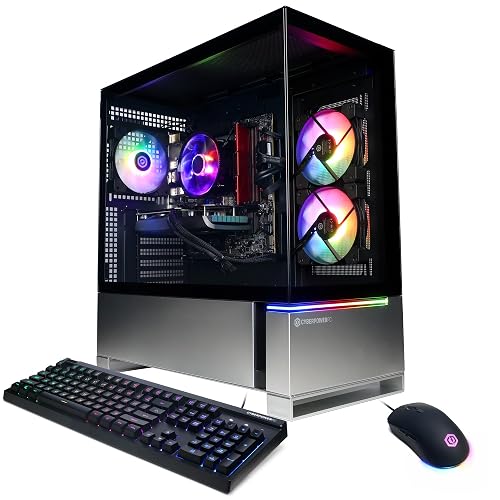
CyberPowerPC Gamer Xtreme VR Gaming PC (GXiVR8060A24)
If you want a VR-ready gaming desktop that balances price, performance, and ease of setup, the CyberPowerPC Gamer Xtreme VR (GXiVR8060A24) is a strong fit. It includes an Intel Core i5-13400F, 16 GB of DDR5 memory, and an NVIDIA GeForce RTX 4060 8 GB, which should handle most VR titles at solid 1080p settings. The 1 TB PCIe Gen4 SSD delivers fast load times, and Windows 11 Home comes preinstalled. You also get WiFi 5, Bluetooth 4.2, RGB styling, a tempered side panel, a keyboard and mouse, plus free lifetime tech support for extra peace of mind.
- GPU:RTX 4060 8GB
- CPU:Intel Core i5-13400F
- Memory:16GB DDR5
- Storage:1TB NVMe SSD
- Wireless:WiFi 5, Bluetooth 4.2
- Included accessories:Keyboard, mouse
- Additional Feature:7.1 channel audio
- Additional Feature:Tempered side panel
- Additional Feature:Custom RGB lighting
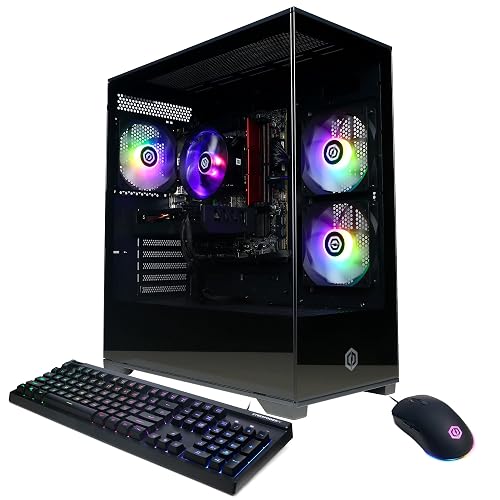
CyberPowerPC Gamer Xtreme VR Gaming PC (GXiVR8060A40)
The CyberPowerPC Gamer Xtreme VR Gaming PC (GXiVR8060A40) is a strong pick for VR-ready gamers who want a balanced, modern desktop without overspending. It features an Intel Core i5-13400F with 10 cores, 16 GB of fast DDR5 memory, and a 1 TB PCIe 4.0 NVMe SSD for quick loads. The RTX 5060 8 GB with GDDR7 helps you push smooth VR gameplay at 1080p. You also get WiFi 6, Bluetooth 5.3, plenty of USB ports, a tempered side panel, RGB lighting, and a keyboard, mouse, and lifetime tech support.
- GPU:RTX 5060 8GB
- CPU:Intel Core i5-13400F
- Memory:16GB DDR5
- Storage:1TB NVMe SSD
- Wireless:WiFi 6, Bluetooth 5.3
- Included accessories:Keyboard, mouse, power cord
- Additional Feature:WiFi 6
- Additional Feature:Bluetooth 5.3
- Additional Feature:USB-C 3.2
CyberPowerPC Gamer Xtreme Gaming PC (GXiVR8040A19)
The CyberPowerPC Gamer Xtreme Gaming PC (GXiVR8040A19) pairs an Intel Core i7-14700F with an NVIDIA GeForce RTX 5060 Ti, delivering the CPU and GPU performance suited for VR gaming and demanding 1080p play. It includes 16GB of DDR5 memory, a 1TB PCIe 4.0 NVMe SSD, and Windows 11 Home in a white tower with tempered glass and RGB accents. Connectivity options include WiFi 6, Bluetooth 5.3, eight USB ports, HDMI, and DisplayPort. A keyboard and mouse are included, and lifetime tech support is provided.
- GPU:RTX 5060 Ti 8GB
- CPU:Intel Core i7-14700F
- Memory:16GB DDR5
- Storage:1TB NVMe SSD
- Wireless:WiFi 6, Bluetooth 5.3
- Included accessories:Keyboard, mouse, power cord
- Additional Feature:White desktop tower
- Additional Feature:20-core i7-14700F
- Additional Feature:8 USB ports
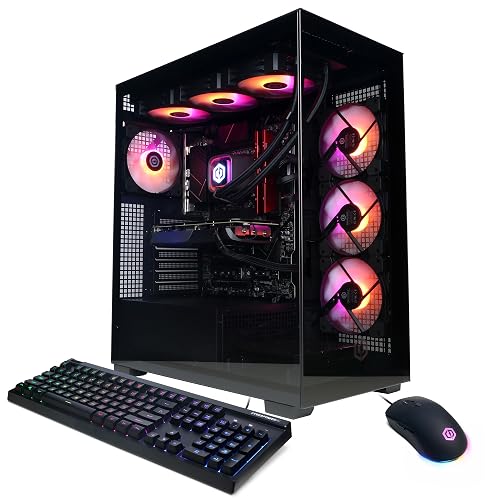
CYBERPOWERPC Gamer Xtreme VR Gaming PC (GXiVR8080A38)
CyberPowerPC’s Gamer Xtreme VR (GXiVR8080A38) is a strong pick if you want a ready-to-run VR desktop with serious headroom, thanks to its Intel Core i9-14900KF and RTX 4070 Super combo. You get 32 GB of DDR5 memory, a 2 TB PCIe Gen4 NVMe SSD, and liquid CPU cooling, so load times stay short and thermals remain controlled. The tempered-glass case adds RGB flair. Windows 11 Home, Wi-Fi 5, Bluetooth 4.2, and an included keyboard and mouse make setup easy. It also offers ample USB, HDMI, and DisplayPort connectivity for your headset and peripherals.
- GPU:RTX 4070 Super 12GB
- CPU:Intel Core i9-14900KF
- Memory:32GB DDR5
- Storage:2TB NVMe SSD
- Wireless:Wi‑Fi 5, Bluetooth 4.2
- Included accessories:Keyboard, mouse
- Additional Feature:Intel Z790 chipset
- Additional Feature:Liquid cool CPU
- Additional Feature:Windows Hello
MSI Codex Z2 Gaming Desktop (A8NVP-436US)
If you want a VR-ready desktop that can handle modern headsets without feeling overbuilt, the MSI Codex Z2 Gaming Desktop (A8NVP-436US) is a strong fit. It features an AMD Ryzen 7 8700F with 8 cores, 16 threads, and boost speeds up to 5.0 GHz, plus an RTX 5070 with 12 GB of Blackwell graphics power. Its 32 GB of DDR5 memory and 2 TB M.2 NVMe SSD keep load times low. You also get Wi-Fi 6, Bluetooth, USB-C, 10 USB ports, air cooling, RGB lighting, and Windows 11 Home.
- GPU:RTX 5070 12GB
- CPU:AMD Ryzen 7 8700F
- Memory:32GB DDR5
- Storage:2TB NVMe SSD
- Wireless:Wi‑Fi 6, Bluetooth
- Included accessories:Keyboard, mouse
- Additional Feature:Air cooling
- Additional Feature:Four cooling fans
- Additional Feature:MSI Center lighting
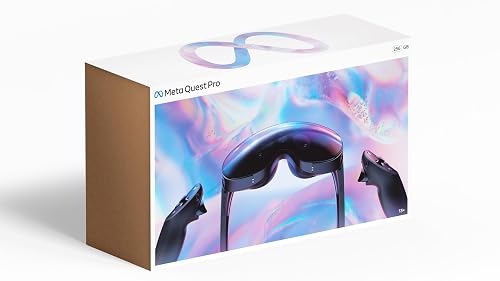
Meta Quest Pro Headset with VR Subscription
The Meta Quest Pro headset bundle is an excellent choice if you want a premium VR setup that combines gaming, learning, and mixed reality in one package. It includes the 256 GB headset and a 1-month Optima Academy Online VR Field Trips subscription, so you can jump into immersive Metaverse environments and themed lessons right away. High-resolution passthrough, full-color sensors, and Meta Avatars make mixed reality feel natural. The Touch Pro Controllers provide precise tracking, finger gestures, and haptics. Pancake lenses, 12 GB RAM, and spatial audio keep performance sharp, comfortable, and versatile.
- GPU:Not included
- CPU:Not included
- Memory:12GB RAM
- Storage:Not included
- Wireless:Not included
- Included accessories:VR subscription bundle
- Additional Feature:Mixed reality passthrough
- Additional Feature:Meta Avatars
- Additional Feature:Quantum dot technology
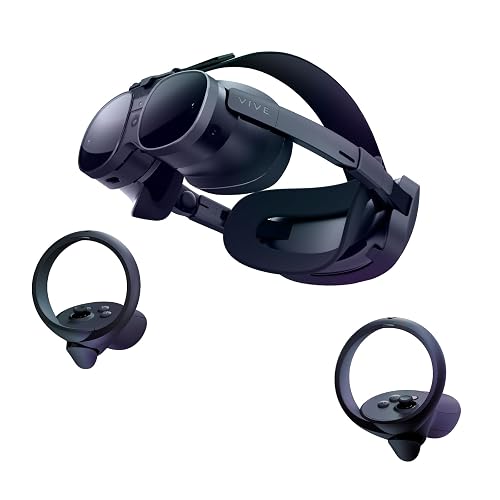
HTC Vive XR Elite VR Headset with Controllers
HTC Vive XR Elite is designed for VR gamers who want both PC-powered performance and standalone flexibility in a compact headset. You can plug it into a VR-ready PC for low-latency, high-fidelity gaming, or use it standalone without base stations. Its 3840 x 1920 display, 110° field of view, and 90 Hz refresh rate deliver sharp, smooth visuals. You get swappable battery power, an adjustable fit, built-in speakers, full-color passthrough, depth sensing, and hand tracking. The Deluxe Pack adds a Face Gasket 2.0, Deluxe Strap, Temple Clips, and an MR Gasket.
- GPU:Not included
- CPU:Not included
- Memory:Not included
- Storage:Not included
- Wireless:Not included
- Included accessories:Controllers, straps, face gaskets
- Additional Feature:Standalone headset
- Additional Feature:110° field of view
- Additional Feature:Hot-swappable battery
Factors to Consider When Choosing Gaming PCs for VR
When choosing a gaming PC for VR, start with a VR-ready graphics card and a powerful processor so your headset runs smoothly. You should also have sufficient memory and fast storage to keep load times low and gameplay responsive. Finally, check connectivity options, including the necessary ports and wireless support, to make setup easier and more reliable.
VR-Ready Graphics Card
A VR-ready graphics card needs enough dedicated VRAM to keep high-resolution textures smooth, so 8 GB is the practical minimum, and 12 GB or more is better for newer headsets and demanding games. You should also look for fast memory, because newer standards like GDDR7 can help keep frame times steadier than older GDDR6 cards. Make sure the card offers at least two high-bandwidth outputs, such as DisplayPort and HDMI, so you can connect modern headsets or extra displays without trouble. For sharper VR, choose a GPU that can handle higher rendering demands, with 1920 x 1080 as a bare minimum, and 3840 x 2160 being far more suitable. A modern PCI Express system, plus solid power and cooling, helps the card stay fast during long sessions.
Processor Performance
For VR gaming, choose a CPU with at least 6 performance cores and 4 efficiency cores, about 10 cores total, to help keep frame times stable while the headset demands low latency. If you stream, record, or run background apps, a 20-core chip can help, but do not ignore single-thread speed, since many game engines still rely on it. Base clocks around 2.5 GHz to 3.2 GHz are common. Sustained boost behavior and cooling matter more than the listed base speed. Favor newer chipsets with DDR5 support, because they help the CPU feed data to the GPU quickly. For demanding VR titles, pick a processor that keeps up with high refresh rates and avoids stutter or dropped frames.
Memory Capacity
Memory matters as much as raw speed in a VR PC. Sixteen gigabytes of RAM is a solid starting point, but 32 GB gives you more breathing room for heavier games, background apps, and smoother multitasking. You will notice fewer stutters when you keep Discord, a browser, or recording software open alongside VR titles. Check the system’s maximum memory support as well, because 96 GB, 128 GB, or even 192 GB indicates how far you can upgrade later. Look for DDR5 speeds around 4800 MT/s to 6000 MHz for responsive performance. A motherboard with four RAM slots usually provides more flexibility than one with two slots, since you can expand gradually. For VR, choose enough memory now, but leave room to grow.
Fast Storage
Fast storage can make a big difference in VR, especially when you are launching games, loading detailed worlds, or updating headset software. Look for an NVMe SSD, ideally a PCIe Gen4 or PCIe 4.0 model, because it will load VR games far faster than older SATA drives. That speed cuts down waiting when you start titles, install patches, or enter environments packed with large texture assets. Capacity matters just as much, though, so a 1 TB SSD is a smart minimum for most VR setups. Your library can grow fast, and headset apps take space too. For smoother everyday use, choose a system with fast solid-state storage and enough free room to avoid running nearly full.
Connectivity Options
Connectivity can make or break a VR-ready gaming PC, so start with the right ports and wireless features. You should have at least one high-speed USB-C port and several USB-A ports so your headset, sensors, and accessories plug in directly without hubs. Aim for eight to ten total USB ports if you run controllers, tracking gear, a keyboard, and a mouse together. For wireless convenience, choose Wi‑Fi 6 and Bluetooth 5.3 to improve pairing and keep VR downloads and streaming stable. A wired Ethernet LAN port helps cut latency and keeps large game downloads consistent. Finally, check the graphics outputs. You should get at least one HDMI port and two DisplayPort connections, since VR setups and multi-monitor gaming rely on them.
Cooling Solution
Cooling is critical in a VR gaming PC because the CPU and GPU can remain under heavy load for long sessions. Choose a system that keeps both chips stable when VR pushes them hard. For midrange builds, strong air cooling can work well, but only if the case has excellent airflow and multiple fans. For high-end CPUs and graphics cards, liquid cooling usually does a better job controlling heat and preventing temperature spikes. A case with front and rear fan placement, for example a 3-front, 1-rear layout, helps pull in cool air and push out hot air efficiently. Better cooling also reduces thermal throttling, giving smoother frame times and more consistent VR performance during long play sessions.
Expansion Potential
When you choose a VR gaming PC, think beyond today’s headset and look for room to grow. Favor a motherboard and case with multiple expansion slots, ideally three to five, so you can add or swap graphics, storage, capture, or networking cards later. Pick a system with at least four RAM slots and a high memory ceiling, such as 128 GB or 192 GB support, because VR workloads can grow fast. Also ensure plenty of USB-C and USB-A ports for headsets, sensors, and accessories without relying on a hub. Start with 1 TB or 2 TB of NVMe storage and extra drive support. Finally, check that the power supply and cooling can handle stronger future components.
Frequently Asked Questions
Which VR Games Demand the Most Powerful PC Hardware?
You’ll stress your PC most with Half-Life: Alyx, Microsoft Flight Simulator VR, Assetto Corsa Competizione, DCS World, and Boneworks. Beauty versus brutality, because you’re pushing high frame rates, dense worlds, and physics-heavy simulations hard.
How Much Desk Space Do Vr-Ready Gaming PCS Usually Need?
You will usually need about 1 to 2 square feet for the tower itself, plus extra room for airflow and cables. For easy access, leave a clear 2-foot-wide area beside your desk.
Can These PCS Support Future VR Headset Upgrades?
Yes, they will often remain capable. Future headsets may require a stronger GPU, more VRAM, and newer ports. You will be better off choosing upgrade-friendly hardware now.
What Accessories Improve VR Comfort and Tracking?
You can improve comfort with a padded face cushion, a counterweight strap, and washable grips. For better tracking, add lighthouse base stations, extra controllers, or ceiling-mounted cables. Keep lenses clean. These measures help you remain comfortable, stable, and immersed for longer.
How Often Should a VR Gaming PC Be Upgraded?
Upgrade your VR gaming PC every 3 to 5 years, or sooner if new headsets stutter, visuals degrade, or you pursue higher refresh rates and resolutions. Check performance yearly, then replace the component or system that limits comfort.




