

You want stronger 4K performance, but you do not want to sacrifice value, and that is exactly where RTX 5070 Ti gaming PCs become interesting. From prebuilt towers like the Skytech Gaming King 95 to build-ready options such as MSI Ventus 3X OC, you will see which systems truly justify their price, cooling, and upgrade paths, and which ones only look ready for 2026.
| MSI Gaming RTX 5070 Ti Ventus 3X OC Graphics Card | 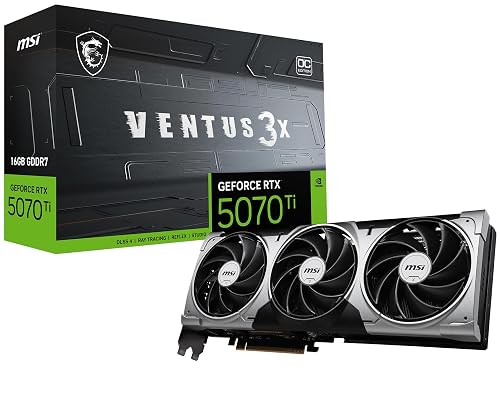 | Best GPU | Graphics Card: RTX 5070 Ti 16GB | CPU: Not included | Memory: Not included | VIEW LATEST PRICE | Read Our Analysis |
| Skytech Gaming King 95 Desktop PC Ryzen 7 9800X3D |  | Best Overall | Graphics Card: RTX 5070 Ti 16GB | CPU: Ryzen 7 9800X3D | Memory: 32GB DDR5 | VIEW LATEST PRICE | Read Our Analysis |
| Lenovo Legion Tower 5i AI-Powered Gaming PC |  | Best Upgrade Pick | Graphics Card: RTX 5070 Ti | CPU: Core Ultra 7 265F | Memory: 32GB DDR5 | VIEW LATEST PRICE | Read Our Analysis |
| TOPGRO T1-Pro Mini Gaming PC (Core i9 RTX 4060) | 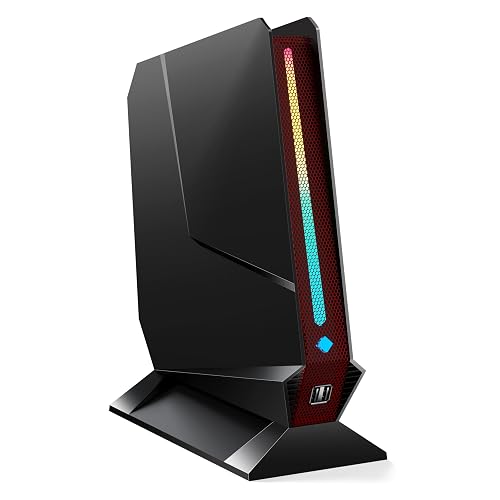 | Best Compact Option | Graphics Card: RTX 4060 8GB | CPU: Core i9-13900HK | Memory: 32GB DDR5-5200 | VIEW LATEST PRICE | Read Our Analysis |
| Skytech Gaming King 95 Desktop PC Ryzen 7 9800X3D | 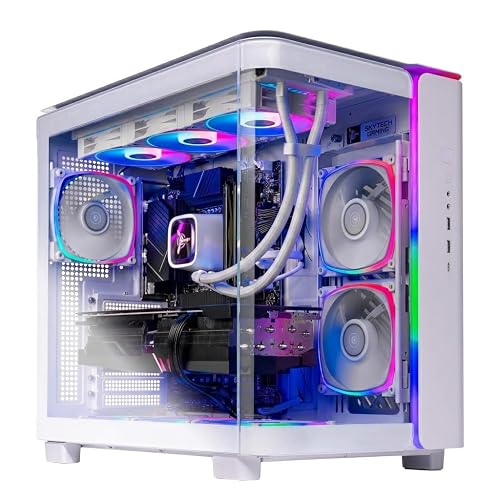 | Best For Gaming | Graphics Card: RTX 5070 Ti 16GB | CPU: Ryzen 7 9800X3D | Memory: 32GB DDR5 | VIEW LATEST PRICE | Read Our Analysis |
| Horizon Autherium Dragon RGB Gaming PC (RTX 5070) | 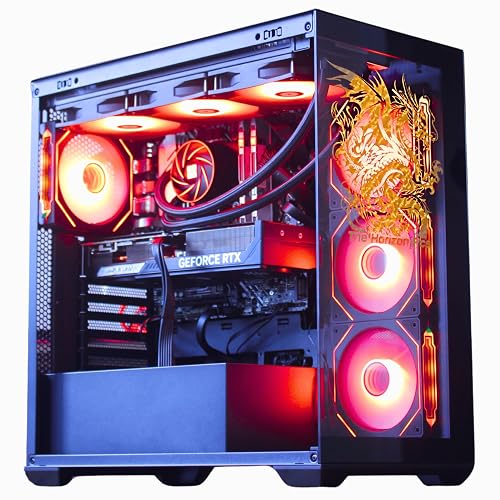 | Best For Power Users | Graphics Card: RTX 5070 12GB | CPU: Core i9 KF | Memory: 64GB DDR4 | VIEW LATEST PRICE | Read Our Analysis |
| Thermaltake LCGS Versa i570S Gaming Desktop (H16S-B760-570-LCS) | 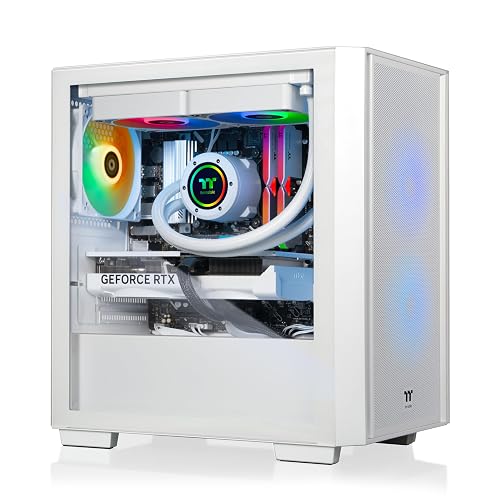 | Best Premium Build | Graphics Card: RTX 5070 12GB | CPU: Core i9-14900KF | Memory: 32GB DDR5 | VIEW LATEST PRICE | Read Our Analysis |
More Details on Our Top Picks
MSI Gaming RTX 5070 Ti Ventus 3X OC Graphics Card
The MSI Gaming RTX 5070 Ti 16G Ventus 3X OC is a strong pick if you want a high-performance gaming PC that stays clean and practical rather than flashy. You get NVIDIA’s Blackwell architecture, 16GB of GDDR7 memory, and a 256-bit bus for smooth modern gaming. MSI sets the GPU at 2497 MHz, and adds DLSS 4 support for improved frame rates. Its VENTUS cooler uses TORX Fan 5.0, a nickel-plated copper baseplate, and Core Pipe contact for efficient heat control. You also get three DisplayPort 2.1a ports, HDMI 2.1b, and a three-year warranty.
- Graphics Card:RTX 5070 Ti 16GB
- CPU:Not included
- Memory:Not included
- Storage:Not included
- Cooling:Triple-fan air cooling
- Operating System:Not included
- Additional Feature:TORX Fan 5.0
- Additional Feature:Nickel-plated copper baseplate
- Additional Feature:Triple DisplayPort 2.1a
Skytech Gaming King 95 Desktop PC Ryzen 7 9800X3D
If you want a high-end RTX 5070 Ti gaming PC that balances raw speed with strong cooling, the Skytech Gaming King 95 is a standout pick. It includes an AMD Ryzen 7 9800X3D, 32GB of DDR5 6000 RGB memory, and a 2TB Gen4 NVMe SSD for fast launches and smooth multitasking. The RTX 5070 Ti 16GB delivers ultra settings at 1440p with 60+ FPS in demanding games. A 360mm AIO cooler, ARGB fans, and an 850W Gold PSU help keep performance steady. You also get Windows 11, Wi-Fi, no bloatware, and a free keyboard and mouse.
- Graphics Card:RTX 5070 Ti 16GB
- CPU:Ryzen 7 9800X3D
- Memory:32GB DDR5
- Storage:2TB NVMe SSD
- Cooling:360mm AIO liquid
- Operating System:Windows 11 Home
- Additional Feature:360mm AIO liquid cooler
- Additional Feature:Includes keyboard and mouse
- Additional Feature:1440p Quad HD
Lenovo Legion Tower 5i AI-Powered Gaming PC
Lenovo’s Legion Tower 5i AI-Powered Gaming PC is a strong pick for you if you want an RTX 5070 Ti desktop that can handle AAA gaming, streaming, and creative work without slowing down. Its Intel Core Ultra 7 265F and 32GB of DDR5 memory help you enjoy smooth multitasking, fast loads, and ultra-high FPS. You can expand memory to 128GB and add more storage as your needs grow. The toolless side panel makes upgrades easy, and RGB lighting adds flair. With WiFi 6E, 2.5G Ethernet, and quiet 180W cooling, it stays fast and cool.
- Graphics Card:RTX 5070 Ti
- CPU:Core Ultra 7 265F
- Memory:32GB DDR5
- Storage:1TB SSD
- Cooling:Air cooling
- Operating System:Not included
- Additional Feature:Transparent tool-less side panel
- Additional Feature:Expandable up to 128GB
- Additional Feature:3 months Game Pass
TOPGRO T1-Pro Mini Gaming PC (Core i9 RTX 4060)
For gamers who want a compact desktop that can still handle modern 1080p and 1440p play, the TOPGRO T1-Pro Mini Gaming PC pairs an Intel Core i9-13900HK with an RTX 4060 mobile GPU, delivering strong performance in a small black chassis. It includes 32GB of DDR5-5200 memory, a 1TB PCIe 4.0 SSD, and room to expand storage to 8TB. Dual HDMI ports support 4K at 60Hz. WiFi 6E, Bluetooth 5.3, and 2.5Gbps LAN keep you connected. Windows 11 Pro, adjustable RGB lighting, and a two-year warranty complete the package.
- Graphics Card:RTX 4060 8GB
- CPU:Core i9-13900HK
- Memory:32GB DDR5-5200
- Storage:1TB NVMe SSD
- Cooling:Adjustable fan cooling
- Operating System:Windows 11 Pro
- Additional Feature:2x HDMI 2.0 ports
- Additional Feature:Bluetooth 5.3
- Additional Feature:Expandable storage up to 8TB
Skytech Gaming King 95 Desktop PC Ryzen 7 9800X3D
Skytech’s King 95 is designed for players who want a top-tier 1440p machine built around AMD Ryzen 7 9800X3D and NVIDIA RTX 5070 Ti. It includes 8 fast cores, 32 GB of DDR5 RGB memory, and a 1 TB Gen4 NVMe SSD for quick loads and responsive multitasking. A 360 mm AIO cooler and an 850 W Gold ATX 3 power supply help keep performance steady. With Wi-Fi, ample USB ports, HDMI, DisplayPort, and a bundled keyboard and mouse, you can start gaming on Windows 11 Home right away.
- Graphics Card:RTX 5070 Ti 16GB
- CPU:Ryzen 7 9800X3D
- Memory:32GB DDR5
- Storage:1TB NVMe SSD
- Cooling:360mm AIO liquid
- Operating System:Windows 11 Home
- Additional Feature:King 95 White case
- Additional Feature:Lifetime technical support
- Additional Feature:16:9 aspect ratio
Horizon Autherium Dragon RGB Gaming PC (RTX 5070)
If you want a high-end RTX 5070 gaming PC that also handles heavy multitasking, the Horizon Autherium Dragon RGB is a strong fit thanks to its Core i9 KF processor, 64GB of RAM, and 10TB of total storage. You get a 16-core chip with up to 5.4 GHz boost, a factory overclocked RTX 5070 with 12GB GDDR7, and DLSS 4.0 for smooth play. The 360mm liquid cooling, 11 fan layout, and 850W Gold PSU keep it stable. You also get Wi-Fi 6E, 2.5 Gb Ethernet, plenty of USB ports, and Windows 11 Pro.
- Graphics Card:RTX 5070 12GB
- CPU:Core i9 KF
- Memory:64GB DDR4
- Storage:10TB total storage
- Cooling:360mm liquid cooling
- Operating System:Windows 11 Pro
- Additional Feature:10TB total storage
- Additional Feature:11 total fans
- Additional Feature:Magnetic dust filters
Thermaltake LCGS Versa i570S Gaming Desktop (H16S-B760-570-LCS)
Thermaltake’s LCGS Versa i570S Gaming Desktop is a strong pick if you want a compact, white, RTX 5070 Ti-ready style gaming tower. It pairs an Intel Core i9-14900KF with 32GB of DDR5 memory and a 1TB NVMe SSD. You get an RTX 5070 with 12GB of GDDR7, liquid cooling, and a mesh front panel to help airflow. WiFi, DisplayPort, HDMI, and three USB ports keep your setup flexible. Windows 11, the full-size keyboard, and the clean PSU cover make it easy to use for gaming and everyday tasks.
- Graphics Card:RTX 5070 12GB
- CPU:Core i9-14900KF
- Memory:32GB DDR5
- Storage:1TB NVMe SSD
- Cooling:240mm liquid cooling
- Operating System:Windows 11
- Additional Feature:Mesh front panel
- Additional Feature:Full-length PSU cover
- Additional Feature:240mm radiator
Factors to Consider When Choosing Gaming PCs With RTX 5070 Ti
When choosing a gaming PC with an RTX 5070 Ti, check the GPU cooling design and ensure the case provides sufficient airflow and clearance. Pair the GPU with a balanced CPU so neither component bottlenecks the other, and include enough memory and storage for modern games. Finally, confirm the power supply has adequate headroom to support the system safely under load.
GPU Cooling Design
GPU cooling design matters a lot with an RTX 5070 Ti, because you need a setup that moves heat away from the GPU and its 16 GB of GDDR7 memory quickly enough to keep performance steady. Look for coolers with linked fan blades, strong airflow pressure, and a large heatsink; these features help you hold boost clocks during long sessions. A nickel-plated copper baseplate and direct-contact heat pipes pull heat from the GPU die and nearby memory chips more efficiently, reducing thermal buildup. Triple-fan open-air coolers usually work best, since they spread heat across a wider area compared to compact options. Also choose a case with clear exhaust paths and room for airflow, or the card can run hotter under sustained load.
CPU Pairing Balance
A well-matched CPU is just as important as the RTX 5070 Ti itself, because it keeps the GPU fed and prevents frame-rate ceilings from holding back high-refresh 1440p or 4K gaming. Aim for a modern high-end 8-core to 16-core processor that can boost to around 5.0 GHz or higher; that is a practical match for this class of graphics card. If you choose a much weaker chip, you will likely hit CPU bottlenecks in esports titles, open-world games, and busy multiplayer matches. Look for solid cache, core count, and memory bandwidth as well, because they help smooth 1% lows and keep frame delivery consistent. That balance also helps when you stream or create content, allowing the CPU to handle extra tasks while the RTX 5070 Ti focuses on rendering and AI features.
Memory And Storage
Once the CPU match is sorted, memory and storage become the next big parts of getting the most from an RTX 5070 Ti gaming PC. Aim for 32 GB of DDR5 as your baseline, since it provides smooth gameplay, solid streaming, and easy multitasking. If you edit video, run heavy apps, or keep many background tasks open, 64 GB makes more sense. For speed, look for DDR5 rated around 5600 to 6000 MT/s, which helps keep the system responsive. For storage, 1 TB works for a smaller library. Choose 2 TB or more to give room for modern AAA games and updates. A Gen4 NVMe M.2 SSD is ideal for fast boots and quick loading, and additional M.2 or SATA expansion keeps upgrades simple later.
Power Supply Headroom
For an RTX 5070 Ti gaming PC, power supply headroom matters as much as raw wattage, so choose a unit that can stay comfortably above the system’s peak draw. You want enough margin for GPU boost behavior and brief transient spikes that can push power demand past the average number on paper. For many builds with a high-end CPU, plus several drives or cooling components, an 850W PSU is a sensible target. An 80 Plus Gold model can help you hold stable output under load while cutting excess heat and fan noise. If you expect to add more storage, fans, or other hardware later, leave extra capacity now. A PSU that rarely runs near its limit usually lasts longer and performs more predictably.
Case Airflow Clearance
After you have settled on the right PSU headroom, the next bottleneck is often the case itself. You need enough internal clearance for an RTX 5070 Ti, since many cards stretch to about 15.2 inches and still need space for front fans, radiators, and cable bends. Do not cram the chassis; give the GPU breathing room so heat can escape instead of building up. Prioritize strong front-to-back airflow, especially with a card that boosts to 2497 MHz and uses 16 GB of GDDR7 memory under heavy gaming loads. Mesh-front cases usually help, because unrestricted intake lets a triple-fan cooler exhaust hot air more efficiently. Also make sure thick 240 mm or 360 mm coolers fit without starving the graphics card of fresh air.
Display Resolution Support
When you choose an RTX 5070 Ti gaming PC, make sure its display support matches the screen you plan to use, starting with at least 2560 x 1440 for the best balance of sharp detail and smooth performance. This resolution lets you enjoy the GPU’s sweet spot without wasting power on pixels you cannot see clearly. If you will game or edit on a 4K monitor, confirm the system supports 3840 x 2160 output so it can drive ultra-high-definition visuals properly. For multi-monitor rigs or long-term flexibility, look for support near 7680 x 4320. Also check that the PC includes modern standards like DisplayPort 2.1a or HDMI 2.1b. Match resolution support to your monitor’s aspect ratio and use, or you will not benefit from extra headroom.
Port And Connectivity
Ports and connectivity matter as much as raw graphics power, because your RTX 5070 Ti PC still needs the right outputs and links to match your setup. Check for multiple DisplayPort 2.1a outputs and at least one HDMI 2.1b port so you can drive modern 4K or 8K monitors without compromise. Make sure the system supports your target resolution and refresh rate, since this class of GPU can handle up to 7680 x 4320 with the right hardware. Also look for a PCI Express graphics slot with enough clearance around the card for easy access and clean cable routing. Finally, verify you have plenty of USB 2.0, USB 3.0, USB 3.2, and USB-C ports, plus 2.5G Ethernet and Wi-Fi 6E or better for fast, stable connectivity.
Warranty And Support
Warranty and support can matter as much as the hardware itself, because a strong RTX 5070 Ti gaming PC should come with protection if something goes wrong. Check the parts and labor warranty length first, since coverage can run from one year to three years or more. Longer coverage lowers your repair risk. Make sure the seller includes free technical support for setup, troubleshooting, and hardware questions, because quick help saves time. Also confirm whether the warranty covers only parts or both parts and labor, since full coverage gives you broader protection. If support is only temporary, consider a better option. For prebuilt systems, verify shipment testing and packaging; proper checks and safe delivery reduce the chance of defects when your PC arrives.
Frequently Asked Questions
How Much Power Does an RTX 5070 Ti Require?
You’ll typically need about 300 watts for an RTX 5070 Ti. Pair it with a quality 750 watt PSU or higher for headroom, stability, and CPU intensive gaming setups.
Is 32GB RAM Enough for 2026 Gaming?
Yes, 32GB RAM is enough for 2026 gaming, your rig will not need a skyscraper for one game, just a solid apartment. You will play smoothly, even with browsers and chat apps open, without worrying.
Can These PCS Handle 4K Gaming Smoothly?
Yes, you can game at 4K smoothly on these PCs in many titles, especially when using DLSS and optimized settings. You may need to dial back ultra ray tracing in the heaviest games at times.
Should I Choose Intel or AMD for RTX 5070 Ti?
Choose AMD for better gaming value and smoother 1% lows unless you need Intel’s stronger productivity or specific features. With an RTX 5070 Ti, either CPU vendor works well. Decide based on your budget and workloads.
Is Liquid Cooling Necessary for This GPU?
No, you generally do not need liquid cooling for this GPU. A good air-cooled case with quality fans is sufficient, unless you plan to overclock or build an exceptionally quiet system with very tight thermal constraints.




