


If your ping spikes for even a second, these router deals can mean the difference between winning and getting wrecked.
You will find Wi‑Fi 7 and 6E options, multi‑gig ports, and QoS features that help keep game traffic steady.
The question is which model fits your setup best, because a few of these picks could change your network more than you expect.
| GL.iNet Flint 3 Tri-Band WiFi 7 Router | 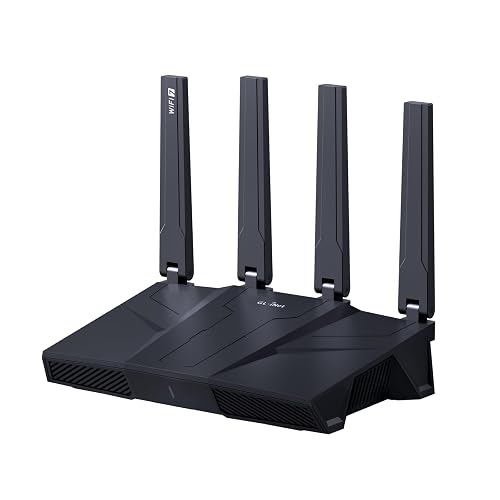 | Best Overall | Wi‑Fi Generation: Wi‑Fi 7 | Band Support: Tri-band | Gaming Features: Low-latency gaming | VIEW LATEST PRICE | Read Our Analysis |
| ASUS ROG Rapture WiFi 6E Gaming Router (GT-AXE16000) | 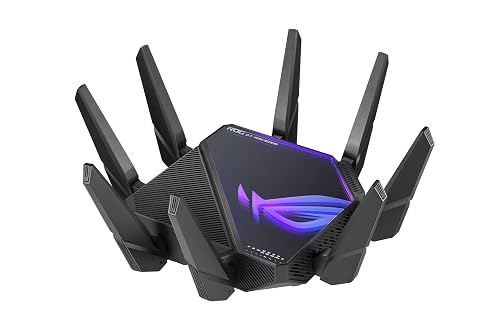 | Best Premium | Wi‑Fi Generation: Wi‑Fi 6E | Band Support: Quad-band | Gaming Features: Triple-level acceleration | VIEW LATEST PRICE | Read Our Analysis |
| NETGEAR Nighthawk AX5 WiFi 6 Router (RAX43) (Renewed) | 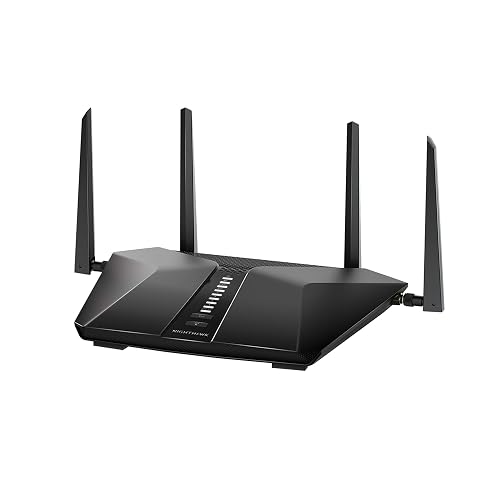 | Best Budget | Wi‑Fi Generation: Wi‑Fi 6 | Band Support: Dual-band | Gaming Features: Gaming optimized | VIEW LATEST PRICE | Read Our Analysis |
| TP-Link Tri-Band AXE5400 Wi-Fi 6E Gaming Router |  | Best Feature-Rich | Wi‑Fi Generation: Wi‑Fi 6E | Band Support: Tri-band | Gaming Features: Game acceleration | VIEW LATEST PRICE | Read Our Analysis |
| ASUS RT-AX82U AX5400 WiFi 6 Gaming Router |  | Best Design | Wi‑Fi Generation: Wi‑Fi 6 | Band Support: Dual-band | Gaming Features: Game acceleration | VIEW LATEST PRICE | Read Our Analysis |
| NETGEAR Nighthawk WiFi 6 Router (RAX36) | 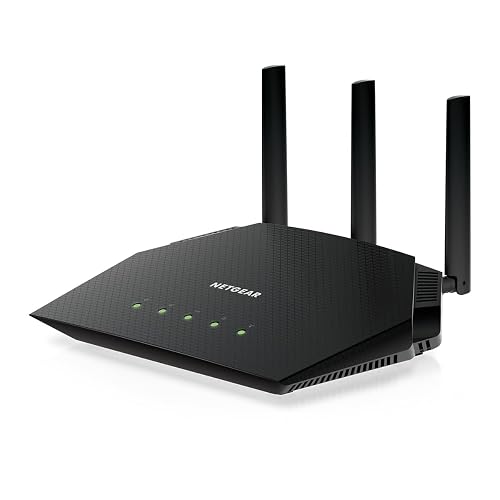 | Best For Small Homes | Wi‑Fi Generation: Wi‑Fi 6 | Band Support: Dual-band | Gaming Features: Gaming streaming | VIEW LATEST PRICE | Read Our Analysis |
| MSI Radix AXE6600 WiFi 6E Gaming Router | 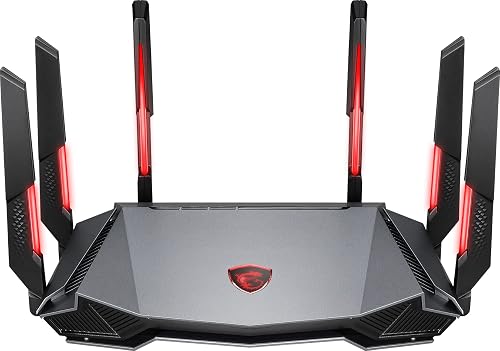 | Best For Gamers | Wi‑Fi Generation: Wi‑Fi 6E | Band Support: Tri-band | Gaming Features: Game accelerator | VIEW LATEST PRICE | Read Our Analysis |
More Details on Our Top Picks
GL.iNet Flint 3 Tri-Band WiFi 7 Router
The GL.iNet Flint 3 Tri-Band WiFi 7 Router is a strong pick if you want a gaming router that can also handle a crowded, high-speed home network. It offers Wi‑Fi 7, tri-band coverage, and support for the 6 GHz band, so your devices can move fast with less lag. Its five 2.5G-capable LAN ports keep wired gear responsive. MLO, 4K QAM, and preamble puncturing boost efficiency. You can also run VPNs at impressive speeds, block ads with AdGuard Home, and secure your setup with WPA3, firewall protection, and Bark parental controls.
- Wi‑Fi Generation:Wi‑Fi 7
- Band Support:Tri-band
- Gaming Features:Low-latency gaming
- Security:Ad/tracker blocking
- Device Capacity:100+ devices
- Management:App/web control
- Additional Feature:2.5G-capable ports
- Additional Feature:AdGuard Home support
- Additional Feature:Bark parental controls
ASUS ROG Rapture WiFi 6E Gaming Router (GT-AXE16000)
If you want a serious upgrade for competitive play and whole-home coverage, the ASUS ROG Rapture WiFi 6E Gaming Router (GT-AXE16000) stands out with quad-band WiFi 6E, dual 10G ports, and a massive 16,000 Mbps combined speed. You will also get a 6 GHz band for lower latency, less interference, and wider channels. ASUS RangeBoost Plus helps extend coverage, and triple-level game acceleration keeps your matches responsive. With AiMesh, QoS, parental controls, WPA3 security, and six ports, you can build a fast, secure network for consoles, PCs, and more.
- Wi‑Fi Generation:Wi‑Fi 6E
- Band Support:Quad-band
- Gaming Features:Triple-level acceleration
- Security:Internet security
- Device Capacity:Multi-device support
- Management:App/web control
- Additional Feature:Dual 10G ports
- Additional Feature:ASUS RangeBoost Plus
- Additional Feature:Instant Guard protection
NETGEAR Nighthawk AX5 WiFi 6 Router (RAX43) (Renewed)
Looking for a renewed gaming router that can handle fast-paced play and heavy streaming? The NETGEAR Nighthawk AX5 WiFi 6 Router (RAX43) delivers AX4200 speeds with up to 4.2 Gbps total throughput, and 5-stream dual-band Wi-Fi 6 for stronger performance. It can cover about 2,000 sq. ft., providing smoother gaming, UHD video, and faster transfers. A 1.5 GHz triple-core processor keeps everything running efficiently, and the Nighthawk app simplifies setup. NETGEAR Armor protects your network and devices from hackers, ransomware, and brute-force attacks.
- Wi‑Fi Generation:Wi‑Fi 6
- Band Support:Dual-band
- Gaming Features:Gaming optimized
- Security:NETGEAR Armor
- Device Capacity:4x capacity
- Management:Nighthawk app
- Additional Feature:1.5 GHz tri-core
- Additional Feature:40% throughput boost
- Additional Feature:Renewed unit
TP-Link Tri-Band AXE5400 Wi-Fi 6E Gaming Router
TP-Link’s Archer GXE75 is a strong pick if you want a Wi‑Fi 6E gaming router that can handle fast-paced play and a busy home network at the same time. You get tri-band 6 GHz, 5 GHz, and 2.4 GHz coverage, plus speeds up to 5.4 Gbps and a 2.5G WAN/LAN port for faster upstream traffic. Its game acceleration, QoS, and real-time panel help cut lag and manage devices. You can also use EasyMesh, VPN tools, WPA3, and HomeShield. The Tether app makes setup simple, and it supports Alexa and Google Assistant.
- Wi‑Fi Generation:Wi‑Fi 6E
- Band Support:Tri-band
- Gaming Features:Game acceleration
- Security:HomeShield antivirus
- Device Capacity:100 devices
- Management:Tether/web control
- Additional Feature:Game panel dashboard
- Additional Feature:EasyMesh support
- Additional Feature:USB 3.0 port
ASUS RT-AX82U AX5400 WiFi 6 Gaming Router
The ASUS RT-AX82U AX5400 WiFi 6 Gaming Router is a strong pick for gamers who want fast, responsive wireless performance without overcomplicating their setup. It delivers WiFi 6 speeds up to 5400 Mbps, dual-band coverage, 160 MHz channels, and MU-MIMO for smoother connections. Game Acceleration helps cut lag, and the ASUS Router app, with Mobile Game Mode, provides one-tap latency reduction. You also get a dedicated gaming port, AiMesh support for whole-home expansion, AiProtection Pro, WPA3, parental controls, and customizable Aura RGB lighting.
- Wi‑Fi Generation:Wi‑Fi 6
- Band Support:Dual-band
- Gaming Features:Game acceleration
- Security:AiProtection Pro
- Device Capacity:Mesh expansion
- Management:ASUS Router app
- Additional Feature:160 MHz support
- Additional Feature:ASUS Aura RGB
- Additional Feature:Mobile Game Mode
NETGEAR Nighthawk WiFi 6 Router (RAX36)
Built for players and streamers who need fast, reliable wireless without paying for a full mesh system, the NETGEAR Nighthawk WiFi 6 Router (RAX36) delivers AX3000 WiFi 6 speeds, coverage up to 2,000 sq. ft., and support for up to 25 devices. You can game, stream, and join video calls without bogging down your network. Four Gigabit Ethernet ports let you wire in consoles or PCs, and the USB 3.0 port adds flexibility. It connects to your separate modem and supports cable, fiber, DSL, and satellite internet up to 1 Gbps. Built-in VPN support is included.
- Wi‑Fi Generation:Wi‑Fi 6
- Band Support:Dual-band
- Gaming Features:Gaming streaming
- Security:Built-in VPN
- Device Capacity:25 devices
- Management:App control
- Additional Feature:Built-in VPN
- Additional Feature:USB 3.0 port
- Additional Feature:Supports 1 Gbps
MSI Radix AXE6600 WiFi 6E Gaming Router
If you need a gaming router that can handle multiple devices without slowing your match, the MSI Radix AXE6600 WiFi 6E Gaming Router is a strong choice. It provides tri-band WiFi 6E on 2.4 GHz, 5 GHz, and 6 GHz, plus 8-stream support for up to 6.6 Gbps of aggregate throughput. A 1.8 GHz quad-core processor delivers reliable, low-latency connections for every device in your home. AI QoS prioritizes traffic automatically, and the game accelerator keeps your connection steady. Mystic Light RGB adds style and customization.
- Wi‑Fi Generation:Wi‑Fi 6E
- Band Support:Tri-band
- Gaming Features:Game accelerator
- Security:AI QoS
- Device Capacity:Multi-user support
- Management:AI QoS control
- Additional Feature:1.8 GHz quad-core
- Additional Feature:Mystic Light RGB
- Additional Feature:8-stream tri-band
Factors to Consider When Choosing Gaming Router Deals January 2026
When you compare gaming router deals in January 2026, start with the Wi‑Fi generation so you get the speed and range your setup needs. You should also look for latency reduction features, multi‑band coverage, and gaming QoS controls that keep your games smooth under load. Do not skip security and parental controls, as they help you protect your network and manage access with ease.
Wi-Fi Generation
Wi‑Fi generation is the first spec to check in gaming router deals: pick the newest standard your devices support, whether that is Wi‑Fi 6, 6E, or 7, because each step up brings higher speeds, better spectral efficiency, and lower latency. Wi‑Fi 6 gives you strong 2.4 and 5 GHz performance and optional 160 MHz channels, while 6E adds the cleaner 6 GHz band for less interference. Wi‑Fi 7 goes further with wider channels, Multi‑Link Operation, and higher throughput, which helps when you are gaming while others stream, download, or call. Newer standards also use OFDMA, MU‑MIMO, and 4K or 1024‑QAM to handle more devices at once. Buy the newest generation only if your PC, console, or adapter can actually use it.
Latency Reduction Features
Latency matters as much as raw speed in gaming router purchases, so look for features that keep packets moving smoothly under load. Prioritize MLO and enhanced OFDMA, since these can combine channels across bands, cut retransmissions, and trim latency when your network gets crowded. Give priority to game acceleration, QoS, and traffic shaping so your console or PC gets first dibs on bandwidth and ping spikes stay low. Wider 160 MHz channels, 6 GHz access, and 4K QAM also reduce buffering delays when you are pushing lots of data. Do not overlook a fast multi core CPU and at least 1 GB of RAM, because they help the router process packets, VPNs, and rules without slowing down. Features such as BSS coloring, preamble puncturing, and TWT also help keep interference low.
Multi-Band Coverage
To keep gaming smooth across busy homes, choose a tri-band or quad-band router with a 6 GHz band, especially if you are juggling gaming, 4K/8K streaming, and background devices at the same time. Check each band’s peak PHY rate and the router’s total throughput so you do not bottleneck a single channel during long matches. Look for Multi-Link Operation and band steering, since they let your gaming traffic shift across bands for steadier latency and quicker recovery from interference. Remember that 5 GHz and 6 GHz deliver faster speeds but shorter range, so match the antenna count and coverage claims to your layout. If your home is large, plan wired backhaul or extenders. Also confirm the router can handle 50 to 100 plus devices without slowing play.
Gaming QoS Controls
Dial in QoS before you buy, because the best gaming router deals in January 2026 should let you set device and app level priorities for consoles and PCs, not just a generic “gaming mode.” You will want configurable traffic shaping with uplink and downlink limits, plus a clear latency target so your ping stays in competitive range during peak hours. Look for adaptive QoS that identifies game packets and gives them priority while your household streams 4K video. Make sure the router can handle 2.5G or multi gig WAN and LAN speeds, otherwise QoS will not have enough headroom to work well. Advanced controls, such as per device scheduling, WRR, and fq_codel or CAKE, can keep latency steady. If you game over a VPN, verify that the router can exempt that tunnel from priority rules.
Security And Parental Controls
Once you have tuned QoS for smooth gameplay, shift your attention to security and family controls, because a gaming router should protect your network as well as it prioritizes traffic. Check for WPA3 and WPA2-Enterprise so you can shield guest devices and logins from snoops. You should also require firmware updates at least quarterly, with a simple update button, so patching never becomes a chore. Built-in DNS ad and tracker blocking, or support for tools like AdGuard Home, helps you block malicious domains and reduce privacy leaks. For kids, choose routers with schedules, per-device or per-profile filters, and activity reports. Finally, favor secure remote admin through encrypted cloud access, two-factor authentication, or VPN management, and disable cloud services or WPS when you do not need them.
Frequently Asked Questions
Do Gaming Routers Improve Ping on All Internet Plans?
No, you cannot expect a gaming router to lower ping on every plan; it is a skilled ferryman, not a miracle. You will see gains only when your home network, congestion, and ISP routing allow it to steer more effectively.
Is Wi-Fi 7 Necessary for Competitive Gaming Today?
No, you do not need Wi-Fi 7 for competitive gaming today. You will get better results from a stable, low-latency connection, a wired Ethernet link, and proper router placement. Wi-Fi 7 can help, but it is not essential yet.
Can a Gaming Router Replace a Separate Mesh System?
A gaming router can replace your mesh system if your place is small, but you will lose blanket coverage. In a larger home, use mesh nodes to keep every room on the fast signal.
Are Renewed Gaming Routers Reliable for Long-Term Use?
Renewed gaming routers can be reliable for long-term use if you purchase from reputable sellers, confirm warranty coverage, and verify the device condition. You will save money, but do not expect the same lifespan or pristine components as a brand-new unit.
How Often Do Gaming Router Deals Usually Change?
Deals can change almost hourly, and you’ll see big swings during sales events. Check daily, because retailers slash prices, then pull them back quickly. Weekends and holidays usually bring the best surprises.




