


You might not realize that a wheel’s rotation range and pedal resistance can change how quickly you improve in a racing game. When you choose the right setup, you do more than steer better, you feel every corner, curb, and braking point with greater control. From entry-level options to sim-grade models, the best picks can transform your desk into something far more convincing. One of them may fit your style better than you expect.
| Racing Wheel Stand for Logitech G25/G27/G29/G920 | 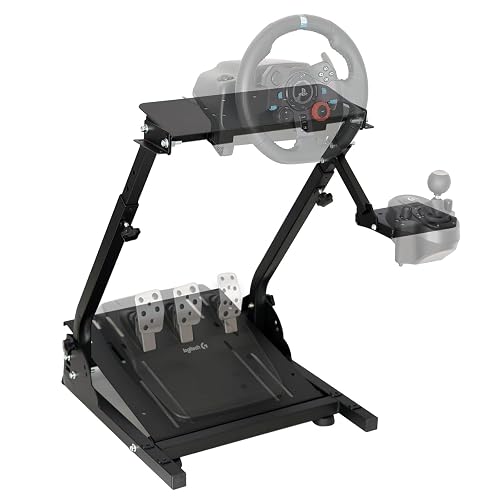 | Best for Sim Setups | Compatibility: Logitech/Thrustmaster, PC/console | Pedals: Not included | Shifter: Not included | VIEW LATEST PRICE | Read Our Analysis |
| PXN V3 PRO Racing Wheel with Pedals | 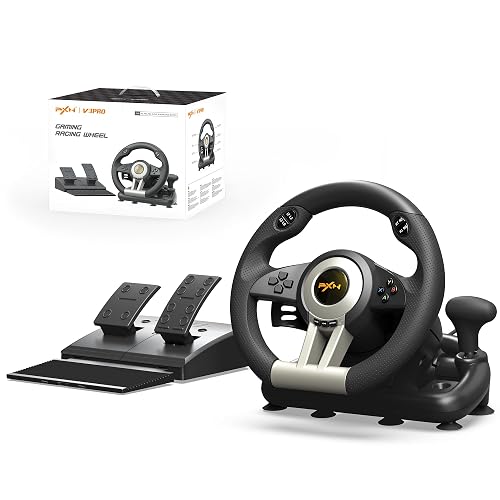 | Best for Beginners | Compatibility: PC/PS4/PS3/Xbox/Switch | Pedals: Included, 2-pedal set | Shifter: Sequential shifter | VIEW LATEST PRICE | Read Our Analysis |
| PXN V9 Racing Steering Wheel with Shifter & Pedals | 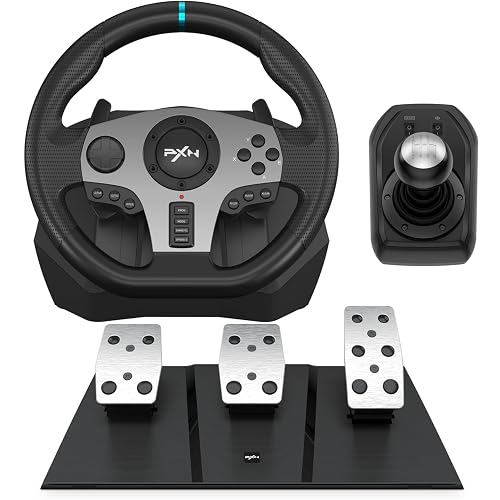 | Best for Immersion | Compatibility: PC/PS4/PS3/Xbox/Switch | Pedals: Included, 3-pedal set | Shifter: Included | VIEW LATEST PRICE | Read Our Analysis |
| DOYO Gaming Racing Wheel with Pedals for Multiple Platforms | 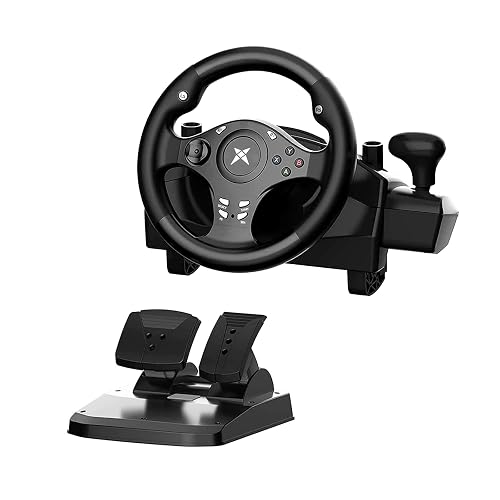 | Best for Customization | Compatibility: PC/PS4/PS3/Xbox/Switch/Android | Pedals: Included, split brake/throttle | Shifter: Not included | VIEW LATEST PRICE | Read Our Analysis |
| HORI Wireless Racing Wheel Apex for PlayStation | 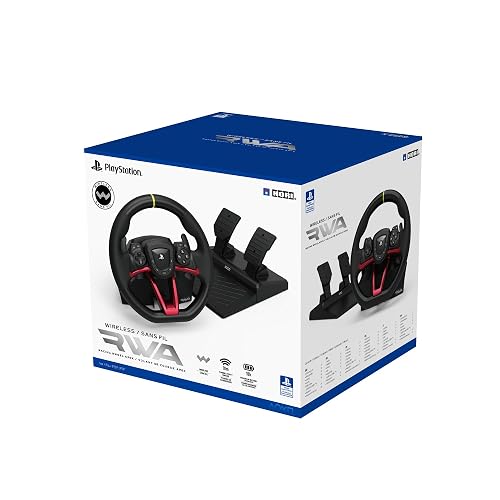 | Best Wireless Option | Compatibility: PS5/PS4/PC | Pedals: Full-size pedals | Shifter: Paddle shifters | VIEW LATEST PRICE | Read Our Analysis |
| PXN V9 Gaming Racing Wheel with Pedals and Shifter | 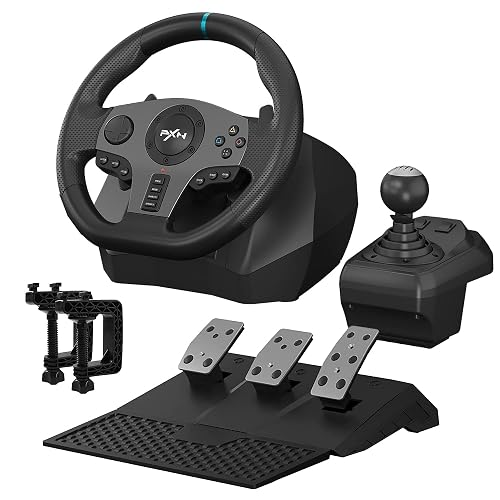 | Best Advanced Pick | Compatibility: PC/PS3/PS4/Xbox/Switch | Pedals: Included, 3-pedal set | Shifter: H-pattern shifter | VIEW LATEST PRICE | Read Our Analysis |
| FASTSNAIL Steering Wheels for Nintendo Switch 2/1/OLED | 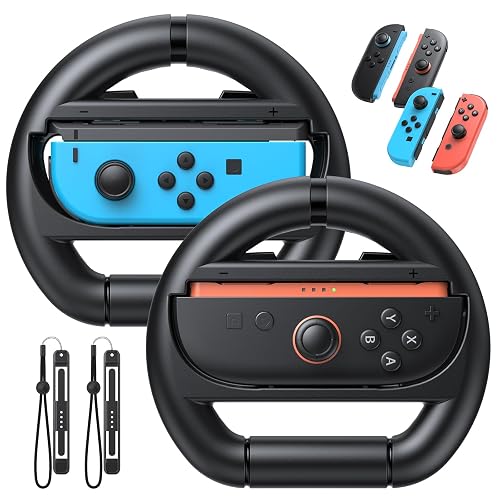 | Best for Switch Players | Compatibility: Switch 2/Switch/OLED | Pedals: Not included | Shifter: Not included | VIEW LATEST PRICE | Read Our Analysis |
More Details on Our Top Picks
Racing Wheel Stand for Logitech G25/G27/G29/G920
If you already own a Logitech G25, G27, G29, or G920, this racing wheel stand is a smart choice because it provides a stable, low-vibration setup without taking over your room. The height adjusts from 25.6 to 31.9 inches, and the wheel plate tilts to match your driving style. Steel tubes, extra-wide mounting panels, and an anti-slip mat keep everything secure. When you are finished, fold it up for compact storage. It is also compatible with select Thrustmaster wheels, and it supports PS3, PS4, PC, and Xbox One.
- Compatibility:Logitech/Thrustmaster, PC/console
- Pedals:Not included
- Shifter:Not included
- Steering Range:Adjustable angle
- Vibration:Low-vibration
- Mounting:Foldable stand
- Additional Feature:Height adjustable
- Additional Feature:Foldable design
- Additional Feature:Extra-wide panels
PXN V3 PRO Racing Wheel with Pedals
The PXN V3 PRO Racing Wheel with Pedals is a solid choice for beginner and casual racers who want an accessible upgrade to more immersive driving. It supports multiple platforms: PC, PS4, PS3, Xbox One, Xbox Series X|S, and Nintendo Switch, and offers plug-and-play setup with games such as Forza Horizon, Gran Turismo, and F1. Dual motor vibration provides feedback for turns, braking, and bumps. You can shift using the wheel’s sequential shifter or the paddle shifters. Foldable pedals, an anti-slip wheel, and secure suction cups or a C-clamp make setup simple and stable.
- Compatibility:PC/PS4/PS3/Xbox/Switch
- Pedals:Included, 2-pedal set
- Shifter:Sequential shifter
- Steering Range:Not stated
- Vibration:Dual-motor vibration
- Mounting:Suction cups/C-clamp
- Additional Feature:10.24-inch wheel
- Additional Feature:Sequential shifter
- Additional Feature:Textured anti-slip grip
PXN V9 Racing Steering Wheel with Shifter & Pedals
PXN’s V9 Racing Steering Wheel stands out for players who want broad platform support without giving up hands-on control. You can use it on PC, PS4, PS3, Xbox One, Xbox Series X, S, and Nintendo Switch, with Windows 7 through 11 support. The wheel offers 270 degree and 900 degree rotation, X-input or D-input, and real dual vibration motors. You’ll also get paddles, a 3-in-1 pedal set, and a shifter that works in truck mode. Mount it with suction cups or brackets, then tune sensitivity in the PXN Wheel app.
- Compatibility:PC/PS4/PS3/Xbox/Switch
- Pedals:Included, 3-pedal set
- Shifter:Included
- Steering Range:270°/900°
- Vibration:Dual vibration
- Mounting:Suction cups/C-brackets
- Additional Feature:PXN Wheel app
- Additional Feature:3-in-1 pedal
- Additional Feature:X/D input modes
DOYO Gaming Racing Wheel with Pedals for Multiple Platforms
DOYO’s gaming racing wheel is a strong pick if you want one setup that works across almost every major platform, including Xbox, PlayStation, PC, Switch, and Android. You can plug it into Xbox Series X|S, Xbox One, PS4, PS3, or PC. Its 270° turning range gives you better control than basic 180° wheels. Dual vibration motors add feedback for bumps and drifts, and seven sensitivity levels help you tune response. The split pedals deliver progressive braking, and suction cups keep everything steady during intense races.
- Compatibility:PC/PS4/PS3/Xbox/Switch/Android
- Pedals:Included, split brake/throttle
- Shifter:Not included
- Steering Range:270°
- Vibration:Dual vibration
- Mounting:Suction cups
- Additional Feature:7-level sensitivity
- Additional Feature:One-click key mapping
- Additional Feature:Progressive pressure pedals
HORI Wireless Racing Wheel Apex for PlayStation
HORI’s Wireless Racing Wheel Apex is a strong pick if you want a clean, cable-free setup without giving up race-ready control. You can use it on PlayStation 5, PlayStation 4, or Windows PCs; the included USB receiver keeps the wireless link stable up to 32 feet. It provides paddle shifters, full-size pedals, 23 buttons, and quick switching between 270° and 180° steering. You can tweak dead zone and pedal sensitivity, and the rechargeable battery lasts up to 10 hours. The sturdy clamp and steel screw pin help you mount it securely.
- Compatibility:PS5/PS4/PC
- Pedals:Full-size pedals
- Shifter:Paddle shifters
- Steering Range:180°/270°
- Vibration:Not stated
- Mounting:Desk clamp
- Additional Feature:Wireless USB receiver
- Additional Feature:Rechargeable battery
- Additional Feature:23 onboard controls
PXN V9 Gaming Racing Wheel with Pedals and Shifter
With its included three-pedal set, six-speed H-pattern shifter, and switchable 270°/900° rotation, the PXN V9 Gaming Racing Wheel is a strong pick if you want a more immersive driving setup without jumping to a high-end rig. You get dual vibration motors for feedback, a full-size ergonomic wheel, and wired USB support for PC, PS3, PS4, Xbox One, Xbox Series X/S, and Nintendo Switch. It works well for racing and truck sims, and the PXN app lets you tune sensitivity, vibration, and button mapping. On PC, you may need to use the MODE setting for D-input compatibility.
- Compatibility:PC/PS3/PS4/Xbox/Switch
- Pedals:Included, 3-pedal set
- Shifter:H-pattern shifter
- Steering Range:270°/900°
- Vibration:Dual vibration
- Mounting:Suction cups
- Additional Feature:H-pattern shifter
- Additional Feature:PXN Wheel app
- Additional Feature:16-button layout
FASTSNAIL Steering Wheels for Nintendo Switch 2/1/OLED
FASTSNAIL’s 2-pack steering wheel set is a strong pick if you want a simple, family-friendly way to make Mario Kart and other Switch racing games feel more immersive. You can use it with Switch 2 Joy-Con 2, or with Switch and OLED Joy-Cons by adding the included wrist bands. The palm-sized ABS wheels feel light, grip well, and mimic a real racing wheel’s curve. Precise cutouts keep buttons and lights accessible, and trigger shoulders assist with drifting and acceleration. Snap your Joy-Con in quickly, and you are ready to play at home or on the go.
- Compatibility:Switch 2/Switch/OLED
- Pedals:Not included
- Shifter:Not included
- Steering Range:Wheel accessory
- Vibration:Not stated
- Mounting:Handheld wheels
- Additional Feature:Joy-Con 2 compatible
- Additional Feature:2-pack included
- Additional Feature:Wrist straps included
Factors to Consider When Choosing Gaming Steering Wheels
When choosing a gaming steering wheel, confirm it is compatible with your platform and provides the wheel rotation range you want. Check pedal quality and available shifter options, since these affect how realistic the experience feels. Finally, ensure the wheel has strong mounting stability so it stays secure during intense races.
Platform Compatibility
Platform compatibility should be your first check, because a great wheel will not help if your console or PC cannot read it. Confirm the wheel supports your system’s console generation or PC OS, including Windows X-input or D-input modes, so the pedals and wheel appear correctly without adapters. Check whether it connects by wired USB, wireless USB receiver, or Bluetooth, and make sure your device supports that interface and any required drivers. Also verify force feedback, paddle shifters, and clutch or shifter mapping on your platform, since some consoles or OS versions limit them. On consoles, pairing may require an official controller. On PC or mobile, you may need companion software for setup and button mapping before racing smoothly.
Wheel Rotation Range
Wheel rotation range is one of the biggest factors in how a steering wheel feels, because it controls how far you can turn the wheel and how closely it matches real driving. You will usually see 180°, 270°, 360°, 540°, or 900° options. Lower ranges feel snappier and work well for arcade racers or formula games where quick inputs matter. Higher ranges give you smoother, more realistic control in simulators and road racing. If you play different genres, choose a wheel that lets you switch rotation modes or adjust sensitivity. That way you can limit a high-rotation wheel for titles that expect less turn lock. Wider rotation also takes more hand movement, so tune steering dead zones and control mapping for the sharpest response.
Pedal Quality
Pedals can make or break the feel of a gaming steering wheel, because they control how confidently you can brake and modulate throttle input. Favor sets with separate, progressive brake mechanisms, since they give you independent travel and pressure sensing for more realistic braking. Load cell or progressive resistance brake pedals feel far more precise than basic spring or potentiometer designs, so you can brake harder with better repeatability. Metal construction and reinforced mounting points help reduce flex and vibration, keeping responses consistent under heavy use. Adjustable spacing, angle, and travel let you tune the setup for comfort and heel and toe control. Also choose non slip faces and secure mounting options, like clamps or stand mounts, so the pedals will not shift during aggressive driving.
Shifter Options
Shifter choice can change how a gaming steering wheel feels as much as the wheel itself. You should pick between H-pattern and sequential designs. H-pattern shifters mimic real manual gearboxes with distinct gates, so they suit you if you want realism. Sequential shifters move up or down in a straight or rocker motion, making them better for faster, race-style shifts. Check the gear count, especially five to six gears for H-pattern setups, and make sure reverse is included or easy to reach. Pay attention to throw length, gate detents, and shift force; lighter, shorter action feels quicker, while heavier, longer action feels more authentic. Also look for configurable modes, button mapping, and software support, so you can tailor the shifter to your games and driving style.
Mounting Stability
A stable mount matters just as much as force feedback, because a wheel that shifts or flexes can ruin control and immersion. Match the mounting method to your desk or rig: clamp, C-bracket, suction cups, or stand bolt holes. Check that the surface thickness and material fit securely so the wheel will not loosen mid-race. Look for multiple contact points or a wide base footprint, since they reduce lateral and twisting movement when the motor kicks in. Choose a mount with a low profile and rigid construction to keep leverage down and wobble away. Anti-slip pads or rubber feet help absorb vibration and protect surfaces. Finally, confirm the weight rating; steel or reinforced alloy holds up best under high torque and long sessions.
Adjustability Features
Adjustability lets a steering wheel fit your body, your games, and your driving style so you can dial in comfort and control instead of forcing one setup for everything. Choose a wheel with a rotation range you can set anywhere from 270° to 900°, allowing you to tune responsiveness for arcade racers or heavier simulators. Ensure the rim or base can tilt, raise, or mount cleanly to your desk or stand, keeping your wrists and shoulders aligned. Look for adjustable force feedback and vibration levels, since stronger settings can boost realism but also tire your arms. Pedals should let you change spacing, travel, and resistance. Finally, pick shifters and button modes that reposition easily and that can swap between X and D input or between different rotation profiles.
Build Materials
While adjustability helps you fit the wheel to your setup, the materials underneath decide how well it holds up and how faithfully it responds. Look for a steel or aluminum frame, since it cuts flex, reduces vibration, and keeps force feedback sharper over time. For the rim, leather or high-quality synthetic leather provides stronger grip, better sweat resistance, and a more premium feel. Metal paddle shifters feel crisper and survive heavy use better than plastic ones. Pedals should use steel construction and metal pivot points, or a load-cell brake for steadier pressure and a more realistic brake feel. Hardened steel or brass in bearings, fasteners, and gears helps limit play, so your wheel stays precise and responsive longer.
Wireless Versus Wired
Wireless steering wheels can tidy up your setup and give you more freedom to move, but they may also add a bit of latency or signal interference compared with wired models. If you race casually, that tradeoff can feel worth it, especially when you want fewer cables and a cleaner desk. For competitive or sim-focused play, though, you will usually prefer wired connections because they deliver the lowest, most consistent response times. Also check battery life if you go wireless, you do not want your session cut short, and play-while-charging support helps. Watch for USB dongles, Bluetooth pairing, and platform compatibility too. If you want the best of both worlds, choose a dual-mode wheel and switch between convenience and reliability as needed.
Frequently Asked Questions
Which Wheel Offers the Strongest Force Feedback for Realistic Racing?
Like a storm in your hands, the Fanatec Podium DD2 delivers the strongest force feedback for realistic racing. You will feel every curb, slip, and bite of the track with brutal, precise detail.
Are Gaming Steering Wheels Compatible With All Major Racing Games?
No, there is no universal compatibility. Check each wheel and each game’s supported devices list, because while many major racing games work well with popular models, some titles require additional setup or do not fully support force feedback.
How Do I Mount a Racing Wheel to a Desk Securely?
Clamp it firmly to your desk. For example, if you are using a Logitech wheel, tighten its built-in clamp, add a non-slip mat, and brace the pedals against a wall so you do not feel wobble.
Do Steering Wheels Improve Lap Times in Competitive Racing Games?
Yes. You will often improve lap times because you can steer more precisely, recover from slides faster, and modulate throttle more effectively. You will only gain time if you practice enough to adapt confidently.
What Wheel Features Matter Most for Beginners?
For beginners, choose a wheel that acts like a steady compass: good force feedback, a comfortable grip, responsive pedals, an intuitive button layout, and adjustable rotation. You will learn faster when the controls remain predictable, not flashy.




