


If you want a Core i7 gaming laptop in 2026, you have smart options that do not feel like a gamble.
The ASUS TUF Dash 15 gives you solid RTX 3060 value.
The Acer Nitro V and MSI Thin 15 models step up with the newer i7-13620H and RTX 4050 for sharper visuals and smoother play.
Next, look at cooling, screen speed, and memory, because those details can make one laptop feel far better in your hands.
| ASUS TUF Dash 15 Gaming Laptop (FX517ZM-AS73) | 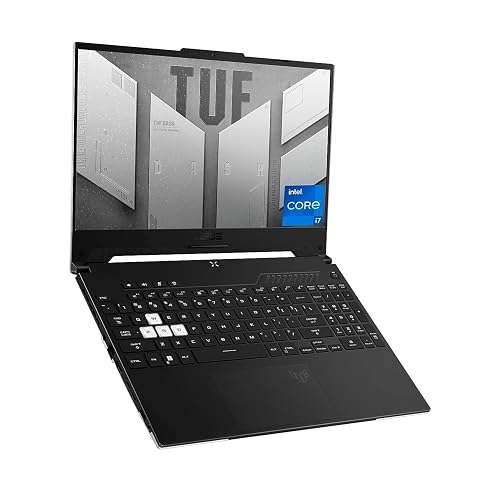 | Best All-Around | Processor: Intel Core i7-12650H | Graphics: RTX 3060 6GB | Screen Size: 15.6-inch | VIEW LATEST PRICE | Read Our Analysis |
| Acer Nitro V Gaming Laptop (ANV15-52-586Z) |  | Best Budget RTX 4050 | Processor: Intel Core i5-13420H | Graphics: RTX 4050 | Screen Size: 15.6-inch | VIEW LATEST PRICE | Read Our Analysis |
| Acer Nitro V Gaming Laptop (ANV15-52-76NK) |  | Best for Multitasking | Processor: Intel Core i7-13620H | Graphics: RTX 4050 | Screen Size: 15.6-inch | VIEW LATEST PRICE | Read Our Analysis |
| MSI Thin 15 Gaming Laptop i7 RTX 4050 | 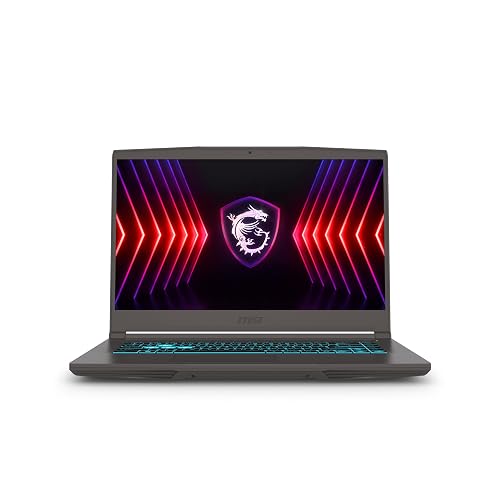 | Best Lightweight Pick | Processor: Intel Core i7-12650H | Graphics: RTX 4050 6GB | Screen Size: 15.6-inch | VIEW LATEST PRICE | Read Our Analysis |
| MSI Thin 15 Gaming Laptop B13VE-2678US | 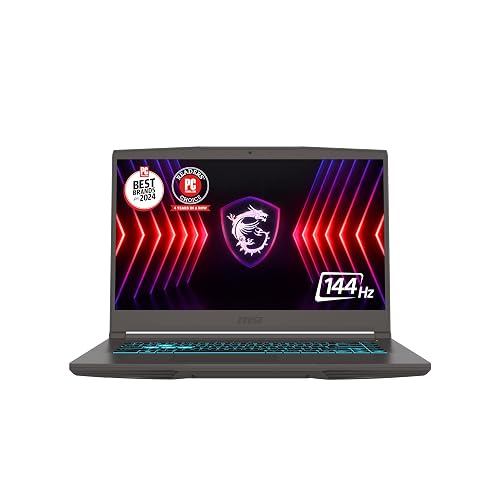 | Best Value Performance | Processor: Intel Core i7-13620H | Graphics: RTX 4050 6GB | Screen Size: 15.6-inch | VIEW LATEST PRICE | Read Our Analysis |
More Details on Our Top Picks
ASUS TUF Dash 15 Gaming Laptop (FX517ZM-AS73)
If you want an Intel Core i7 gaming laptop that feels fast without getting fussy, the ASUS TUF Dash 15 (FX517ZM-AS73) is a strong fit, especially for players who want smooth 1080p gaming and everyday speed in one machine. You get a 12th Gen i7-12650H, RTX 3060 graphics, and 16GB of DDR5 memory, so games and apps open quickly. The 144Hz Full HD screen keeps motion crisp, and the MUX switch lets the GPU work directly. Add Wi-Fi 6, robust ports, and MIL-STD-810H durability, and you have a reliable travel-ready rig.
- Processor:Intel Core i7-12650H
- Graphics:RTX 3060 6GB
- Screen Size:15.6-inch
- Resolution:1920 x 1080
- Refresh Rate:144Hz
- Operating System:Windows 11 Home
- Additional Feature:MUX Switch support
- Additional Feature:MIL-STD-810H durability
- Additional Feature:Dolby Atmos audio
Acer Nitro V Gaming Laptop (ANV15-52-586Z)
The Acer Nitro V Gaming Laptop (ANV15-52-586Z) is a smart pick for gamers who want solid 1080p performance without spending too much, and it delivers a good balance of speed, display quality, and everyday usability. It is powered by a 13th Gen Intel Core i5-13420H with 8 cores, and an NVIDIA RTX 4050 with DLSS 3.5 and 194 AI TOPS to help games run smoother and look sharper. The 15.6-inch Full HD IPS screen runs at 165 Hz, which keeps fast action looking clean. Additional features include 8 GB of DDR5 memory, a 512 GB SSD, Wi-Fi 6, Thunderbolt 4, and a backlit keyboard.
- Processor:Intel Core i5-13420H
- Graphics:RTX 4050
- Screen Size:15.6-inch
- Resolution:1920 x 1080
- Refresh Rate:165Hz
- Operating System:Windows 11 Home
- Additional Feature:300 nit brightness
- Additional Feature:Killer Ethernet E2600
- Additional Feature:No webcam
Acer Nitro V Gaming Laptop (ANV15-52-76NK)
Acer’s Nitro V Gaming Laptop (ANV15-52-76NK) is a smart pick when you want strong gaming power without sacrificing everyday speed. Its Intel Core i7-13620H can handle gaming, recording, streaming, and editing video, music, or photos. The RTX 4050 graphics add 194 AI TOPS, DLSS 3.5, and improved ray tracing for richer visuals. The 15.6-inch Full HD IPS screen with a 165 Hz refresh rate reduces ghosting and keeps motion smooth. You also get 16 GB of DDR5, a 1 TB PCIe Gen 4 SSD, Wi-Fi 6, Killer Ethernet, and Thunderbolt 4.
- Processor:Intel Core i7-13620H
- Graphics:RTX 4050
- Screen Size:15.6-inch
- Resolution:1920 x 1080
- Refresh Rate:165Hz
- Operating System:Windows 11 Home
- Additional Feature:1TB Gen 4 SSD
- Additional Feature:16GB DDR5 memory
- Additional Feature:Killer Ethernet E2600
MSI Thin 15 Gaming Laptop i7 RTX 4050
MSI’s Thin 15 Gaming Laptop is a smart pick when you want strong gaming power without carrying a bulky machine. It includes an Intel Core i7-12650H, an NVIDIA RTX 4050 with 6 GB GDDR6, 16 GB DDR5 memory, and a 512 GB NVMe SSD, so games load fast and run smoothly. The 15.6-inch Full HD 144 Hz screen keeps motion crisp, and Cooler Boost 5 helps manage heat. You also get Wi-Fi 6E, Bluetooth 5.3, HDMI, Ethernet, and a backlit keyboard. It runs Windows 11 Home and remains easy to carry.
- Processor:Intel Core i7-12650H
- Graphics:RTX 4050 6GB
- Screen Size:15.6-inch
- Resolution:1920 x 1080
- Refresh Rate:144Hz
- Operating System:Windows 11 Home
- Additional Feature:Wi-Fi 6E support
- Additional Feature:Cooler Boost 5
- Additional Feature:Max 64GB RAM
MSI Thin 15 Gaming Laptop B13VE-2678US
Built for players who want strong 1080p gaming without carrying a bulky rig, the MSI Thin 15 Gaming Laptop B13VE-2678US delivers a balanced mix of speed, portability, and everyday comfort. It features an Intel Core i7-13620H, NVIDIA GeForce RTX 4050 graphics, 16 GB of RAM, and a 512 GB SSD, so games and apps load quickly. The 15.6-inch, 144 Hz FHD display keeps motion smooth, which benefits shooters and action titles. The slim black chassis, Wi-Fi 6E support, and Cooler Boost thermal solution help you stay ready for class, work, and long play sessions.
- Processor:Intel Core i7-13620H
- Graphics:RTX 4050 6GB
- Screen Size:15.6-inch
- Resolution:1920 x 1080
- Refresh Rate:144Hz
- Operating System:Windows 11 Home
- Additional Feature:4 total USB ports
- Additional Feature:4-hour battery life
- Additional Feature:Slim lightweight chassis
Factors to Consider When Choosing Intel Core i7 Gaming Laptops
When choosing an Intel Core i7 gaming laptop, start with the processor generation, since newer chips generally deliver better speed and efficiency. Next evaluate GPU performance, display refresh rate, memory and storage, and port selection, because each factor affects how smoothly your games run and how well the laptop fits your setup. Matching these elements intelligently prevents buying a machine that looks powerful on paper but feels awkward during actual play.
Processor Generation
Processor generation matters because it affects how fast an Intel Core i7 gaming laptop performs in real use. Newer i7 chips typically deliver better gaming and multitasking thanks to improved architectures, higher boost clocks, and stronger core configurations. A 12th Gen i7 can still handle games well, but a 13th Gen model often feels snappier when gaming and running background apps. Also choose an H-series chip, as it generally maintains performance better under sustained load than lower-power variants. Generation also influences efficiency, heat, and platform support, so the laptop will stay more stable during long sessions. If prices are similar, pick the newer i7 for better future-proofing and greater peace of mind.
GPU Performance
GPU performance can make or break your gaming experience, even if you already have a strong Intel Core i7 inside the laptop. You need a graphics chip that can push steady frame rates in demanding games at 1080p or higher. Look for support for DLSS and ray tracing, because these features can sharpen visuals and keep gameplay smoother in supported titles. Also, do not ignore video memory. A 6GB GDDR6 card works as a solid base, while more VRAM helps with heavier textures and busy scenes. Next, check the laptop’s graphics path. A dedicated GPU with a direct connection to the display cuts bottlenecks and helps latency. If you want a 15.6 inch 144Hz or 165Hz panel, the GPU must keep up; otherwise you will leave performance on the table.
Display Refresh Rate
A high refresh rate can make a big difference in how a gaming laptop feels, especially if you play fast action games. When you choose an Intel Core i7 gaming laptop, look for at least 144 Hz, because it keeps motion smoother and input feel sharper. If you want a small edge in competitive play, 165 Hz can look even cleaner during quick turns and busy fights. Still, the screen can only shine when the laptop pushes strong frame rates, so the higher number matters most when your games run near it. Lower refresh screens can still work, but you may notice more blur or stutter during rapid movement. Between 144 Hz and 165 Hz, the change is real, yet it is usually less dramatic than a big jump in resolution or GPU power.
Memory And Storage
For most Intel Core i7 gaming laptops, memory and storage shape the day-to-day experience more than many people expect. You should start with 16 GB of DDR5, because 8 GB can feel tight when you game, stream, and keep tabs open. If a laptop has two memory slots, that is even better, since you may grow from 32 GB to 64 GB later. Faster DDR5-4800 memory also gives you more bandwidth than older DDR4-3200. Storage matters just as much. A 512 GB SSD fills fast; a 1 TB PCIe Gen 4 SSD gives you room for big games, updates, and your creative files. Also look for extra M.2 slots or easy access panels, because upgrades should feel simple, not like a puzzle.
Port Selection
Ports can make or break how easy your Intel Core i7 gaming laptop is to live with. Look for at least one fast USB-C port; Thunderbolt 4 is even better because it lets you move data quickly, drive external displays, and connect docks with one cable. Next, check for several USB-A ports, since your mouse, keyboard, headset, and storage drives may still rely on them. HDMI matters too, especially if you want to hook up a monitor or TV with sharp, smooth output. An Ethernet port can help you get steadier, lower-latency online play, which feels great when every millisecond counts. Finally, choose a laptop with enough total ports so you can plug in what you need without juggling adapters.
Cooling And Battery
When you game on an Intel Core i7 laptop, cooling matters just as much as raw speed, because that powerful CPU and a discrete GPU can build heat fast under load. Look for dual fans, wide vents, and smart thermal controls that keep performance steady during long matches. Then check the battery size, because a 76Wh pack can last longer than a 51Wh one, even though gaming still drains it quickly. Also remember that bright screens, fast refresh rates, and strong GPUs can consume power rapidly. Good cooling helps too, since it reduces fan noise and wasted energy when you are just browsing. If you plan to play unplugged, you will want both strong cooling and easy access to charging.
Frequently Asked Questions
Do These Laptops Support External 4K Monitors?
Yes. You can usually connect external 4K monitors if your laptop includes HDMI 2.1, USB-C with DisplayPort, or Thunderbolt. Check each model’s ports and GPU support first for best results.
Can the RAM Be Upgraded Later?
Usually you can upgrade the RAM later, but it depends on the laptop. Some models use soldered memory, so you cannot upgrade them. Check the specifications first to avoid buying a lemon.
How Noisy Are the Fans During Gaming?
During gaming you will usually hear a noticeable whoosh, not a jet engine. Lighter loads stay fairly quiet, but turbo modes and hotter titles make fans ramp up quickly. Headphones help, and adjusting cooling profiles can reduce noise.
Do Any Models Include Thunderbolt Ports?
Yes, many Intel Core i7 gaming laptops include Thunderbolt ports, especially higher-end models. You can use them for fast docks, external GPUs, and speedy storage. Check specs carefully, since some budget rigs skip them.
What Battery Life Can Gamers Expect While Browsing?
You can expect roughly 5 to 8 hours of browsing, depending on screen brightness, battery size, and refresh rate. Lowering settings and using integrated graphics will extend that between charges.




