


Choosing an Intel Core i9 laptop in 2026 can feel like picking a race car with a desk job, because you want speed, control, and enough comfort to use it all day.
If you need heavy workstation power, the Dell Precision 7670 stands out. The MSI Katana 15 HX and Dell G16 7630 push gaming frames hard, while the Acer Nitro V keeps costs sane. The ASUS Vivobook S 16 AI adds a sharp OLED screen, but the real question is which one fits your loadout best?
| Dell Precision 7670 Workstation Laptop (Renewed) | 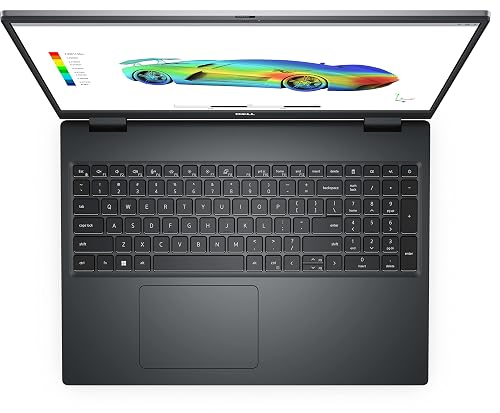 | Best Workstation | Processor: Intel Core i9-12950HX | Memory: 64GB DDR5 | Storage: 2TB SSD | VIEW LATEST PRICE | Read Our Analysis |
| MSI Katana 15 HX Gaming Laptop (B14WGK-016US) | 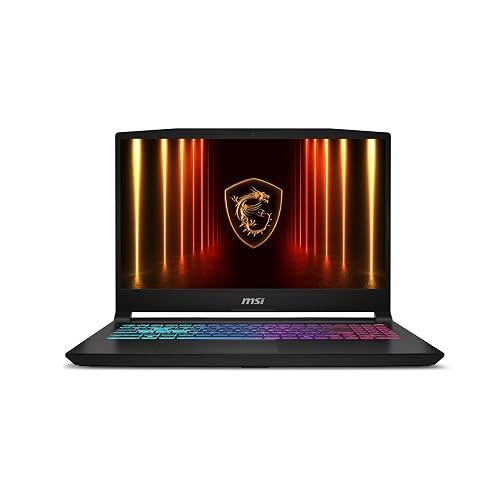 | Best Gaming Powerhouse | Processor: Intel Core i9-14900HX | Memory: 32GB DDR5 | Storage: 1TB SSD | VIEW LATEST PRICE | Read Our Analysis |
| Dell G16 7630 Gaming Laptop with RTX 4070 | 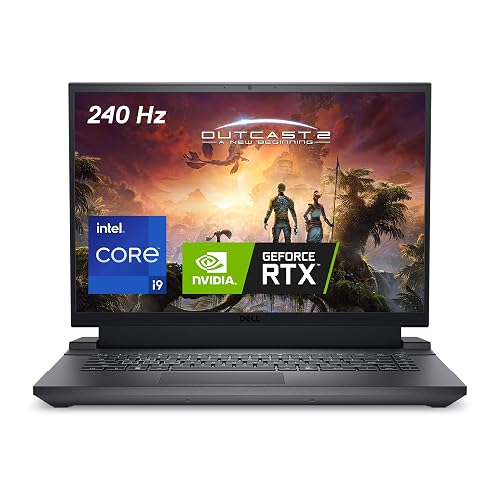 | Best High-Refresh Gaming | Processor: Intel Core i9-13900HX | Memory: 16GB DDR5 | Storage: 1TB SSD | VIEW LATEST PRICE | Read Our Analysis |
| Acer Nitro V Gaming Laptop (ANV15-52-98KV) |  | Best Budget Gaming | Processor: Intel Core i9-13900H | Memory: 16GB DDR4 | Storage: 1TB SSD | VIEW LATEST PRICE | Read Our Analysis |
| ASUS Vivobook S 16 AI Laptop 3K OLED |  | Best OLED Productivity | Processor: Intel Core Ultra 9 285H | Memory: 32GB LPDDR5X | Storage: 512GB/1TB/2TB SSD | VIEW LATEST PRICE | Read Our Analysis |
More Details on Our Top Picks
Dell Precision 7670 Workstation Laptop (Renewed)
If you need a laptop that handles heavy work without slowing you down, the Dell Precision 7670 Workstation Laptop is a strong choice. It features a 12th Gen Intel Core i9-12950HX with 16 cores, so apps open quickly and multitasking remains smooth. With 64 GB of DDR5 RAM and a 2 TB SSD you can move large files without waiting. The 16-inch FHD+ display and NVIDIA RTX A2000 graphics deliver clear visuals for editing and design. It includes Windows 11 Pro, Wi-Fi, Bluetooth, and a backlit keyboard. The unit weighs 5.8 pounds and does not include a webcam.
- Processor:Intel Core i9-12950HX
- Memory:64GB DDR5
- Storage:2TB SSD
- Display Size:16-inch
- Operating System:Windows 11 Pro
- Dedicated Graphics:Nvidia RTX A2000 4GB
- Additional Feature:CAMM DDR5 RAM
- Additional Feature:4GB RTX A2000
- Additional Feature:90-day warranty
MSI Katana 15 HX Gaming Laptop (B14WGK-016US)
The MSI Katana 15 HX Gaming Laptop (B14WGK-016US) is a strong pick for users who want serious Intel Core i9 power in a portable gaming machine that can also handle creative work without slowing down. Its i9-14900HX, RTX 5070, 32 GB of DDR5 RAM, and 1 TB SSD provide fast load times and smooth multitasking. The 15.6-inch QHD+ 165 Hz display keeps motion sharp and colors rich. Cooler Boost 5 helps during long sessions, and the 4-zone RGB keyboard, Wi-Fi 6E, and light 4.96-pound build make daily use feel easy and ready.
- Processor:Intel Core i9-14900HX
- Memory:32GB DDR5
- Storage:1TB SSD
- Display Size:15.6-inch
- Operating System:Windows 11 Home
- Dedicated Graphics:NVIDIA RTX 5070 8GB
- Additional Feature:Cooler Boost 5
- Additional Feature:100% DCI-P3
- Additional Feature:4-zone RGB keyboard
Dell G16 7630 Gaming Laptop with RTX 4070
The Dell G16 7630 Gaming Laptop with RTX 4070 is a strong choice if you want Core i9 performance without sacrificing smooth gaming or fast multitasking. It includes the 24-core i9-13900HX, 16 GB of DDR5 RAM, and a 1 TB SSD, so applications launch quickly and demanding tasks run smoothly. The 16-inch QHD+ 240 Hz display delivers sharp visuals and fluid motion. The RTX 4070 and a vapor chamber cooling system help maintain performance during extended sessions. Connectivity options include Wi-Fi 6, Thunderbolt 4, and five USB ports. The laptop has a robust build and weighs approximately 6.3 pounds.
- Processor:Intel Core i9-13900HX
- Memory:16GB DDR5
- Storage:1TB SSD
- Display Size:16-inch
- Operating System:Windows 11 Home
- Dedicated Graphics:NVIDIA RTX 4070 8GB
- Additional Feature:240Hz VRR display
- Additional Feature:Vapor chamber cooling
- Additional Feature:Thunderbolt 4 port
Acer Nitro V Gaming Laptop (ANV15-52-98KV)
Acer’s Nitro V Gaming Laptop (ANV15-52-98KV) is designed for players and power users who want a serious Intel Core i9 laptop without giving up speed, clarity, or control. It features an Intel Core i9-13900H and RTX 5060 graphics, delivering lively gaming and fast creative workflows. The 15.6-inch Full HD IPS screen runs at 165 Hz, keeping motion smooth and sharp. With 16 GB DDR4, a 1 TB PCIe Gen 4 SSD, Wi-Fi 6, Thunderbolt 4, dual fans, and NitroSense, you stay ready, connected, and calm. A backlit keyboard and a 4.66-pound frame add comfort and portability.
- Processor:Intel Core i9-13900H
- Memory:16GB DDR4
- Storage:1TB SSD
- Display Size:15.6-inch
- Operating System:Windows 11 Home
- Dedicated Graphics:NVIDIA RTX 5060 Laptop GPU
- Additional Feature:NVIDIA Blackwell architecture
- Additional Feature:Thunderbolt 4
- Additional Feature:572 AI TOPS
ASUS Vivobook S 16 AI Laptop 3K OLED
If you want a slim 16-inch laptop that feels ready for work and travel, the ASUS Vivobook S 16 AI Laptop with a 3K OLED screen is a strong fit for you. It features a Core Ultra 9 processor, 32 GB of LPDDR5X memory, and fast SSD options, so apps open quickly and multitasking stays smooth. The 3K OLED panel delivers rich color, 120 Hz motion, and bright viewing for editing or streaming. With Thunderbolt 4, HDMI 2.1, Wi-Fi 7, and a privacy-shutter camera, it handles meetings, content creation, and long days with ease.
- Processor:Intel Core Ultra 9 285H
- Memory:32GB LPDDR5X
- Storage:512GB/1TB/2TB SSD
- Display Size:16-inch
- Operating System:Windows 11 Home
- Dedicated Graphics:Intel Arc Graphics
- Additional Feature:3K OLED display
- Additional Feature:Intel AI Boost
- Additional Feature:MIL-STD-810H durability
Factors to Consider When Choosing Intel Core i9 Laptops
When choosing an Intel Core i9 laptop, begin with the processor core count; it determines how well the system handles heavy workloads and multitasking. Next, match the graphics performance, display resolution and refresh rate, memory, and storage so you avoid buying a machine that is either overpowered or underpowered for your needs. Also consider cooling and battery life, because a fast laptop must stay cool and provide enough runtime for your actual day.
Processor Core Count
Processor core count can make a big difference in how an Intel Core i9 laptop feels in real use. When you juggle many apps, more cores help you stay smooth and responsive. Intel Core i9 laptop chips can range from 12 cores to 24 cores, so you should compare that number closely. If you handle video rendering, 3D tasks, or large code builds, a 16-core or 24-core model usually gives you a clear edge. Core count also works with clock speed, since cores help with parallel work while boost speeds help with quick bursts. For gaming or basic daily use, very high core counts may matter less, but they still give you room to grow without stress.
Graphics Performance Needs
Strong graphics performance matters just as much as core count in an Intel Core i9 laptop, especially since the GPU can shape how smooth your games, edits, and 3D projects feel. Compare the GPU class and its memory first. A 4GB workstation chip can handle lighter design work, but 8GB GDDR6 or GDDR7 gaming graphics give you more room for big textures, complex scenes, and layered timelines. Also look for newer features like ray tracing, DLSS, and AI acceleration, because they can lift frame rates and sharpen visual quality. If you push heavy workloads, you also need solid cooling, since a fast GPU is only helpful when the chassis keeps it from throttling. That balance matters when your projects run long and your patience does not.
Display Resolution And Refresh
A fast GPU is only part of the story, because the display decides how clearly you see that power at work. If you want crisp text and more room to work, look at higher resolutions such as Full HD+ 1920 × 1200, QHD+ 2560 × 1600, or 3K 2880 × 1800. A 16:10 screen gives you extra vertical space, so you scroll less and keep more of your project in view. Then consider refresh rate. A 120 Hz panel feels smoother than 60 Hz, while 165 Hz and 240 Hz make fast motion look even cleaner. For gaming or quick scrolling, that extra fluidity really helps. The best choice comes from balance. Pick sharper detail if you read and create most, or choose faster motion if you play often.
Memory And Storage Capacity
Memory and storage determine how smooth an Intel Core i9 laptop feels in daily use. Treat 32 GB of RAM as the solid starting point, because it handles heavy multitasking well. If you run large projects, virtual machines, or advanced creative apps, 64 GB gives you more breathing room. Faster DDR5 memory, such as 4800 MHz or 5600 MHz, also helps your laptop switch between demanding apps with less lag. For storage, 1 TB is sufficient for many users, but 2 TB provides more space for games, media, and professional tools. Choose an NVMe PCIe SSD, since it boots faster and moves files quicker. If you edit, simulate, or store large datasets locally, prioritize additional RAM and SSD capacity first.
Cooling And Battery Life
Because Intel Core i9 laptops can push a lot of power through their CPUs and graphics chips, cooling should be one of the first things you check. Look for dual fans, heat pipes, a vapor chamber, and wide exhaust vents, because they help keep temperatures down during long renders, edits, or game sessions. If you choose a thin and light model, expect more fan noise and faster throttling when the load stays high. Battery life matters too, but a big 75 Wh or 86 Wh pack will not last long if you keep the chip and GPU working hard. Bright 165 Hz or 240 Hz screens also consume power quickly. Look for AI managed power modes, smart fan curves, and solid standby behavior when you need quieter, cooler unplugged use.
Frequently Asked Questions
Which Intel Core i9 Laptop Offers the Longest Battery Life?
No Intel Core i9 laptop truly sips power like a desert bloom, but you will usually get the longest battery life from Lenovo ThinkPad P1 or Dell XPS 17, depending on your screen, battery, and workload.
Are Intel Core i9 Laptops Good for 8K Video Editing?
Yes, you can edit 8K video on Intel Core i9 laptops, and they are strong choices for it. You will need a powerful GPU, plenty of RAM, and fast storage. Thermals and battery life, however, can still limit sustained performance.
Do These Laptops Support External 4K or 8K Monitors?
Yes, you can connect external 4K or 8K monitors if your laptop’s ports and GPU permit it. Think of your machine as a gatekeeper: use Thunderbolt, HDMI 2.1, or DisplayPort to open wide.
Which Model Has the Quietest Cooling System Under Load?
You’ll likely find the quietest cooling under load on the Asus ProArt Studiobook 16 OLED. Its larger chassis allows the fans to spin more slowly, producing less noise than thinner Core i9 rivals.
Can Intel Core i9 Laptops Handle Advanced AI Workloads?
Yes, you can run advanced AI workloads on Intel Core i9 laptops, but only until heat rises, fans roar, and the GPU takes over. You will get strong CPU performance, but dedicated graphics and cooling still determine how far you can go.




