


If you are hunting for a compact machine that can keep up with heavy work, creative apps, and late-night multitasking, Intel Core i9 mini computers deserve attention in 2026.
You will see substantial gains from chips such as the i9-14900HX.
The real question is which model gives the right mix of speed, cooling, ports, and upgrade room.
Some are built for raw power, while others focus on quiet operation and improved everyday comfort, and that contrast is where things get interesting.
| KAMRUI Hyper H2 Mini Gaming PC (i9-11900H) | 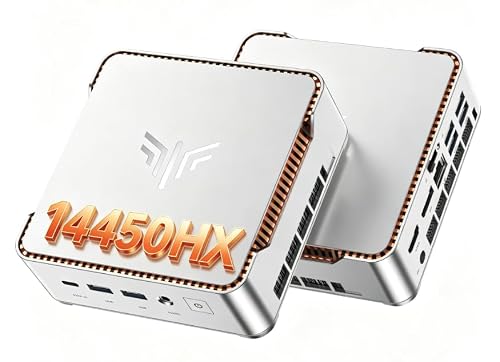 | Budget Power Pick | Processor: Intel Core i9-11900H | Memory: 32GB DDR memory | Storage: 1TB M.2 SSD | VIEW LATEST PRICE | Read Our Analysis |
| GEEKOM IT13 Mini PC with Intel i9 1TB SSD | 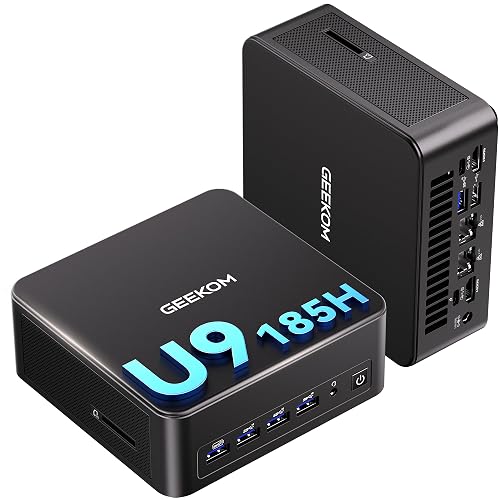 | Best for Creators | Processor: Intel Core i9-13900HK | Memory: 16GB DDR4 | Storage: 1TB PCIe Gen4 SSD | VIEW LATEST PRICE | Read Our Analysis |
| KAMRUI Hyper H2 Mini PC Core i9-14900HX | 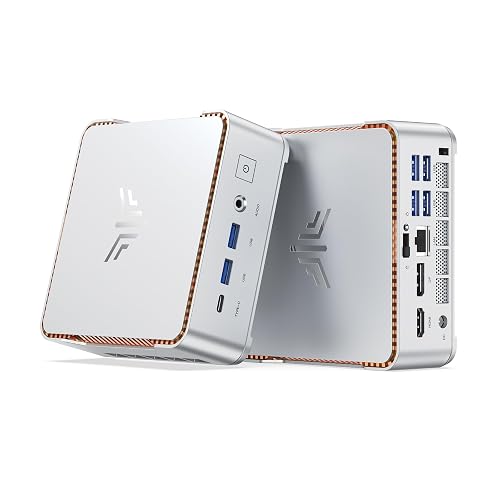 | Best Performance | Processor: Intel Core i9-14900HX | Memory: 32GB DDR4 | Storage: 1TB NVMe PCIe 4.0 SSD | VIEW LATEST PRICE | Read Our Analysis |
| ACEMAGIC M5 Mini PC Core i9-14900HX 32GB 1TB SSD | 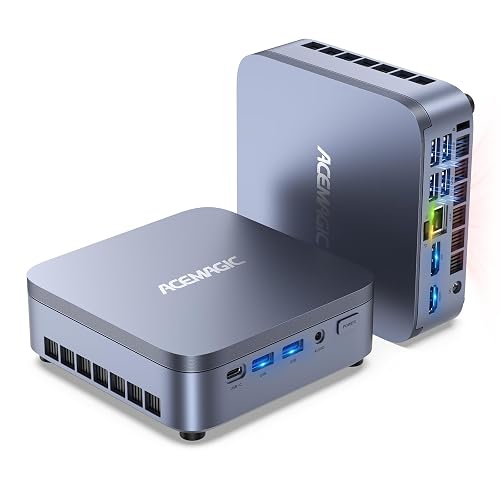 | Best Premium Pick | Processor: Intel Core i9-14900HX | Memory: 32GB DDR4 | Storage: 1TB NVMe PCIe 4.0 SSD | VIEW LATEST PRICE | Read Our Analysis |
| ACEMAGIC M1 Mini PC Intel Core i9 Desktop | 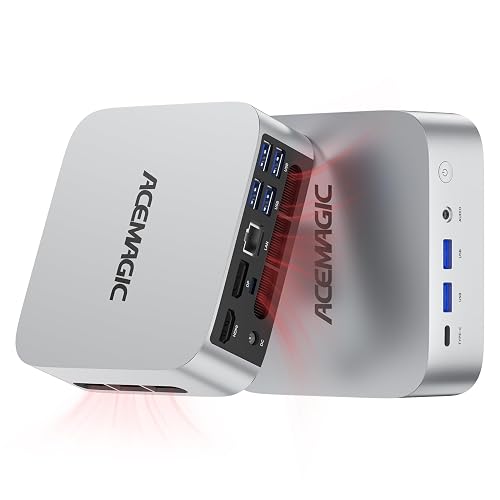 | Best Versatile Pick | Processor: Intel Core i9-11900H | Memory: 32GB DDR4 | Storage: 1TB M.2 2280 SSD | VIEW LATEST PRICE | Read Our Analysis |
More Details on Our Top Picks
KAMRUI Hyper H2 Mini Gaming PC (i9-11900H)
If you want a mini PC that feels closer to a real desktop than a tiny box, the KAMRUI Hyper H2 Mini Gaming PC with the Intel Core i9-11900H is a strong pick. You get 8 cores, 16 threads, and turbo speeds up to 4.9 GHz, so games, edits, and heavy apps stay smooth. The system includes 32 GB DDR memory and a 1 TB SSD, which help you open files quickly and keep more work ready. It supports triple 4K displays, offers six USB ports, and includes Wi Fi 6 and Bluetooth 5.2, all in a compact silver case.
- Processor:Intel Core i9-11900H
- Memory:32GB DDR memory
- Storage:1TB M.2 SSD
- Operating System:Windows 11 Pro
- Form Factor:Mini PC
- Wireless:WiFi 6, Bluetooth 5.2
- Additional Feature:Triple-display support
- Additional Feature:4K@60Hz output
- Additional Feature:VESA mount support
GEEKOM IT13 Mini PC with Intel i9 1TB SSD
The GEEKOM IT13 Mini PC with Intel i9 and 1TB SSD is a smart pick when you want serious speed in a compact chassis without cluttering your desk. Its 13th Gen Core i9-13900HK, with 14 cores and 20 threads, handles office work, classes, editing, and daily multitasking with ease. You get 16GB of RAM, a fast PCIe Gen4 SSD, and room to upgrade later. Dual USB4 and HDMI ports let you run up to four displays. WiFi 6E, 2.5GbE, and Windows 11 Pro keep performance smooth and security current.
- Processor:Intel Core i9-13900HK
- Memory:16GB DDR4
- Storage:1TB PCIe Gen4 SSD
- Operating System:Windows 11 Pro
- Form Factor:Mini PC
- Wireless:WiFi 6E, Bluetooth 5.2
- Additional Feature:Quad-display support
- Additional Feature:Dual USB4 ports
- Additional Feature:3-year warranty
KAMRUI Hyper H2 Mini PC Core i9-14900HX
KAMRUI’s Hyper H2 Mini PC with the Core i9-14900HX is a smart pick when you want desktop-level speed in a compact machine that will not crowd your desk. You get 24 cores, 32 threads, and boosts up to 5.8 GHz, so your apps open fast and stay responsive. With 32 GB DDR4 dual-channel RAM and a 1 TB PCIe 4.0 SSD, you can juggle work, games, and large files with less waiting. It also supports up to 64 GB RAM, two SSDs, triple 4K displays, WiFi 6E, and Windows 11 Pro.
- Processor:Intel Core i9-14900HX
- Memory:32GB DDR4
- Storage:1TB NVMe PCIe 4.0 SSD
- Operating System:Windows 11 Pro
- Form Factor:Mini PC
- Wireless:WiFi 6E, Bluetooth 5.2
- Additional Feature:24-core processor
- Additional Feature:Triple 4K display
- Additional Feature:2 SSD slots
ACEMAGIC M5 Mini PC Core i9-14900HX 32GB 1TB SSD
ACEMAGIC M5 Mini PC with the Intel Core i9-14900HX is a strong pick for you if you want desktop level speed in a tiny case without giving up flexibility. You get 24 cores, 32 threads, and up to 5.8 GHz, so heavy editing, 3D work, and multitasking feel smooth. The 32 GB DDR4 RAM and 1 TB PCIe 4.0 SSD help apps open fast, and you can expand both later. It supports triple 4K displays, has seven USB ports, WiFi 6, and Bluetooth 5.2 to make setup easy. The quiet 35 dB cooling and 55 W power draw keep it calm.
- Processor:Intel Core i9-14900HX
- Memory:32GB DDR4
- Storage:1TB NVMe PCIe 4.0 SSD
- Operating System:Windows 11 Pro
- Form Factor:Mini PC
- Wireless:WiFi 6, Bluetooth 5.2
- Additional Feature:Six-component cooling
- Additional Feature:Near-silent operation
- Additional Feature:Linux dual-boot
ACEMAGIC M1 Mini PC Intel Core i9 Desktop
Powered by the Intel Core i9-11900H, the ACEMAGIC M1 Mini PC delivers real desktop performance in a compact chassis. It offers 8 cores, 16 threads, and up to 4.9 GHz, so multitasking and demanding applications run smoothly. The system ships with 32 GB DDR4 RAM and a 1 TB SSD, and storage can be expanded to 4 TB. For creative work, UHD graphics support 4K output across three displays. Quiet cooling, WiFi 6, 2.5G LAN, and USB-C keep your setup responsive and well connected.
- Processor:Intel Core i9-11900H
- Memory:32GB DDR4
- Storage:1TB M.2 2280 SSD
- Operating System:Windows 11 Pro
- Form Factor:Mini PC
- Wireless:WiFi 6, Bluetooth 5.2
- Additional Feature:2.5G LAN
- Additional Feature:Dual cooling tubes
- Additional Feature:External 75-inch display
Factors to Consider When Choosing Intel Core i9 Mini Computers
When choosing an Intel Core i9 mini computer, start by checking the processor’s cores and threads, as they determine how smoothly your applications run. Next, compare clock speed, cache, memory capacity, and memory speed, since these components work together to improve everyday performance without slowing you down. Also review storage expansion options and graphics display outputs, so your mini PC can grow with your needs and connect to the screens you want.
Processor Cores And Threads
Core counts and thread counts can tell you a lot about how well an Intel Core i9 mini computer will fit your day-to-day work. If you juggle apps, keep many browser tabs open, or run creative tools, more cores usually help you breathe easier. An 8-core, 16-thread chip can handle solid productivity. Fourteen-core and twenty-four-core models provide much stronger multitasking and parallel performance. Thread count matters as well, because it helps the processor manage more jobs at once. So, 16 threads can feel great for editing and gaming, while 20 or 32 threads suit rendering and heavy background work better. Comparing 8, 14, and 24 cores gives you a clear picture of how well your mini computer can handle content creation, virtualization, and busy app switching.
Clock Speed And Cache
Clock speed and cache can make a big difference in how a mini computer feels in daily use. When you compare Intel Core i9 models, check both base and turbo speeds. A chip that jumps from about 4.9 GHz to 5.8 GHz can feel snappier when you launch apps, open files, or edit media. Still, peak speed is not the whole story. Cache helps the processor keep useful data close, so it does not keep reaching into slower memory. That means smoother multitasking and better handling of large files. For heavy work, an i9 with 24 MB to 36 MB of cache often feels more balanced. In short, a slightly lower clock with stronger cache can beat a faster chip that stumbles when you juggle tasks.
Memory Capacity And Speed
Memory capacity matters as much as raw speed, because your Intel Core i9 mini computer can only stay smooth if it has enough room to work. For most people, 32 GB of RAM provides a strong base for multitasking, while 16 GB still covers light office tasks and web use. If you open large photo, video, design, or data files, extra memory helps keep things moving without stutter. Speed matters too; 3200 MHz DDR4 often delivers quick, responsive performance for everyday work and editing. Choose dual-channel memory when you can, because matched sticks usually boost bandwidth and feel faster. If you plan to run demanding apps, look for support for 64 GB or even 96 GB so your system can grow with you.
Storage Expansion Options
Just as important as speed and cooling, storage expansion can determine how long your Intel Core i9 mini computer stays useful. Look for at least one M.2 SSD slot, since many models start at 1 TB and scale to 4 TB or more. If you need extra room, a second M.2 slot lets you pair two 2 TB drives for 4 TB total. Some mini computers also support a 2.5-inch SATA bay, which provides additional capacity for bulky files, often up to 4 TB. Speed still matters. PCIe Gen4 M.2 storage loads large projects faster than SATA, so your edits do not crawl. Before you buy, check for support of M.2 2242, M.2 2280, SATA, and NVMe. Confirming compatibility saves you headaches later.
Graphics And Display Output
Once you’ve sorted out storage, the next thing to check is how your Intel Core i9 mini computer handles your screens. Look at the video outputs first, because HDMI, DisplayPort, USB-C, USB4, and Thunderbolt determine how many monitors you can run. Next, check the resolution and refresh rate. Some systems deliver smooth 4K at 60 Hz, while others can drive dual 8K or higher rates on the right ports. If you multitask all day, triple or quad display support can feel like a small miracle, without the cape. Also make sure the graphics match your work. Integrated Intel graphics handle office tasks, media, and light creative jobs well, but they are not built for heavy AAA gaming or nonstop 8K rendering.
Ports And Wireless Connectivity
When checking Intel Core i9 mini computers, ports and wireless features determine whether daily use is smooth or frustrating. Aim for enough USB ports for your gear; many models provide six to seven total, including both USB-A and USB-C. Also check for HDMI, DisplayPort, and USB-C or Thunderbolt outputs, since they determine how many monitors you can connect and how sharp the image will be. If you use more than one screen, confirm triple or quad display support and the maximum resolution, which can reach 4K at 60 Hz or higher. For networking, Wi Fi 6 or 6E and Bluetooth 5.2 keep connections steady. If you move large files frequently, choose Gigabit Ethernet or 2.5 GbE.
Cooling And Power Use
Because Intel Core i9 mini computers pack serious power into a tiny case, you need to pay close attention to heat and energy use. Most high-end models draw about 45 W to 55 W, so you want strong performance without waste. When you run video editing, rendering, or heavy multitasking, that 8-core, 16-thread or 24-core, 32-thread chip can heat up fast. Look for cooling that uses heat pipes, vapor chambers, fins, and quiet fans, because those parts work together to keep speeds steady. A lower-noise system can also make daily use much nicer, especially near 35 dB. In addition, features like auto power-on, Wake-on-LAN, and efficient 54 W to 55 W operation help you save energy while reducing thermal stress.
Warranty And Support
A strong warranty can give you real peace of mind, especially with an Intel Core i9 mini computer that works hard and costs a lot. When you compare models, look at the warranty length first, since coverage can range from one year to three years, and that extra time lowers your risk. Next, check the support style. Some brands give you 24/7 help or lifetime customer service, while others keep one-on-one help limited. You should also ask how fast they solve problems; a promise to reply or fix issues within 24 hours can save your day. Make sure the warranty is manufacturer-backed, and see if it includes remote troubleshooting, direct contact, manuals, setup guides, and repair or replacement help.
Frequently Asked Questions
Are Intel Core i9 Mini Computers Good for Video Editing?
Yes, they are well suited for video editing when you need strong CPU performance in a compact form factor. Ensure you have enough RAM, fast storage, and effective cooling, because sustained editing workloads can still tax mini computers.
Can i9 Mini PCS Handle 4K Gaming Smoothly?
Yes, you can game smoothly at 4K on some i9 mini PCs, but you need a strong GPU, effective cooling, and tuned settings. You will not get every title maxed out, though.
Do These Mini Computers Support Multiple Monitors?
Yes. Many Intel Core i9 mini computers can drive multiple monitors, provided they have enough HDMI, DisplayPort, or USB-C outputs. Check each model’s port count and GPU capabilities before purchasing.
How Much Electricity Do Core i9 Mini PCS Use?
You will typically see about 20 to 60 watts at idle, and 100 to 150 watts under heavy load. Individual Core i9 mini PCs can spike higher. Check the power brick and system settings to estimate your actual usage.
Can I Upgrade RAM and Storage Later?
Yes, you can usually upgrade RAM and storage later, but it depends on the model. Check whether the mini PC has accessible SO-DIMM slots and M.2 bays before buying.




