


Nearly 80% of PC slowdowns trace back to storage limits, so the SSD you pick can change your whole system’s feel. When you compare the SIX X7400 and Acer Predator GM7 with solid SATA options like the JOIOT X12, BX500, and PNY CS900, you will see real tradeoffs in speed, heat, price, and endurance. The right choice depends on how you use your PC, and one model here may surprise you.



More Details on Our Top Picks
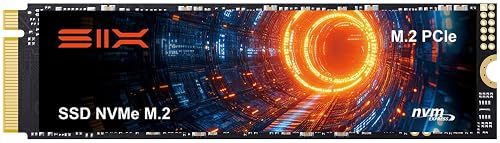
SIX 1TB NVMe M.2 SSD with Heatsink
If you want an SSD that feels fast the moment you hit the power button, the SIX X7400 NVMe M.2 SSD with Heatsink is made for you. It is a 1TB M.2 2280 drive that uses PCIe Gen4 x4 and NAND flash for quick, steady storage. It can reach up to 7350 MB/s, so your games, files, and projects open fast. It fits desktops, laptops, and PS5 consoles, making it suitable for gaming, editing, or heavy work. The heatsink helps it stay cool, and the five year warranty provides added peace of mind.
- Capacity:1 TB
- Form Factor:M.2 2280
- Interface:PCIe Gen4 x4 NVMe
- NAND Type:NAND flash
- Max Read Speed:Up to 7350 MB/s
- Warranty:5-year limited
- Additional Feature:PS5 storage expansion
- Additional Feature:Up to 7350 MB/s
- Additional Feature:Includes heatsink kit
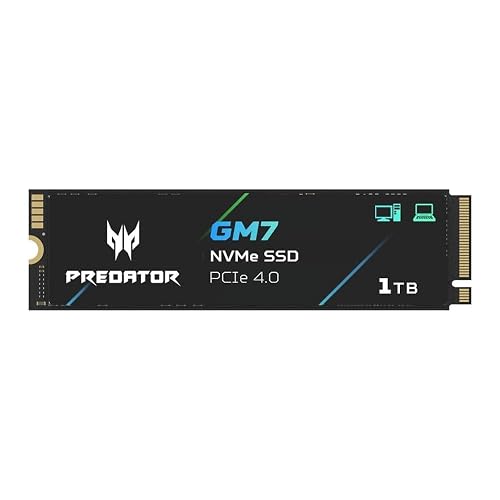
Acer Predator GM7 1TB NVMe SSD (BL.9BWWR.118)
The Acer Predator GM7 1TB NVMe SSD is an excellent choice when you need fast load times, smooth game installs, and quick file transfers while maintaining power efficiency. It uses the M.2 2280 form factor, PCIe Gen4 x4, and NVMe 2.0, delivering up to 7,400 MB/s sequential read and 6,500 MB/s sequential write speeds. HMB and SLC caching help keep the system responsive. Its modern controller and NAND also help control heat and power consumption. For gaming, content creation, or PS5 use, the drive performs quickly, runs cool, and proves dependable. Biwin Intelligence software provides cloning, migration, testing, and straightforward drive management.
- Capacity:1 TB
- Form Factor:M.2 2280
- Interface:PCIe Gen4 x4 NVMe 2.0
- NAND Type:NAND flash
- Max Read Speed:Up to 7400 MB/s
- Warranty:Not specified
- Additional Feature:NVMe 2.0 support
- Additional Feature:HMB cache support
- Additional Feature:Drive cloning software
JOIOT 512GB 2.5″ SATA III Internal SSD
JOIOT’s 512GB X12 2.5-inch SATA III SSD is a straightforward upgrade that can make an older laptop or PC feel like new. It delivers SATA 3.0 speeds up to 550 MB/s read and 450 MB/s write, so Windows, apps, and games load faster. The drive uses 3D TLC NAND and a shock-resistant, moving-part-free design, which helps ensure reliable operation. With a polycarbonate shell and low operating temperatures, it is suitable for daily work, media, and creative tasks.
- Capacity:512 GB
- Form Factor:2.5-inch
- Interface:SATA III
- NAND Type:3D NAND TLC
- Max Read Speed:Up to 550 MB/s
- Warranty:Warranty available
- Additional Feature:3D TLC NAND
- Additional Feature:Shock resistant design
- Additional Feature:Polycarbonate enclosure
Silicon Power 1TB SATA III Internal SSD (SU001TBSS3A55S25EC)
Silicon Power’s Ace A55 1TB SATA III internal SSD is a smart pick for anyone who wants a fast, low-hassle upgrade for an older desktop, Ultrabook, or slim notebook. The slim 2.5-inch, 7 mm drive slips in easily and stays light. With 3D NAND, a strong controller, and SLC Cache, it boosts boot times, application load times, and file transfers up to 500 MB/s. Because it has no moving parts, it resists shocks and vibration. ECC, S.M.A.R.T., and bad block management provide added reliability, and SP Toolbox lets you check drive health, temperature, and write activity.
- Capacity:1 TB
- Form Factor:2.5-inch
- Interface:SATA III
- NAND Type:3D NAND
- Max Read Speed:500 MB/s
- Warranty:3-year limited
- Additional Feature:SLC Cache technology
- Additional Feature:S.M.A.R.T. monitoring
- Additional Feature:Bad Block Management
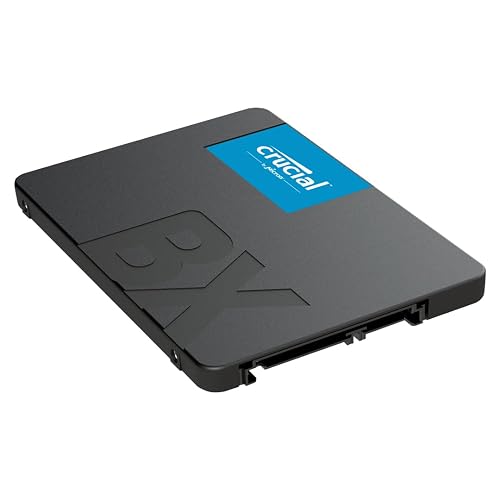
Crucial BX500 1TB 2.5-Inch Internal SSD (CT1000BX500SSD1)
Crucial BX500 1TB SATA SSD is a solid choice for a straightforward upgrade that revives an older desktop, laptop, or supported handheld without drama. The 2.5-inch, 7 mm drive fits many bays, supports SATA 6.0 Gb/s, and uses Micron 3D NAND for consistent everyday performance. It offers read speeds up to 540 MB/s, so applications load quickly and boot times are reduced. It is about 300% faster than a hard drive and significantly more power efficient. Compatible with PC, Mac, and Linux, Crucial backs the drive with a 3-year limited warranty.
- Capacity:1 TB
- Form Factor:2.5-inch
- Interface:SATA 6.0 Gb/s
- NAND Type:Micron 3D NAND
- Max Read Speed:Up to 540 MB/s
- Warranty:3-year limited
- Additional Feature:256MB cache
- Additional Feature:45x energy efficient
- Additional Feature:Frustration-Free Packaging
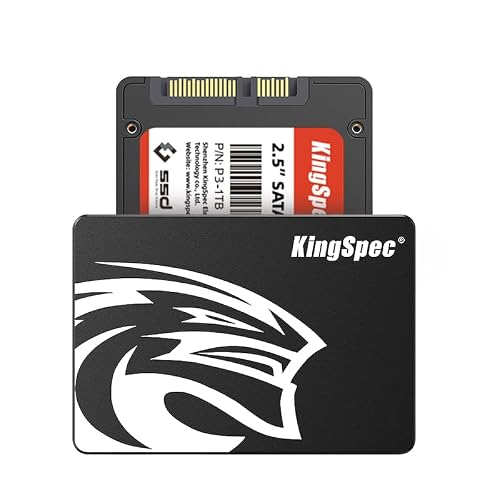
KingSpec 1TB 2.5″ SATA III Internal SSD
The KingSpec USP3 1TB 2.5-inch SATA III Internal SSD is a smart pick if you want a simple upgrade that can wake up an older laptop or desktop without the usual fuss. You get 1TB of space, plus read speeds up to 550 MB/s and write speeds up to 520 MB/s, so your apps open faster and boots feel snappy. Because it uses 3D NAND, wear-leveling, TRIM, NCQ, and S.M.A.R.T., you can trust it more for daily use. It also stays quiet, handles heat well, and works with Windows, Linux, and Unix systems.
- Capacity:1 TB
- Form Factor:2.5-inch
- Interface:SATA Rev. 3.0
- NAND Type:3D NAND flash
- Max Read Speed:Up to 550 MB/s
- Warranty:3-year limited
- Additional Feature:Wear-leveling support
- Additional Feature:TRIM support
- Additional Feature:Lifetime technical support
PNY CS900 250GB SATA III SSD (SSD7CS900-250-RB)
With a slim 7 mm build and fast SATA III speeds, the PNY CS900 250GB SSD7CS900-250-RB is a smart fit if you want a simple speed boost for a laptop, PC, or Mac without paying for extra space you may never use. You get up to 535 MB/s read and 500 MB/s write speeds, so your system starts faster and apps open with less waiting. Because it uses 3D NAND with no moving parts, it runs cooler, saves power, and feels more dependable. It also includes hardware encryption and a three year warranty, which adds peace of mind.
- Capacity:250 GB
- Form Factor:2.5-inch
- Interface:SATA III
- NAND Type:3D NAND
- Max Read Speed:Up to 535 MB/s
- Warranty:3-year manufacturer
- Additional Feature:Hardware encryption
- Additional Feature:7 mm thickness
- Additional Feature:Mac compatible
Factors to Consider When Choosing Internal SSDs
When choosing an internal SSD, start with storage capacity because it should match how you use your PC now and in the future. Next, check the interface type, speed ratings, and form factor so the drive fits your system and delivers the performance you expect. Also confirm compatibility first, because the right SSD only helps if your motherboard and slot can actually support it.
Storage Capacity
Storage size should match how you actually use your PC, not just how you hope to use it someday. If you mainly need Windows, a few apps, and light files, 250 to 512 GB can be sufficient. If you game, edit photos, or create content, 1 TB usually feels safer and less cramped. For 4K video, raw photos, VM images, or large media libraries, you will be happier with 2 TB or more. Keep in mind that usable space is a bit smaller than the labeled capacity, so plan for 5 to 10 percent less. Also, larger drives often age better under heavy write workloads, and they can save you from constant cleanup, transfers, and upgrade stress.
Interface Type
The right SSD size only helps if the drive can actually fit and run at the speed your system supports, so interface type matters just as much as capacity. You will usually choose between SATA III and PCIe NVMe. SATA III tops out near 500 to 600 MB/s, so it fits older PCs and many 2.5-inch bays well. PCIe NVMe drives in M.2 2280 size need an M.2 slot with PCIe lanes, and they can work in older PCIe generations too, just at that generation’s limit. Also check whether your M.2 slot supports NVMe or only SATA signaling. Match the physical size, like 2230 or 2280, and watch heat too, because faster NVMe drives can run warmer and may need a heatsink.
Speed Ratings
Speed ratings can seem confusing at first, but they are simply an indication of how fast an SSD moves data in real use. Start with sequential read and write numbers, since those matter most when copying large files or launching big games. Then check random IOPS, because they indicate how responsive the drive will feel when the system handles many small tasks and apps. Make sure the rating matches the interface, because a fast NVMe drive can be limited by a slow connection. Do not rely only on burst speed; some drives start strong and then slow down after the cache fills. Also evaluate controller quality, NAND type, and thermal management, as these determine sustained performance and help prevent unexpected slowdowns.
Form Factor
When you choose an internal SSD, form factor is one of the first things you need to check, because a drive can look perfect on paper and still not fit your system at all. You will usually see M.2, 2.5-inch SATA, or U.2. M.2 drives often use the 2280 size, but they also come in other widths and lengths, so you should match the slot size first. 2.5-inch SATA drives need room for their 7 mm or 9.5 mm body and the standard SATA cables. U.2 drives need their own bay and connector. Also, some M.2 slots handle SATA only, while others use NVMe over PCIe. Finally, think about heat. M.2 drives may need a heatsink, while 2.5-inch drives usually depend on airflow.
Compatibility Checks
Before you buy an internal SSD, confirm it will work in your system. First, match the form factor to your bay and mounting points. A 2.5 inch, 7 mm drive will not fit where an M.2 2280 slot belongs, and the reverse is true as well. Next, check the interface your board or laptop supports. PCIe Gen4 x4 NVMe, PCIe Gen3, and SATA III all behave differently, so a mismatch can slow performance or prevent the drive from working. If you plan to use it as a boot drive, make sure your BIOS or UEFI supports NVMe boot. Also confirm your case or slot has room for the drive capacity and any heatsink, and verify your operating system and drivers can recognize it.
Warranty Coverage
A solid warranty can save you a lot of stress, so check the fine print, not just the number of years on the box. Expect most SSD warranties to run three to five years. Longer coverage often indicates the maker trusts the drive’s durability. Read what the warranty actually covers. It usually protects against defects, but it may exclude data loss, drops, spills, and normal wear from heavy writes.
Next, check how claims work. Some brands replace the drive only, while others repair it. Cross-shipping can reduce downtime, but return shipping may cost you. Finally, watch TBW and DWPD limits, since exceeding them can void coverage. Register the drive, save your receipt, and note any regional rules before you need help.
Frequently Asked Questions
How Long Do Internal SSDS Typically Last?
Internal SSDs typically last 5 to 10 years, and often longer depending on usage, heat, and build quality. In practice you will usually replace one for increased capacity before it reaches the end of its usable life.
Can I Use an SSD as My Primary Boot Drive?
Yes, you can use an SSD as your primary boot drive; in fact, you should. It will start your system quickly, run quietly, and often outlast older hard drives, provided you keep backups and maintain sufficient free space.
Do SSDS Improve Gaming Load Times Significantly?
Yes, you will usually see much faster game loading with an SSD compared to a hard drive, though improvements vary by title. You will not necessarily get higher FPS, but you will spend far less time waiting.
What’s the Difference Between SSD Cache and DRAM?
SSD cache speeds things up dramatically; it temporarily stores hot data for faster access. DRAM serves as the drive’s fast memory buffer, helping it organize operations and respond more quickly.
Can I Clone My Old Hard Drive to a New SSD?
Yes, you can clone your old hard drive to a new SSD if you use cloning software and have enough storage space. You will keep your files, apps, and operating system, and then you can boot from the SSD afterward.




