


Nearly 80% of laptop thefts happen in public spaces, so you need a lock that actually fits your device and your routine.
In 2026 you will see strong picks for Kensington slots, wedge slots, keyhole cables, and even slotless tablets.
Each option solves a different problem.
The right choice can save you a lot of stress, and the details below show which locks earn trust when your laptop safety is on the line.
| Sendt Black Notebook/Laptop Combination Lock Security Cable |  | Best for Kensington Slots | Lock Type: Combination | Cable Length: 6 ft | Cable Material: Zinc alloy | VIEW LATEST PRICE | Read Our Analysis |
| Kensington N17 Dell Laptop Security Lock (K68008WW) |  | Best for Dell Laptops | Lock Type: Combination | Cable Length: Standard cable | Cable Material: Carbon steel | VIEW LATEST PRICE | Read Our Analysis |
| AOMGD Laptop Lock Security Cable for 3x7mm Keyholes | 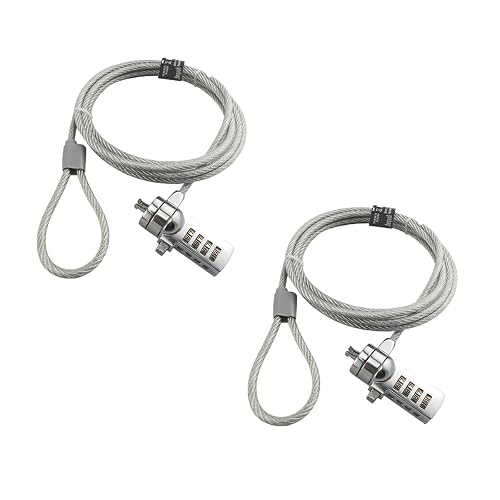 | Best for Older MacBooks | Lock Type: Combination | Cable Length: 6 ft | Cable Material: Galvanized steel | VIEW LATEST PRICE | Read Our Analysis |
| AboveTEK Laptop and Tablet Security Lock Cable | 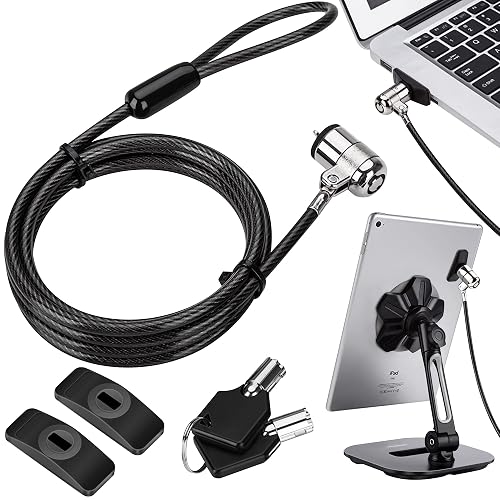 | Best Adhesive Option | Lock Type: Keyed | Cable Length: 6 ft | Cable Material: Galvanized steel | VIEW LATEST PRICE | Read Our Analysis |
| Laptop Cable Lock with Keys for Electronics |  | Best With Keys | Lock Type: Keyed | Cable Length: 6.5 ft | Cable Material: Twisted steel | VIEW LATEST PRICE | Read Our Analysis |
| Laptop Cable Lock Anti-Theft Combination Lock (10 Pack) | 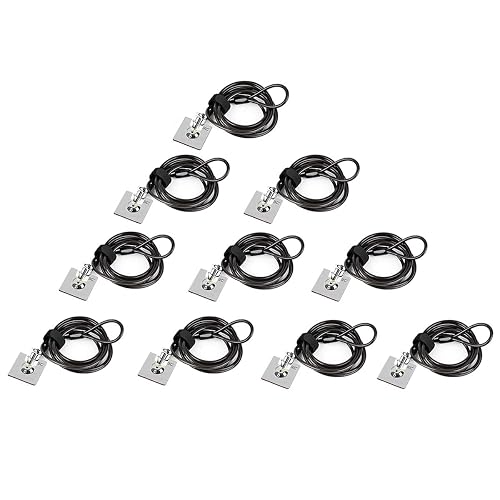 | Best Combo Pack | Lock Type: Combination | Cable Length: 6.5 ft | Cable Material: Stranded steel | VIEW LATEST PRICE | Read Our Analysis |
| Laptop Cable Lock Anti-Theft Security Kit (2 Pack) |  | Best 2-Pack | Lock Type: Keyed | Cable Length: Standard cable | Cable Material: Carbon steel | VIEW LATEST PRICE | Read Our Analysis |
More Details on Our Top Picks
Sendt Black Notebook/Laptop Combination Lock Security Cable
If you need a simple way to protect a laptop that uses a Kensington security slot, the Sendt Black Notebook/Laptop Combination Lock Security Cable is a smart fit. Its 6 foot cable secures your device while leaving room to move. The 4 dial lock provides up to 10,000 combinations, allowing you to choose a code that feels personal and secure. The zinc alloy construction is sturdy, and the design helps prevent accidental resets. Note that it will not fit Dell laptops, Kensington Nano slots, or Noble wedge slots.
- Lock Type:Combination
- Cable Length:6 ft
- Cable Material:Zinc alloy
- Keyhole Fit:Kensington slot
- Code Capacity:10,000 combos
- Anchor Plate:No
- Additional Feature:Prevents accidental reset
- Additional Feature:10,000 combinations
- Additional Feature:Zinc alloy build
Kensington N17 Dell Laptop Security Lock (K68008WW)
The Kensington N17 Dell Laptop Security Lock (K68008WW) is a smart pick for Dell and Alienware users who want strong theft protection without the hassle of a traditional key. You get a wedge lock that snaps in with one hand, then grips tightly for a firm fit. Its resettable 4-wheel code gives you 10,000 combinations, so you can lock up fast and move on. The cut-resistant carbon steel cable anchors to a desk, table, or fixed structure. It is independently verified, built with stainless steel, and backed by a 5-year warranty.
- Lock Type:Combination
- Cable Length:Standard cable
- Cable Material:Carbon steel
- Keyhole Fit:Wedge slot
- Code Capacity:10,000 combos
- Anchor Plate:No
- Additional Feature:Push-button engagement
- Additional Feature:Cut-resistant carbon steel
- Additional Feature:5-year warranty
AOMGD Laptop Lock Security Cable for 3x7mm Keyholes
AOMGD’s 2-piece laptop security cable lock is a smart choice if your device has a 3 x 7 mm keyhole and you want simple, keyless protection without extra fuss. It uses a 4-digit resettable code, so you can choose one of 10,000 combinations and keep it private. The 6-foot galvanized steel cable is durable and helps deter theft. Before you lock it, test the preset 0000 code, then change it with a small flat-head screwdriver. It is suitable for older MacBook Pros and travel bags, but it does not work with newer MacBooks or many square keyhole models.
- Lock Type:Combination
- Cable Length:6 ft
- Cable Material:Galvanized steel
- Keyhole Fit:3×7 mm keyhole
- Code Capacity:10,000 combos
- Anchor Plate:No
- Additional Feature:2-pack bundle
- Additional Feature:Old MacBook Pro fit
- Additional Feature:Travel bag compatible
AboveTEK Laptop and Tablet Security Lock Cable
AboveTEK’s Laptop and Tablet Security Lock Cable provides fast, reliable theft protection in busy public spaces, ideal when you want a simple setup without sacrificing strength. You receive two keys, two adhesive anchor sets, and a 6-foot cut-resistant galvanized steel cable. The industrial-grade 3M adhesive grips flat surfaces securely, so you can attach tablets, phones, or large notebooks in seconds. The stainless steel lock feels smooth and durable, giving you confidence in cafes, libraries, shops, and display areas. It is compatible with MacBooks, iPads, Android devices, and more.
- Lock Type:Keyed
- Cable Length:6 ft
- Cable Material:Galvanized steel
- Keyhole Fit:Standard slot
- Code Capacity:N/A
- Anchor Plate:Yes
- Additional Feature:3M adhesive anchors
- Additional Feature:2-key set
- Additional Feature:Tablet stand compatible
Laptop Cable Lock with Keys for Electronics
Laptop cable locks with keys are a practical choice for simple, reliable protection of everyday devices such as MacBooks, Surface tablets, Kindles, Samsung phones, Android tablets, and projectors. The lock features a super-strong stainless steel head, a 360° swivel, and a cut-resistant twisted cable with a PVC coating. If your device has a standard lock slot, insert the head and loop the 6.5 foot cable around a fixed object. If it does not, use the anchor plate and then secure the lock in place. Always check compatibility first, because some models require an I3C adhesive plate.
- Lock Type:Keyed
- Cable Length:6.5 ft
- Cable Material:Twisted steel
- Keyhole Fit:Standard slot
- Code Capacity:N/A
- Anchor Plate:Yes
- Additional Feature:360° rotating head
- Additional Feature:PVC-coated cable
- Additional Feature:Adhesive anchor option
Laptop Cable Lock Anti-Theft Combination Lock (10 Pack)
This 10 pack is a smart pick if you manage several devices and want the same easy protection on each one. You get a 4-digit code, so you keep control without chasing keys. The 360° rotating stainless steel head, and the cut-resistant, PVC-coated 6.5 ft cable, help you secure laptops, tablets, monitors, projectors, docks, and notebooks. It fits standard 7 x 3 mm slots, and the anchor plates help devices without keyholes. Set it, lock it, and breathe easier.
- Lock Type:Combination
- Cable Length:6.5 ft
- Cable Material:Stranded steel
- Keyhole Fit:Standard slot
- Code Capacity:10,000 combos
- Anchor Plate:Yes
- Additional Feature:10-pack bundle
- Additional Feature:One-handed operation
- Additional Feature:Push-to-lock function
Laptop Cable Lock Anti-Theft Security Kit (2 Pack)
Need a simple, dependable way to keep your gear safer on the go? This 2 pack provides a practical solution for laptops and other devices. Use the security slot that fits most laptops, and apply the adhesive anchor plates when a device lacks a slot. Wrap the 5 mm carbon steel cable around an immovable object to discourage quick grabs. The cable uses twisted wires for strength, and the lock turns freely for easier operation. Two keys are included for backup.
- Lock Type:Keyed
- Cable Length:Standard cable
- Cable Material:Carbon steel
- Keyhole Fit:Standard slot
- Code Capacity:N/A
- Anchor Plate:Yes
- Additional Feature:2-pack bundle
- Additional Feature:5mm cable
- Additional Feature:Freely rotating interface
Factors to Consider When Choosing Laptop Security Locks
When choosing a laptop security lock, first verify that it fits your device and is compatible with the locking slot. Next evaluate the locking mechanism, cable strength, and installation method to ensure solid protection without a difficult setup. If you travel frequently, select a model that also meets your portability needs so you remain secure without adding unnecessary weight.
Device Compatibility
Which lock will actually fit your laptop? Start by checking the security slot on your device, because standard 7 x 3 mm slots, wedge slots, and Nano slots are not interchangeable. Measure the opening or confirm the size before you buy. Some locks only fit 3 x 7 mm or Kensington-style holes. Then check your device category. Some locks work with many laptops and tablets, while others match only certain brands or models. If your laptop has no built-in slot, look for a lock with an adhesive anchor plate or a similar attachment for slotless devices. Also read the compatibility notes closely, because a lock that fits one laptop family may fail on another. That small check will save you stress later.
Locking Mechanism
The lock-and-key choice can shape how easy your laptop is to secure every day. You can pick a keyed lock if you prefer a physical key, or a combination lock if you want a 4-digit code with up to 10,000 possible combinations. Next, check how the mechanism feels in use. A push-button or one-handed design lets you lock your device faster, which is helpful when you are rushing between meetings. Also choose a lock head that seats tightly in the security slot, because a firm fit helps prevent pulling, twisting, and unintended release. Some locks also block accidental reset or code changes, so your setting stays secure. Finally, make sure the mechanism matches your slot type, whether standard, wedge, or nano.
Cable Strength
Strong cable material is your first line of defense, so do not settle for anything flimsy. Look for cut-resistant metals such as galvanized steel, carbon steel, stainless steel, or stranded steel; they make tampering harder. Next, pay attention to thickness. A cable around 5 mm wide, or one built with multiple strands, usually provides better strength without feeling weak. Then check the length. A 6 to 6.5 foot cable can give more room to anchor your laptop, but it still needs a tough core. Also, a PVC coating helps resist wear and protects the metal inside. Finally, choose cables tested for pull and torque resistance, since real strength depends on how well the lock stands up under force.
Installation Method
When you choose a laptop security lock, the installation method matters just as much as cable strength because a lock only helps if it fits your device well and you can use it with ease. First, check the slot type on your device; you may need a built-in security slot, a wedge slot, or a 3 × 7 mm keyhole. Next, match the connector shape before you buy because a wrong fit wastes time and causes stress. Some locks slide straight into the slot, then you wrap the cable around a fixed object. If your device lacks a slot, choose an adhesive anchor plate for a flat, hard surface. Also, keyed, combination, and push-button designs all install quickly; one-handed styles feel easier when you use them often.
Portability Needs
If you travel often, portability can make a laptop security lock feel helpful instead of annoying. You will appreciate a lighter lock and cable because they fit in your bag without adding much weight. A 6 foot cable usually gives you enough reach, so you can secure your laptop in airports, libraries, or hotel rooms without carrying extra bulk. Keyless combination locks are useful because you do not need to pack or keep track of a small key. A compact lock head and a flexible steel cable make coiling and storage easier. If you move between devices, check for a standard 7 x 3 mm slot, since that size is usually more practical. If you pack quickly, choose a lock you can install and remove in seconds.
Security Ratings
Confidence starts with proof, and laptop lock security ratings give you that proof before you buy. Look for independent testing against torque, pull, foreign implements, lock lifecycle, corrosion, key strength, and harsh weather. Those checks show the lock can handle real pressure, not just glossy claims. Next, pay attention to the combination count. A 4 digit resettable code with 10,000 possible mixes gives thieves far less room to guess. Compare materials as well. Stainless steel, zinc alloy, hardened steel, and carbon steel usually hold up better than lighter options. Also check for cut resistant cables and reinforced lock heads, since they slow forced entry. Finally, make sure the lock snaps into the slot with a strong, unique fit. That detail can make a big difference when you need peace of mind.
Frequently Asked Questions
Are Laptop Security Locks Compatible With All Laptop Brands?
No, you cannot assume laptop security locks fit every brand. Check your laptop’s lock slot type, because brands and models vary. Some devices require adapters, and some do not support standard locks at all.
Can I Travel With a Laptop Lock Through Airport Security?
Yes, you can usually travel with a laptop lock through airport security. It is a small item, not a prohibited threat. Pack it in carry-on or checked baggage, and remove it if asked.
Do Laptop Locks Work on Desks Made of Glass?
No, not directly. You will need a clamp, an anchor, or a cable loop around a stronger fixture, because glass desks cannot hold the lock securely. You can still protect your laptop by attaching it to another object.
How Often Should I Replace My Laptop Security Lock Cable?
You should replace your laptop security lock cable every 2 to 3 years, or sooner if it frays, stiffens, rusts, or the lock jams. Check it regularly and replace it as soon as any wear appears to maintain strong protection.
Will a Laptop Lock Void My Device Warranty?
Usually, no, your laptop lock will not void your warranty. Over 60% of thefts are opportunistic, so you are protecting your device. Do not force an incompatible lock into the slot or damage ports, as that could void warranty coverage.




