


If you work on a laptop for hours, the right stand can save your neck, clear your desk, and help your device run cooler.
In 2026, the best options combine smart adjustability with solid build quality, so you can position your screen at eye level without wobble or fuss.
Some stands fold flat for travel, while others swivel or lift higher for shared work and improved posture, and the real challenge is choosing the one that matches your setup, your space, and the way you work.
| Portable Laptop Stand for 10-16″ Computers |  | Best Compact Pick | Compatibility: 10–16 in laptops | Adjustability: Fixed height | Foldability: Compact modular | VIEW LATEST PRICE | Read Our Analysis |
| Lamicall Adjustable Laptop Stand with 360° Rotating Base | 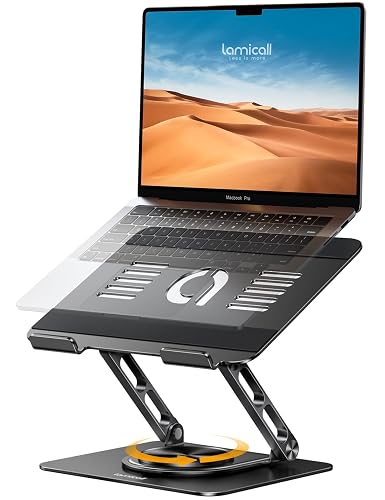 | Best Rotating Stand | Compatibility: 10–17.3 in laptops | Adjustability: Height/angle adjustable | Foldability: Foldable | VIEW LATEST PRICE | Read Our Analysis |
| tounee Telescopic Laptop Stand with 360° Swivel Base | 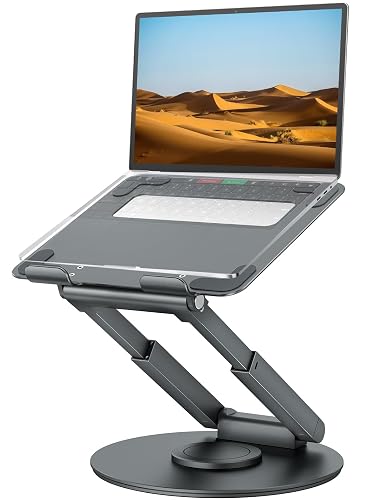 | Best Sit-Stand Option | Compatibility: 10–17 in laptops | Adjustability: Telescopic height/angle adjustable | Foldability: Foldable | VIEW LATEST PRICE | Read Our Analysis |
| Amazon Basics Adjustable Laptop Stand for Desk |  | Best Basic Stand | Compatibility: 10–15.6 in laptops | Adjustability: Height/angle adjustable | Foldability: Foldable | VIEW LATEST PRICE | Read Our Analysis |
| Adjustable Foldable Laptop Stand for 10-15.6” Laptops | 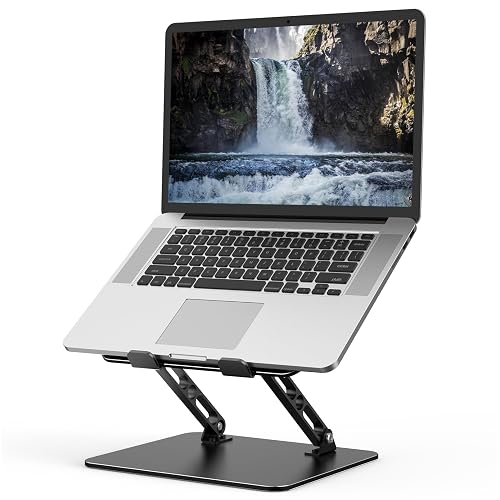 | Best Budget Foldable | Compatibility: 10–15.6 in laptops | Adjustability: Height/angle adjustable | Foldability: Foldable | VIEW LATEST PRICE | Read Our Analysis |
| BESIGN LS03 Aluminum Laptop Stand for 10-15.6″ Laptops | 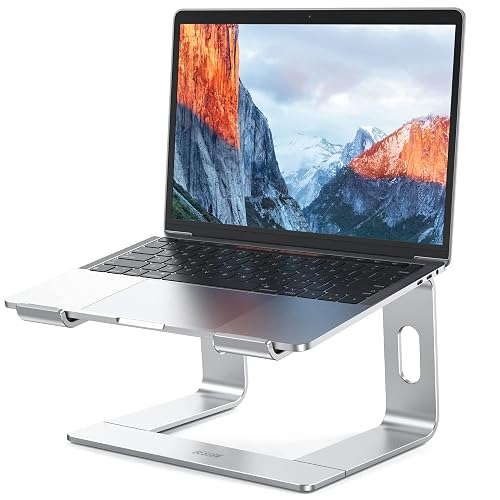 | Best Lightweight Stand | Compatibility: 10–15.6 in laptops | Adjustability: Adjustable length | Foldability: Fold-flat | VIEW LATEST PRICE | Read Our Analysis |
| AOEVI Adjustable Laptop Stand with 360° Rotating Base |  | Best for Collaboration | Compatibility: 10–16 in laptops | Adjustability: Height/angle adjustable | Foldability: Foldable | VIEW LATEST PRICE | Read Our Analysis |
More Details on Our Top Picks
Portable Laptop Stand for 10-16″ Computers
If you use a 10 to 16 inch laptop and want a setup that feels easier on your body, this portable laptop stand is a smart fit. It raises your screen by 6 inches, so your neck stays calmer and your wrists align better. It fits MacBook, Surface, Dell, HP, Lenovo, and Chromebook models, letting you switch devices without stress. The aluminum body helps move heat away, and the hollow design boosts airflow. Because it snaps together quickly and weighs little, you can pack it, move it, and keep your desk steady.
- Compatibility:10–16 in laptops
- Adjustability:Fixed height
- Foldability:Compact modular
- Rotation:No rotation
- Material:Aluminum alloy/metal/plastic
- Ventilation:Hollow airflow design
- Additional Feature:6-inch screen elevation
- Additional Feature:Snap-together assembly
- Additional Feature:Deformation-resistant design
Lamicall Adjustable Laptop Stand with 360° Rotating Base
The Lamicall Adjustable Laptop Stand with a 360° rotating base is a smart choice when comfort, flexibility, and screen sharing all matter. It fits laptops from 10 to 17.3 inches, so it works with many MacBook, Surface, Dell, HP, and Chromebook models. You get multiple height and angle settings, and a screen position that helps keep your eyes level. The rotating base makes team demos and client meetings easier. Its aluminum construction stays sturdy, vents heat effectively, and the stand folds flat for travel, storage, and daily desk use.
- Compatibility:10–17.3 in laptops
- Adjustability:Height/angle adjustable
- Foldability:Foldable
- Rotation:360° rotating base
- Material:Aluminum alloy
- Ventilation:Ventilation holes
- Additional Feature:Larger heavier base
- Additional Feature:Dual-screen alignment
- Additional Feature:Screen-sharing support
tounee Telescopic Laptop Stand with 360° Swivel Base
For anyone who spends long hours at a desk, the tounee Telescopic Laptop Stand with 360° Swivel Base is a smart upgrade because it supports a healthier sit-stand routine without making your setup complicated. You can raise your screen from 2.1 to 21 inches and switch positions with the telescoping button when your back needs a break. The aluminum alloy frame and heavier base keep it steady, even with laptops up to 22 lbs. The smooth 360° swivel makes chats easier, and the foldable design saves space for your MacBook Pro or other 10 to 17-inch laptop.
- Compatibility:10–17 in laptops
- Adjustability:Telescopic height/angle adjustable
- Foldability:Foldable
- Rotation:360° rotating base
- Material:Aluminum alloy
- Ventilation:Open design
- Additional Feature:Sit-stand support
- Additional Feature:2.1-21 inch height
- Additional Feature:Supports 22 lbs
Amazon Basics Adjustable Laptop Stand for Desk
The Amazon Basics Adjustable Laptop Stand for Desk is a smart choice when you want better posture without adding bulk to your workspace. You can raise it up to 7 inches, so your screen sits at a more natural level during long work sessions. The adjustable angle helps you fine-tune comfort, which can quickly reduce neck strain. It fits laptops and tablets from 10 to 15.6 inches, including MacBook, Surface, and Dell XPS models. Its aluminum frame is light, sturdy, and foldable, so you can move it, store it, and use it anywhere with ease.
- Compatibility:10–15.6 in laptops
- Adjustability:Height/angle adjustable
- Foldability:Foldable
- Rotation:No rotation
- Material:Aluminum
- Ventilation:Open hollow design
- Additional Feature:7-inch height adjustment
- Additional Feature:Non-slip silicone pads
- Additional Feature:Protective hooks
Adjustable Foldable Laptop Stand for 10-15.6” Laptops
A foldable laptop stand like the Gogoonike ZB-1688 is a smart pick if you use a 10 to 15.6 inch laptop and want better comfort without losing desk space. You can adjust the height and angle to ease neck strain, back pain, and tired eyes. Its metal build feels sturdy, yet the 0.9 kilogram frame remains easy to carry. Anti-skid silicone pads and rubber mats protect your laptop from scratches and slips. The open design and ventilation holes improve airflow, so your device runs cooler at home, in the office, or on the road.
- Compatibility:10–15.6 in laptops
- Adjustability:Height/angle adjustable
- Foldability:Foldable
- Rotation:No rotation
- Material:Metal/ABS/aluminum/silicone
- Ventilation:Ventilation holes
- Additional Feature:Supports 17.6 lbs
- Additional Feature:Anti-skid silicone pads
- Additional Feature:Smooth edge finish
BESIGN LS03 Aluminum Laptop Stand for 10-15.6″ Laptops
The BESIGN LS03 Aluminum Laptop Stand is a smart pick if you use a 10 to 15.6 inch laptop and want better comfort without crowding your desk. It fits MacBook, ThinkPad, Dell, HP, ASUS, and Chromebook models with ease. It lifts your screen 6 inches, which reduces neck and shoulder strain. The aluminum frame stays sturdy and can hold up to 8.8 pounds. The open design improves airflow and helps your laptop stay cooler. It folds flat, assembles in three steps, and keeps your workspace neat.
- Compatibility:10–15.6 in laptops
- Adjustability:Adjustable length
- Foldability:Fold-flat
- Rotation:No rotation
- Material:Aluminum alloy
- Ventilation:Open aluminum structure
- Additional Feature:Detachable design
- Additional Feature:Three-step assembly
- Additional Feature:Folds flat
AOEVI Adjustable Laptop Stand with 360° Rotating Base
Built for people who want comfort without giving up flexibility, the AOEVI Adjustable Laptop Stand with 360° Rotating Base fits right in if you move between solo work, shared tables, and quick team huddles. You can raise the screen and tilt it from 0 to 90 degrees to ease your neck and shoulders. The round base spins both ways, so you can share your view quickly without lifting the stand. Airflow cutouts help keep your laptop cool, and the padded platform with rubber edges adds protection. It fits 10 to 16 inch devices and stays steady up to 22 lb.
- Compatibility:10–16 in laptops
- Adjustability:Height/angle adjustable
- Foldability:Foldable
- Rotation:360° rotating base
- Material:Aluminum alloy
- Ventilation:Cutout airflow design
- Additional Feature:Infinite rotation both directions
- Additional Feature:0-90° angle range
- Additional Feature:Rectangular airflow cutouts
Factors to Consider When Choosing Laptop Stands
When choosing a laptop stand, first confirm it fits your laptop’s size so it does not wobble or feel cramped. Next evaluate the height and angle, along with stability, weight, material, and airflow, because these factors determine how comfortable, sturdy, and cool your setup will be. A good stand supports proper posture, protects the device, and reduces neck strain at your desk.
Laptop Size Compatibility
How sure are you that your laptop and stand actually match? Start by checking the stand’s supported size range in inches. Many stands fit only 10 to 15.6 inches, 10 to 16 inches, or 10 to 17.3 inches, so your laptop needs to fall inside that window. A 16 inch model may fit one stand and miss another that stops at 15.6 inches. Next, look beyond the screen label; your laptop’s full footprint matters, especially if you carry a wider 15.6 inch or 16 inch machine. If you use a compact 12 or 13 inch notebook, make sure the stand still grips it securely. If you plan to upgrade later, choose a broader range now so you will not have to shop twice.
Height And Angle
A good laptop stand should do more than just lift your device. You want enough height adjustment to bring the screen near eye level, and many stands provide about 2.1 inches to 21 inches of lift. That range helps you match your setup to your chair, desk, and posture. Next, check the angle control. A wider tilt range lets you work while sitting or standing without feeling stuck in one awkward view. Better yet, choose a stand that lets you adjust height and tilt separately. Small changes can ease neck strain and help your head stay back, not forward. If you share your screen, smooth rotation is handy, too. For typing, aim for a setting that keeps your wrists and elbows relaxed while the display remains easy to see.
Stability And Weight
Stability matters because your stand should feel solid every time you type, tap, or reach for your trackpad. Check the load rating first and make sure it exceeds your laptop’s weight. Many sturdy stands handle about 4 to 10 kg, while lighter models may support closer to 5 kg. Next, inspect the base. A heavier base usually reduces shake, sliding, and tipping during long work sessions. Look for non-slip pads, rubber grips, and protective hooks, as these features help hold your laptop steady on smooth desks. Also verify that the stand remains firm when raised higher, because weak frames can bend under pressure. If you travel often, choose a foldable model under 1 kg; expect less rigidity compared to a larger stand.
Material And Build
Once your stand feels steady on the desk, the next thing to check is what it is made of and how it is built. Aluminum alloy is a smart choice because it stays light, feels rigid, and can move some heat away from your laptop. Look for a higher load capacity, around 8 to 11 lb or more, so the stand resists wobbling, sliding, and tip overs while you type. Notice the shape as well. Open or hollow frames let air move more freely, which helps during busy work sessions. Then check the touch points, such as rubber pads, silicone strips, or padded hooks, which protect your laptop from scratches and keep it from creeping around. If you want a foldable model, make sure the joints feel tight and durable.
Cooling And Airflow
When you choose a laptop stand, cooling matters more than most people realize because a hot laptop can slow down right when you need it most. Look for an open or hollow design, since it allows air to circulate under the device and reduces heat buildup. Aluminum alloy stands help as well, because metal absorbs and disperses heat away from the laptop. Next, check for ventilation holes, cutouts, or U-shaped frames; these features boost airflow and help your machine breathe more easily. Also, a stand that raises your laptop several inches gives air more room to reach the underside and vents. With improved airflow, you can maintain steadier performance during video calls, work sessions, or long stretches of use.
Portability And Storage
Portability matters as much as comfort if you carry your laptop from place to place. Look for a stand that folds flat or breaks down into a compact shape, because it slips into a laptop bag or backpack without a fight. Light models, often around 0.7 to 1.0 kg, are easier to haul yet remain steady on a desk. Check folded dimensions, not just the open size; a stand near 10 x 9 x 2 inches stores far better than a bulky frame. Modular or detachable parts also help, since a few simple pieces pack neatly and stack cleanly. If you switch between home, office, and travel often, choose a space-saving stand that stores easily and will not eat up your desk.
Ergonomic Benefits
What good is a laptop stand if it looks nice but leaves your neck sore by lunchtime? You need a stand that lifts your screen close to eye level, so your neck stays relaxed and your shoulders do not creep upward. Next, choose one with adjustable height and angle. That lets you keep your wrists and elbows in a natural line while you type and read. Also, a stand that supports both sitting and standing helps you shift posture during the day, which can ease back strain. Just as important, pick a stable base with firm support. When the stand does not wobble or slide, you can focus better and feel more comfortable. In the end, the best ergonomic stand makes your workday feel lighter.
Base Rotation Features
A 360° rotating base makes a laptop stand more useful in daily life. You can turn your screen smoothly for sharing, presentations, or a quick angle change without lifting your laptop. That saves effort and keeps your setup steady. Rotation also helps when you work with others, because everyone can see the screen from different spots during meetings or group tasks. Look for a base that swivels with light force and stays centered, since that makes small adjustments feel easy, not fiddly. If you often face yourself, a client, or a second monitor, rotation keeps the view lined up. When you type while the stand moves, a heavier base helps cut wobble and keeps everything calm.
Frequently Asked Questions
Are Laptop Stands Safe for Prolonged Daily Use?
Yes. You can safely use laptop stands daily if they are stable, properly adjusted, and keep your wrists and neck comfortable. Take regular breaks, because poor positioning can still cause strain over time.
Can a Laptop Stand Improve Typing Posture?
Yes, a laptop stand can improve typing posture. It raises your screen, promotes a straighter neck, and helps keep your wrists and shoulders more comfortable while you type.
Do Laptop Stands Help Prevent Overheating?
Yes, laptop stands can help prevent overheating by lifting the device and improving airflow around the vents. You should still keep dust off and avoid blocking fans, but using a stand often reduces heat buildup noticeably.
Will a Stand Fit Laptops With Thick Protective Cases?
Yes. Check the stand’s width, depth, and lip clearance first. Choose adjustable or extra-wide models for bulky cases. Very thick sleeves may need to be removed for a secure fit.
Are Portable Stands Stable on Uneven Surfaces?
Yes, portable stands can wobble on uneven surfaces, like a house of cards. You will get better stability with wider feet, rubber grips, and adjustable legs. Still, test them before trusting your laptop.




