

If you’re juggling spreadsheets, tax files, and video calls, the right laptop can make your day feel a lot easier.
You need a machine that’s fast, secure, and comfortable for long sessions.
The best choice is not always obvious.
In 2026, six standouts cover premium 2-in-1 flexibility, AI-ready performance, and budget-friendly practicality, and the details may surprise you.
| Microsoft Surface Pro 2-in-1 Laptop/Tablet (2024) |  | Best Portable 2-in-1 | Operating System: Windows 11 Copilot+ PC | Display Size: 13-inch | RAM: 16 GB | VIEW LATEST PRICE | Read Our Analysis |
| Microsoft Surface Pro 2-in-1 Laptop/Tablet (2024) |  | Premium 2-in-1 | Operating System: Windows 11 Copilot+ PC | Display Size: 13-inch | RAM: 16 GB | VIEW LATEST PRICE | Read Our Analysis |
| Microsoft Surface Laptop (2024) Copilot+ PC 32GB/1TB Black |  | Best High-End | Operating System: Windows 11 Home | Display Size: 13.8-inch | RAM: 32 GB | VIEW LATEST PRICE | Read Our Analysis |
| ASUS Vivobook Go 15.6″ FHD Slim Laptop (E1504FA-AB34) | 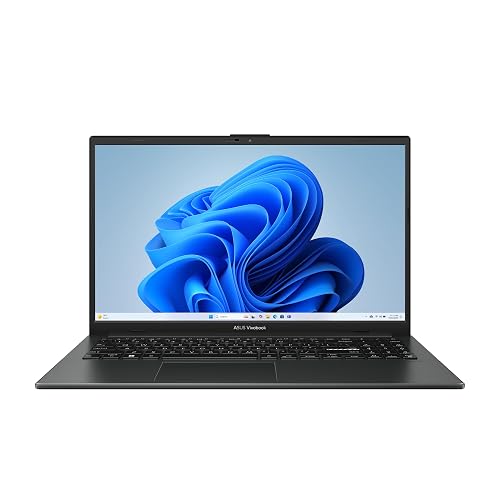 | Budget-Friendly Pick | Operating System: Windows 11 Home | Display Size: 15.6-inch | RAM: 8 GB | VIEW LATEST PRICE | Read Our Analysis |
| ASUS Chromebook CX15 Laptop (CX1505CTA-AS88F-PG) | 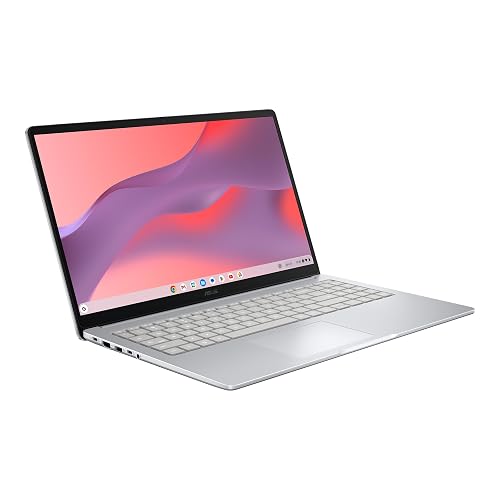 | Best Chromebook | Operating System: Chrome OS | Display Size: 15.6-inch | RAM: 8 GB | VIEW LATEST PRICE | Read Our Analysis |
| Dell 15 Laptop DC15250 with 120Hz FHD Display |  | Best Value | Operating System: Windows 11 Home | Display Size: 15.6-inch | RAM: 8 GB | VIEW LATEST PRICE | Read Our Analysis |
More Details on Our Top Picks
Microsoft Surface Pro 2-in-1 Laptop/Tablet (2024)
If you want a sleek, portable machine that can handle spreadsheets, meetings, and note taking with ease, the Microsoft Surface Pro 2-in-1 Laptop/Tablet (2024) stands out for accountants who value flexibility. You get a 13-inch OLED touchscreen, a built-in kickstand, and optional Surface Pro Flex Keyboard support for laptop, tablet, or sketchbook use. With Snapdragon X Elite or X Plus, 16 GB of RAM, and Copilot+ AI features, it helps you work faster and stay secure. You will also appreciate about 14 hours of battery life, 256 GB of storage, and fast charging through USB-C or Surface Connect.
- Operating System:Windows 11 Copilot+ PC
- Display Size:13-inch
- RAM:16 GB
- Storage:256 GB
- Wireless:Not specified
- Battery Life:Up to 14 hours
- Additional Feature:13-inch OLED touchscreen
- Additional Feature:Detachable Flex Keyboard
- Additional Feature:Built-in kickstand
Microsoft Surface Pro 2-in-1 Laptop/Tablet (2024)
The Microsoft Surface Pro 2-in-1 Laptop/Tablet (2024) is a strong choice for accountants who need a portable Windows 11 Copilot+ PC that handles spreadsheets, client files, and mobile work with ease. You can choose Snapdragon X Elite or X Plus performance, and the powerful NPU boosts AI-driven tasks. The 13-inch OLED touchscreen delivers sharp, cinematic color. With 16GB of RAM and a 1TB SSD, you get room for large files. Battery life reaches up to 14 hours, charging is fast at 65W, and you can use Surface Connect or USB-C for flexible charging, all in a sleek black design.
- Operating System:Windows 11 Copilot+ PC
- Display Size:13-inch
- RAM:16 GB
- Storage:1 TB SSD
- Wireless:Not specified
- Battery Life:Up to 14 hours
- Additional Feature:Snapdragon X Elite
- Additional Feature:13-inch OLED touchscreen
- Additional Feature:Built-in kickstand
Microsoft Surface Laptop (2024) Copilot+ PC 32GB/1TB Black
Microsoft Surface Laptop (2024) Copilot+ PC, 32GB/1TB, Black is a strong pick for accountants who want a slim, premium Windows 11 laptop with plenty of memory for heavy spreadsheets, multiple accounting apps, and long work sessions. It has a 13.8-inch PixelSense touchscreen, a 12-core Snapdragon X Elite chip, and a fast AI-ready NPU that can help streamline modern workflows. The 32GB RAM and 1TB SSD provide room for large files and quick access. At 2.96 pounds it is easy to carry. Wi-Fi 7, long battery life, and USB-C support help keep you productive.
- Operating System:Windows 11 Home
- Display Size:13.8-inch
- RAM:32 GB
- Storage:1 TB SSD
- Wireless:Wi‑Fi 7 / Bluetooth 5.4
- Battery Life:Up to 20 hours
- Additional Feature:13.8-inch PixelSense touchscreen
- Additional Feature:HDR-capable display
- Additional Feature:600 nits brightness
ASUS Vivobook Go 15.6″ FHD Slim Laptop (E1504FA-AB34)
ASUS Vivobook Go 15.6″ FHD Slim Laptop (E1504FA-AB34) is a practical pick if you want a budget-friendly accounting laptop that keeps everyday work moving, thanks to its Ryzen 3 7320U chip, 8 GB of DDR5 memory, and built-in numeric keypad for quicker data entry. It also includes a 15.6-inch Full HD display, a 256 GB SSD, and Windows 11 Home for spreadsheets, invoices, and cloud apps. The 42 Wh battery can last up to 11 hours, and fast charging helps when you are busy. It is slim, durable, and ready for light office travel.
- Operating System:Windows 11 Home
- Display Size:15.6-inch
- RAM:8 GB
- Storage:256 GB SSD
- Wireless:Wi‑Fi 5 / Bluetooth 5.1
- Battery Life:Up to 11 hours
- Additional Feature:180° lay-flat hinge
- Additional Feature:Number keypad
- Additional Feature:5 MIL-STD 810H tests
ASUS Chromebook CX15 Laptop (CX1505CTA-AS88F-PG)
If you want a budget-friendly Chromebook that keeps accounting work organized, the ASUS Chromebook CX15 (CX1505CTA-AS88F-PG) is built for you. You get a 15.6-inch Full HD anti-glare display, a full-size keyboard with numpad, and 8 GB of LPDDR5 memory for spreadsheets and web apps. Its Intel Processor N50, 128 GB SSD, and Chrome OS boot fast and are simple to manage. You can connect monitors, printers, and storage through USB-C, USB-A, and HDMI. The Titan C2 chip, MIL-STD 810H durability, and up to 10-hour battery life help you work securely and on the go.
- Operating System:Chrome OS
- Display Size:15.6-inch
- RAM:8 GB
- Storage:128 GB SSD
- Wireless:Wi‑Fi 5 / Wi‑Fi 6 / Bluetooth not specified
- Battery Life:Up to 10 hours
- Additional Feature:Titan C2 security chip
- Additional Feature:Fast Boot under 10s
- Additional Feature:Chromebook anti-virus protection
Dell 15 Laptop DC15250 with 120Hz FHD Display
The Dell 15 DC15250 is a solid pick for accountants who want a practical work laptop with a roomy keyboard, a separate numeric keypad, and a calculator hotkey for faster number entry. You get a 15.6-inch FHD 120Hz display, an Intel Core 3 100U, Intel UHD Graphics, 8GB DDR4 RAM, and a 512GB SSD for smooth everyday bookkeeping. Windows 11 Home keeps the environment familiar. Lifted hinges improve your typing angle, while ComfortView helps cut blue light during long sessions. Battery life is efficient, ExpressCharge helps you top up quickly, and 1 year onsite service adds reassurance.
- Operating System:Windows 11 Home
- Display Size:15.6-inch
- RAM:8 GB
- Storage:512 GB SSD
- Wireless:Not specified
- Battery Life:Not specified
- Additional Feature:120Hz display
- Additional Feature:Lifted hinges
- Additional Feature:ComfortView blue-light reduction
Factors to Consider When Choosing Laptops For Accountants
When choosing a laptop for accounting work, ensure it has sufficient processing power to run spreadsheets, tax software, and other business tools smoothly. You should also have ample memory for multitasking, reliable storage for files, a comfortable display for long sessions, and battery life that lasts through your day. Balancing these factors helps you work more efficiently and with less strain.
Processing Power Needs
Power matters more than many accountants expect. If you are juggling large Excel workbooks, pivot tables, or Power Query, look for a CPU with at least 4 to 6 high-performance cores and strong single-thread speed so recalculations finish faster. Choose a processor with high boost clocks, ideally around 3.0 GHz or more, because many accounting apps still lean on one core. If you also run accounting software, browsers, or virtual machines at once, aim for 8 to 16 logical cores so background tasks do not bog down your work. If you use AI bookkeeping or automated reconciliation, a chip with an NPU or other hardware acceleration can help. Finally, make sure the laptop’s cooling can sustain that power; thin designs with low TDP CPUs may throttle during long reports.
Memory And Multitasking
Memory is what keeps your workflow smooth when you are bouncing between Excel, browser tabs, accounting software, and maybe even a virtual machine. If you usually juggle spreadsheets, databases, or remote desktop sessions, choose at least 16 GB of RAM so your apps do not stutter when you switch tasks. For heavier workloads, 32 GB gives you more breathing room and cuts down on paging to disk, which helps everything stay responsive. You will also get better results from faster, dual-channel memory, since bandwidth matters when Excel recalculates large models or you run data-heavy tools. If you plan to use virtual machines or in-memory analytics, look for upgradeable RAM or buy more capacity upfront, because some laptops make later upgrades hard or impossible.
Storage Capacity
Once you have enough RAM to keep your apps moving smoothly, the next thing to check is storage capacity. Aim for at least 512 GB of SSD space so you can keep large spreadsheets, accounting databases, and backups without constantly swapping drives. Choose an NVMe or PCIe SSD instead of SATA or an HDD, since it will open and save files much faster and keep your workflow responsive. If you store local client files, install accounting software, or run virtual machines, 1 TB or more is a smarter choice. Keep active files on the internal drive, then back up monthly or incrementally to an external or network location. Also plan for 20 to 30 percent annual growth, so today’s storage will not feel cramped next tax season or after audit season.
Display Comfort
For comfortable long work sessions, choose a laptop display that gives you enough room to read spreadsheets without constant zooming. You will usually do best with a 13 to 15.6 inch screen, since it balances portability with workspace; a larger panel can show more columns at once. Pick at least Full HD (1920×1080) so text and numbers stay sharp, and consider 2560×1600 if you want even less eye strain and more data visible. A matte or anti-glare finish helps you work under office lights without distracting reflections. Aim for 300 to 400 nits of brightness, good color accuracy, and strong contrast so gridlines and small numerals stay clear. Flicker-free backlighting, blue light reduction, and adjustable refresh rates can also reduce fatigue during long accounting sessions.
Battery Life
Battery life matters because you need a laptop that can last through a full day of spreadsheets, email, and client work without constantly hunting for a charger. Aim for at least 8 to 10 hours of mixed use so you can work comfortably from morning to evening. A larger battery, measured in watt-hours, usually gives you more real-world runtime, especially when paired with a low-power processor. You will also get better endurance from efficient integrated graphics, adaptive brightness, and strong power-management settings. Fast charging helps too; you can top up to about 80% in under an hour during short breaks. To protect battery health, avoid draining it to 0% or keeping it at 100% all the time, so it lasts through more busy seasons.
Port Selection
Ports matter because they determine how easily you can connect your laptop to the gear you use every day. Look for at least two USB-A ports and one USB-C port, so you can plug in older peripherals, external drives, and newer accessories without juggling adapters. A USB-C or Thunderbolt 4 port with power delivery and DisplayPort Alt Mode lets you charge your laptop and drive one or more monitors through a single cable. If you present often, choose HDMI or mini-DisplayPort for quick connection to client screens and conference-room displays. An SD card reader or microSD slot helps when you import receipts or scanned documents. For large transfers and backups, built-in Gigabit Ethernet or easy USB-C Ethernet support keeps your connection stable and fast.
Security Features
After you pick the right ports, shift your attention to security features, because accountants handle sensitive financial data every day. Look for TPM 2.0, which protects encryption keys and helps BitLocker secure your drive. Biometric login matters too, so choose a laptop with Windows Hello fingerprint or IR face recognition and multi-factor authentication. These layers make it harder for anyone else to reach your accounting apps. You also want UEFI Secure Boot and current firmware, since they block boot-level tampering and rootkits. Favor models with strong disk encryption support and fast SSDs, so backups, restores, and audits stay responsive even on encrypted volumes. Finally, make sure the device supports enterprise remote management and patching, so you can keep updates applied quickly across every endpoint.
Keyboard And Input
When you choose a laptop for accounting work, start with the keyboard and input experience because you will spend a lot of time entering numbers and moving between spreadsheets. Pick a comfortable full-size keyboard with a dedicated numeric keypad, or at least a fast numeric entry option, so you can handle long columns of figures efficiently. Aim for keys with 1.5 to 2.0 mm travel and firm, quiet feedback to help reduce fatigue and mistakes. Make sure the touchpad is accurate, or plan to pair the laptop with a precise mouse, and check that it supports multi-touch gestures for quick navigation. Good spacing, clear key legends, and backlighting also help. Finally, verify USB-A, USB-C, or docking support for external keypads, keyboards, and scanners.
Frequently Asked Questions
Do Accountants Need Dedicated Graphics Cards?
No, you usually do not need a dedicated graphics card. You can comfortably run spreadsheets, prepare balance reports, and manage taxes using integrated graphics. If you perform heavy data visualization, however, you may appreciate having a dedicated GPU.
Is Touchscreen Useful for Accounting Work?
A touchscreen can help with quick scrolling, signing forms, and navigating spreadsheets, but it is not essential. For accounting work, a sharp display, a comfortable keyboard, and reliable battery life are usually more important.
Which Operating System Is Best for Tax Software?
Windows is usually the best choice for tax software because most programs support it first. You can use a Mac, but you will often need compatibility tools or virtualization. Check the software’s system requirements before you buy.
How Much Storage Do Accountants Really Need?
You’ll usually need 512 GB, and 1 TB is safer if you store many client files, scans, and backups. You can manage with 256 GB, but you’ll fill it fast, especially if you keep years of records locally.
Are Refurbished Laptops Suitable for Accountants?
Yes, refurbished laptops can suit accounting work if chosen carefully. You will save money, but check battery health, warranty coverage, and overall performance. Prioritize reliable brands, solid storage, and secure, up-to-date software support.




