

If you are choosing a laptop for your business in 2026, you need more than speed alone. You want something light enough to carry, secure enough for client work, and powerful enough to keep up with long days and constant multitasking.
The right pick can change how you work on the move. Not every model fits the same needs, and that is where the real differences start to matter.
| Microsoft Surface Pro 2-in-1 Copilot+ PC (2024) |  | Best Productivity Tablet | Operating System: Windows 11 Home | Screen Size: 13-inch | Processor: Snapdragon X Elite | VIEW LATEST PRICE | Read Our Analysis |
| Microsoft Surface Pro 2-in-1 Copilot+ PC (2024) |  | Best Premium Tablet | Operating System: Windows 11 Copilot+ PC | Screen Size: 13-inch | Processor: Snapdragon X Elite | VIEW LATEST PRICE | Read Our Analysis |
| Microsoft Surface Laptop (2024) Copilot+ PC 1TB SSD |  | Best Premium Laptop | Operating System: Windows 11 Copilot+ PC | Screen Size: 13.8-inch | Processor: Snapdragon X Elite | VIEW LATEST PRICE | Read Our Analysis |
| Lenovo V-Series V15 Business Laptop Ryzen 7 1TB SSD | 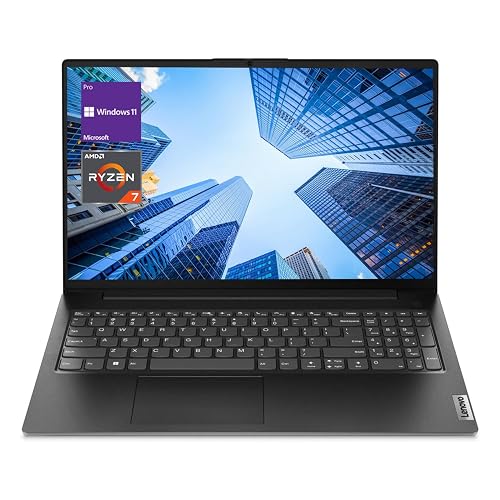 | Best Business Workhorse | Operating System: Windows 11 Pro | Screen Size: 15.6-inch | Processor: AMD Ryzen 7 7730U | VIEW LATEST PRICE | Read Our Analysis |
| HP 14-inch Ultra Light Laptop with Office 365 & Copilot | 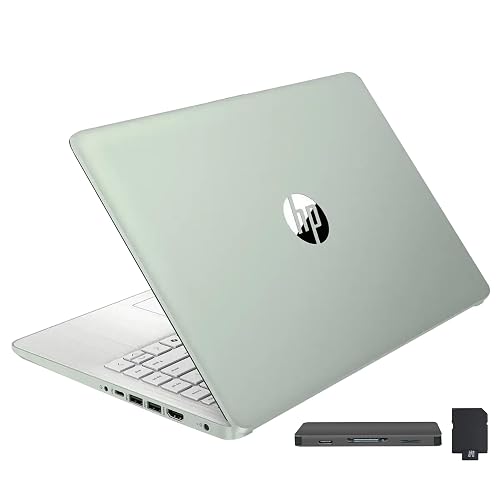 | Best Budget Pick | Operating System: Windows 11 S | Screen Size: 14-inch | Processor: Intel N150 | VIEW LATEST PRICE | Read Our Analysis |
| HP 15.6″ Business Laptop with Office 365 and AI | 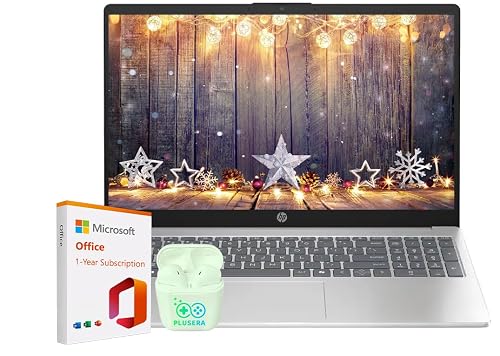 | Best Office Value | Operating System: Windows 11 | Screen Size: 15.6-inch | Processor: Intel N100 | VIEW LATEST PRICE | Read Our Analysis |
More Details on Our Top Picks
Microsoft Surface Pro 2-in-1 Copilot+ PC (2024)
If you are an entrepreneur who needs a lightweight, flexible device that can keep up with meetings, planning, and travel, the Microsoft Surface Pro 2-in-1 Copilot+ PC (2024) is a strong fit. It offers a 13-inch OLED touchscreen, a Snapdragon X Elite chip, 16 GB of RAM, and a 256 GB SSD for smooth multitasking. Its kickstand and detachable keyboard support laptop, tablet, and sketch modes. Wi‑Fi 7 and up to 14 hours of battery life help you stay productive on the move. Copilot+ features and Windows 11 Home add smart tools for work.
- Operating System:Windows 11 Home
- Screen Size:13-inch
- Processor:Snapdragon X Elite
- RAM:16 GB
- Storage:256 GB SSD
- Wireless:Wi‑Fi 7 / Bluetooth
- Additional Feature:13-inch OLED touchscreen
- Additional Feature:Detachable tablet design
- Additional Feature:Up to 14 hours
Microsoft Surface Pro 2-in-1 Copilot+ PC (2024)
The Microsoft Surface Pro 2-in-1 Copilot+ PC (2024) is a smart fit for entrepreneurs who want one device that handles work, meetings, and travel without slowing them down. It has a 13-inch OLED touchscreen with cinematic color and a 1,000,000:1 contrast ratio, so presentations and creative work look sharp. With Snapdragon X Elite or X Plus performance, 16 GB of RAM, and a 1 TB SSD, it keeps your workflow moving. Its built-in NPU powers AI tasks, and Windows 11 Copilot+ features boost productivity, privacy, and security. You can work up to 14 hours and recharge fast with 65 W charging.
- Operating System:Windows 11 Copilot+ PC
- Screen Size:13-inch
- Processor:Snapdragon X Elite
- RAM:16 GB
- Storage:1 TB SSD
- Wireless:Wi‑Fi / Bluetooth
- Additional Feature:1TB SSD storage
- Additional Feature:Snapdragon X Elite
- Additional Feature:65W fast charging
Microsoft Surface Laptop (2024) Copilot+ PC 1TB SSD
Microsoft’s Surface Laptop (2024) Copilot+ PC is well suited for entrepreneurs who need fast multitasking, AI-assisted productivity, and ample storage in a portable package. It features a 12-core Snapdragon X Elite chip, 32 GB of RAM, and a 1 TB SSD, letting you run apps, manage files, and handle creative work without slowdown. The 13.8-inch touchscreen offers a bright HDR display and a slim, lightweight design, making it easy to work anywhere. With up to 20 hours of battery life and built-in Copilot+ security, you will stay productive and protected.
- Operating System:Windows 11 Copilot+ PC
- Screen Size:13.8-inch
- Processor:Snapdragon X Elite
- RAM:32 GB
- Storage:1 TB SSD
- Wireless:Wi‑Fi / Bluetooth
- Additional Feature:32GB RAM
- Additional Feature:20-hour battery life
- Additional Feature:Bright HDR display
Lenovo V-Series V15 Business Laptop Ryzen 7 1TB SSD
Built for entrepreneurs who need serious multitasking power, the Lenovo V-Series V15 pairs an AMD Ryzen 7 7730U processor with 40GB of RAM and a 1TB NVMe SSD, so you can juggle spreadsheets, video calls, and cloud apps without slowing down. You get Windows 11 Pro, a 15.6-inch FHD display, and a numeric keypad for faster data entry. The 3.59-pound clamshell stays portable. Wi-Fi 6, Bluetooth 5.0, Ethernet, HDMI, and USB ports keep you connected. It is a practical business laptop with a webcam, a 38Wh battery that supports all-day use, and solid 2024 specs.
- Operating System:Windows 11 Pro
- Screen Size:15.6-inch
- Processor:AMD Ryzen 7 7730U
- RAM:40 GB
- Storage:1 TB SSD
- Wireless:Wi‑Fi 6 / Bluetooth 5.0
- Additional Feature:Numeric keypad included
- Additional Feature:RJ45 Ethernet port
- Additional Feature:1-year warranty
HP 14-inch Ultra Light Laptop with Office 365 & Copilot
If you need a lightweight Windows laptop that keeps up with everyday work, the HP 14-inch Ultra Light Laptop is a strong choice. It has a 14-inch HD anti-glare display, 16 GB of RAM, and an Intel N150 processor for smooth email, document editing, video calls, and web apps. Windows 11 S, Microsoft 365, and Copilot provide useful productivity tools out of the box. It weighs 3.24 pounds, so it is easy to carry. Wi-Fi 6, HDMI, USB-C, and additional USB-A ports help you stay connected. Fast Charge and the included docking station increase flexibility.
- Operating System:Windows 11 S
- Screen Size:14-inch
- Processor:Intel N150
- RAM:16 GB
- Storage:416 GB total
- Wireless:Wi‑Fi 6 / Bluetooth
- Additional Feature:7-in-1 docking station
- Additional Feature:Microsoft 365 included
- Additional Feature:HP Fast Charge
HP 15.6″ Business Laptop with Office 365 and AI
The HP 15.6″ Business Laptop with Office 365 and AI is a smart fit for entrepreneurs who need a practical, budget-friendly Windows 11 machine for everyday business tasks, remote meetings, and light productivity. It features an Intel N100 processor, 16 GB of RAM, and a 128 GB SSD for smooth multitasking and quick startups. The 15.6-inch anti-glare display, full-size keyboard, and 720p webcam make work sessions easier. Wi‑Fi 6, Bluetooth 5.4, and versatile ports help you connect fast. You also get Office 365 with Copilot AI, plus up to 11.75 hours of battery life.
- Operating System:Windows 11
- Screen Size:15.6-inch
- Processor:Intel N100
- RAM:16 GB
- Storage:128 GB SSD
- Wireless:Wi‑Fi 6 / Bluetooth 5.4
- Additional Feature:Camera privacy shutter
- Additional Feature:Bluetooth 5.4
- Additional Feature:Full-size keypad
Factors to Consider When Choosing Laptops For Entrepreneurs
When choosing a laptop for your business, prioritize performance, portability, and battery life so you can work efficiently wherever you are. Choose a sharp display for long work sessions, and select enough storage to keep your files organized. Balance these factors to pick a laptop that fits your daily needs and supports future growth.
Performance Needs
Performance starts with matching the laptop to your workload. Choose a CPU with at least four cores and strong boost clocks if you will juggle many apps, analyze data, or run local AI tasks. You will also want enough memory; 16 GB is the practical floor for smooth multitasking, while 32 GB or more helps when you handle large datasets, virtual machines, or content creation. Pick a PCIe NVMe SSD with at least 512 GB so apps open fast and files move quickly during frequent iterations. If you plan to run on-device inference or generative tools, look for an NPU or other hardware acceleration and confirm framework support. Finally, check cooling and sustained power delivery, because strong performance only matters if the laptop can maintain it under long, demanding workloads.
Portability Matters
After matching a laptop to your workload, consider how easily you can carry it through a packed day. You will notice the difference when your machine stays under about 1.4 to 1.8 kg, because lighter laptops reduce shoulder strain during commuting, client visits, and airport runs. Look for thin profiles and compact 12 to 14 inch designs, or footprints around 12 by 8 to 9 inches, so they slide into backpacks and briefcases without extra bulk. Also choose a sturdy build with solid hinges, a reinforced chassis, and a spill resistant keyboard, since frequent handling can test weaker devices. Fast charging and USB-C PD support help you recharge quickly from common chargers or power banks, so you can stay flexible.
Battery Life
Battery life matters because you do not always get a convenient outlet between meetings, travel, and client work. Aim for 8 to 10 hours of real-world use so you can handle browsing, video calls, and document edits without hunting for a charger. Check the battery rating in watt-hours. Forty to fifty Wh usually suits thinner laptops, while 60 Wh or more gives you more endurance for heavier workloads. You will also want fast charging, ideally enough to reach about 50 percent in 30 to 45 minutes, so a short break can restore useful power. Pay attention to processor efficiency and power-hungry screens, since a more efficient CPU and lower-power settings stretch runtime. Finally, confirm USB-C Power Delivery support and the included charger wattage.
Display Quality
When you’re choosing a laptop for business use, display quality can directly affect how comfortably you work all day. You’ll want at least a 13, 14 inch screen with 1920×1080 resolution or higher so text stays sharp and multitasking feels easy. IPS or OLED panels are smart picks because they deliver strong contrast, wide color coverage, and better visibility in mixed lighting. Aim for 300 nits minimum, with 400 plus nits being even better, plus an anti-glare or matte finish to reduce reflections. If you sketch, annotate, or jot notes, touch support and a responsive stylus matter. Also choose a 16:10 or 3:2 aspect ratio and slim bezels to maximize usable space without making the laptop feel bulky.
Storage Capacity
Storage capacity matters because it affects how smoothly your business tools, files, and backups fit into daily work. If you mostly handle documents and spreadsheets, 256 GB can work, but you will outgrow it quickly with media or project archives. For larger files, multiple virtual machines, or creative workloads, aim for at least 512 GB SSD. If you edit video, manage high resolution images, run large databases, or keep offline data science projects, 1 TB or more gives you room to breathe. Choose an NVMe PCIe SSD for faster boot times, quicker app launches, and faster transfers. Check for an extra M.2 slot or an upgradeable bay, and plan storage for versioned backups as well.
Connectivity Options
Connectivity options can make or break how smoothly your laptop fits into your business setup. You want a strong mix of ports so you can plug in chargers, displays, and older accessories without adapters piling up. Aim for at least one USB-C port with Power Delivery and DisplayPort alt mode, plus a USB-A port and HDMI or mini-DisplayPort. If you use docks, external storage, or multiple monitors, make sure the USB-C or Thunderbolt support handles PCIe or DisplayPort over USB-C. For busy offices, choose Wi‑Fi 6, Wi‑Fi 6E, or newer and Bluetooth 5.x for steadier, faster connections. If you need reliable uploads or video calls, look for Ethernet support or a good USB-C Gigabit adapter. Also confirm the USB-C port supports at least 65 W charging.
Security Features
Security features are easy to overlook, but they are critical when your laptop holds client data, financial records, or business accounts. Choose a model with TPM 2.0 and secure boot, since they store encryption keys and help block firmware and boot attacks. Fingerprint readers or Windows Hello facial recognition make sign-ins faster and much harder to phish than passwords. Ensure the laptop supports full-disk encryption such as BitLocker, and confirm its key management integrates with your identity platform. You should also require signed firmware updates and automatic security patches to keep vulnerabilities closed. For sensitive AI tasks and credentials, look for vTPM, virtualization-based security, or an isolated enclave or NPU.
Frequently Asked Questions
Which Laptop Battery Lasts Longest for All-Day Meetings and Travel?
The MacBook Air M3 typically lasts the longest, often providing 15 to 18 hours of battery life. You can get through meetings and travel without hunting for outlets, especially if you keep screen brightness moderate and use lightweight apps.
Which Model Offers the Best Security for Sensitive Business Data?
You’ll want the Lenovo ThinkPad X1 Carbon. It provides strong security with a fingerprint reader, an IR camera, TPM, and an optional privacy screen, so you can protect sensitive business data while you work anywhere.
Are These Laptops Powerful Enough for Video Editing and Design Work?
Yes. You can handle video editing and design work if you choose a laptop with a strong multicore processor, 16 GB or more of RAM, and a dedicated GPU. You will edit smoothly; however, 4K workflows may still benefit from higher end models.
Which Laptop Is Easiest to Upgrade or Repair Later?
The Framework laptop is usually the easiest to upgrade or repair later, because you can swap parts yourself. Many ThinkPads and Dell Latitudes can also be serviced, but they are often less modular than the Framework.
Which Device Has the Best Keyboard for Long Typing Sessions?
You will likely type longest on a ThinkPad, where deep travel and crisp feedback provide all-day comfort. Thinner ultrabooks feel sleek, but they often tire your fingers sooner during marathon writing sessions and spreadsheets.




