

If you want smoother Fortnite matches in 2026, you will need more than just a fast processor. The best laptops now pair high refresh displays, capable GPUs, and sufficient cooling to stay steady in tight fights.
From Acer Nitro V models to HP Victus options and a lighter NIMO pick, each one targets a different type of player. The real difference comes down to which specs matter most for your game.
| Acer Nitro V Gaming Laptop (ANV15-51-51H9) | 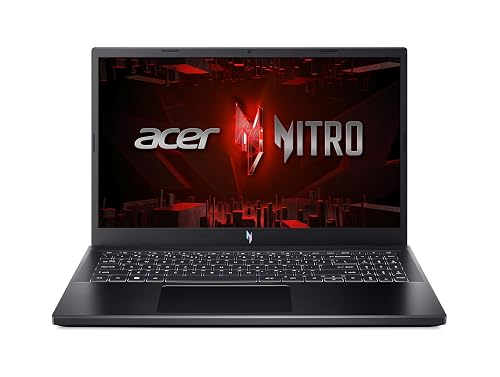 | Best Budget RTX 4050 | Processor: Intel Core i5-13420H | Graphics: NVIDIA GeForce RTX 4050 | Memory: 8 GB DDR5 | VIEW LATEST PRICE | Read Our Analysis |
| HP Victus 15 Gaming Laptop Ryzen 5 RTX 2050 |  | Best Mid-Range Pick | Processor: AMD Ryzen 5 7535HS | Graphics: NVIDIA GeForce RTX 2050 | Memory: 16 GB DDR5 | VIEW LATEST PRICE | Read Our Analysis |
| HP Victus 15.6 i5 Gaming Laptop RTX 3050 | 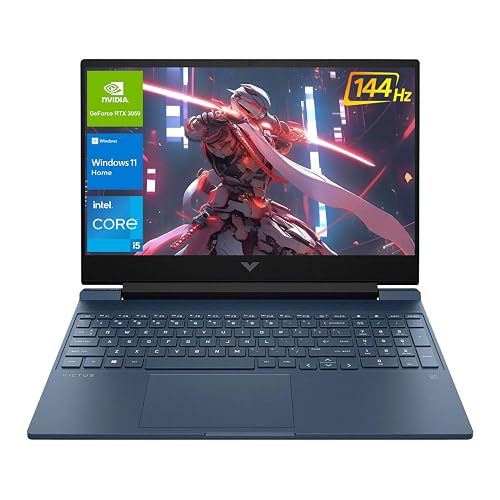 | Best RAM Upgrade | Processor: Intel Core i5-12450H | Graphics: NVIDIA GeForce RTX 3050 | Memory: 32 GB | VIEW LATEST PRICE | Read Our Analysis |
| Acer Nitro V Gaming Laptop (ANV15-52-586Z) |  | Best Entry-Level RTX 4050 | Processor: Intel Core i5-13420H | Graphics: NVIDIA GeForce RTX 4050 | Memory: 8 GB DDR5 | VIEW LATEST PRICE | Read Our Analysis |
| Acer Nitro V Gaming Laptop (ANV15-52-76NK) |  | Best Overall | Processor: Intel Core i7-13620H | Graphics: NVIDIA GeForce RTX 4050 | Memory: 16 GB DDR5 | VIEW LATEST PRICE | Read Our Analysis |
| NIMO 15.6″ FHD Light Gaming Laptop Ryzen 7 Pro 6850U | 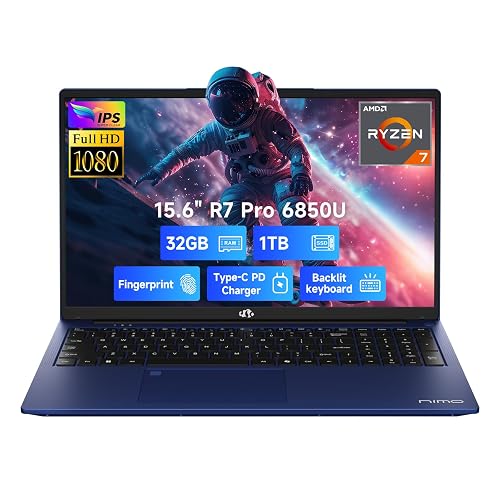 | Best Light Gaming | Processor: AMD Ryzen 7 Pro 6850U | Graphics: AMD Radeon 680M | Memory: 32 GB LPDDR5 | VIEW LATEST PRICE | Read Our Analysis |
More Details on Our Top Picks
Acer Nitro V Gaming Laptop (ANV15-51-51H9)
If you want a Fortnite-ready laptop that balances speed, smooth visuals, and portability, the Acer Nitro V Gaming Laptop (ANV15-51-51H9) is built for you. You get an Intel Core i5-13420H and an RTX 4050 with DLSS 3, so you can push strong frame rates at 1080p. Its 15.6 inch IPS display runs at 144Hz for sharper motion. With 8GB of DDR5 RAM, a 512GB Gen4 SSD, Wi-Fi 6, Thunderbolt 4, and HDMI 2.1, you can expand and connect easily. Dual fans, NitroSense, and a backlit keyboard help you game comfortably on Windows 11 Home.
- Processor:Intel Core i5-13420H
- Graphics:NVIDIA GeForce RTX 4050
- Memory:8 GB DDR5
- Storage:512 GB SSD
- Display:15.6″ FHD 144 Hz IPS
- Operating System:Windows 11 Home
- Additional Feature:Thunderbolt 4 support
- Additional Feature:Dual-fan cooling
- Additional Feature:144Hz refresh rate
HP Victus 15 Gaming Laptop Ryzen 5 RTX 2050
The HP Victus 15 with a Ryzen 5 7535HS and RTX 2050 is a smart pick for Fortnite players who want smooth 1080p gameplay on a 144 Hz display without spending a fortune. You get 16GB of DDR5 RAM, a 1TB PCIe SSD, and a 15.6-inch IPS panel that stays sharp and responsive. The 6-core, 12-thread CPU helps keep matches fluid, and the RTX 2050 handles competitive settings well. You also get Wi-Fi 6, HDMI 2.1, USB-C, a backlit keyboard, and Windows 11 Home in a 5.1 pound chassis.
- Processor:AMD Ryzen 5 7535HS
- Graphics:NVIDIA GeForce RTX 2050
- Memory:16 GB DDR5
- Storage:1 TB SSD
- Display:15.6″ FHD 144 Hz IPS
- Operating System:Windows 11 Home
- Additional Feature:Numeric keypad
- Additional Feature:SD card reader
- Additional Feature:HP Wide Vision camera
HP Victus 15.6 i5 Gaming Laptop RTX 3050
With its Intel Core i5-12450H, RTX 3050 graphics, and 144Hz 15.6-inch display, the HP Victus 15.6 is a solid pick if you want smooth Fortnite gameplay without overspending. You get 32GB of RAM and a 1TB PCIe NVMe SSD, so matches load fast and multitasking feels snappy. The 1080p IPS screen stays clear and reduces glare, and Windows 11 Home adds modern tools. HDMI 2.1, USB-A, USB-C, Wi-Fi 6, and Ethernet give you flexible hookups. The backlit keyboard and webcam also make it practical for everyday play and school.
- Processor:Intel Core i5-12450H
- Graphics:NVIDIA GeForce RTX 3050
- Memory:32 GB
- Storage:1 TB SSD
- Display:15.6″ FHD 144 Hz IPS
- Operating System:Windows 11 Home
- Additional Feature:32GB RAM
- Additional Feature:Multi-format SD reader
- Additional Feature:Anti-glare micro-edge display
Acer Nitro V Gaming Laptop (ANV15-52-586Z)
Acer’s Nitro V Gaming Laptop (ANV15-52-586Z) is a strong Fortnite pick for players who want fast, smooth gameplay without overspending, thanks to its Intel Core i5-13420H, RTX 4050 graphics, and 165 Hz 15.6-inch Full HD display. You will get reliable performance for streaming, multitasking, and schoolwork as well. The 8 GB DDR5 memory and 512 GB PCIe Gen 4 SSD keep load times quick, and you can upgrade to 32 GB later. Wi Fi 6, Thunderbolt 4, HDMI, and Ethernet provide flexible connectivity, while the backlit keyboard and 4.66 pound design make it practical.
- Processor:Intel Core i5-13420H
- Graphics:NVIDIA GeForce RTX 4050
- Memory:8 GB DDR5
- Storage:512 GB SSD
- Display:15.6″ FHD 165 Hz IPS
- Operating System:Windows 11 Home
- Additional Feature:165Hz refresh rate
- Additional Feature:Killer E2600 Ethernet
- Additional Feature:No webcam
Acer Nitro V Gaming Laptop (ANV15-52-76NK)
If you want a Fortnite-ready laptop that balances speed, smooth visuals, and room to grow, the Nitro V 15 hits a strong sweet spot. It is powered by an Intel Core i7-13620H and RTX 4050 graphics with DLSS 3.5, and includes 16 GB of DDR5 RAM to keep matches responsive. The 15.6-inch Full HD IPS display refreshes at 165 Hz, helping fast builds look crisp. You also get a 1 TB PCIe Gen 4 SSD, Thunderbolt 4, Wi-Fi 6, and a backlit keyboard. It weighs 4.66 pounds and runs Windows 11 Home.
- Processor:Intel Core i7-13620H
- Graphics:NVIDIA GeForce RTX 4050
- Memory:16 GB DDR5
- Storage:1 TB SSD
- Display:15.6″ FHD 165 Hz IPS
- Operating System:Windows 11 Home
- Additional Feature:16GB RAM
- Additional Feature:1TB SSD
- Additional Feature:Included key chain
NIMO 15.6″ FHD Light Gaming Laptop Ryzen 7 Pro 6850U
The NIMO 15.6″ FHD Light Gaming Laptop Ryzen 7 Pro 6850U is a smart pick for Fortnite players who want solid 1080p gameplay without paying for a bulky gaming machine. It includes an AMD Ryzen 7 Pro 6850U with 8 cores, 16 threads, and Radeon 680M graphics, plus 32GB LPDDR5 RAM and a 1TB PCIe 4.0 SSD. The 15.6-inch IPS anti-glare display, backlit keyboard, and fingerprint reader make daily use easy. At 3.75 pounds, it is portable, and USB-C charging helps you stay ready.
- Processor:AMD Ryzen 7 Pro 6850U
- Graphics:AMD Radeon 680M
- Memory:32 GB LPDDR5
- Storage:1 TB SSD
- Display:15.6″ FHD IPS
- Operating System:Windows 11 Home
- Additional Feature:Fingerprint reader
- Additional Feature:100W USB-C charging
- Additional Feature:2-year support
Factors to Consider When Choosing Laptops For Fortnite Game
When choosing a laptop for Fortnite, first check CPU performance and graphics capability, as they drive smooth gameplay and stable frame rates. You should also have enough memory and storage to keep the game running well and to allow room for updates. A fast display refresh rate improves responsiveness, and solid cooling efficiency helps the laptop stay cool under sustained load.
CPU Performance
For Fortnite, you will want a CPU with strong single-core boost performance, ideally 3.5 GHz or higher, because the game leans heavily on single-threaded speed for smooth frame rates. You should also look for 6 to 8 cores and threads, which help your laptop handle streaming, voice chat, and background tasks without hurting gameplay. A modern chip with 8 to 16+ MB of L3 cache can cut latency and keep frame times steadier during fast edits and fights. Higher IPC matters too, since it helps your CPU sustain strong performance under load. Good thermal headroom lets boosts hold longer in extended matches. If you pair the laptop with a discrete GPU, make sure the processor can match your target resolution and refresh rate.
Graphics Capability
Once your CPU can keep Fortnite responsive, the GPU becomes the main factor shaping how smooth the game feels on your laptop. Aim for a discrete graphics card with at least 4 GB of GDDR6 VRAM, since that helps you hold stable 1080p performance and smoother frame rates. Look for modern API support, especially DirectX 12, plus upscaling tools like NVIDIA DLSS or AMD FSR, which can raise FPS without a big visual hit. If you play on a high-refresh display, choose a GPU that can deliver 100+ FPS at medium to high settings. Also check the laptop’s cooling and sustained boost behavior, because throttling can cut performance. Finally, compare TGP, since a higher power version often beats a low power model.
Memory and Storage
Memory and storage matter more than many players expect, because they affect both Fortnite’s smoothness and how quickly you can jump into a match. Aim for at least 16 GB of DDR4 or DDR5 RAM; 32 GB helps if you stream or edit while playing. Faster dual-channel memory, especially DDR5 at 4800 MHz or higher, can boost responsiveness and frame consistency. For storage, pick an NVMe SSD as your main drive. 512 GB is the minimum. PCIe Gen3 or Gen4 speeds shorten load times and reduce texture streaming stutters. Also plan for extra space through a second M.2 slot, a 1 to 2 TB drive, or an external SSD. Make sure you can upgrade both components later.
Display Refresh Rate
A higher display refresh rate can make Fortnite feel much smoother, since 120 Hz, 144 Hz, or 165 Hz panels show motion more fluidly than a 60 Hz screen. You will notice easier tracking when you swing your camera quickly or follow opponents in build fights. For a 144 Hz or 165 Hz panel to help, your GPU and settings need to push matching frame rates; otherwise you will not gain much. High refresh displays can also cut perceived input lag, so your shots and edits feel more immediate. Pair the screen with G-Sync or FreeSync to reduce tearing and stutter when FPS changes. Keep in mind that these displays can use more power, so battery life may drop when you play unplugged.
Cooling Efficiency
Beyond screen speed, a laptop’s cooling system has a big impact on how Fortnite actually feels during long sessions. You want CPU and GPU temps to stay below about 85°C, because once they climb higher, thermal throttling can cut frame rates and dull your aim. Check for multiple heat pipes, dual or more high RPM fans, and strong exhaust vents that pull heat away from the core parts. Large intake grilles, an elevated chassis, and low thermal resistance materials help you sustain boost clocks longer, not just spike briefly. If you like control, choose a model with user adjustable fan profiles or performance modes. Watch real time temps, clocks, and fan RPM, and use thermal pads, repasting, or a cooling pad if heat keeps running high.
Battery Life
Battery life matters in Fortnite because long multiplayer sessions and constant building or combat can drain a laptop fast. You should look for at least 6 to 8 hours of mixed-use battery life, and 3 to 4 plus hours for actual gaming on battery. Expect a big drop during play; 120 to 165 Hz screens and higher GPU clocks can cut runtime by 40 to 70 percent versus light tasks. To stretch sessions, use power-saving profiles, let the laptop switch between integrated and discrete graphics, and cap your frame rate to 60 to 90 FPS on battery. Bigger batteries, especially 60 Wh or more, usually last longer. If you will game unplugged, choose efficient CPU and GPU designs plus DDR5 or LPDDR memory, then lower resolution, trim graphics settings, and close background apps.
Port Selection
When you narrow down a Fortnite laptop, don’t overlook the ports, because they can make or break your setup. You should want at least one HDMI 2.1 port or a USB-C port with DisplayPort Alt Mode or Thunderbolt 4, so you can drive an external 1080p/144Hz monitor or better for smoother play and streaming. Choose a model with two or more USB-A ports for your mouse, keyboard, and storage. An RJ-45 Ethernet jack helps you keep latency low and packet loss down in competitive matches. Make sure you have a combo headset jack or separate audio ports, plus USB audio support for clean voice chat. An SD or microSD reader and an extra high-speed, NVMe-capable USB-C port also make clip transfers easy without clogging your gaming peripherals.
Frequently Asked Questions
Which Fortnite Settings Balance Visuals and Maximum Frame Rate Best?
You’ll get the best balance with medium textures, low shadows, view distance set to Far, and effects set to Low. Keep 3D resolution near 100%. Cap FPS to match your display, and disable motion blur.
Is a 144HZ Display Necessary for Competitive Fortnite?
No, you do not need 144Hz, but you will notice the difference. A 60Hz display updates every 16.7 ms, while a 144Hz display refreshes more smoothly and helps you track builds and edits faster. If you are serious about competitive play, it is worth considering.
How Much SSD Storage Does Fortnite and Updates Usually Need?
Fortnite itself usually needs about 40 to 50 GB, and updates can push you past 60 GB or more. You should keep at least 100 GB free so you can install patches, store cache files, and avoid storage problems.
Does Battery Life Matter When Playing Fortnite on a Laptop?
Yes, battery life matters. If you’re gaming unplugged, your laptop can throttle performance quickly and drain fast. Don’t let the experience fall apart; plug in for smoother Fortnite sessions and consistent frame rates every time.
Are External Gaming Mice Helpful for Fortnite on Laptops?
Yes, you will usually aim better with an external gaming mouse on a laptop. You get faster clicks, lower latency, and better tracking than with a touchpad, which helps building, aiming, and editing feel more precise and responsive.




