


You do not have to sacrifice color accuracy for speed, and that is why these seven OLED laptops matter for photo editing. You will find sharp panels, rich contrast, and powerful CPUs in models such as the ASUS Vivobook S15 Slim, HP OmniBook 5, LG gram SuperSlim, and Zenbook 14X.
The real difference comes from details that shape your workflow, battery life, ports, and how each machine feels when you edit for hours.
| ASUS Vivobook S 15 Slim OLED Laptop |  | Best Overall | Display Size: 15.6-inch | Touch Support: No | CPU Platform: Intel Core Ultra 7 | VIEW LATEST PRICE | Read Our Analysis |
| Windows 2-in-1 Touchscreen Laptop with 256GB SSD |  | Budget-Friendly Pick | Display Size: 11.6-inch | Touch Support: Multi-touch | CPU Platform: Intel Celeron | VIEW LATEST PRICE | Read Our Analysis |
| HP OmniBook 5 14-inch AI PC (14-he0099nr) |  | Best AI PC | Display Size: 14-inch | Touch Support: No | CPU Platform: Snapdragon X Plus | VIEW LATEST PRICE | Read Our Analysis |
| HP OmniBook 5 16-inch Next Gen AI PC | 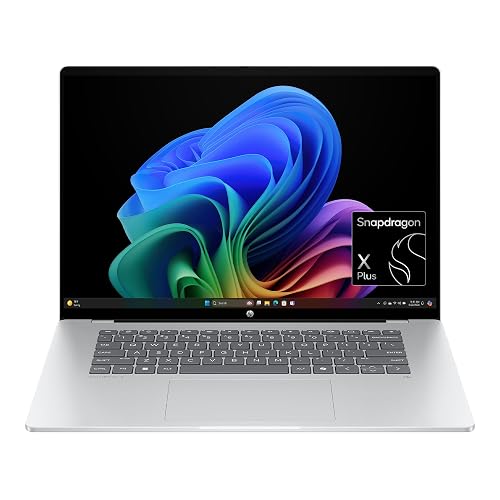 | Best Big-Screen | Display Size: 16-inch | Touch Support: Touchscreen | CPU Platform: Snapdragon X Plus | VIEW LATEST PRICE | Read Our Analysis |
| LG gram SuperSlim 15.6″ OLED Laptop Core i7 | 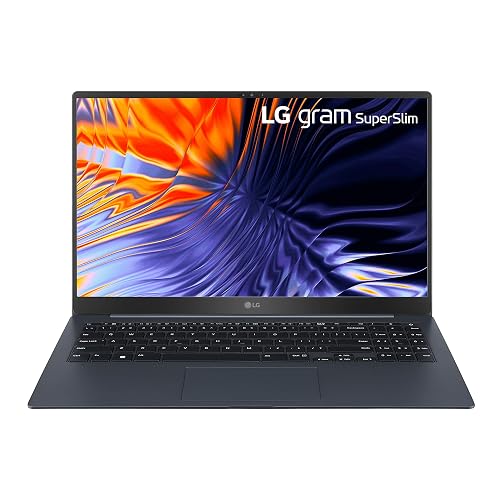 | Best Ultralight | Display Size: 15.6-inch | Touch Support: No | CPU Platform: Intel Core i7 | VIEW LATEST PRICE | Read Our Analysis |
| Asus Zenbook 14X OLED Business Laptop i7-13700H 16GB 512GB |  | Best Touchscreen | Display Size: 14.5-inch | Touch Support: Touchscreen | CPU Platform: Intel Core i7 | VIEW LATEST PRICE | Read Our Analysis |
| ASUS Vivobook S16 AI PC Laptop (Intel Core Ultra 9) |  | Best Premium Powerhouse | Display Size: 16-inch | Touch Support: No | CPU Platform: Intel Core Ultra 9 | VIEW LATEST PRICE | Read Our Analysis |
More Details on Our Top Picks
ASUS Vivobook S 15 Slim OLED Laptop
If you want a slim laptop that makes your photos look rich and true to life, the ASUS Vivobook S 15 Slim OLED is a strong choice. It features a 15.6-inch 3K OLED screen with 100% RGB color and 500 nits of brightness, so edits feel vivid and accurate. The Intel Core Ultra 7 processor and 16 GB of LPDDR5X memory let you move through Lightroom and Photoshop smoothly. Thunderbolt 4, HDMI 2.1, Wi-Fi 6E, and a 75 Wh battery provide flexible, all-day work support.
- Display Size:15.6-inch
- Touch Support:No
- CPU Platform:Intel Core Ultra 7
- Memory:16 GB
- Storage:1 TB / 2 TB / 4 TB
- Wireless:Wi‑Fi 6E, Bluetooth 5.3
- Additional Feature:3K 120Hz OLED
- Additional Feature:180° lay-flat hinge
- Additional Feature:Thunderbolt 4 ports
Windows 2-in-1 Touchscreen Laptop with 256GB SSD
The Windows 2-in-1 Touchscreen Laptop with 256GB SSD is a practical choice for photo editors who need a portable, flexible device for everyday creative work. It features an 11.6-inch FHD touch display, and its 360-degree hinge lets you switch between laptop, stand, tent, and tablet modes with ease. The 4-core Intel Celeron processor and 4 GB of memory handle light editing tasks, while the SSD ensures fast startup and quiet operation. Windows 11 provides useful tools and enhanced security. You can connect external monitors as well.
- Display Size:11.6-inch
- Touch Support:Multi-touch
- CPU Platform:Intel Celeron
- Memory:4 GB
- Storage:256 GB
- Wireless:Dual-band Wi‑Fi, Bluetooth
- Additional Feature:360° convertible design
- Additional Feature:Multi-touch display
- Additional Feature:USB-C full features
HP OmniBook 5 14-inch AI PC (14-he0099nr)
HP OmniBook 5 14-inch AI PC (14-he0099nr) is a smart pick for photo editors who want a bright OLED screen, solid speed, and easy portability without paying for a bulky workstation. You get a 14-inch 2K OLED panel with crisp 1920 x 1200 detail, quick 0.2 ms response, and 300 nits of brightness. The Snapdragon X Plus chip, 16 GB of memory, and 1 TB SSD help you move through edits smoothly. The 1080p IR camera, dual speakers, Wi-Fi 6E, and long battery life make daily work feel easy.
- Display Size:14-inch
- Touch Support:No
- CPU Platform:Snapdragon X Plus
- Memory:16 GB
- Storage:1 TB
- Wireless:Wi‑Fi 6E, Bluetooth 5.3
- Additional Feature:Copilot+ PC features
- Additional Feature:HP AI Companion
- Additional Feature:Ocean-bound plastic materials
HP OmniBook 5 16-inch Next Gen AI PC
Built for editors who want vivid color without carrying a heavy machine, the HP OmniBook 5 16-inch Next Gen AI PC features a 16-inch 2K OLED touch display with 95% DCI-P3 color, 0.2 ms response time, and 300 nits of brightness, so your photos look crisp, rich, and easier to judge while you work. It includes 16 GB LPDDR5x memory, a 512 GB SSD, and the Snapdragon X Plus chip for smooth file handling. Its 3.5-pound body, fast charging, Wi-Fi 6E, and long battery life let you edit from couch to café without stress.
- Display Size:16-inch
- Touch Support:Touchscreen
- CPU Platform:Snapdragon X Plus
- Memory:16 GB
- Storage:512 GB
- Wireless:Wi‑Fi 6E, Bluetooth 5.3
- Additional Feature:Generative Fill
- Additional Feature:HP Fast Charge
- Additional Feature:EPEAT Gold Climate+
LG gram SuperSlim 15.6″ OLED Laptop Core i7
LG gram SuperSlim 15.6″ OLED Laptop, Core i7 is a smart pick for photo editors who want a light, easy-to-carry laptop without giving up a sharp, color-rich screen. You get a 15.6-inch OLED display with 100% DCI-P3, so your edits look vivid and accurate. The Core i7-1360P, 32 GB of LPDDR5 memory, and 2 TB SSD help you move fast through large files. Also, Thunderbolt 4, Wi-Fi 6, and two HDMI ports make setup and connectivity simple. At 2.18 pounds, it slips into your bag and stays ready.
- Display Size:15.6-inch
- Touch Support:No
- CPU Platform:Intel Core i7
- Memory:32 GB
- Storage:2 TB
- Wireless:Wi‑Fi 6, Bluetooth
- Additional Feature:2.18 pound weight
- Additional Feature:Seven MIL-STD tests
- Additional Feature:Two Thunderbolt 4
Asus Zenbook 14X OLED Business Laptop i7-13700H 16GB 512GB
The Asus Zenbook 14X OLED Business Laptop is a strong choice for photo editing, offering fast performance in a compact package. Its Intel Core i7-13700H processor, 16GB of RAM, and 512GB SSD let you work through edits without lag so you can stay in your flow. The 14.5-inch 2.8K OLED display delivers rich color, deep contrast, and 100% DCI-P3 coverage, which matters when you fine-tune skin tones or shadows. In addition, the 120Hz refresh rate, Thunderbolt 4 ports, HDMI 2.1, and backlit keyboard make daily work smooth and straightforward.
- Display Size:14.5-inch
- Touch Support:Touchscreen
- CPU Platform:Intel Core i7
- Memory:16 GB
- Storage:512 GB
- Wireless:Wi‑Fi 6E, Bluetooth 5.3
- Additional Feature:550 nits HDR
- Additional Feature:Glossy touchscreen
- Additional Feature:HDMI cable included
ASUS Vivobook S16 AI PC Laptop (Intel Core Ultra 9)
The ASUS Vivobook S16 AI PC Laptop with Intel Core Ultra 9 is an excellent choice for photographers who edit all day and want a screen that makes color work less stressful. It features a 16-inch OLED panel with 2.8K resolution, 120 Hz motion, 600-nit HDR peak brightness, and full DCI-P3 coverage, so edits look rich and accurate. The Core Ultra 9, 32 GB LPDDR5X, and a 2 TB SSD keep large files moving quickly. Thunderbolt 4, Wi-Fi 7, Dolby Atmos, and a lightweight 3.31-pound design help keep your workflow smooth everywhere.
- Display Size:16-inch
- Touch Support:No
- CPU Platform:Intel Core Ultra 9
- Memory:32 GB
- Storage:2 TB
- Wireless:Wi‑Fi 7, Bluetooth 5.4
- Additional Feature:Intel AI Boost
- Additional Feature:Wi-Fi 7
- Additional Feature:Privacy shutter camera
Factors to Consider When Choosing Laptops With OLED Display For Photo Editing
When choosing an OLED laptop for photo editing, start with color accuracy, because edits only look right if the screen shows true tones. Next consider resolution, screen size, brightness, and contrast, as these determine how much detail you can see and how well you can work in different lighting. Also check the processor, memory, and ports, since smooth performance and fast file transfer save time and reduce frustration.
Color Accuracy
Color accuracy should be one of your first checks, because an OLED screen can look stunning and still miss the mark for photo work if its colors are off. Aim for a panel that covers at least 100% of sRGB and, preferably, 95% or more of DCI-P3 or full Adobe RGB. Check factory calibration and look for a Delta E average under 2, since lower numbers indicate truer color. Make sure the screen supports 10-bit color, either native or 8+2 FRC, so gradients remain smooth instead of showing banding. Also verify strong uniformity, stable viewing angles, and even brightness across the panel. Finally, confirm ICC profile support, because that helps you build a setup that is trustworthy and print ready.
Resolution And Size
Resolution and size matter a lot because they determine how clearly you see details and how comfortably you work. For photo editing, choose an OLED laptop with at least a 15 to 16 inch screen and 2K resolution or higher. That provides sufficient pixel density for sharp retouching and cleaner edges. If you can find 3K or 2.8K on a 15 to 16 inch panel, that is preferable because you will zoom less and edit more precisely. A larger 16 inch screen also gives more room for tools and image panels. A 14 to 15 inch model may be easier to carry. Match the resolution to your software’s scaling so controls remain usable and edits stay accurate.
Brightness And Contrast
A great OLED laptop should do more than look vivid, because for photo editing, brightness and contrast determine how truthfully you see every pixel. Aim for at least 400 to 500 nits of sustained brightness, with higher peak brightness for HDR previews. That provides clear highlights and midtones without guesswork. Next, check for OLEDs deep native contrast, since a black floor near zero helps you spot shadow detail and tonal changes that can be lost on weaker screens. Also make sure brightness stays color accurate as you dim or raise it, because your edits should hold up in any room. Finally, look for strong uniformity and per pixel control, so one corner does not fool you while you retouch.
Processor And Memory
Just as important as the OLED panel itself, the processor and memory determine how smoothly your photo edits come together. A fast screen will still feel slow if the laptop cannot keep up. Look for at least a quad core CPU; 6 to 8 cores is better for adjustments, exports, and filter work. Strong single core boost clocks make tools feel snappy when you move sliders or open large files. For memory, 16 GB is the minimum for moderate RAW editing. Choose 32 GB or more for layered projects and heavy multitasking. Faster DDR5 or LPDDR5 memory helps as well, because higher bandwidth keeps image data moving. If your software relies on acceleration, select a balanced combination of CPU, GPU, and RAM.
Port Selection
When you are picking a laptop for photo editing, the ports matter almost as much as the OLED screen. You need a high-bandwidth video output, such as Thunderbolt, USB-C with DisplayPort Alt Mode, or HDMI 2.1, so you can connect an external monitor at full resolution and smooth refresh rates. Also make sure you get at least one USB-C port and one USB-A port with USB 3.2 Gen 2 or faster. That helps you move RAW files quickly from card readers and SSDs without waiting around. A full-size SD or microSD reader with UHS-II support is a huge plus for fast imports. USB-C power delivery is handy too, and a 3.5 mm combo jack gives you reliable wired audio.
Battery Life
Battery life can make or break an OLED laptop for photo editing, especially once you move away from the charger and into real work. OLED screens can drain power fast, mainly when you keep whites bright and push the panel to peak brightness. If you edit on the go, look for a battery around 60 to 75 Wh or more. You will also stretch runtime by lowering brightness to 100 to 200 nits, using dark mode, and turning on local dimming when it is available. Just as important, check for adaptive refresh rates and smart power modes, because they help the laptop sip rather than gulp power. Keep in mind that GPU filters, tethered transfers, and extra drives can cut battery life in half.
Frequently Asked Questions
Are OLED Laptops Better for Photo Editing Than IPS Laptops?
Yes, OLED typically delivers richer blacks and higher contrast, so you can judge tones more easily. You may prefer IPS, however, for more consistent brightness, lower burn-in risk, and generally better long-term color stability.
Do OLED Screens Cause Burn-In During Photo Editing?
Yes, burn-in can occur, but it is not inevitable. Static toolbars can leave permanent marks on OLEDs over time. You can reduce the risk with screen savers, hiding the user interface, and varied, moderate usage.
Is a 4K OLED Display Necessary for Professional Photo Editing?
No, you do not need a 4K OLED for professional photo editing, but you will benefit from it when working with very high-resolution images. You can work professionally with a lower-resolution panel if it is color-accurate and well calibrated.
How Much RAM Is Ideal for Photo Editing on an OLED Laptop?
For casual photo editing, aim for 16 GB of RAM. Choose 32 GB for serious work. Opt for 64 GB if you handle very large RAW files or run Photoshop and Lightroom at the same time. More RAM improves responsiveness and reduces slowdowns.
Do OLED Laptops Drain Battery Faster Than Non-Oled Models?
Yes, OLED laptops typically drain battery faster because bright pixels consume more power. You can save battery by lowering screen brightness, using dark mode, and avoiding mostly white screens when possible.




