


If you juggle class notes on a Surface Pro in tablet mode and then switch to a full keyboard for work, you already know why Windows 11 laptops can feel like a real upgrade. The best picks right now offer more than a new logo on the lid, since they combine speed, battery life, and comfort in ways that suit everyday use.
From sleek 2-in-1s to roomy 15-inch workhorses, each model solves a different problem, and one of them may fit your needs better than you expect.
| Microsoft Surface Pro 2-in-1 Laptop/Tablet (2024) |  | Best Overall | Operating System: Windows 11 Home | Screen Type: OLED touchscreen | Screen Size: 13 inches | VIEW LATEST PRICE | Read Our Analysis |
| Microsoft Surface Pro 2-in-1 Laptop/Tablet (2024) |  | Best Premium Pick | Operating System: Windows 11 Copilot+ PC | Screen Type: OLED touchscreen | Screen Size: 13 inches | VIEW LATEST PRICE | Read Our Analysis |
| Microsoft Surface Laptop (2024) Copilot+ PC 1TB SSD |  | Best for Power Users | Operating System: Windows 11 Copilot+ PC | Screen Type: Touchscreen | Screen Size: 13.8 inches | VIEW LATEST PRICE | Read Our Analysis |
| Dell Latitude 3190 2-in-1 Touchscreen Laptop (Renewed) |  | Best Budget 2-in-1 | Operating System: Windows 11 | Screen Type: LCD touchscreen | Screen Size: 11.6 inches | VIEW LATEST PRICE | Read Our Analysis |
| Dell Inspiron Touchscreen Laptop 15.6″ Windows 11 Pro | 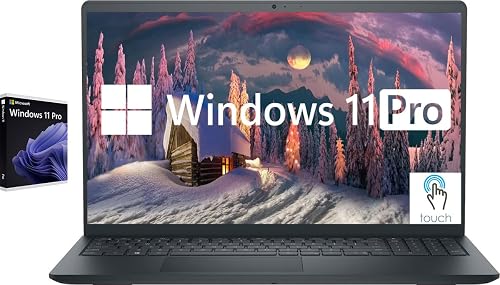 | Best for Productivity | Operating System: Windows 11 Pro | Screen Type: IPS touchscreen | Screen Size: 15.6 inches | VIEW LATEST PRICE | Read Our Analysis |
| HP 14″ Windows 11 Laptop (Renewed) | 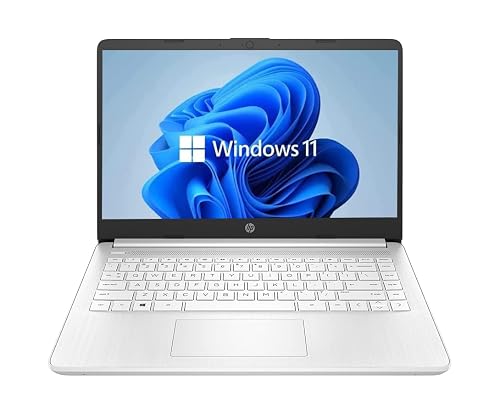 | Best Budget Option | Operating System: Windows 11 | Screen Type: HD touchscreen | Screen Size: 14 inches | VIEW LATEST PRICE | Read Our Analysis |
| Dell 15 Laptop DC15250 with FHD 120Hz Display |  | Best Everyday Laptop | Operating System: Windows 11 Home | Screen Type: FHD display | Screen Size: 15.6 inches | VIEW LATEST PRICE | Read Our Analysis |
More Details on Our Top Picks
Microsoft Surface Pro 2-in-1 Laptop/Tablet (2024)
If you want a Windows 11 device that can keep up with work, class, and creative play, the Microsoft Surface Pro 2-in-1 Laptop/Tablet (2024) is a strong pick. You get a 13-inch PixelSense OLED touchscreen, sharp 2560 x 1600 detail, and rich color for videos or sketches. The Snapdragon X Elite, 16 GB of RAM, and 256 GB SSD help you move fast. Its detachable design lets you switch from laptop to tablet in seconds. Plus, Wi-Fi 7, a webcam, built-in speakers, and up to 14 hours of battery life keep your day smooth.
- Operating System:Windows 11 Home
- Screen Type:OLED touchscreen
- Screen Size:13 inches
- Processor:Snapdragon X Elite
- Memory:16 GB RAM
- Storage:256 GB SSD
- Additional Feature:Detachable 2-in-1 design
- Additional Feature:PixelSense OLED display
- Additional Feature:Wi-Fi 7 support
Microsoft Surface Pro 2-in-1 Laptop/Tablet (2024)
Microsoft’s Surface Pro 2-in-1 Laptop/Tablet (2024) is a smart choice for people who want one device that handles work, creative tasks, and travel without feeling bulky. It runs Windows 11 and features a sharp 13-inch OLED touchscreen, with either a Snapdragon X Elite or X Plus chip for smooth performance and strong battery life of up to 14 hours. With 16 GB of RAM and a 1 TB SSD you get room to multitask and store files. Fast charging also helps you get back to full power quickly when your day runs long.
- Operating System:Windows 11 Copilot+ PC
- Screen Type:OLED touchscreen
- Screen Size:13 inches
- Processor:Snapdragon X Elite / X Plus
- Memory:16 GB RAM
- Storage:1 TB SSD
- Additional Feature:Copilot+ PC features
- Additional Feature:1,000,000:1 contrast
- Additional Feature:65W fast charging
Microsoft Surface Laptop (2024) Copilot+ PC 1TB SSD
With the Microsoft Surface Laptop 2024, you get a Windows 11 laptop built for people who want speed, style, and all-day ease in one slim machine. You will notice the 13.8-inch touchscreen right away, with bright HDR and support for touch or pen input. Inside, the Snapdragon X Elite chip, 32 GB of RAM, and 1 TB SSD keep your apps moving fast. The Copilot+ PC features and a strong NPU help you work smarter. With up to 20 hours of battery life, you can stay productive, creative, and relaxed.
- Operating System:Windows 11 Copilot+ PC
- Screen Type:Touchscreen
- Screen Size:13.8 inches
- Processor:Snapdragon X Elite
- Memory:32 GB RAM
- Storage:1 TB SSD
- Additional Feature:32 GB RAM
- Additional Feature:Up to 20 hours
- Additional Feature:Bright HDR technology
Dell Latitude 3190 2-in-1 Touchscreen Laptop (Renewed)
The Dell Latitude 3190 2-in-1 Touchscreen Laptop (Renewed) is a smart pick for students, mobile workers, and anyone who wants a compact Windows 11 laptop that can handle everyday tasks without feeling bulky. It includes 8GB of DDR4 RAM, a 128GB SSD, and a quad-core Intel Celeron N5030 that can boost to 2.4 GHz, so apps open fast and basic work stays smooth. Its 11.6-inch touchscreen, 2-in-1 design, stylus support, and full-size keyboard make it easy to switch from typing to tapping. Wi-Fi 6, USB-C, HDMI, Ethernet, and a webcam add practical flexibility.
- Operating System:Windows 11
- Screen Type:LCD touchscreen
- Screen Size:11.6 inches
- Processor:Intel Celeron N5030
- Memory:8 GB RAM
- Storage:128 GB SSD
- Additional Feature:90-day warranty
- Additional Feature:Stylus support
- Additional Feature:DisplayPort video output
Dell Inspiron Touchscreen Laptop 15.6″ Windows 11 Pro
Dell Inspiron Touchscreen Laptop, 15.6″ Windows 11 Pro is a smart pick if you want a laptop that keeps up with busy workdays, class notes, and everyday multitasking without feeling bulky. It includes an Intel Core i5, 32 GB of memory, and a 1 TB SSD, so apps open quickly and files remain easy to access. The 15.6-inch Full HD touchscreen makes tapping and scrolling simple, and the full keyboard with number pad helps you work faster. Wi-Fi 5, HDMI, multiple USB ports, and an estimated 7-hour battery life provide reliable day-to-day flexibility.
- Operating System:Windows 11 Pro
- Screen Type:IPS touchscreen
- Screen Size:15.6 inches
- Processor:Intel Core i5-1155G7
- Memory:32 GB RAM
- Storage:1 TB SSD
- Additional Feature:720p HD webcam
- Additional Feature:SD card reader
- Additional Feature:Numeric keypad
HP 14″ Windows 11 Laptop (Renewed)
If you want a low-cost Windows 11 laptop for school, light work, or everyday browsing, this renewed HP 14-inch model makes a lot of sense. It is a 2022 HP 14 with a Celeron dual-core chip, 4 GB of DDR4 memory, and a 64 GB SSD, so it boots quickly and handles simple tasks well. The 14-inch HD BrightView screen, backlit keyboard, Wi-Fi, Bluetooth, USB-C, and USB-A ports keep things practical. Because Amazon tests it and backs it with a 90-day warranty, you can feel more confident buying refurbished.
- Operating System:Windows 11
- Screen Type:HD touchscreen
- Screen Size:14 inches
- Processor:Intel Celeron Dual-Core
- Memory:4 GB RAM
- Storage:64 GB SSD
- Additional Feature:Amazon Renewed Guarantee
- Additional Feature:Backlit keyboard
- Additional Feature:35 Wh battery
Dell 15 Laptop DC15250 with FHD 120Hz Display
Sharp, smooth, and built for everyday wins, the Dell 15 Laptop DC15250 with FHD 120Hz display is a dependable Windows 11 machine that feels easy to live with. You get a 15.6-inch matte screen with crisp 1080p detail and fluid scrolling, so work and streaming feel calmer. Its Intel Core 3 100U, 8 GB of RAM, and 512 GB SSD handle school tasks, email, and light multitasking with ease. Wi-Fi 6, Bluetooth 5.3, USB ports, HDMI, and SD card support keep you connected. The comfortable keyboard, numeric keypad, and 4.2 pound weight make daily use simple.
- Operating System:Windows 11 Home
- Screen Type:FHD display
- Screen Size:15.6 inches
- Processor:Intel Core 3 100U
- Memory:8 GB RAM
- Storage:512 GB SSD
- Additional Feature:120Hz refresh rate
- Additional Feature:Express Charge support
- Additional Feature:1-Year Onsite Service
Factors to Consider When Choosing Laptops With Windows 11
When choosing a laptop with Windows 11, start with display quality, because a clear, bright screen makes work and streaming easier on your eyes. Next, evaluate processor performance, memory and storage, and battery life, since these determine how fast the laptop runs and how long it lasts during your day. Also check port selection so you do not get stuck hunting for adapters, which can be an annoying extra task.
Display Quality
Display quality can make or break your Windows 11 experience because you’ll see it every time you open your laptop. Start with at least a 1920×1080 screen for sharp text. Choose 2560×1600 or better if you want finer detail on a 13 to 15 inch display. Next, pay attention to the panel. IPS gives you accurate color, while OLED provides richer contrast and deeper blacks, which helps if you edit photos or videos. Brightness matters too: 300 nits works indoors, but 600 nits or more is preferable near windows or outside. Also look for touch, 90 to 120 Hz refresh rates, and pen support if you take notes or sketch. Remember that brighter and faster screens can drain battery sooner.
Processor Performance
A great screen can make your laptop pleasant to use, but the processor determines how fast it feels in daily use, and that matters just as much in Windows 11. Look for at least four strong cores or a smart hybrid design so your laptop keeps up when you switch tasks. A higher boost speed helps apps open quickly, while more cores improve multitasking and handling heavy workloads. If you want Windows 11’s newer features, choose a chip with an NPU or a similar accelerator. Also verify whether the processor targets x86-64 or ARM, since compatibility can differ. Finally, compare benchmark scores and cooling. A fast chip feels great only if the laptop can keep it cool.
Memory And Storage
Next, match storage to your habits. A 256 GB SSD works as a floor for Windows 11 and basic apps, but 512 GB to 1 TB fits games, photos, and projects much better. Choose an NVMe PCIe drive instead of SATA or eMMC, because it boots faster and moves files with less waiting. Also, check for upgradeable SO-DIMM or M.2 slots, since that lets you add memory or storage later.
Battery Life
Once you’ve picked the right memory and storage, battery life should be high on your list, because it decides how far your laptop can go when the charger stays home. Check the rated battery size in watt-hours and the claimed runtime, but don’t stop there. A 40 to 50 Wh battery often lasts longer, yet your real use matters more. If you browse, stream, and write, compare those estimates instead of flashy peak numbers. Heavy graphics work and bright OLED screens can drain fast, so be realistic. Also look for fast charging, ideally with 65W support, and Windows 11 tools like battery saver, adaptive brightness, and efficiency mode. Finally, remember that thinner laptops usually trade size for shorter runtime, while thicker ones often carry bigger cells.
Port Selection
Ports matter more than many buyers expect, because the right mix can save you from a bag full of adapters and a lot of quiet frustration later. Make sure the laptop has at least one USB-C port with Power Delivery and DisplayPort Alt Mode, since that lets you charge it and connect displays through one cable. Also look for both USB-A and USB-C ports, so you can use older gear and newer accessories without hunting for dongles. If you need serious speed, check for Thunderbolt 4 or USB4 for docks, external GPUs, and fast storage. Confirm HDMI or Mini DisplayPort for direct monitor hookups. Finally, a card reader, Ethernet port, and a 3.5 mm jack can make your work feel much easier.
Portability Factors
A lighter laptop can make a bigger difference than you might expect, especially when you carry it from class to work to home all day. Aim for models under 1.3 kg and under 0.7 inches thick, since they slip into bags with less strain. Next, check battery life closely. A 45 to 50 Wh battery, or a rated runtime around 10 to 14 hours, helps you stay productive without hunting for an outlet. Screen size matters too. Thirteen to 14 inch clamshells or detachable 2 in 1s usually feel easier to manage than 15 inch laptops. Lighter bodies often use aluminum or magnesium, which keeps strength high. Fewer ports can cut weight, but you may need a small USB C hub on the go.
Touchscreen Support
If you plan to tap, sketch, or mark up files on your Windows 11 laptop, the screen has to do more than just look nice. You need a capacitive touchscreen with at least 10-point multi-touch support, so gestures feel smooth and accurate. If you draw or write often, check for active pen support with Wacom, MPP, or Windows Pen Protocol, plus tilt, pressure sensitivity, and palm rejection. Higher resolutions like FHD or 2560 by 1600 also help keep lines crisp and your notes easy to read. Then think about the finish. Glossy panels look rich, but they can catch glare and fingerprints. Matte screens cut reflections, yet they may look less vivid. Finally, touch use and faster refresh rates can drain battery faster, so match the screen to your daily routine.
Security Features
Security should sit near the top of your list when choosing a Windows 11 laptop, because it protects both your files and your peace of mind. Check for Secure Boot and TPM 2.0, since they help verify startup files and support BitLocker encryption. Next, look for Intel VT-x or AMD-V, plus VBS and Hyper-V support, so Windows can isolate risky tasks and guard your credentials. A fingerprint reader or infrared camera makes Windows Hello easy and helps block phishing. Confirm the maker provides steady BIOS, UEFI, and driver updates, because fast patches close weak spots before trouble starts. Finally, choose a laptop with measured boot, DMA protection for USB-C or Thunderbolt, and a hardware-backed keystore. These features quietly work while you work.
Frequently Asked Questions
How Do Windows 11 Laptops Improve Battery Life?
Windows 11 laptops extend battery life like a careful marathon runner. They use smarter power management, reduce background activity, enter improved sleep states, and apply adaptive brightness, so the laptop sips energy instead of gulping it.
Can These Laptops Handle Gaming and Creative Work?
Yes. Choose models with strong CPUs, dedicated GPUs, and sufficient RAM. You will get smoother editing, faster rendering, and solid frame rates in many modern games.
Is Windows 11 Compatible With Older Software?
Yes, you can often run older software on Windows 11, but you may need to use compatibility mode or install updates. If an app is outdated, you might encounter glitches, missing drivers, or installation errors.
What Security Features Make Windows 11 Safer?
Windows 11 locks down threats like a vault. You get hardware-based isolation, Secure Boot, TPM 2.0, Windows Hello, Smart App Control, and stronger phishing protections, so attackers have fewer openings.
How Often Does Windows 11 Receive Updates?
You typically receive Windows 11 quality updates monthly, and security patches arrive each Patch Tuesday. Feature updates are usually released once a year. Microsoft may occasionally deliver additional fixes or servicing updates when needed.




