


You do not need to overspend to get the most from a Ryzen 9 9950X, but the wrong board can still choke its potential. That is why the best picks, like the ASUS ROG Strix X870-A, MSI MAG X870 Tomahawk, and MSI MPG X870E Carbon, matter so much. They provide strong VRMs, cool-running components, fast Gen5 storage, and modern extras such as USB4 and Wi-Fi 7.
The tricky part is knowing which one fits your build best, and that is where things get interesting.


More Details on Our Top Picks
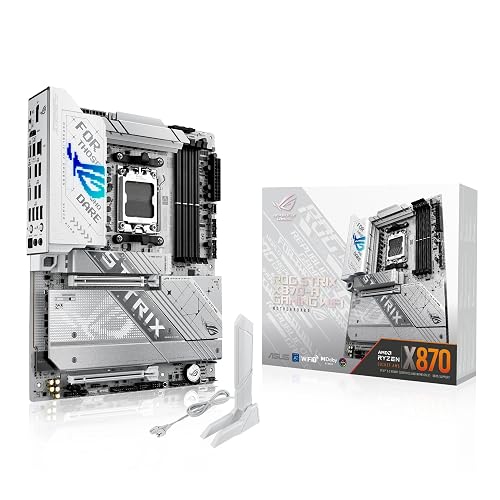
ASUS ROG Strix X870-A Gaming WiFi Motherboard
If you want a motherboard that can keep up with the Ryzen 9 9950X without feeling strained, the ASUS ROG Strix X870-A Gaming WiFi stands out. You get an AM5 board built for Ryzen 7000, 8000, and 9000 chips, so your upgrade path stays open. Its 16+2+2 power stages, each rated at 90A, help feed heavy loads with ease. Dual ProCool II connectors, sturdy chokes, and tough capacitors add real confidence. You also get WiFi 7, USB4, PCIe 5.0, four M.2 slots, DDR5 AEMP, and strong cooling tools.
- Socket:AM5
- Form Factor:ATX
- Memory Type:DDR5
- PCIe Support:PCIe 5.0
- Wi-Fi:WiFi 7
- M.2 Slots:4 slots
- Additional Feature:16+2+2 power stages
- Additional Feature:ASUS AI Overclocking
- Additional Feature:USB4 connectivity
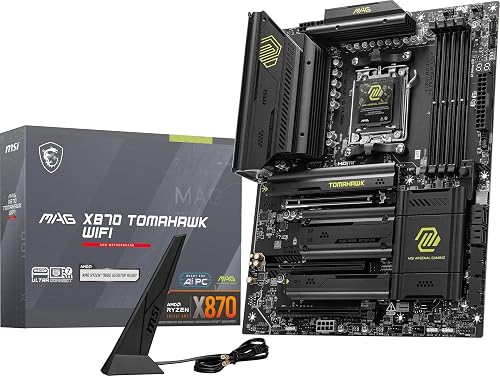
MSI MAG X870 Tomahawk WiFi Gaming Motherboard
The MSI MAG X870 Tomahawk WiFi Gaming Motherboard is a strong match for anyone building a Ryzen 9 9950X system that needs speed, stability, and room to grow. It supports AM5 for Ryzen 9000, 8000, and 7000 processors, plus DDR5, PCIe 5.0, and M.2 Gen5 for fast storage and graphics. The USB4 port, Wi-Fi 7, 5 Gbps LAN, and Bluetooth 5.4 keep the setup moving smoothly. Its extended PWM heatsink and robust power delivery help the 9950X remain steady under load, and Audio Boost 5 delivers richer in-game sound.
- Socket:AM5
- Form Factor:ATX
- Memory Type:DDR5
- PCIe Support:PCIe 5.0
- Wi-Fi:Wi-Fi 7
- M.2 Slots:Gen5 support
- Additional Feature:5Gbps LAN
- Additional Feature:Bluetooth 5.4
- Additional Feature:Audio Boost 5
AMD Ryzen™ 9 5900XT 16-Core 32-Thread Unlocked Desktop Processor
Built for builders who still rely on AMD’s AM4 platform, the Ryzen 9 5900XT provides a clear path to high-end desktop performance without requiring a full system overhaul. It features 16 Zen 3 cores, 32 threads, and a 4.8 GHz max boost so applications remain responsive under heavy load. With 72 MB of cache, it handles content creation and gaming with ease. The processor supports DDR4-3200 and PCIe 4.0 to keep your system modern. It is unlocked for overclocking, allowing you to tune performance, but note that a cooler is not included.
- Socket:AM4
- Form Factor:Desktop CPU
- Memory Type:DDR4
- PCIe Support:PCIe 4.0
- Wi-Fi:Not included
- M.2 Slots:Not included
- Additional Feature:16 cores
- Additional Feature:32 threads
- Additional Feature:72MB cache
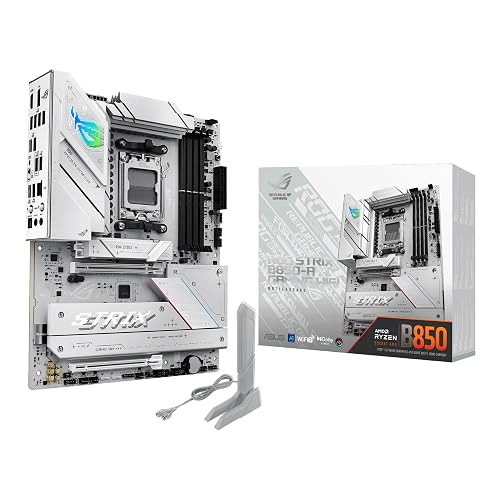
ASUS ROG Strix B850-A Gaming WiFi Motherboard
For Ryzen 9 9950X builders who want strong power delivery without jumping to a high-end flagship board, the ASUS ROG Strix B850-A Gaming WiFi is a smart, well-balanced pick. It features a 14+2+2 power design with 80A stages, 8+8-pin ProCool power, and sturdy alloy chokes, so the chip can stay steady under heavy work. You also get DDR5 support up to 192 GB and 8000 MHz. Four M.2 slots, PCIe 5.0, WiFi 7, 2.5G LAN, and 17 USB ports make setup easy. High-end cooling helps too.
- Socket:AM5
- Form Factor:ATX
- Memory Type:DDR5
- PCIe Support:PCIe 5.0
- Wi-Fi:WiFi 7
- M.2 Slots:4 slots
- Additional Feature:14+2+2 power stages
- Additional Feature:192GB memory support
- Additional Feature:ASUS AI Advisor
MSI MPG X870E Carbon WiFi Gaming Motherboard
MSI’s MPG X870E Carbon WiFi Gaming Motherboard makes a strong case for a Ryzen 9 9950X build if you want top-tier speed without sacrificing easy setup or modern extras. This ATX AM5 board supports Ryzen 9000, 8000, and 7000 processors, plus DDR5 memory up to 256 GB and 7800 MHz. PCIe 5.0 and Gen5 M.2 storage reduce load times. Wi-Fi 7, dual 5 Gbps LAN, USB 40 Gbps, and EZ PCIe Release keep your build fast, clean, and stress-free.
- Socket:AM5
- Form Factor:ATX
- Memory Type:DDR5
- PCIe Support:PCIe 5.0
- Wi-Fi:Wi‑Fi 7
- M.2 Slots:Gen5 support
- Additional Feature:Dual LAN
- Additional Feature:256GB memory support
- Additional Feature:EZ PCIe Release
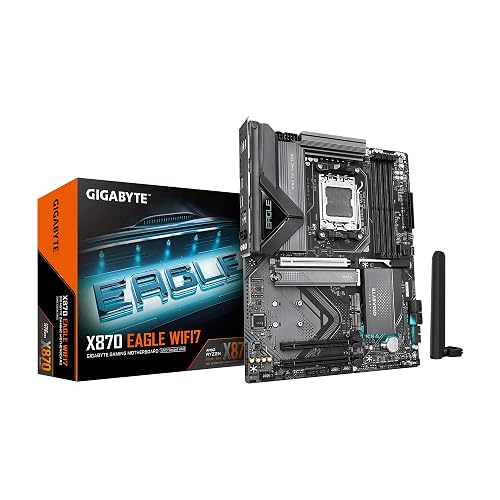
GIGABYTE X870 Eagle WiFi 7 Motherboard
The GIGABYTE X870 Eagle WiFi 7 Motherboard stands out if you want a strong AM5 board that gives the Ryzen 9 9950X plenty of room to breathe without making setup feel like a chore. It supports Ryzen 9000, 8000, and 7000 chips, plus DDR5 with four DIMM slots and AMD EXPO. Its 14+2+2 power design and thermal guards help keep heat in check. You also get PCIe 5.0, four M.2 slots, dual USB4, WiFi 7, 2.5GbE LAN, and EZ-Latch, making daily use easy. A five-year warranty adds real peace of mind.
- Socket:AM5
- Form Factor:ATX
- Memory Type:DDR5
- PCIe Support:PCIe 5.0
- Wi-Fi:WiFi 7
- M.2 Slots:4 slots
- Additional Feature:14+2+2 power phases
- Additional Feature:Dual USB4 ports
- Additional Feature:5-year warranty
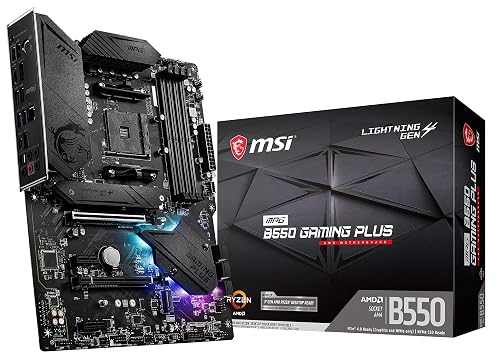
MSI MPG B550 Gaming Plus V1 Motherboard
The MSI MPG B550 Gaming Plus V1 provides a solid, budget-friendly AM4 foundation if you are building around a Ryzen CPU that fits the socket, but it is not compatible with the Ryzen 9 9950X. It supports DDR4 memory across four slots for up to 128 GB, giving your system ample headroom. PCIe 4.0, a Lightning Gen 4 M.2 slot, and four SATA ports offer fast storage options. An extended heatsink, M.2 Shield Frozr, and 2 oz copper help keep temperatures down. RGB lighting adds visual flair.
- Socket:AM4
- Form Factor:ATX
- Memory Type:DDR4
- PCIe Support:PCIe 4.0
- Wi-Fi:Not included
- M.2 Slots:Gen4 slot
- Additional Feature:MYSTIC LIGHT RGB
- Additional Feature:2 oz copper PCB
- Additional Feature:3-year warranty
Factors to Consider When Choosing Motherboards for AMD Ryzen 9 9950X
When choosing a motherboard for the AMD Ryzen 9 9950X, start with the correct socket and a robust power delivery design that can handle this high-performance processor. Check memory compatibility, PCIe expansion options, and cooling features, since each one affects overall system stability and performance. Select components carefully to ensure a reliable build today and the flexibility to support future upgrades.
Socket Compatibility
For the Ryzen 9 9950X, socket match comes first, because you need an AM5 motherboard to even get started. Check that label before anything else, since the wrong socket will not let the CPU fit or work. Next, look for BIOS support, because some AM5 boards need an update before they fully recognize the chip. Also confirm DDR5 memory support and PCIe 5.0 lanes, since those platform features depend on the socket design. If you plan to upgrade later, choose an AM5 board with long term support so you will not feel boxed in next year. It is a small detail that saves big headaches, and it beats buying the almost right board by a mile.
Power Delivery
Power delivery matters a lot with the Ryzen 9 9950X, because this chip can pull hard on the motherboard’s VRM when you push it through heavy multitasking, rendering, or long gaming sessions. You should aim for a board with a strong 12+2, 14+2, or 16+2 phase design, plus high amp power stages that can handle 80 to 90A each. That gives you steadier current and more room for boost or overclocking. Also check for dual 8-pin CPU power connectors and a reinforced 24-pin ATX plug, since they help cut voltage drop. Then look at VRM cooling, big heatsinks, heatpipes, and good thermal pads keep temperatures down. Finally, BIOS controls like load line calibration and voltage monitoring help you tune stability with confidence.
Memory Support
Memory support can make a bigger difference than many buyers expect, because the Ryzen 9 9950X really likes fast, stable DDR5. Check that the board supports DDR5 speeds near 7000 to 8000+ MHz with EXPO or XMP, since that helps the chip stretch its legs. Next, look at capacity and slot count; four DIMM slots with 128 GB to 256 GB give you room for heavy multitasking and professional workloads. Also confirm the QVL so your kit has been verified, which prevents late-night setup problems. Pay attention to the memory trace layout, PCB quality, heatsinks, and thermal pads. Good cooling around the RAM area helps high-speed memory stay steady when you push tight timings.
PCIe Expansion
Fast RAM is only part of the story, because a Ryzen 9 9950X build also needs a motherboard that can move data quickly across every add-in card you plan to use. You should want PCIe 5.0 on the main x16 GPU slot, since it gives your graphics card room to breathe and keeps you ready for newer hardware. Next, check full-length slots and lane split options, such as x16, x8, x8 or x16, x4, x4, so extra GPUs, RAID cards, or NVMe adapters do not fight for bandwidth. Also, look at Gen4 or Gen5 M.2 slots and see whether they share lanes with SATA or PCIe slots. Finally, choose reinforced slots, strong power delivery, and BIOS controls for link speed and bifurcation.
Cooling Features
Keeping a Ryzen 9 9950X cool starts with the motherboard itself, because this chip can push a board hard during long gaming, editing, or rendering sessions. Choose a board with large VRM heatsinks and heat pipes, since strong power delivery runs hot under load. Next, check for M.2 shields and quality thermal pads so your NVMe drives do not slow down during heavy file work. It also helps to pick a board with fan headers for chipset, VRM, and AIO pumps, because that gives your cooler room to do its job. After that, look for thermal telemetry and smart fan control so temperatures stay balanced without extra noise. Finally, make sure the PCB layout encourages airflow and supports steady boost or overclocking.
Connectivity Options
Connectivity can make or break a Ryzen 9 9950X build, so choose a motherboard that expands your options rather than limits them. Start with a PCIe 5.0 x16 slot for your main GPU, as that preserves bandwidth for future cards. Then ensure several M.2 slots with PCIe Gen4 or Gen5 support and heatsinks, so your SSDs stay fast and avoid thermal throttling. Next, look for USB4 or 40 Gbps Type-C, plus extra USB 3.2 Gen2x2 and Gen2 ports to keep docks and drives performing. You should also want 2.5GbE Ethernet, Wi-Fi 6E or Wi-Fi 7, and Bluetooth 5.2 or newer. Finally, verify that the rear I/O and internal headers provide sufficient SATA, USB, Thunderbolt or USB4, and front-panel Type-C support for real-world expansion.
Frequently Asked Questions
Which Chipset Offers the Best Overclocking Support for Ryzen 9 9950X?
You’ll get the best overclocking support from X870E or X670E chipsets, as they provide robust VRMs, strong power delivery, and extensive BIOS tuning features. You will not gain much from B650 boards.
Do These Motherboards Support PCIE 5.0 Graphics Cards?
Yes. Most of these boards provide PCIe 5.0 x16 support for graphics cards. Check each motherboard’s slot layout, since some reserve PCIe 5.0 lanes for NVMe drives or operate the graphics slot at PCIe 4.0.
How Important Is VRM Cooling for the Ryzen 9 9950X?
VRM cooling is very important for the Ryzen 9 9950X, it helps your motherboard deliver stable power, maintain boost clocks, and avoid throttling under heavy loads. You should use robust heatsinks and ensure good airflow for best performance.
Will These Boards Fit Standard ATX PC Cases?
Yes. Standard ATX motherboards will fit most ATX cases. Check your case specifications for supported motherboard sizes and verify clearance for CPU coolers, cable routing, and front-panel headers before you buy.
Which Motherboard Has the Best Wi-Fi and Bluetooth Features?
You’ll get the best Wi-Fi and Bluetooth from boards with Wi-Fi 7 and Bluetooth 5.4, offering high speeds and stable connections. Look for ASUS ROG, MSI MEG, or Gigabyte AORUS models.




