


You want faster ports, cleaner cables, and smoother control, and this guide shows how to get all three without wasting money or desk space. Options range from a powered USB-C hub to a 4K KVM, plus smart tools such as a macro keypad, a low-lag mouse, and easy dust cleanup gear.
Each pick solves a real setup problem. If your desk feels busy now, the next choices can make it calm, sharp, and ready for more.
| intpw 9-Port USB-C 10Gbps Powered USB Hub | 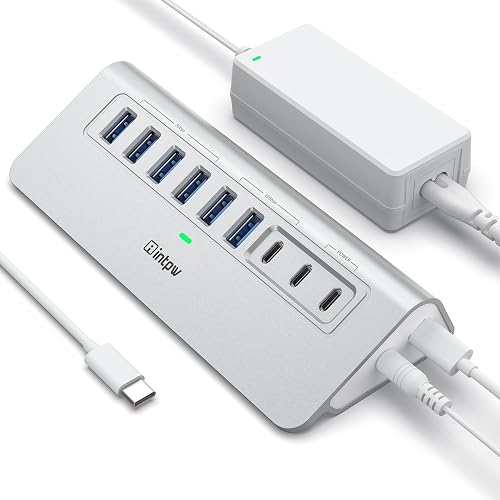 | Best USB Hub | Function: USB hub | Connectivity: USB-C | Power Source: Wall-powered | VIEW LATEST PRICE | Read Our Analysis |
| WOLFBOX MF200 Cordless Air Duster with 4 Nozzles | 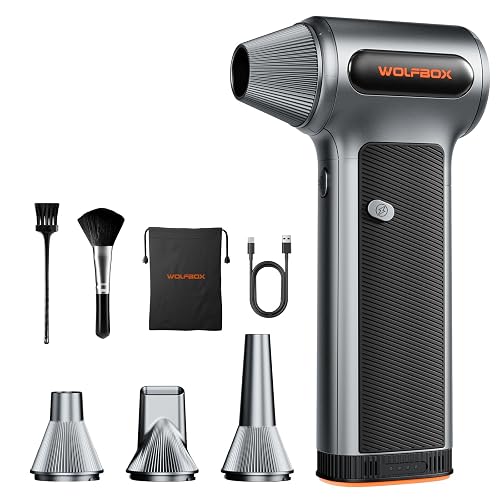 | Best Air Duster | Function: Air duster | Connectivity: USB-C charging | Power Source: Rechargeable battery | VIEW LATEST PRICE | Read Our Analysis |
| WOLFBOX Compressed Air Duster 3-Speed Rechargeable Cordless Blower | 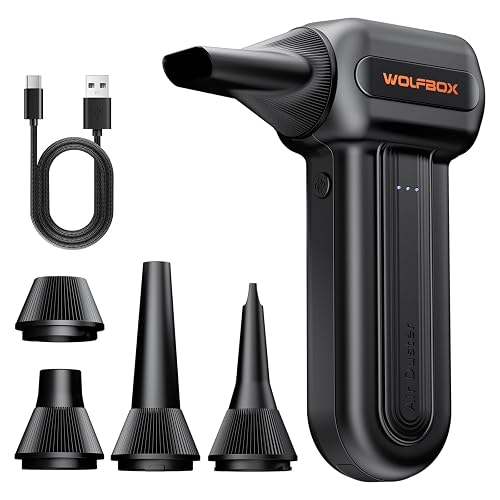 | Longest Runtime | Function: Air duster | Connectivity: USB-C charging | Power Source: Rechargeable battery | VIEW LATEST PRICE | Read Our Analysis |
| FIFINE AmpliGame Stream Controller with 15 Macro Keys | 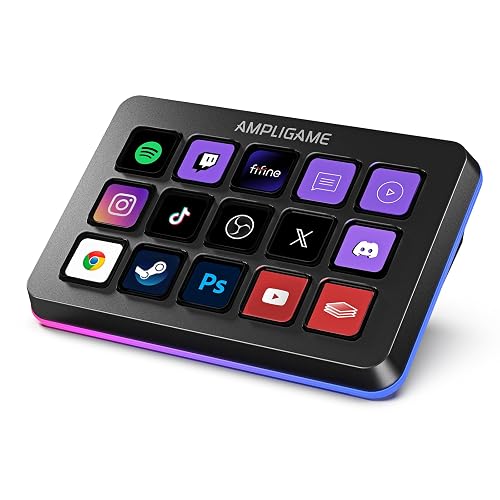 | Best for Streamers | Function: Stream controller | Connectivity: USB | Power Source: USB-powered | VIEW LATEST PRICE | Read Our Analysis |
| Hearvo USB 3.0 HDMI KVM Switch for 2 Computers | 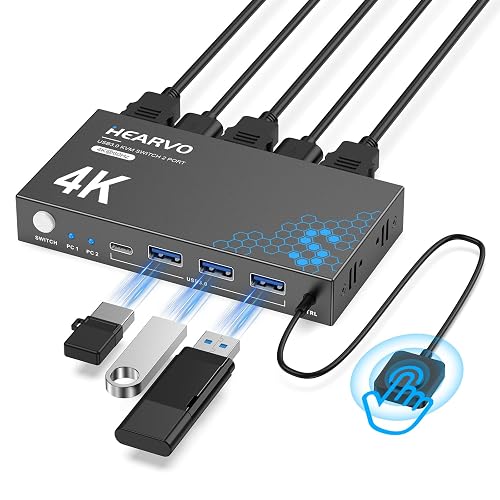 | Best KVM Switch | Function: KVM switch | Connectivity: HDMI/USB | Power Source: Bus-powered | VIEW LATEST PRICE | Read Our Analysis |
| VSDINSIDE Macro Keypad Stream Controller with 18 Keys | 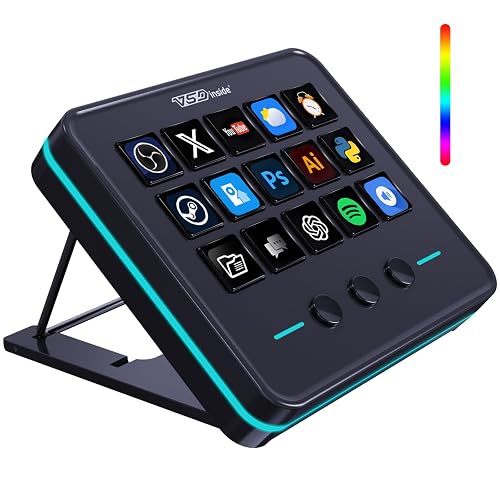 | Best Macro Pad | Function: Macro keypad | Connectivity: USB-C | Power Source: USB-powered | VIEW LATEST PRICE | Read Our Analysis |
| K&F Concept BS500M 2-in-1 Magnetic Air Duster/Vacuum | 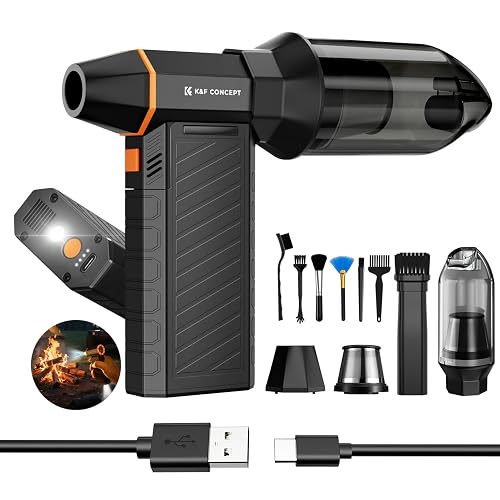 | Best 2-in-1 Cleaner | Function: Air duster/vacuum | Connectivity: USB-C charging | Power Source: Rechargeable battery | VIEW LATEST PRICE | Read Our Analysis |
More Details on Our Top Picks
intpw 9-Port USB-C 10Gbps Powered USB Hub
If your desk feels crowded with slow ports, messy cables, and devices fighting for power, the intpw 9-Port USB-C 10Gbps Powered USB Hub can clean things up fast. You get one USB-C 10Gbps port, two USB-A 10Gbps ports, and four USB-A 5Gbps ports for quick file moves and smooth editing. Two 45W USB-C charging ports keep your phone or tablet ready. The aluminum body feels sturdy, and the angled base stays stable. It includes a 65W adapter, a USB-C cable, and protection against overload, overvoltage, short circuits, and overcharge.
- Function:USB hub
- Connectivity:USB-C
- Power Source:Wall-powered
- Speed/Tiers:10Gbps/5Gbps
- Portability:Desktop
- Warranty:18 months
- Additional Feature:32-degree ergonomic tilt
- Additional Feature:50%+ recycled materials
- Additional Feature:Overload protection built-in
WOLFBOX MF200 Cordless Air Duster with 4 Nozzles
The WOLFBOX MF200 Cordless Air Duster with 4 Nozzles is a smart pick for anyone who wants a cleaner PC setup without the hassle of canned air or tangled cords. It features a brushless motor, strong jet airflow up to 87.5 m/s, and three speed settings, so you can move from gentle keyboard dusting to tougher debris quickly. The swappable battery lasts up to 100 minutes and recharges by Type-C in 2.5 hours, keeping you ready. Four nozzles, two brushes, and a storage pouch make cleanup easy at home, in your car, or on the go.
- Function:Air duster
- Connectivity:USB-C charging
- Power Source:Rechargeable battery
- Speed/Tiers:3 speeds
- Portability:Portable
- Warranty:24 months
- Additional Feature:Swappable battery system
- Additional Feature:Brushless motor design
- Additional Feature:Includes storage pouch
WOLFBOX Compressed Air Duster 3-Speed Rechargeable Cordless Blower
WOLFBOX’s MF60 and MF70 cordless air duster is a smart pick for anyone who wants fast, tidy cleaning without reaching for canned air repeatedly. You get three speeds, so you can start gentle at 25,000 RPM, then move up to 60,000 or 110,000 RPM when dust hides in vents and fans. Its brushless motor helps you clear keyboards, cases, and car vents with ease. You also get two batteries, up to 240 minutes on low, five nozzles, and a compact 8-ounce body that fits backpacks and glove boxes. It is a small tool that saves big hassle.
- Function:Air duster
- Connectivity:USB-C charging
- Power Source:Rechargeable battery
- Speed/Tiers:3 speeds
- Portability:Portable
- Warranty:24 months
- Additional Feature:Up to 110,000 RPM
- Additional Feature:Five included nozzles
- Additional Feature:Reusable canned-air alternative
FIFINE AmpliGame Stream Controller with 15 Macro Keys
FIFINE’s AmpliGame Stream Controller with 15 macro keys is a desk upgrade that reduces strain on your hands and clears mental clutter. Tap a key to launch apps, switch OBS scenes, adjust audio, or open tools without digging through menus. The touchscreen shows clear icons and gives quick feedback, so you always know what each press will do. You can build folders, set up scenes, and use plugins with drag and drop ease. It works with Mac and PC, and its RGB glow adds a polished, playful touch.
- Function:Stream controller
- Connectivity:USB
- Power Source:USB-powered
- Speed/Tiers:15 keys
- Portability:Desktop
- Warranty:Not stated
- Additional Feature:15 customizable LCD keys
- Additional Feature:Touchscreen visual feedback
- Additional Feature:RGB glowing ring
Hearvo USB 3.0 HDMI KVM Switch for 2 Computers
Need a simple way to tame two computers without cluttering your desk? The Hearvo USB 3.0 HDMI KVM Switch S7232H lets you run one monitor, keyboard, mouse, and USB gear across two PCs or laptops. You can also share printers, drives, webcams, and headsets with ease. It handles 4K at 60 Hz, supports HDCP 2.2, and uses adaptive EDID for a steady picture. Four USB 3.0 ports keep transfers fast. Plus, you can switch with the button or a wired remote, and plug-and-play setup saves time.
- Function:KVM switch
- Connectivity:HDMI/USB
- Power Source:Bus-powered
- Speed/Tiers:4K 60Hz
- Portability:Desktop
- Warranty:Lifetime plan
- Additional Feature:4K 60Hz support
- Additional Feature:Wired remote controller
- Additional Feature:Adaptive EDID optimization
VSDINSIDE Macro Keypad Stream Controller with 18 Keys
The VSDINSIDE Macro Keypad Stream Controller with 18 Keys is a smart pick if you want faster control without cluttering your desk. It provides 18 programmable controls, including 15 LCD keys and 3 buttons. You can launch apps, trigger macros, switch OBS scenes, and send text with one tap. The USB-C connection keeps setup simple, and the RGB ring adds a clean look. You can customize each key with JPG, PNG, or GIF images, and use plugins for weather, clocks, calendars, and reminders. It works with Windows and Mac, and 24/7 support helps you feel covered.
- Function:Macro keypad
- Connectivity:USB-C
- Power Source:USB-powered
- Speed/Tiers:18 keys
- Portability:Desktop
- Warranty:Not stated
- Additional Feature:18 programmable keys
- Additional Feature:Operation Follow feature
- Additional Feature:Weather and calendar plugins
K&F Concept BS500M 2-in-1 Magnetic Air Duster/Vacuum
K&F Concept’s BS500M 2-in-1 Magnetic Air Duster/Vacuum is ideal if you want one compact tool that can both blast dust away and pull it in, making it a practical choice for cleaning tight PC spaces, busy desks, and car interiors without juggling two devices. It features a brushless motor, three speed settings, and strong airflow that reaches hard spots quickly. The magnetic nozzle clicks on easily, and the LEDs help you see hidden debris. With 180 minutes of runtime, it is ready when your setup needs a quick, confident cleanup.
- Function:Air duster/vacuum
- Connectivity:USB-C charging
- Power Source:Rechargeable battery
- Speed/Tiers:3 speeds
- Portability:Portable
- Warranty:2 years
- Additional Feature:2-in-1 blow-vacuum
- Additional Feature:Magnetic click-lock nozzle
- Additional Feature:SOS strobe light
Factors to Consider When Choosing Pc Peripherals
When choosing PC peripherals, start with compatibility and connectivity so everything works with your devices immediately. Next, assess performance requirements, power and charging options, and port count and speed, so you avoid slow links or frequent unplugging. Finally, consider size and portability; the best gear should fit your desk, your bag, and your daily routine without making life harder.
Compatibility And Connectivity
Compatibility and connectivity can make or break your peripheral upgrade, so check the details before you buy. First, match the port on your PC to the device. USB-C 3.2 Gen 2 and USB-A 3.0 or 3.1 move data much faster than USB 2.0, so you will not bottleneck a fast dock or drive. Next, look at power needs. Some hubs offer USB-C PD ports, but they may only charge, not pass data or charge your laptop. For displays, confirm HDMI 4K at 60 Hz or DisplayPort support, and verify HDCP and EDID. Also, make sure Windows, macOS, or Linux supports the device software. Finally, check cable fit, connector space, and whether an external adapter is needed.
Performance Requirements
Your peripheral should match how you actually work, because raw specs only help if they fit your daily tasks. If you edit large photos or video, pick USB 3.2 Gen 2 or faster so files move quickly and external SSDs stay useful. For normal drives and simple accessories, USB 3.0 usually feels fine. When you play games or capture live audio and video, choose wired gear or a strong wireless dongle with very low polling delay, because even tiny lag can feel annoyingly fast. Also check display support, such as 4K at 60 Hz, plus HDCP and EDID, so screens and capture devices behave properly. Finally, match mouse DPI, keyboard switch feel, and fan or motor strength to the job, so your tools feel responsive, not fussy.
Power And Charging
Once you’ve picked peripherals that match your speed and workflow, the next thing to check is how they get power and how they charge. Look for the PD rating first, because 45W or 65W tells you if a hub can keep your laptop, tablet, or phone fed without slowing down. Next, check which ports carry data and which only provide power, since a charge-only port can leave an SSD sitting there like it forgot its job. Also, make sure the adapter includes a strong enough power brick for every device you will run at once. Safety features matter too, especially overload and short-circuit protection. For battery-powered tools, compare capacity, runtime, and recharge time so you are not left waiting when work is moving.
Port Count And Speed
A few well-placed ports can make a setup feel calm instead of cramped. When you choose a peripheral, match its port count to the gear you already use. Multiple USB-A ports help with mice, keyboards, and drives, while USB-C fits newer laptops. For displays, HDMI or DisplayPort keeps things simple. Next, look at speed. Use USB 3.0 at 5 Gbps for everyday gear, but pick USB 3.2 Gen 2 or Thunderbolt for fast SSDs and 4K transfers. If you plan to charge through the peripheral, check the PD wattage so your phone, tablet, or laptop gets enough power. Also, watch for data-only and power-only ports. Finally, remember that shared bandwidth can slow down several busy devices at once.
Size And Portability
When you take your gear on the move, size matters more than you might think. A setup that feels neat on your desk can become a cramped headache in your bag. You will notice the difference quickly when you choose a compact keyboard, such as a 60 to 80 percent model, and a mouse that stays under 100 to 120 grams. Those small wins save space and reduce your load. Next, check for folding parts or detachable pieces, such as stands or numpads, because they shrink the footprint. Also favor wireless gear with reliable Bluetooth or 2.4 GHz connections, and make sure the dongle stores safely. Finally, look for strong battery life and rugged cases, pouches, or locking attachments that protect your gear on the go.
Software And Macros
Before you use flashy features, check the software behind the peripheral, because it can make the difference between smooth control and constant frustration. Make sure the configuration software works with your OS, for example Windows 11 or macOS 14, and that it receives regular updates. That keeps things secure and compatible. Next, evaluate macro capabilities. You should be able to build single-key or multi-key actions, add delays, loops, and text, and launch files or URLs. If you game or work quickly, confirm whether macros can chain together. Then assess comfort features, such as per-key icons, animations, or LCD labels, plus easy drag-and-drop setup and folder or scene organization. Finally, verify that you can save and export profiles, switch them by application, and use hardware macros when you need safer, offline control.
Frequently Asked Questions
Can These Peripherals Work With Laptops and Desktops Alike?
Yes. Most of these peripherals work with both laptops and desktops, provided your device has the appropriate ports or supports Bluetooth, USB, or a wireless receiver. Check compatibility before connecting.
Do I Need Special Drivers for These Devices?
Usually no, you do not need special drivers; most peripherals work plug and play. About 70% of common USB devices install automatically, so you can start using them quickly. Check the manufacturer only for advanced features or RGB control.
How Much Desk Space Do These Accessories Usually Take?
You will usually need about 12 to 24 inches for a keyboard, mouse, and monitor stand, plus extra room for speakers or a dock. Compact gear saves space, but larger setups can quickly crowd your desk.
Are Any of These Peripherals Good for Travel Use?
Yes, like pocket-sized tools in a toolbox, some peripherals travel well. You can grab compact mice, foldable keyboards, and lightweight headsets; they slip into bags easily and keep your mobile setup nimble.
Which Accessory Offers the Easiest Plug-And-Play Setup?
A USB headset offers the easiest plug-and-play setup. You simply connect it and start using it; no extra drivers are required and you get immediate access to audio and the microphone.




