


If you are considering an RTX 5060, there are several sensible options to choose from, which can make the decision feel unexpectedly complex.
Some cards remain compact for tight builds, while others run cooler, operate more quietly, or provide extra VRAM for more demanding games.
The real question is not simply which model is good, but which one fits your case, your noise tolerance, and your playstyle.
| ASUS Prime GeForce RTX 5070 Graphics Card |  | Best Premium Pick | GPU Model: GeForce RTX 5070 | Memory: 12 GB GDDR7 | PCIe Interface: PCIe 5.0 x16 | VIEW LATEST PRICE | Read Our Analysis |
| MSI GeForce RTX 5060 VENTUS 2X OC Graphics Card | 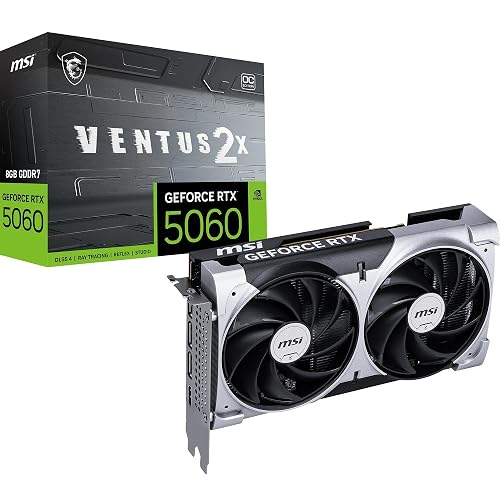 | Best Budget Pick | GPU Model: GeForce RTX 5060 | Memory: 8 GB GDDR7 | PCIe Interface: PCIe 5.0 x8 | VIEW LATEST PRICE | Read Our Analysis |
| ASUS Dual GeForce RTX 5060 8GB OC Edition |  | Best Compact Pick | GPU Model: GeForce RTX 5060 | Memory: 8 GB GDDR7 | PCIe Interface: PCIe 5.0 x16 | VIEW LATEST PRICE | Read Our Analysis |
| GIGABYTE GeForce RTX 5060 WINDFORCE OC Graphics Card | 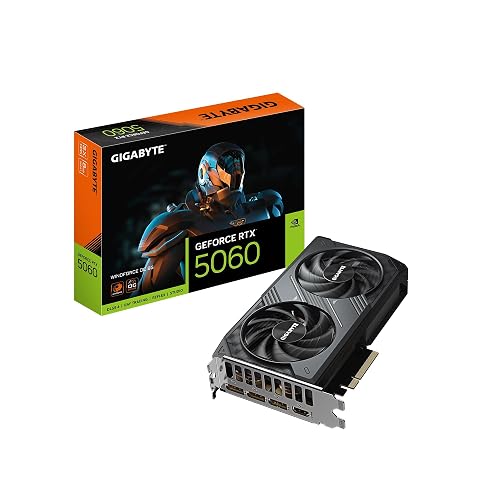 | Best Balanced Pick | GPU Model: GeForce RTX 5060 | Memory: 8 GB GDDR7 | PCIe Interface: PCIe 5.0 x16 | VIEW LATEST PRICE | Read Our Analysis |
| MSI Gaming RTX 5060 8G Shadow OC Graphics Card | 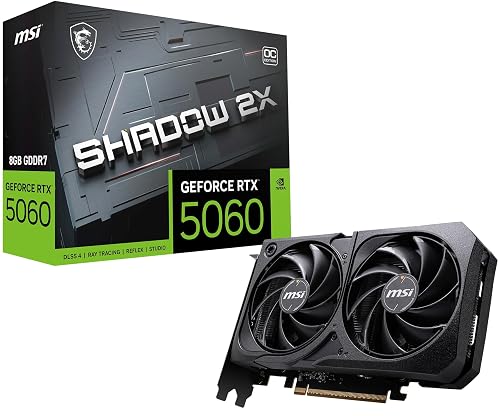 | Best Value Pick | GPU Model: GeForce RTX 5060 | Memory: 8 GB GDDR7 | PCIe Interface: PCI Express | VIEW LATEST PRICE | Read Our Analysis |
| GIGABYTE GeForce RTX 5060 Ti Gaming OC 8G Graphics Card |  | Best For Gamers | GPU Model: GeForce RTX 5060 Ti | Memory: 8 GB GDDR7 | PCIe Interface: PCIe 5.0 x16 | VIEW LATEST PRICE | Read Our Analysis |
| GIGABYTE GeForce RTX 5060 Ti Gaming OC 16G Graphics Card | 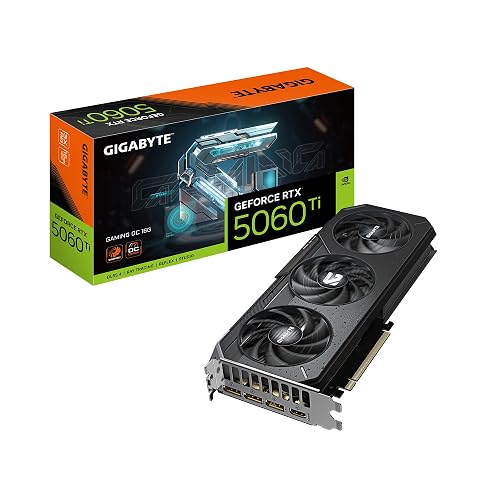 | Best Overall | GPU Model: GeForce RTX 5060 Ti | Memory: 16 GB GDDR7 | PCIe Interface: PCIe 5.0 x16 | VIEW LATEST PRICE | Read Our Analysis |
More Details on Our Top Picks
ASUS Prime GeForce RTX 5070 Graphics Card
The ASUS Prime GeForce RTX 5070 Graphics Card is a smart pick if you want strong 1440p gaming power in a small case without giving up modern features. You get 12GB of GDDR7 memory, a fast Blackwell GPU, and DLSS 4 for smoother play. Its 2.5 slot build fits compact desktops better than many chunky cards, yet it still uses three Axial-tech fans and a phase change thermal pad to stay cool. With HDMI 2.1b, three DisplayPort 2.1b ports, and dual BIOS, you can game, work, and stream with less stress.
- GPU Model:GeForce RTX 5070
- Memory:12 GB GDDR7
- PCIe Interface:PCIe 5.0 x16
- Display Outputs:HDMI + 3x DP
- Cooling:Triple-fan
- Form Factor:2.5-slot
- Additional Feature:12GB GDDR7 VRAM
- Additional Feature:DLSS 4 support
- Additional Feature:Dual BIOS
MSI GeForce RTX 5060 VENTUS 2X OC Graphics Card
MSI’s GeForce RTX 5060 VENTUS 2X OC is a smart pick if you want strong 1080p gaming without going overboard on size, heat, or power draw. You get NVIDIA’s Blackwell GPU, 8 GB of fast GDDR7 memory, and DLSS 4 support for smoother play. The factory overclock provides a modest performance boost. Dual TORX 5.0 fans and ZERO FROZR mode keep things quiet at idle. Its 197 mm, two slot build fits tighter cases, and the single 8 pin connector with a 145 W power draw keeps your setup simple. Video outputs include three DisplayPort 2.1b ports and one HDMI 2.1b port.
- GPU Model:GeForce RTX 5060
- Memory:8 GB GDDR7
- PCIe Interface:PCIe 5.0 x8
- Display Outputs:HDMI + 3x DP
- Cooling:Dual-fan
- Form Factor:2-slot
- Additional Feature:145W power draw
- Additional Feature:8-pin power connector
- Additional Feature:ZERO FROZR idle
ASUS Dual GeForce RTX 5060 8GB OC Edition
Built for gamers and creators who want strong 1080p and 1440p performance without crowding their case, the ASUS Dual GeForce RTX 5060 8GB OC Edition is a smart choice if you value cool, quiet operation in a compact build. It delivers NVIDIA Blackwell performance, 8GB of GDDR7 memory, and DLSS 4 to make games smoother and sharper. The OC mode boosts the clock to 2565 MHz. Dual Axial-tech fans and 0dB idle support keep noise low. With PCIe 5.0, HDMI 2.1b, and three DisplayPort 2.1b outputs, the card supports flexible build options.
- GPU Model:GeForce RTX 5060
- Memory:8 GB GDDR7
- PCIe Interface:PCIe 5.0 x16
- Display Outputs:HDMI + 3x DP
- Cooling:Dual-fan
- Form Factor:2.5-slot
- Additional Feature:623 AI TOPS
- Additional Feature:0dB silent idle
- Additional Feature:SFF-ready design
GIGABYTE GeForce RTX 5060 WINDFORCE OC Graphics Card
GIGABYTE’s GeForce RTX 5060 WINDFORCE OC 8G is a strong pick if you want a compact graphics card that feels ready for both smooth gaming and everyday creative work. You get NVIDIA’s Blackwell GPU, 8GB of fast GDDR7 memory, and DLSS 4 support, so your games can stay sharp without stressing your system. The 2512 MHz clock helps keep performance lively, and the dual-fan WINDFORCE cooler works to stay calm under load. Since it uses PCIe 5.0 and fits desktop builds well, you can expect easy upgrades and reliable 4K-ready output.
- GPU Model:GeForce RTX 5060
- Memory:8 GB GDDR7
- PCIe Interface:PCIe 5.0 x16
- Display Outputs:HDMI + DP
- Cooling:Dual-fan
- Form Factor:Compact
- Additional Feature:2512MHz GPU clock
- Additional Feature:288 customer reviews
- Additional Feature:3-year warranty
MSI Gaming RTX 5060 8G Shadow OC Graphics Card
The MSI Gaming RTX 5060 8G Shadow OC Graphics Card is a compact GPU that performs well for serious gaming and everyday creative work. It delivers NVIDIA Blackwell power, supports DLSS 4, and includes 8 GB of GDDR7 memory on a 128-bit bus. With a 2535 MHz clock, it stays responsive for smooth gameplay. It fits SFF builds, making upgrades easier. Three DisplayPort 2.1a ports and HDMI 2.1b provide strong display options. TORX Fan 5.0, a nickel-plated baseplate, and Core Pipes help keep temperatures under control.
- GPU Model:GeForce RTX 5060
- Memory:8 GB GDDR7
- PCIe Interface:PCI Express
- Display Outputs:HDMI + 3x DP
- Cooling:Dual-fan
- Form Factor:SFF-ready
- Additional Feature:Nickel-plated copper baseplate
- Additional Feature:Core Pipes cooling
- Additional Feature:Quick setup guide
GIGABYTE GeForce RTX 5060 Ti Gaming OC 8G Graphics Card
If you want a midrange card that feels ready for modern gaming without the usual stress, the GIGABYTE GeForce RTX 5060 Ti GAMING OC 8G is a strong pick. It features NVIDIA’s Blackwell RTX 5060 Ti with DLSS 4, 8 GB of GDDR7 memory, and a fast 2647 MHz boost clock. The card uses PCIe 5.0 and supports output up to 7680 x 4320, so your setup can handle very sharp visuals. A triple-fan WINDFORCE cooler keeps temperatures under control. The card includes DisplayPort and HDMI outputs, and comes with a 3 year warranty.
- GPU Model:GeForce RTX 5060 Ti
- Memory:8 GB GDDR7
- PCIe Interface:PCIe 5.0 x16
- Display Outputs:HDMI + DP
- Cooling:Triple-fan
- Form Factor:Standard
- Additional Feature:2647MHz GPU clock
- Additional Feature:3-fan cooling
- Additional Feature:AI acceleration
GIGABYTE GeForce RTX 5060 Ti Gaming OC 16G Graphics Card
Built for gamers and creators who want strong 1440p performance with extra room to breathe, the GIGABYTE GeForce RTX 5060 Ti Gaming OC 16G gives you 16GB of fast GDDR7 memory, a sharp 2,647 MHz boost clock, and DLSS 4 support in one sleek package. You also get the Blackwell GPU, PCIe 5.0 x16 support, and a WINDFORCE triple-fan cooler that helps keep temperatures steady. This lets you push ray tracing, high frame rates, and creative workloads with more confidence. The card includes a 3 year warranty and carries a 4.8 rating for added peace of mind.
- GPU Model:GeForce RTX 5060 Ti
- Memory:16 GB GDDR7
- PCIe Interface:PCIe 5.0 x16
- Display Outputs:HDMI + DP
- Cooling:Triple-fan
- Form Factor:Standard
- Additional Feature:16GB GDDR7 VRAM
- Additional Feature:236 customer reviews
- Additional Feature:4.8 average rating
Factors to Consider When Choosing Rtx 5060 Graphics Cards
When choosing an RTX 5060 graphics card, begin with VRAM capacity because it determines how well games and creative applications handle large textures and high-resolution visuals. Check the cooling design and power requirements as well. A card with efficient cooling runs quieter, and a properly matched PSU keeps the system stable. Finally, confirm the card fits your case and provides the display outputs you need, so installation is straightforward rather than a surprise.
VRAM Capacity
VRAM capacity is one of the first things you should check on an RTX 5060 graphics card, because it decides how much visual data the GPU can keep ready at once. For most 1080p games, 6 to 8 GB usually feels fine, so you can play at high settings without much fuss. But once you move to 1440p, use ultra texture packs, or run heavier creative projects, 10 to 16 GB gives you more breathing room and helps prevent stutter. Ray tracing, frame generation, and upscaling also eat extra memory, so you should leave some headroom. If you use multiple high resolution monitors or big mods, choose more VRAM. Also check memory speed and bus width, because they can keep data moving smoothly, too.
Cooling Design
Feel the cooler first, because cooling design can shape how an RTX 5060 performs in real use. You will usually get steadier boost speeds from dual or triple fan axial cards, since they push more air across the fin stack and spread heat better than single fan models. A larger heatsink with tight fin spacing and several heat pipes helps move warmth away fast, so your GPU stays calmer in long gaming sessions. Also look for quality thermal pads and paste, and direct-contact heat pipes, because they improve heat transfer from the chip and memory. Zero RPM modes can keep things quiet at idle, but they require smart fan curves. Finally, check slot size and your case vents, so the cooler can breathe without drama.
Power Requirements
Power needs can make or break your RTX 5060 experience, so check them before you buy. Start with the card’s TDP; many RTX 5060-class models sit around 145 W. That number helps you size your PSU for steady gaming loads. Next, confirm the power plug. Some cards use a single 8-pin or a 6+2 pin connector, while others may support newer slot-based standards. After that, evaluate your whole system. A midrange build often needs 450 to 650 W, depending on CPU and attached devices. Leave 20 to 30 percent headroom for safer voltage and future upgrades. Finally, remember that higher power increases heat, so ensure your case airflow and VRM cooling are adequate.
Form Factor
When you are choosing an RTX 5060 graphics card, form factor matters just as much as speed, because a great card is still a bad fit if it will not slide into your case cleanly. Check the slot width first, since single, 2-slot, 2.5-slot, and 3-slot designs can crowd nearby cards. Then measure the card’s length against your case’s GPU clearance, because a long model can block drive bays or press into the front panel. In small cases, also check height and backplate shape, so you do not run into side vents, M.2 brackets, or tubing. Next, think about cooling, since thicker multi-slot cards need stronger airflow. Finally, watch the weight, because heavy GPUs can stress the PCIe slot and may require a support bracket.
Display Outputs
Once the card fits your case, the next big check is the display outputs, because the ports on an RTX 5060 determine how easily you can hook up your monitor setup. Check the mix of DisplayPort 2.1b and HDMI 2.1b first so you can connect your screen without a dongle or a messy adapter chain. Then match the card’s maximum resolution and refresh rate to your display, whether you want crisp 4K at high speed or even 8K support. If you run more than one monitor, confirm there are enough outputs for each panel. Also, newer port versions matter because they enable more bandwidth and smoother features. Finally, make sure your cables, monitor, and other gear all use the same standard, or you may get a quiet downgrade.
Warranty Coverage
A strong warranty can save you a lot of stress later, so check it before you buy an RTX 5060 graphics card. Confirm how long the manufacturer backs it, usually one to three years, and whether it covers parts, labor, and firmware or driver faults. Next, determine if you must ship back the whole card or if you can get a replacement unit, and watch for shipping fees. Read the fine print on what voids coverage, such as damage, tampering, new thermal pads, BIOS tweaks, or pushing power limits. Also, check whether the warranty stays with the card or only with you. Finally, learn the RMA steps, proof of purchase requirements, repair time, and whether you can borrow hardware while you wait.
Frequently Asked Questions
Does RTX 5060 Support 1440P Gaming Smoothly?
Yes, you can game smoothly at 1440p with an RTX 5060, especially in esports and well optimized titles. You will need sensible settings in demanding games, though. DLSS can help you keep frame rates high.
Which RTX 5060 Card Is Quietest Under Load?
You will usually get the quietest RTX 5060 from cards with the largest heatsinks and three fans, such as the ASUS TUF or MSI Gaming X. Their fans spin more slowly under load, so overall noise is lower.
Is 8GB VRAM Enough for Future Games?
Not really. You will be fine in many current games, but future titles may demand more. You can still play at 1080p with sensible settings, yet 12 GB or more gives you much better headroom.
Do These Cards Need a Specific Power Supply?
Yes. You will usually need a quality PSU with the correct PCIe or 12V 2×6 connectors, and enough wattage for your system. Check each card’s requirements, and do not rely on a weak, outdated power supply.
Can RTX 5060 Run Without Extra Case Clearance?
Usually, yes, you can run an RTX 5060 without extra case clearance if your case fits standard mid-length cards. You should still check your GPU length, front fan spacing, and cable room before buying.




