


If you want a GPU that feels smarter than its price tag, the RTX 5060 Ti class gives you a lot to work with. You get strong 1440p performance, better ray tracing, and DLSS 4 support without needing a giant case or a huge power supply.
Some cards stay cool and quiet in small builds, while others use bigger fans and 16GB of VRAM for more room to grow. The right pick depends on what you value most, and a few clear trade-offs might surprise you.
| ASUS Dual GeForce RTX 5060 8GB OC Edition |  | Best Compact Pick | GPU Model: GeForce RTX 5060 | Memory Capacity: 8 GB | Memory Type: GDDR7 | VIEW LATEST PRICE | Read Our Analysis |
| GIGABYTE GeForce RTX 5060 WINDFORCE OC 8G Graphics Card | 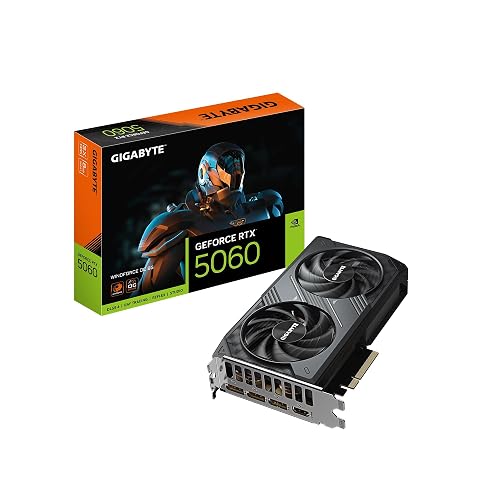 | Best Budget RTX 5060 | GPU Model: GeForce RTX 5060 | Memory Capacity: 8 GB | Memory Type: GDDR7 | VIEW LATEST PRICE | Read Our Analysis |
| GIGABYTE GeForce RTX 5060 Ti Gaming OC 8G Graphics Card |  | Best Midrange Gaming | GPU Model: GeForce RTX 5060 Ti | Memory Capacity: 8 GB | Memory Type: GDDR7 | VIEW LATEST PRICE | Read Our Analysis |
| GIGABYTE GeForce RTX 5060 Ti Gaming OC 16G | 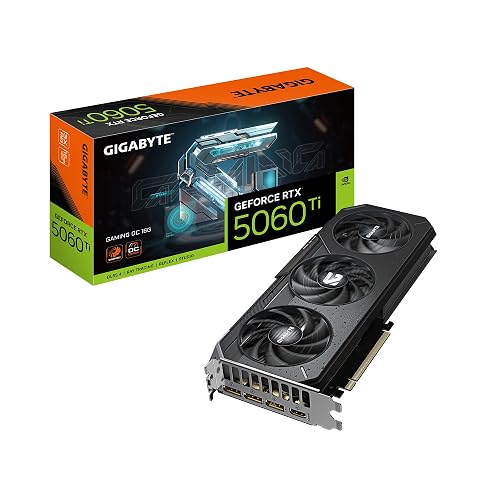 | Best 16GB Option | GPU Model: GeForce RTX 5060 Ti | Memory Capacity: 16 GB | Memory Type: GDDR7 | VIEW LATEST PRICE | Read Our Analysis |
| MSI GeForce RTX 5060 Ti 16G Graphics Card |  | Best Value 16GB | GPU Model: GeForce RTX 5060 Ti | Memory Capacity: 16 GB | Memory Type: GDDR7 | VIEW LATEST PRICE | Read Our Analysis |
| ASUS Dual GeForce RTX 5060 Ti Graphics Card | 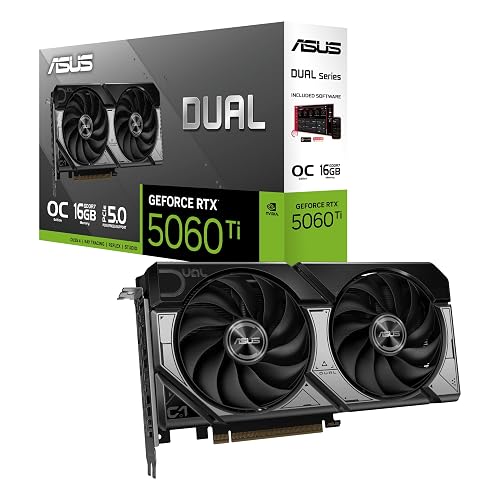 | Best Premium Compact | GPU Model: GeForce RTX 5060 Ti | Memory Capacity: 16 GB | Memory Type: GDDR7 | VIEW LATEST PRICE | Read Our Analysis |
| PNY NVIDIA GeForce RTX 5060 Epic-X ARGB OC GPU |  | Best RGB Pick | GPU Model: GeForce RTX 5060 | Memory Capacity: 8 GB | Memory Type: GDDR7 | VIEW LATEST PRICE | Read Our Analysis |
More Details on Our Top Picks
ASUS Dual GeForce RTX 5060 8GB OC Edition
If you want a compact card that still feels ready for serious gaming, the ASUS Dual GeForce RTX 5060 8GB OC Edition makes a strong case. You get NVIDIA Blackwell power, 623 AI TOPS, and DLSS 4 so your games can look sharp and run smoothly. The 8GB GDDR7 memory and PCIe 5.0 x16 link help keep performance quick, and OC mode pushes the clock speed to 2565 MHz. Its 2.5 slot design lets you fit it in smaller desktops without sacrificing cooling. Dual fans and a 0dB mode keep noise low.
- GPU Model:GeForce RTX 5060
- Memory Capacity:8 GB
- Memory Type:GDDR7
- PCIe Version:PCIe 5.0 x16
- Cooling Fans:2 fans
- Max Resolution:7680 x 4320
- Additional Feature:623 AI TOPS
- Additional Feature:0dB technology
- Additional Feature:SFF-ready design
GIGABYTE GeForce RTX 5060 WINDFORCE OC 8G Graphics Card
The GIGABYTE GeForce RTX 5060 WINDFORCE OC 8G is a smart pick for gamers and creators who want modern speed in a compact card without paying for extra bulk they may never use. It features NVIDIA’s Blackwell RTX 5060 GPU, 8GB of GDDR7 memory, and a 2512 MHz boost clock, so games feel snappy and edits move smoothly. The dual-fan WINDFORCE cooler helps it stay calm under pressure, and PCIe 5.0 support keeps it ready for newer systems. It also handles DLSS 4, ray tracing, AI tasks, and 8K output with ease.
- GPU Model:GeForce RTX 5060
- Memory Capacity:8 GB
- Memory Type:GDDR7
- PCIe Version:PCIe 5.0 x16
- Cooling Fans:2 fans
- Max Resolution:7680 x 4320
- Additional Feature:WINDFORCE cooling
- Additional Feature:28000 MHz memory
- Additional Feature:3-year warranty
GIGABYTE GeForce RTX 5060 Ti Gaming OC 8G Graphics Card
GIGABYTE’s GeForce RTX 5060 Ti GAMING OC 8G delivers solid 1080p and 1440p performance for gamers and creators who want modern features like DLSS 4 and AI-boosted graphics. It includes 8GB of fast GDDR7 memory, a 2647 MHz boost clock, and PCIe 5.0 support. The WINDFORCE triple-fan cooler helps keep temperatures under control, so your system stays steady during long sessions. The card provides DisplayPort and HDMI outputs, and it supports sharp 8K displays. For your desktop, it is a smart, confident upgrade.
- GPU Model:GeForce RTX 5060 Ti
- Memory Capacity:8 GB
- Memory Type:GDDR7
- PCIe Version:PCIe 5.0 x16
- Cooling Fans:3 fans
- Max Resolution:7680 x 4320
- Additional Feature:2647 MHz boost
- Additional Feature:WINDFORCE cooling
- Additional Feature:Gaming OC model
GIGABYTE GeForce RTX 5060 Ti Gaming OC 16G
Built for gamers and creators who want strong 1440p performance with room for future-proofing, the GIGABYTE GeForce RTX 5060 Ti GAMING OC 16G delivers a balanced mix of speed, efficient cooling, and modern features. It combines NVIDIA Blackwell performance, 16GB of GDDR7 memory, and a 2647 MHz boost clock to make demanding games run smoother. The 3-fan WINDFORCE cooler keeps noise and temperatures under control. With DLSS 4, improved RT and Tensor Cores, and PCIe 5.0 support, you get sharper visuals, faster AI workloads, and confidence that this card is ready for future upgrades.
- GPU Model:GeForce RTX 5060 Ti
- Memory Capacity:16 GB
- Memory Type:GDDR7
- PCIe Version:PCIe 5.0 x16
- Cooling Fans:3 fans
- Max Resolution:7680 x 4320
- Additional Feature:16 GB GDDR7
- Additional Feature:WINDFORCE cooling
- Additional Feature:3-year warranty
MSI GeForce RTX 5060 Ti 16G Graphics Card
MSI’s GeForce RTX 5060 Ti 16G VENTUS 2X OC PLUS is a strong choice for 1440p gaming, offering headroom for newer titles and creative workloads. It includes 16GB of GDDR7 memory, a 128-bit interface, and a 2.6 GHz GPU clock for responsive, consistent performance. Dual STORMFORCE fans help manage noise and heat during extended sessions. With PCIe 5.0, HDMI 2.1b, and DisplayPort 2.1b, modern displays connect easily. Its 4.6-star rating reflects solid user confidence.
- GPU Model:GeForce RTX 5060 Ti
- Memory Capacity:16 GB
- Memory Type:GDDR7
- PCIe Version:PCIe 5.0
- Cooling Fans:2 fans
- Max Resolution:7680 x 4320
- Additional Feature:VENTUS 2X OC PLUS
- Additional Feature:STORMFORCE fans
- Additional Feature:4.6 star rating
ASUS Dual GeForce RTX 5060 Ti Graphics Card
The ASUS Dual GeForce RTX 5060 Ti Graphics Card is a smart pick if you want strong modern gaming power in a smaller build without giving up cool, quiet operation. You get 16 GB of GDDR7 memory, NVIDIA Blackwell performance, and DLSS 4 support for smoother play. Its 2632 MHz OC boost helps you push demanding games. Dual Axial-tech fans and 0dB Technology keep noise low at light loads. Since it uses a compact 2.5 slot design, it fits more easily in SFF desktops. You also get three DisplayPort 2.1b ports, HDMI 2.1b, and a reassuring 3 year warranty.
- GPU Model:GeForce RTX 5060 Ti
- Memory Capacity:16 GB
- Memory Type:GDDR7
- PCIe Version:PCIe 5.0 x16
- Cooling Fans:2 fans
- Max Resolution:7680 x 4320
- Additional Feature:767 AI TOPS
- Additional Feature:Axial-tech fans
- Additional Feature:SFF-ready design
PNY NVIDIA GeForce RTX 5060 Epic-X ARGB OC GPU
PNY’s NVIDIA GeForce RTX 5060 Epic-X ARGB OC Triple Fan is a smart pick if you want a compact card that still delivers modern gaming performance, reliable cooling, and a touch of visual flair. It includes 8GB of GDDR7 memory, a 128-bit bus, and a 2280 MHz clock, so your desktop can handle sharp 1440p gameplay with ease. The card uses PCIe 5.0 x8 and a two-slot, small form factor friendly design, so it fits tighter builds. You also get DLSS 4, Reflex, Studio tools, and triple outputs for fast, flexible use.
- GPU Model:GeForce RTX 5060
- Memory Capacity:8 GB
- Memory Type:GDDR7
- PCIe Version:PCIe 5.0 x8
- Cooling Fans:3 fans
- Max Resolution:7680 x 4320
- Additional Feature:Epic-X ARGB
- Additional Feature:NVIDIA Studio
- Additional Feature:NVIDIA Reflex
Factors to Consider When Choosing Rtx 5060 Ti Graphics Cards
When choosing an RTX 5060 Ti graphics card, start with the fundamentals that determine performance and compatibility: VRAM capacity, cooling design, card dimensions, clock speeds, and power connectors. Ensure you have enough VRAM for your games and applications, and choose a cooler that maintains safe temperatures without excessive noise. Also verify the card will fit in your case and that your power supply has the required connectors and sufficient wattage, so the upgrade is straightforward and reliable.
VRAM Capacity
VRAM is the card’s short-term memory, and it can make or break how smooth your RTX 5060 Ti feels in real use. If you mostly game at 1080p, 8 GB can do the job, especially in esports titles. But once you turn on ray tracing, high-resolution textures, or heavy mods, you can exceed that limit quickly. When that happens, the card may rely on system RAM, and you will notice stutters. If you need more room for 4K gaming, larger scene files, or machine-learning work, 16 GB provides better breathing room. Match the memory to your habits: choose 8 GB for budget-friendly play, or pick 16 GB for smoother performance and longer-lasting value.
Cooling Design
After you match the VRAM to how you game or work, the next thing to judge is how well the RTX 5060 Ti can stay cool under pressure. Favor dual or triple fans with axial blades, because they push more air across the GPU and memory. A larger heatsink, a thicker fin stack, and heatpipes help spread heat, so the card holds boost clocks longer during heavy play or rendering. Also check the cooler’s airflow path, as barrier rings and smart fin angles can move hot air where your case can clear it. If the card uses 0dB fan stop, make sure the fans wake up fast enough for real loads. A strong cooler is quiet, and it also stays ready when the action heats up.
Card Size
Card size can make or break your RTX 5060 Ti upgrade, so check your case before you buy. Measure the length, width, and slot height in your case and compare them with the card, since many models run about 8.9 to 11.1 inches long and occupy 2 to 2.5 slots. That extra thickness can crowd nearby expansion slots and reduce airflow. Next, inspect the power plug area and the space behind the motherboard tray, because a long board or rear connector can bump into panels or drive cages in small builds. Also check cooler height and fan count, since large triple-fan designs may brush side vents or interfere with CPU coolers. Finally, make sure front fans or radiators still have room to breathe.
Clock Speeds
Clock speeds reveal a lot about how an RTX 5060 Ti will feel in real games, especially if you already know the card fits your case. Higher GPU core clocks usually yield better raster and shader performance, so you can see smoother frame rates at the same settings. Boost clock matters more than the base number, because that is the speed the card tries to hold during play. Check memory clock and bandwidth as well, since they help with textures and higher resolutions. A fast-rated card only helps if it can stay at those speeds. Good cooling and solid power delivery keep clocks steady, while heat or power limits can trim performance. Even 50 to 150 MHz can improve results, but do not ignore noise.
Power Connectors
Before you buy an RTX 5060 Ti, check the power connectors first; the wrong plug can turn an exciting upgrade into a frustrating fit issue. Match the card’s required plug type and count, whether 8-pin, 6-pin, or 12VHPWR, with your PSU. Next, make sure your power supply has enough wattage and rail amperage for the card’s recommended system draw, so your PC stays steady under load. Use short, well-made PCIe cables or the included adapter to reduce voltage drop and heat. If your card uses 12VHPWR, verify your PSU supports it, or confirm that an adapter made from multiple 8-pin leads is acceptable. If you plan to overclock, leave extra headroom, and seat every connector firmly.
Display Outputs
Along with raw speed, the display outputs on an RTX 5060 Ti matter a lot because they determine how easily your monitor setup will actually work. Check whether the card uses DisplayPort 2.1 or 1.4, and HDMI 2.1b or 2.0, so you can hit your target resolution, refresh rate, and color depth. If you run more than one screen, count the ports and make sure you have enough DisplayPort and HDMI connections for smooth multitasking. Also confirm the maximum output per port and the card’s total bandwidth, especially if you want 4K at 144 Hz or 8K at 60 Hz. Finally, check VRR, HDR, and DSC support, and verify port spacing, because a great card feels less great when the plugs do not fit.
Warranty Length
When you’ve checked that the RTX 5060 Ti has the right display ports for your setup, the next thing to look at is the warranty length, because a good card should protect your wallet long after the box is opened. A three year warranty is common and it can save you from paying for costly defects. Look closely at what the policy covers. You want parts and labor, and you should know if the warranty stays with you or transfers to a later owner. Also, check what voids coverage. Aftermarket coolers, BIOS flashing, physical damage, and heavy overclocking can all end coverage quickly. Finally, compare the retailer’s return window with the maker’s claim process, shipping costs, and repair time.
Price To Performance
Great price to performance on an RTX 5060 Ti is not just about the lowest sticker price. A cheaper card can still cost you more if it runs slower, gets hotter, or falls behind in the games you actually play. Compare core clocks and memory setup, such as 16 GB versus 8 GB GDDR7, with average FPS in your favorite titles. Check 1% lows, not just peak numbers, because smoother play feels better. Weigh AI and ray tracing results against the cost if you care about creative work or advanced lighting. Also evaluate VRAM, bandwidth, and your target resolution; for 1440p and 4K, extra memory often pays off. Finally, favor cards with strong cooling, since steady boost clocks help your money go further.
Frequently Asked Questions
Do RTX 5060 Ti Cards Support AV1 Encoding for Streaming?
Yes, you can stream with AV1 encoding, because RTX 5060 Ti cards support it. You will get cleaner video at lower bitrates, and if your platform accepts AV1, you will notice sharper motion and fewer compression artifacts overall.
Which RTX 5060 Ti Models Fit Compact ITX Gaming Builds?
You should choose compact, dual-slot, short-length RTX 5060 Ti models such as the MSI Ventus, ASUS Dual, and Gigabyte Eagle. These cards fit ITX cases better, allowing you to build a small gaming rig without sacrificing much performance.
Can RTX 5060 Ti Handle 1440P Ray Tracing at High Settings?
Yes, if you prioritize impressive lighting effects over raw performance, the RTX 5060 Ti can handle 1440p ray tracing at high settings. You will likely need DLSS and some tuned settings to keep frame rates comfortably smooth.
Is 16GB VRAM Worth It Over 8GB for Future Games?
Yes, 16GB is worth it if you want smoother texture settings and better longevity. You will avoid VRAM bottlenecks in newer games, especially at 1440p or with mods, though 8GB still works today.
How Much Power Supply Wattage Do RTX 5060 Ti Cards Need?
You might expect a modest GPU to use little power, but most RTX 5060 Ti cards require a 550W PSU. If you overclock or pair the card with a power-hungry CPU, choose a 650W unit for safer headroom.




