


You do not need to feel stuck choosing an RTX 5070, because the best cards make the jump to Blackwell feel practical rather than painful.
Some models prioritize cooler temperatures and quiet fans, while others push harder with more VRAM for creative work and demanding 1440p or 4K gaming.
From PNY’s flashy Epic-X to ASUS’s sturdy Prime and TUF, plus offerings from GIGABYTE, MSI, and budget-oriented options, each card addresses a different need, and the right fit may surprise you.
| PNY NVIDIA GeForce RTX 5070 Epic-X ARGB OC Graphics Card |  | Best Overall | GPU: GeForce RTX 5070 | VRAM: 12GB GDDR7 | Architecture: Blackwell | VIEW LATEST PRICE | Read Our Analysis |
| ASUS Prime GeForce RTX 5070 Graphics Card |  | Best Compact Build | GPU: GeForce RTX 5070 | VRAM: 12GB GDDR7 | Architecture: Blackwell | VIEW LATEST PRICE | Read Our Analysis |
| ASUS TUF GeForce RTX 5070 Ti Graphics Card |  | Best Premium Ti | GPU: GeForce RTX 5070 Ti | VRAM: 16GB GDDR7 | Architecture: Blackwell | VIEW LATEST PRICE | Read Our Analysis |
| GIGABYTE GeForce RTX 5070 AERO OC 12G Graphics Card |  | Best Cooler | GPU: GeForce RTX 5070 | VRAM: 12GB GDDR7 | Architecture: Blackwell | VIEW LATEST PRICE | Read Our Analysis |
| PNY GeForce RTX 5070 Ti Graphics Card | 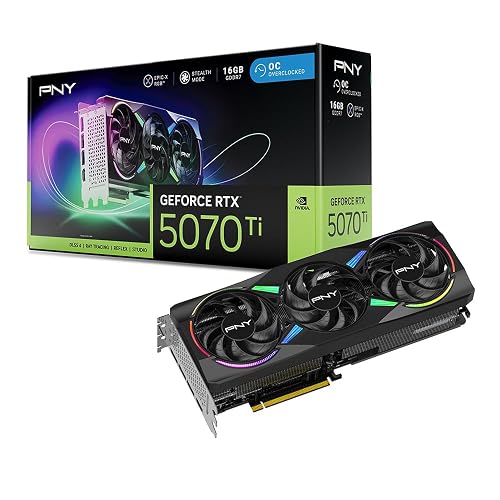 | Best Performance | GPU: GeForce RTX 5070 Ti | VRAM: 16GB GDDR7 | Architecture: Blackwell | VIEW LATEST PRICE | Read Our Analysis |
| GIGABYTE GeForce RTX 5060 WINDFORCE OC 8G Graphics Card | 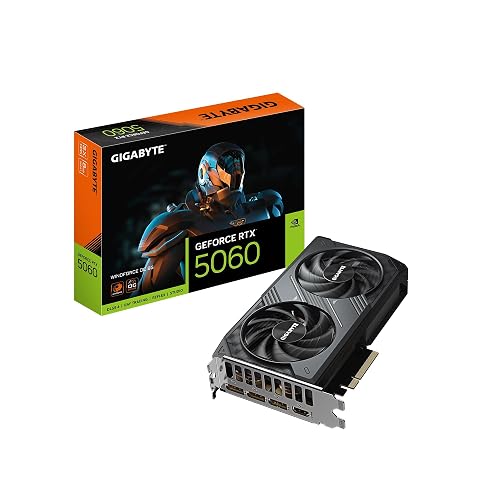 | Best Budget Pick | GPU: GeForce RTX 5060 | VRAM: 8GB GDDR7 | Architecture: Blackwell | VIEW LATEST PRICE | Read Our Analysis |
| MSI Gaming RTX 5070 Ti 16G Shadow Graphics Card | 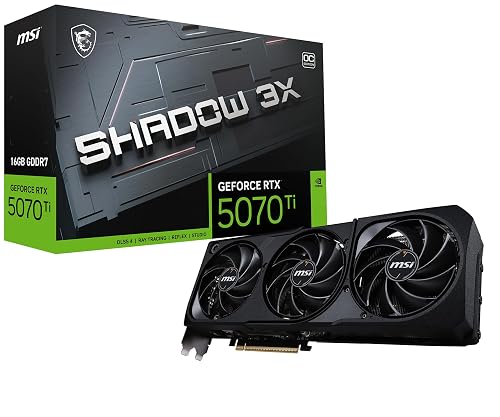 | Best Midrange Ti | GPU: GeForce RTX 5070 Ti | VRAM: 16GB GDDR7 | Architecture: Blackwell | VIEW LATEST PRICE | Read Our Analysis |
More Details on Our Top Picks
PNY NVIDIA GeForce RTX 5070 Epic-X ARGB OC Graphics Card
If you want a card built for serious gaming and smooth creative work, the PNY NVIDIA GeForce RTX 5070 Epic-X ARGB OC Triple Fan makes a strong case. It delivers NVIDIA Blackwell performance, 6,144 CUDA cores, and 12 GB of GDDR7 memory so games and applications stay responsive. With DLSS 4, Reflex, and advanced ray tracing, you get sharper visuals and reduced lag. The triple-fan cooler, ARGB lighting, and Studio support help you work and play with less stress.
- GPU:GeForce RTX 5070
- VRAM:12GB GDDR7
- Architecture:Blackwell
- PCIe:PCIe 5.0
- Max Resolution:7680 x 4320
- Display Outputs:DP x3, HDMI x1
- Additional Feature:Triple-fan cooling
- Additional Feature:ARGB lighting
- Additional Feature:16-pin power cable
ASUS Prime GeForce RTX 5070 Graphics Card
The ASUS Prime GeForce RTX 5070 Graphics Card is a strong choice for builders who want next-generation performance without a bulky setup getting in the way. It delivers NVIDIA Blackwell power, DLSS 4, 12 GB of GDDR7 memory, and PCIe 5.0 support to keep games and creative workflows fast and smooth. Its small-form-factor friendly frame fits compact cases with less stress. The 2.5-slot design maintains broad compatibility while improving cooling. Axial-tech fans and a phase-change thermal pad help keep temperatures down. HDMI 2.1, DisplayPort 2.1, and Dual BIOS provide added flexibility and confidence.
- GPU:GeForce RTX 5070
- VRAM:12GB GDDR7
- Architecture:Blackwell
- PCIe:PCIe 5.0
- Max Resolution:Not listed
- Display Outputs:HDMI x1, DP 2.1 x1
- Additional Feature:Dual BIOS
- Additional Feature:Axial-tech fans
- Additional Feature:Phase-change thermal pad
ASUS TUF GeForce RTX 5070 Ti Graphics Card
ASUS TUF GeForce RTX 5070 Ti Graphics Card stands out for gamers and creators who want strong 4K-ready power without giving up durability or quiet confidence in the build. You get 16GB GDDR7 memory, a Blackwell GPU, and boost speeds up to 2610 MHz in OC mode. Three Axial-tech fans and a massive fin array help keep heat in check, so your desktop stays calmer under load. With DisplayPort 2.1a and HDMI 2.1b outputs, plus rugged military-grade parts, it feels ready for long, demanding sessions.
- GPU:GeForce RTX 5070 Ti
- VRAM:16GB GDDR7
- Architecture:Blackwell
- PCIe:PCIe 5.0
- Max Resolution:7680 x 4320
- Display Outputs:DP x3, HDMI x2
- Additional Feature:Military-grade components
- Additional Feature:Protective PCB coating
- Additional Feature:GPU Tweak III
GIGABYTE GeForce RTX 5070 AERO OC 12G Graphics Card
GIGABYTE’s GeForce RTX 5070 AERO OC 12G is a solid choice if you want strong 1440p performance and 4K-ready capability without moving to a large, power-hungry card. It delivers NVIDIA Blackwell performance, DLSS 4, and upgraded RT and Tensor Cores so games run smoother and smarter. The card’s 12GB GDDR7 memory, 192-bit bus, and 2600 MHz clock speeds help maintain steady performance. A triple-fan WINDFORCE cooler keeps temperatures down, and PCIe 5.0, DisplayPort, and HDMI provide straightforward setup and flexible display options.
- GPU:GeForce RTX 5070
- VRAM:12GB GDDR7
- Architecture:Blackwell
- PCIe:PCIe 5.0
- Max Resolution:7680 x 4320
- Display Outputs:DisplayPort, HDMI
- Additional Feature:WINDFORCE cooling
- Additional Feature:Three-fan design
- Additional Feature:3-year warranty
PNY GeForce RTX 5070 Ti Graphics Card
PNY’s GeForce RTX 5070 Ti Epic-X ARGB OC Triple Fan makes a strong case for gamers and creators who want serious speed without giving up cool, steady performance. You get 16GB of GDDR7 memory, a 256-bit bus, and a 2640 MHz boost clock on NVIDIA’s Blackwell design. That means smooth play and quick project work. Its fourth-generation ray tracing cores and fifth-generation Tensor cores deliver sharper lighting, smarter DLSS gains, and faster Windows tasks. With PCIe 5.0, DisplayPort 2.1, HDMI, Reflex, and Studio drivers, it is ready for your toughest days.
- GPU:GeForce RTX 5070 Ti
- VRAM:16GB GDDR7
- Architecture:Blackwell
- PCIe:PCIe 5.0
- Max Resolution:Not listed
- Display Outputs:HDMI, DisplayPort 2.1
- Additional Feature:256-bit memory bus
- Additional Feature:Reflex technologies
- Additional Feature:NVIDIA Studio drivers
GIGABYTE GeForce RTX 5060 WINDFORCE OC 8G Graphics Card
The GIGABYTE GeForce RTX 5060 WINDFORCE OC 8G is a smart pick if you want strong 1080p and 1440p gaming performance without overcomplicating your build. It includes 8GB of fast GDDR7 memory, a 2,512 MHz boost clock, and PCIe 5.0 support, so your desktop is ready for modern games. The WINDFORCE dual-fan cooler helps keep noise and heat in check, which makes long sessions more comfortable. DLSS 4, ray tracing, and AI features provide sharper visuals and smoother play, while DisplayPort and HDMI keep setup straightforward.
- GPU:GeForce RTX 5060
- VRAM:8GB GDDR7
- Architecture:Blackwell
- PCIe:PCIe 5.0
- Max Resolution:7680 x 4320
- Display Outputs:DisplayPort, HDMI
- Additional Feature:8GB GDDR7
- Additional Feature:WINDFORCE cooling
- Additional Feature:Two-fan design
MSI Gaming RTX 5070 Ti 16G Shadow Graphics Card
The MSI Gaming RTX 5070 Ti 16G Shadow 3X OC is a strong pick if you want high-end gaming power without turning your PC into a space heater. You get NVIDIA Blackwell speed, 16GB of GDDR7 memory, and a 256-bit bus for smooth 4K play. It boosts up to 2497 MHz, so you can count on fast, steady performance. The TORX Fan 5.0 design maintains strong airflow, and the nickel-plated copper baseplate with square core pipes pulls heat away quickly. DLSS 4 and three DisplayPort 2.1a ports make your setup feel ready for anything.
- GPU:GeForce RTX 5070 Ti
- VRAM:16GB GDDR7
- Architecture:Blackwell
- PCIe:PCIe 5.0
- Max Resolution:7680 x 4320
- Display Outputs:DP x3, HDMI x1
- Additional Feature:TORX Fan 5.0
- Additional Feature:Nickel-plated copper baseplate
- Additional Feature:Square-design core pipes
Factors to Consider When Choosing Rtx 5070 Graphics Cards
When choosing an RTX 5070 graphics card, balance VRAM capacity, cooling design, and power requirements so the card fits both your games and your PC. Also check the card’s form factor, because a great GPU will not help much if it squeezes into your case like an overfed raccoon. Finally, confirm that the connectivity options match your monitor setup to avoid inconvenient surprises later.
VRAM Capacity
VRAM capacity can make or break how smooth your RTX 5070 feels in real use, especially once you push past simple 1080p play. For most 1440p gaming and many creative tasks, 12 GB is enough, and it keeps you comfortable without overbuying. If you play in 4K, use multiple monitors, or work with big projects, 16 GB gives you more breathing room and fewer stutters. It also helps when high resolution textures, large framebuffers, or AI and rendering jobs would otherwise lean on slower system memory. Pay attention to bus width and memory speed too, because they shape how fast data moves. If your current VRAM use already sits near the limit, choose the next tier up.
Cooling Design
A well-designed cooler can keep your RTX 5070 calm and steady even during long gaming sessions or heavy creative work. Look for triple-fan models and thicker multi-slot coolers, since they spread heat over a larger area and usually stay cooler than slim two-fan cards. Next, check the heatsink. Bigger fin stacks and thicker heatpipes move heat away from the chip more effectively, which helps boost speeds hold up longer. Fan shape matters too. Axial fans often push more air in open cases, while blower styles can help in tight builds. Good thermal pads or phase change materials also matter, because they cool VRAM and VRMs more evenly. If the cooler cannot handle about 250 W, you will hear more noise and see throttling.
Power Requirements
With the cooler doing its job on the RTX 5070, the next thing to check is whether your power setup can keep up without stress. A typical card pulls about 250 watts, so you need room for the GPU plus the rest of your system. Aim for a PSU with 20 to 30 percent spare capacity to handle load spikes and keep things stable. Also, match the connector layout carefully. Many models use a 16 pin 12VHPWR plug or two 8 pin PCIe plugs, so check your supply before you buy. Make sure your +12V rail has enough amperage, and look for solid OCP and OVP protection. Finally, confirm your cable length and routing path, because clean power delivery should never feel like a wrestling match.
Form Factor
Size matters just as much as speed when choosing an RTX 5070 graphics card, because even a powerful card is useless if it will not fit your case. Check the slot width first, since a 2.4 slot card can crowd nearby PCIe slots and headers. Then measure the card’s length and thickness against your case’s GPU clearance, and leave room for cables and brackets. Many models stretch from about 12 to 15+ inches. If you use a mini-ITX or other compact build, look for SFF-ready support, otherwise you may end up wrestling a large card into a small case. Also watch the weight, since heavier cards may need a support bracket to prevent sag. Finally, make sure the cooler has enough airflow and will not interfere with radiators or drive bays.
Connectivity Options
Before you buy an RTX 5070, make sure its connectivity matches how you actually use your PC, because the ports on the back matter just as much as the power under the hood. Check the display outputs first. You want DisplayPort 2.1 or 2.1a and HDMI 2.1b for high refresh rates, 4K, or even 8K up to 7680×4320, plus DSC and VRR for smooth play. Next, count the ports. Most cards give you three DisplayPort outputs and one HDMI, but layouts can vary, so match them to your monitor setup. Also confirm PCIe 5.0 support and the card’s slot width so it fits your board and case. Finally, verify power plugs, adapter support, and any extras like MST, USB-C, or audio passthrough.
Frequently Asked Questions
Is the RTX 5070 Good for 4K Gaming?
Yes, you can game at 4K on the RTX 5070, but you will often need adjusted settings or upscaling for smooth results. It performs better for high-refresh 1440p, and it still handles many 4K titles well.
How Much Power Does an RTX 5070 Typically Need?
You will typically need around 200 to 250 watts for an RTX 5070. Pair it with a quality 650 to 750 watt power supply, depending on your CPU and overall system load.
Does the RTX 5070 Support DLSS 4?
Yes, the RTX 5070 supports DLSS 4. You get AI upscaling and frame generation benefits, boosting performance while keeping visuals sharp in supported games.
Which RTX 5070 Model Is Best for Small PC Cases?
Choose a compact dual-fan RTX 5070 model with a small cooler, such as the ASUS Dual or MSI Ventus. These cards fit tighter cases more easily, operate quietly, and still deliver strong performance.
Can an RTX 5070 Replace an RTX 4070 Ti?
Yes, you can replace an RTX 4070 Ti with an RTX 5070 if your PSU, case clearance, and cooling are compatible. You will likely get better efficiency and similar or improved performance, depending on the game.




