


You might think every RTX 5090 deal looks the same, but the right card can save you money and prevent upgrade headaches later.
Here, you will see which models cool best, which ones fit tighter builds, and which offer the right ports, power, and warranty support.
A few choices stand out quickly, and one of them may be the safer buy for your setup.
More Details on Our Top Picks
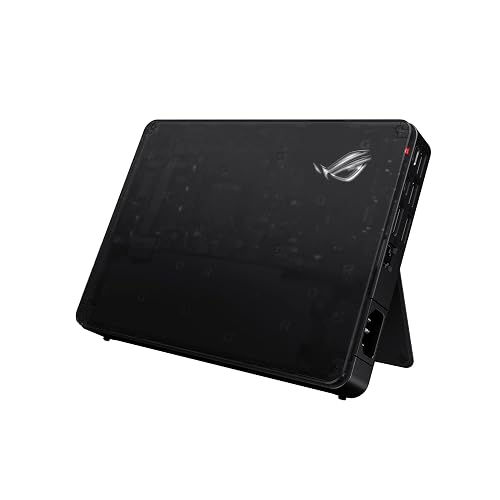
ASUS ROG XG Mobile External Graphics Card RTX 5090
If you want a compact way to turn a laptop into a true gaming and creative powerhouse, the ASUS ROG XG Mobile RTX 5090 is built for you. It features NVIDIA GeForce RTX 5090 Laptop GPU, 24 GB of GDDR7 VRAM, and the performance needed for AAA games and demanding editing tasks. With Thunderbolt 5 it moves data at 120 Gbps and can drive 8K video or three 4K displays at 144 Hz. It remains portable at 2.09 lbs, includes RGB lighting, uses a vapor chamber cooler, and offers a sustained 330 W power profile.
- GPU:RTX 5090 Laptop
- Memory:24 GB GDDR7
- Interface:Thunderbolt 5
- Cooling:Vapor chamber
- Resolution:8K support
- Use Case:Gaming/creation
- Additional Feature:Thunderbolt 5 support
- Additional Feature:8K video output
- Additional Feature:Aura Sync lighting
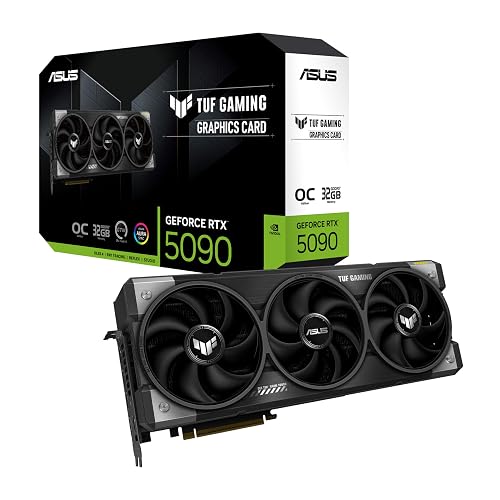
ASUS TUF GeForce RTX 5090 OC Graphics Card
The ASUS TUF GeForce RTX 5090 OC Graphics Card stands out for people who want top-tier 4K and 8K gaming power without giving up durability or effective cooling. It features 32GB of GDDR7 memory, a Blackwell RTX 5090 core, and a 2580 MHz boost clock for smooth, fast gameplay. With PCIe 5.0 support and triple DisplayPort 2.1a plus dual HDMI 2.1b outputs, your setup remains flexible. The 3.6-slot cooler includes a vapor chamber and triple Axial-tech fans to maintain lower temperatures. Military-grade components, a coated PCB, and a 3-year warranty provide additional peace of mind.
- GPU:RTX 5090
- Memory:32 GB GDDR7
- Interface:PCIe 5.0 x16
- Cooling:Triple-fan cooling
- Resolution:8K support
- Use Case:Gaming/professional
- Additional Feature:Protective PCB coating
- Additional Feature:Military-grade components
- Additional Feature:TUF graphics holder
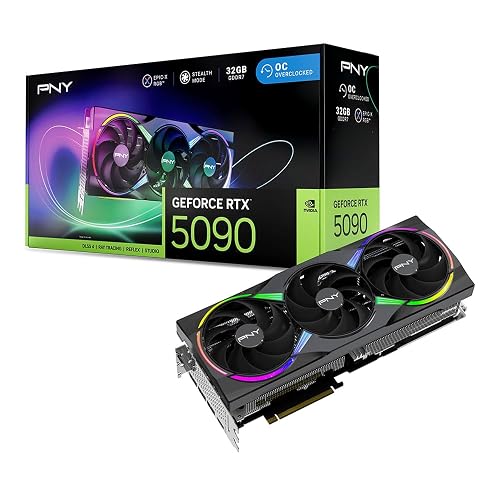
PNY NVIDIA GeForce RTX 5090 Epic-X ARGB OC Graphics Card
PNY’s NVIDIA GeForce RTX 5090 Epic-X ARGB OC is built for users who want top-tier speed without a plain card. It features the Blackwell RTX 5090 GPU, 32 GB of GDDR7 memory, and a 2625 MHz boost clock, so demanding games and heavy projects run smoothly. The triple-fan ARGB cooler and 3.5-slot design help control temperatures, and the included support bracket adds stability. Connectivity includes HDMI and DisplayPort 2.1. You also get full ray tracing, DLSS 4, Reflex 2, and a 3-year warranty for your desktop rig.
- GPU:RTX 5090
- Memory:32 GB GDDR7
- Interface:PCIe 5.0 x16
- Cooling:Triple-fan cooling
- Resolution:8K support
- Use Case:Gaming/creative
- Additional Feature:ARGB triple-fan cooling
- Additional Feature:Support bracket included
- Additional Feature:16-pin adapter cable
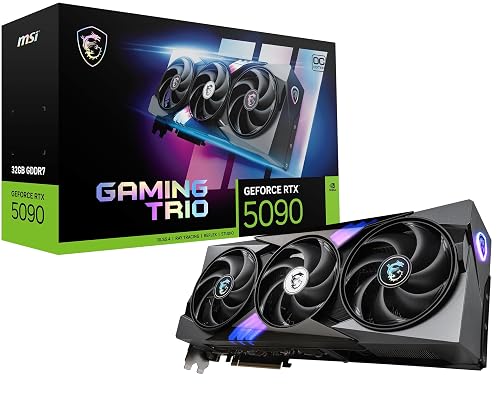
MSI GeForce RTX 5090 GAMING TRIO OC Graphics Card
The MSI GeForce RTX 5090 GAMING TRIO OC is a card to watch if you want top-tier 4K gaming, heavy creative work, or a future-ready build that will not feel outdated anytime soon. It includes 32 GB of GDDR7 memory, a 2.48 GHz boost clock, and PCIe 5.0 support to keep your system responsive. The TRI FROZR 4 cooler with STORMFORCE fans and zero-RPM mode helps it stay calm under sustained load. You also get DLSS 4, strong ray tracing performance, and 8K output, making this MSI card ready for demanding tasks.
- GPU:RTX 5090
- Memory:32 GB GDDR7
- Interface:PCIe 5.0 x16
- Cooling:TRI FROZR 4
- Resolution:8K support
- Use Case:Gaming/creation
- Additional Feature:TRI FROZR 4
- Additional Feature:ZERO FROZR mode
- Additional Feature:Gaming and Silent modes
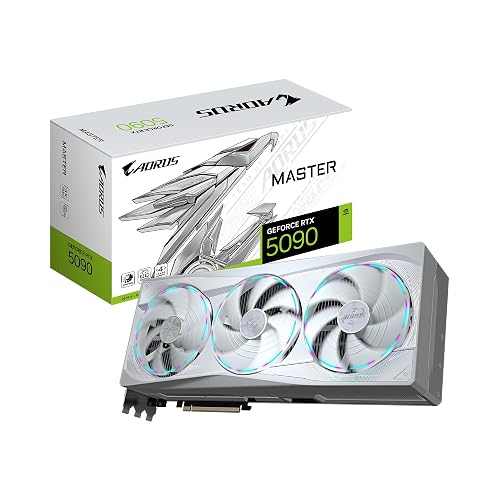
GIGABYTE AORUS GeForce RTX 5090 Master ICE 32G Graphics Card
GIGABYTE’s AORUS GeForce RTX 5090 MASTER ICE 32G is a strong pick if you want top-tier speed, huge 32GB GDDR7 memory, and a card that can handle 4K gaming, creative work, and heavy AI tasks without breaking a sweat. You get NVIDIA Blackwell power, a 2,655 MHz boost, and DLSS 4 for smoother play. The WINDFORCE cooling system with three Hawk Fans helps keep temps in check, while the 16-pin power connector supports the load. It also fits serious setups with PCIe 5.0, HDMI, DisplayPort, and 7,680 x 4,320 output.
- GPU:RTX 5090
- Memory:32 GB GDDR7
- Interface:PCIe 5.0 x16
- Cooling:WINDFORCE cooling
- Resolution:8K support
- Use Case:Gaming/professional
- Additional Feature:WINDFORCE cooling system
- Additional Feature:Hawk Fan design
- Additional Feature:3-year warranty
MSI Gaming RTX 5090 32G Gaming Trio OC Graphics Card
If you want a flagship card that can power through 4K gaming and heavy creative work without feeling strained, the MSI Gaming RTX 5090 32G Gaming Trio OC is the deal to watch. You get NVIDIA’s Blackwell-powered RTX 5090, 32 GB of fast GDDR7, and a wide 512-bit path that helps keep workloads smooth. Its triple-fan cooling, bold GAMING TRIO design, and robust construction help it stay composed under pressure. With three DisplayPort 2.1a ports, HDMI 2.1b, and 8K output, you are set for big-screen play and serious editing.
- GPU:RTX 5090
- Memory:32 GB GDDR7
- Interface:PCIe x16
- Cooling:Triple-fan cooling
- Resolution:8K support
- Use Case:Gaming/creation
- Additional Feature:Extreme performance clock
- Additional Feature:Triple-fan cooling
- Additional Feature:3-year warranty
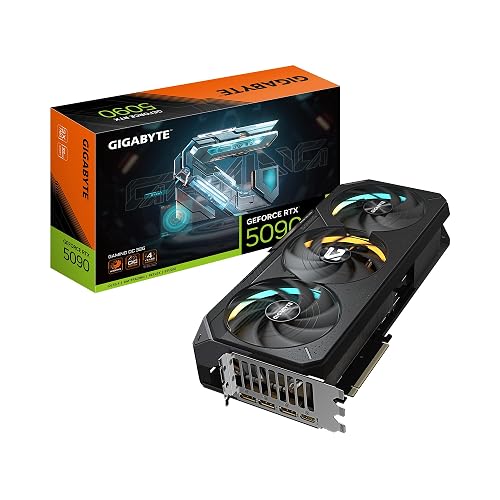
GIGABYTE GeForce RTX 5090 Gaming OC Graphics Card
The GIGABYTE GeForce RTX 5090 Gaming OC 32G is an excellent choice if you want top-tier 4K performance and even 8K-ready power with room to spare. You get NVIDIA Blackwell performance, 32 GB of fast GDDR7, and a 512-bit bus that helps demanding games run smoothly. Its WINDFORCE cooling keeps the card steady during long sessions, so you will not be limited by heat. In addition, DLSS 4, advanced ray tracing, and AI features benefit both gaming and creative work. If your desktop can accommodate its 13.46-inch frame, it is a seriously exciting upgrade.
- GPU:RTX 5090
- Memory:32 GB GDDR7
- Interface:PCIe 5.0 x16
- Cooling:WINDFORCE cooling
- Resolution:8K support
- Use Case:Gaming/creative
- Additional Feature:WINDFORCE cooling system
- Additional Feature:Built-in media bundle
- Additional Feature:3-year warranty
Factors to Consider When Choosing RTX 5090 Deals January 2026
When comparing RTX 5090 deals in January 2026, balance price with the performance you actually need so you do not pay extra for power you will not use. Check the VRAM amount, cooling quality, and power supply demands, since these factors determine how well the card will run in your setup. Finally, confirm the card fits your case; the best deal is not much of a deal if it squeezes your build like a winter coat two sizes too small.
Price Versus Performance
A smart RTX 5090 deal starts with value, not just a flashy sticker price, because a higher cost only makes sense when it gives you real gains in the games and apps you use most. Compare MSRP-adjusted dollars per GB and per TFLOP, then verify whether the card’s extra memory or faster clocks truly help your workloads. Next, examine benchmark gaps at your target settings. If 4K ultra delivers a meaningful improvement over a cheaper SKU, the premium can feel fair. If not, you are paying for bragging rights, and those wear thin quickly. Also factor in power, cooling, and case upgrades in the total. Finally, pay extra only when better bandwidth, features, or efficiency clearly extend useful life for you.
VRAM Capacity Needs
VRAM matters as much as raw speed, so match the card to what you actually do instead of chasing a huge number you may never use. If you game at 4K on max settings, aim for 24 to 32 GB, so big textures, ray tracing, and upscale modes stay smooth. If you play mostly at 1440p or focus on esports, 12 to 16 GB usually works well and can save you money. If you edit 8K video or build large 3D scenes, look for 32 GB or more to avoid out of memory errors. Also check memory type and bandwidth, because faster VRAM can matter as much as size. Add 20 to 30 percent headroom for future mods.
Cooling Solution Quality
Powerful RTX 5090 deals can look tempting, but the cooler on the card often determines how well it performs in your case. Check whether it uses a vapor chamber or heat pipes; a vapor chamber usually spreads heat better. Next, compare fin area and fin density, since more surface can dump heat faster if your case moves enough air. Look for multi-fan, multi-slot designs with smart blade shapes and zero-fan idle modes, because they stay quiet when you are just browsing. Also make sure the card has direct-touch heat pipes or a nickel-plated copper baseplate, plus solid pads for memory and VRMs. Finally, match the thermal profile to your case airflow, or the card may throttle under load.
Power Supply Requirements
If the cooler keeps the card in check, the next thing to check is the power behind it, because even the best RTX 5090 deal can become a headache if your PSU cannot keep up. Aim for a 1000 W or stronger power supply, since these cards can draw significant power when the CPU is under load as well. Ensure your PSU has a 16 pin 12VHPWR connector, or a reliable adapter, and verify it can handle the card’s sustained draw, which may range from about 330 W to 575 W. Also check the +12V rail rating, because weak output can cause voltage drops or shutdowns. Use quality cables, and do not split one cable across heavy loads.
Case Size Compatibility
Under the hood, case size compatibility can make or break your RTX 5090 build, so do not trust a “fits most ATX cases” claim without checking the numbers yourself. Measure your case’s GPU clearance for length, height, and slot width, then compare it with the card’s specs. Many RTX 5090 boards stretch to about 360 mm and need 3 to 3.5 slots, so a tight chassis can turn a great deal into a headache. Next, check PCIe slot spacing, and make sure nearby ports, drives, and headers stay usable. You should also leave room for airflow, because big triple-fan coolers need open intake space and a clear exhaust path. Finally, verify rear cutouts, cable routing, and removable cages or radiators before you buy.
Display Output Options
For RTX 5090 deals, the display outputs matter just as much as the cooler or price tag, because the wrong port mix can turn a great card into a messy setup. Favor cards with multiple DisplayPort 2.1a and HDMI 2.1b ports if you want 8K support or multiple 4K screens at high refresh rates. First, count the ports and match them to your monitors so you do not end up chasing adapters or docks. Next, check bandwidth support on the card, your motherboard, and each display, because 4K at 144 to 480 Hz requires the correct link. Also, make sure the layout fits your cables, capture gear, and VR headset. Three high bandwidth outputs usually give you the most breathing room later.
Warranty And Support
Once you have checked the ports and display support, protect your purchase, because a powerful RTX 5090 only feels like a win when the warranty and support will not leave you stranded later. Check the manufacturer warranty length, since most high-end cards cover about two to three years. Make sure it protects against defects, performance degradation, and VRAM failures. Read the fine print on what voids coverage, such as aftermarket cooling, BIOS modifications, physical damage, or non-approved power adapters. Verify whether RMA shipping is included, how long repairs typically take, and whether cross-ship service is offered. Also compare retailer return windows, which are often 30 days, and confirm that support teams respond promptly and provide firmware and driver assistance.
Frequently Asked Questions
Are RTX 5090 Deals Usually Available Outside Major Sale Events?
Yes, RTX 5090 deals can appear outside major sale events, though they are generally rarer. You will often find them through limited promotions, bundles, or occasional price drops. Do not assume you will get the best savings at any time.
Do RTX 5090 External GPU Setups Need Special Laptop Compatibility?
Yes. You need Thunderbolt 3, Thunderbolt 4, or USB4 support, sufficient PCIe bandwidth, and compatible BIOS. Also check the enclosure power limits, driver support, and your laptop GPU switching settings before buying.
Which RTX 5090 Deal Offers the Best Warranty Coverage?
You’ll usually get the best warranty from the deal that includes a three year manufacturer warranty plus easy RMA support. Ironically, the cheapest option often protects you best when your pricey RTX 5090 misbehaves.
How Much Power Supply Headroom Does an RTX 5090 Need?
You should allow at least 300 to 400 watts of PSU headroom for an RTX 5090, so the system does not spike under load. If you have a high-end CPU, choose a quality 1000 W or greater unit.
Are Refurbished RTX 5090 Cards Worth Considering for Savings?
Yes, you should consider refurbished RTX 5090 cards for savings, they offer lower upfront cost but come with higher risk. Make sure there is warranty and return coverage, and check the seller reputation. A cheap card can be a bargain or a headache.




