


Roughly 80% of modern PC gamers want smooth 1440p play, and that is where the right RTX card can really change your setup.
You will find strong picks here, from the compact RTX 3050 and Dual RTX 5060 to the more powerful RTX 5070 models from PNY, ASUS, and GIGABYTE, each offering a different mix of speed, cooling, and VRAM.
If you have ever wondered which card fits your build without wasting money, the following options make that choice much easier.
| PNY NVIDIA GeForce RTX 5070 Epic-X ARGB OC Graphics Card |  | Best Premium Pick | GPU Model: NVIDIA GeForce RTX 5070 | Memory: 12 GB GDDR7 | Interface: PCIe 5.0 x16 | VIEW LATEST PRICE | Read Our Analysis |
| ASUS Prime GeForce RTX 5070 Graphics Card |  | Best SFF Build | GPU Model: NVIDIA GeForce RTX 5070 | Memory: 12 GB GDDR7 | Interface: PCIe 5.0 x16 | VIEW LATEST PRICE | Read Our Analysis |
| MSI GeForce GT 1030 4GB Graphics Card (GT 1030 4GD4 LP OC) |  | Budget Office Pick | GPU Model: NVIDIA GeForce GT 1030 | Memory: 4 GB DDR4 | Interface: PCIe x16 | VIEW LATEST PRICE | Read Our Analysis |
| Kelinx AISURIX RX 580 8GB Gaming Graphics Card |  | Best Budget RX | GPU Model: AMD Radeon RX 580 | Memory: 8 GB GDDR5 | Interface: PCIe 3.0 x16 | VIEW LATEST PRICE | Read Our Analysis |
| ASUS Dual GeForce RTX 5060 8GB OC Edition |  | Best Compact OC | GPU Model: NVIDIA GeForce RTX 5060 | Memory: 8 GB GDDR7 | Interface: PCIe 5.0 x16 | VIEW LATEST PRICE | Read Our Analysis |
| GIGABYTE GeForce RTX 5070 AERO OC 12G Graphics Card |  | Best Cooling | GPU Model: NVIDIA GeForce RTX 5070 | Memory: 12 GB GDDR7 | Interface: PCIe 5.0 x16 | VIEW LATEST PRICE | Read Our Analysis |
| MSI Gaming RTX 3050 LP 6G OC Graphics Card | 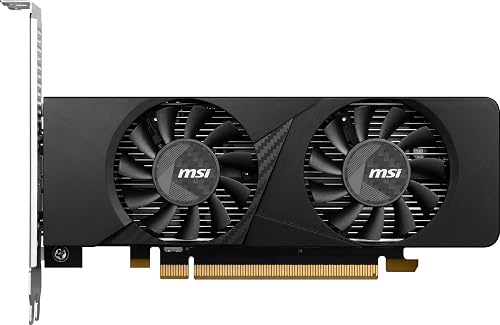 | Best Low-Profile | GPU Model: NVIDIA GeForce RTX 3050 | Memory: 6 GB GDDR6 | Interface: PCIe x16 | VIEW LATEST PRICE | Read Our Analysis |
More Details on Our Top Picks
PNY NVIDIA GeForce RTX 5070 Epic-X ARGB OC Graphics Card
The PNY NVIDIA GeForce RTX 5070 Epic-X ARGB OC Triple Fan is a strong pick if you want a card that feels fast, cool, and ready for modern games without making your build feel oversized. You get 6,144 CUDA cores, 12GB of GDDR7, and DLSS 4, so games look sharp and run smoothly. Its triple-fan ARGB cooler helps keep heat in check, and the 2.4-slot design fits smaller cases. With PCIe 5.0 support, four-display output, and strong creative app support, it handles play and work with ease.
- GPU Model:NVIDIA GeForce RTX 5070
- Memory:12 GB GDDR7
- Interface:PCIe 5.0 x16
- Display Outputs:3 DP, 1 HDMI
- Max Resolution:7680 x 4320
- Form Factor:2.4-slot, SFF-ready
- Additional Feature:DLSS 4 support
- Additional Feature:ARGB triple-fan cooling
- Additional Feature:16-pin power cable
ASUS Prime GeForce RTX 5070 Graphics Card
The ASUS Prime GeForce RTX 5070 offers a smart sweet spot for strong 1440p performance and 4K-ready capability without moving to a much larger card. It includes 12 GB of GDDR7 memory, a 2542 MHz boost clock, and DLSS 4 support for smoother gameplay. Its 2.5-slot, small-form-factor friendly build fits many desktop cases, and the three Axial-tech fans help keep temperatures under control. You also get HDMI 2.1b, three DisplayPort 2.1b outputs, and dual BIOS, making your setup flexible, quiet, and ready for work or gaming.
- GPU Model:NVIDIA GeForce RTX 5070
- Memory:12 GB GDDR7
- Interface:PCIe 5.0 x16
- Display Outputs:3 DP, 1 HDMI
- Max Resolution:7680 x 4320
- Form Factor:2.5-slot, SFF-ready
- Additional Feature:Phase-change thermal pad
- Additional Feature:Dual BIOS
- Additional Feature:Axial-tech fans
MSI GeForce GT 1030 4GB Graphics Card (GT 1030 4GD4 LP OC)
If you need a compact graphics card for everyday PC use that does not take up much space or power, the MSI GeForce GT 1030 4GB DDR4 LP OC is a solid choice. It has a low-profile design, a single fan, and a lightweight 9.6-ounce build that fits in smaller desktops. The Pascal GPU runs at 1430 MHz. You also get DirectX 12, HDCP support, and 4K output via HDMI 2.0b or DisplayPort 1.4a. For light work, media, and simple gaming it performs reliably. MSI provides a 3-year warranty.
- GPU Model:NVIDIA GeForce GT 1030
- Memory:4 GB DDR4
- Interface:PCIe x16
- Display Outputs:1 DP, 1 HDMI
- Max Resolution:3840 x 2160
- Form Factor:Low-profile
- Additional Feature:Low-profile design
- Additional Feature:GeForce Experience support
- Additional Feature:DirectX 12 support
Kelinx AISURIX RX 580 8GB Gaming Graphics Card
Kelinx AISURIX RX 580 8GB Gaming Graphics Card is a smart pick if you want smooth 1080p gaming without paying a high price. It has 2048 stream processors, real 8GB GDDR5 memory, and a 256-bit bus, so it handles mainstream games with steady frame rates and clear visuals. The 14 nm Polaris design supports DirectX 12 and can output up to 4K. It uses a PCIe 3.0 x16 slot, one 8-pin power connector, and a semi-automatic fan with Freeze Fan Stop, so it remains practical, quiet, and easy to live with.
- GPU Model:AMD Radeon RX 580
- Memory:8 GB GDDR5
- Interface:PCIe 3.0 x16
- Display Outputs:2 DP, 1 HDMI
- Max Resolution:3840 x 2160
- Form Factor:Dual-slot
- Additional Feature:Freeze Fan Stop
- Additional Feature:2048 stream processors
- Additional Feature:1 x 8-pin
ASUS Dual GeForce RTX 5060 8GB OC Edition
The ASUS Dual GeForce RTX 5060 8GB OC Edition is a smart pick for gamers who want strong 1080p and 1440p performance in a compact, easy-to-fit card. You get 8GB of GDDR7 memory, PCIe 5.0 support, and a factory boost up to 2565 MHz in OC mode. Its dual Axial-tech fans and 2.5 slot design help keep temperatures steady, and 0dB mode keeps the card quiet at idle. You can connect four displays through HDMI 2.1b and DisplayPort 2.1b. DLSS 4 also helps deliver smoother frame rates with less fuss.
- GPU Model:NVIDIA GeForce RTX 5060
- Memory:8 GB GDDR7
- Interface:PCIe 5.0 x16
- Display Outputs:3 DP, 1 HDMI
- Max Resolution:7680 x 4320
- Form Factor:2.5-slot, SFF-ready
- Additional Feature:623 AI TOPS
- Additional Feature:0dB technology
- Additional Feature:Factory overclocked
GIGABYTE GeForce RTX 5070 AERO OC 12G Graphics Card
Built for gamers and creators who want strong 1440p performance with a polished white design, the GIGABYTE GeForce RTX 5070 AERO OC 12G is a smart pick when you want power without the usual visual bulk. It features NVIDIA Blackwell, 12GB of fast GDDR7, and DLSS 4, so games run smoothly and creative applications respond quickly. The three-fan WINDFORCE cooler helps keep noise and heat in check, letting you stay focused. It uses PCIe 5.0, offers HDMI and DisplayPort, and supports 8K, so you are well covered.
- GPU Model:NVIDIA GeForce RTX 5070
- Memory:12 GB GDDR7
- Interface:PCIe 5.0 x16
- Display Outputs:DisplayPort, HDMI
- Max Resolution:7680 x 4320
- Form Factor:Standard triple-fan
- Additional Feature:WINDFORCE cooling
- Additional Feature:Factory tuned OC
- Additional Feature:AI acceleration
MSI Gaming RTX 3050 LP 6G OC Graphics Card
The MSI Gaming RTX 3050 LP 6G OC Graphics Card is a sensible choice if you need RTX performance in a compact desktop case without sacrificing modern features. It delivers NVIDIA Ampere graphics, ray tracing cores, and tensor cores, so games can look sharp and run smoothly. Its 6GB of GDDR6 memory and 96-bit memory bus handle everyday play well, and the low-profile design fits tight builds. With two HDMI 2.1a ports, one DisplayPort 1.4a, and dual fans, you can stay cool, connected, and ready.
- GPU Model:NVIDIA GeForce RTX 3050
- Memory:6 GB GDDR6
- Interface:PCIe x16
- Display Outputs:2 HDMI, 1 DP
- Max Resolution:3840 x 2160
- Form Factor:Low-profile
- Additional Feature:Ray Tracing Cores
- Additional Feature:Tensor Cores
- Additional Feature:Dual-fan design
Factors to Consider When Choosing Rtx Graphics Cards Gpus
When choosing an RTX graphics card, match its performance to the games or creative work you actually do. Also ensure you have sufficient VRAM, reliable cooling, and a power supply that can support the card. Verify the card’s physical dimensions fit your case so installation is straightforward.
Performance Needs
Performance starts with matching the card to what you actually do, not just chasing the biggest model name. If you game at 1440p or 4K, or you edit large projects, you need enough CUDA cores and a strong boost clock to keep frames and renders moving fast. Next, look for newer RT and Tensor cores if you want better ray tracing and smarter upscaling. Then check cooling and TDP, because a card only stays quick when it can breathe and get steady power. Also make sure your PC can support it. A strong GPU still slows down if your CPU, PSU, or PCIe setup holds it back. Choose the card that fits your workload, and you will feel the difference every session.
VRAM Capacity
VRAM is the part of the card that holds the data it needs right now, such as textures, frame buffers, and other large graphics files, so the amount you have can affect how smooth your system feels. You will usually want at least 8 GB for modern gaming, and 12 GB or more if you play at 1440p or 4K. That extra space helps you avoid stuttering and texture pop-in when scenes get busy. If you use high-resolution texture packs, edit video, render scenes, or run machine learning tasks, more VRAM gives you breathing room and keeps work moving faster. Still, capacity is not everything, because memory type and bandwidth also matter. If you want your RTX card to stay useful longer, choose more VRAM than you need today.
Cooling Design
Cooling design makes a big difference in how an RTX graphics card performs day to day, especially if you game for long sessions or push the card hard. A triple-fan cooler usually moves more air than a dual-fan model, but it also takes more space, so check your case first. Also evaluate the heatsink. More heat pipes and a vapor chamber help pull heat from the GPU and memory faster, which keeps temperatures steadier under load. Fan shape matters as well, because effective blade design and a well-designed shroud can improve airflow in tight cases. If you prefer zero-RPM mode, make sure the cooler still handles idle heat effectively. For hotter cards, a larger cooler is worth the investment.
Power Requirements
Before you choose an RTX graphics card, check its power needs as closely as you check its size and price. Look at the card’s TDP, then make sure your PSU can handle that draw plus your system’s normal load. Many midrange and high-end RTX models require about 150W to 350W or more, so do not guess. Next, confirm you have the right PCIe plugs, whether 6-pin, 8-pin, or 12VHPWR. If the card ships with an adapter, it should match your PSU and its current limits. Also check total wattage and +12V amperage, then leave 20% to 30% headroom for stability. In tight builds, verify the PSU form factor as well. Good airflow helps keep power steady and components cool.
Card Size
The card itself can be the tricky part when you shop for an RTX GPU. First, measure your case clearance for length, height, and open slots, so the card will not crowd drive bays or cables. Then match its slot width, whether it is 2-slot, 2.4-slot, 2.5-slot, or 3-slot, to your build. Next, check PCB height and backplate space against your motherboard, CPU cooler, and front fans. If you are building small, pick an SFF-ready or low-profile card, and make sure the power plug and adapter can bend into place. Also, thicker cards need better airflow, which can limit fan options. Finally, watch the weight. A long, heavy card may need a support bracket to keep your PCIe slot from sagging.
Display Outputs
How will you connect your RTX card to your screen, and will it deliver the image quality you expect? First, check the display ports on the card. You will want DisplayPort 2.1 or HDMI 2.1b if you are aiming for 4K at 120 Hz or 8K at 60 Hz. Next, look at how many outputs you get. Most cards offer three or four outputs, which helps if you run two or three monitors side by side. Then verify the maximum resolution on each port, especially if you use a high resolution panel or a VR headset. If you stream protected video, make sure HDCP support matches your needs. Finally, do not ignore cables and adapters. A cheap DP to HDMI adapter can reduce bandwidth and disable features, and that is a frustrating surprise nobody wants.
Feature Support
Once you’ve checked the ports and monitor support, examine what your RTX card can actually do inside the box. Verify the RTX features you need, such as DLSS 4, Tensor Cores, and ray tracing cores, because not every model provides the same boost. Next, confirm driver and software support so Reflex, CUDA, and creative tools continue to work well on your system. Then review cooling and power delivery. Strong thermals, dual BIOS options, and extra power headroom help the card maintain performance during demanding games and heavy workloads. Also make sure the card fits your case and motherboard, with the correct size, BIOS switch, and PCIe version. This ensures you get the features you paid for without unexpected slowdowns.
Warranty Coverage
Even if a GPU looks perfect on paper, warranty coverage can save you a lot of stress later. Check how long the manufacturer backs the card, because most RTX warranties run one to three years. Read the fine print so you know what is covered, like defects in parts and workmanship, and what is not covered, like drops, overclocking, or a bad install. You also want to see whether the warranty stays with the card or only helps the first buyer, and whether you must register it quickly. Learn the RMA steps, since some brands ask for tests, and shipping may be free or not. Finally, avoid voiding coverage by opening the cooler or using nonstandard power plugs. Keep your receipt handy.
Frequently Asked Questions
Which RTX Card Offers the Best Value for 1440P Gaming?
You’ll get the best value with the RTX 4070 Super. It handles 1440p smoothly, uses less power, and costs less than higher-end cards. If you’re shopping used, a well-priced RTX 3080 can also deliver.
Do All RTX GPUS Support DLSS and Ray Tracing?
No, not every RTX GPU includes both features. Most support ray tracing and DLSS, but older or lower-end models may offer limited performance. You will typically see the biggest improvements on newer cards.
Which RTX Model Is Best for Small-Form-Factor PC Builds?
You should choose the RTX 4060 Ti or RTX 4070, as they are compact and efficient and suit small-form-factor builds well. They deliver strong 1440p performance without the heat and power draw of larger cards.
How Much Power Supply Is Needed for a High-End RTX Card?
You will typically need a 750 W to 850 W power supply for a high-end RTX card, and possibly a 1000 W unit for top-tier models. Check the GPU manufacturer’s recommended wattage, and allow additional headroom.
Can RTX Graphics Cards Handle Video Editing and Streaming Well?
Absolutely, you can edit and stream smoothly with RTX cards, they are workhorses with CUDA cores and NVENC. You will trim timelines, export faster, and broadcast cleanly. Your CPU, RAM, and storage still matter.




