


If you are upgrading your gaming rig and stream setup at the same time, you are in the right place. You want fast frames, smooth multitasking, and a CPU that will not hold you back, whether you are chasing top-tier performance or staying within budget.
From AMD X3D flagships to value-focused AM4 and AM5 picks, the right choice is not obvious yet, and that is where the real comparison starts.
| AMD Ryzen™ 9 5900XT 16-Core 32-Thread Unlocked Desktop Processor |  | Best AM4 Pick | Cores: 16-core | Threads: 32-thread | Socket: AM4 | VIEW LATEST PRICE | Read Our Analysis |
| AMD Ryzen 9 9900X3D 12-Core Processor |  | Best Premium Choice | Cores: 12-core | Threads: 24-thread | Socket: AM5 | VIEW LATEST PRICE | Read Our Analysis |
| AMD Ryzen™ 7 9850X3D Desktop Processor | 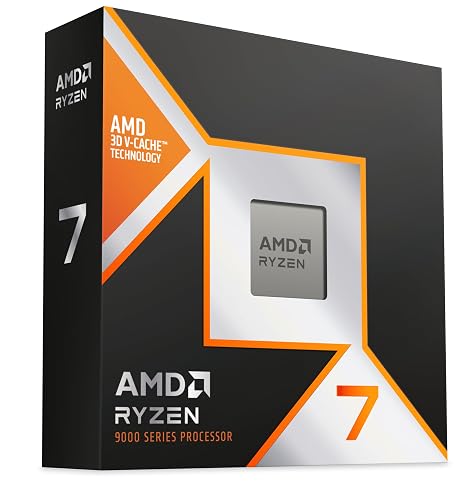 | Best Gaming CPU | Cores: 8-core | Threads: 16-thread | Socket: AM5 | VIEW LATEST PRICE | Read Our Analysis |
| KAMRUI Mini PC E3B Ryzen V2748 16GB 512GB SSD | 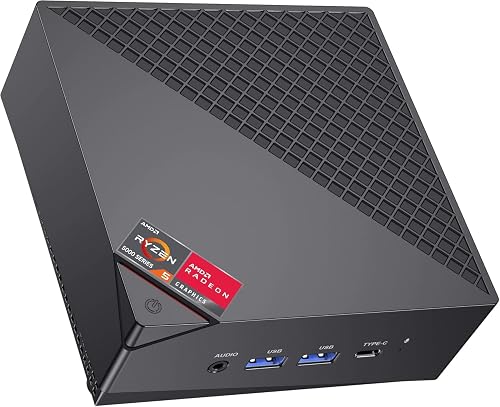 | Best Mini PC | Cores: 8-core | Threads: 16-thread | Socket: Embedded V2748 | VIEW LATEST PRICE | Read Our Analysis |
| Micro Center Ryzen 5 5500 with ASUS TUF Motherboard |  | Best Bundle Deal | Cores: 6-core | Threads: 12-thread | Socket: AM4 | VIEW LATEST PRICE | Read Our Analysis |
| AMD Ryzen 5 7600X3D AM5 6-Core Processor |  | Best Midrange Pick | Cores: 6-core | Threads: 12-thread | Socket: AM5 | VIEW LATEST PRICE | Read Our Analysis |
More Details on Our Top Picks
AMD Ryzen™ 9 5900XT 16-Core 32-Thread Unlocked Desktop Processor
The AMD Ryzen 9 5900XT is a strong pick if you want one CPU to handle gaming and streaming without giving up on content creation. You get 16 cores and 32 threads, so you can multitask smoothly while keeping games responsive. Its Zen 3 design helps deliver strong performance, and the 4.8 GHz boost clock gives you extra speed when you need it. The 72 MB cache and DDR4-3200 support help keep data moving efficiently. It works on Socket AM4 with PCIe 4.0, so you can fit it into a capable platform. It is unlocked for overclocking.
- Cores:16-core
- Threads:32-thread
- Socket:AM4
- Cache:72 MB
- Max Speed:4.8 GHz
- Cooling:Cooler not included
- Additional Feature:Zen 3 architecture
- Additional Feature:72 MB cache
- Additional Feature:PCIe 4.0 support
AMD Ryzen 9 9900X3D 12-Core Processor
The AMD Ryzen 9 9900X3D 12-Core Processor stands out if you want a CPU that can handle gaming, streaming, and content creation without slowing down. It provides 12 cores, 24 threads, and a 4.4 GHz base clock on AMDs AM5 platform, so your system stays responsive under heavy loads. Its 140 MB cache and second generation 3D V-Cache technology help maintain high frame rates while multitasking. With a 120 watt power draw, it suits a serious desktop build. You can rely on it for demanding Windows workloads, and its strong user rating supports that claim.
- Cores:12-core
- Threads:24-thread
- Socket:AM5
- Cache:140 MB
- Max Speed:4.4 GHz
- Cooling:Not specified
- Additional Feature:2nd gen 3D V-Cache
- Additional Feature:140 MB cache
- Additional Feature:120W wattage
AMD Ryzen™ 7 9850X3D Desktop Processor
If you want a gaming-first chip that still leaves plenty of headroom for streaming, the Ryzen 7 9850X3D stands out with its 8-core, 16-thread design and a large 104 MB cache. It runs at a 4.7 GHz base speed on AMD’s AM5 platform, so it can push fast frame rates while handling background tasks smoothly. Its 140 W rating means you will want solid cooling. You also get desktop-class performance built for demanding play. AMD positions it as “The World’s Best Gaming Processor Just Got Faster,” and its 4.8-star rating shows strong buyer confidence.
- Cores:8-core
- Threads:16-thread
- Socket:AM5
- Cache:104 MB
- Max Speed:4.7 GHz
- Cooling:Not specified
- Additional Feature:104 MB cache
- Additional Feature:140W wattage
- Additional Feature:Gaming-focused desktop CPU
KAMRUI Mini PC E3B Ryzen V2748 16GB 512GB SSD
With 8 cores, 16 threads, and up to 4.3 GHz boost speeds, the KAMRUI Mini PC E3B Ryzen V2748 is a smart pick if you want a compact AMD system that can handle gaming, streaming, and everyday multitasking without slowing down. Its Ryzen Embedded V2748 targets about 25% more CPU performance than comparable chips. Sixteen gigabytes of dual-channel DDR4 and a 512GB SSD keep apps responsive, and you also get WiFi 6, Bluetooth 5.2, Radeon graphics, 4K triple-display support, and room to expand storage and memory.
- Cores:8-core
- Threads:16-thread
- Socket:Embedded V2748
- Cache:16 MB
- Max Speed:4.3 GHz
- Cooling:Not specified
- Additional Feature:WiFi 6 support
- Additional Feature:Bluetooth 5.2
- Additional Feature:Triple-display output
Micro Center Ryzen 5 5500 with ASUS TUF Motherboard
For gamers seeking a simple, budget-friendly entry into streaming, this Micro Center bundle pairs the Ryzen 5 5500 with the ASUS TUF Gaming A520M-PLUS WIFI motherboard for a balanced AM4 setup. The processor offers 6 cores, 12 threads, and 4.2 GHz boost speeds, with a 65W design and overclocking access. It ships with the Wraith Stealth cooler, but you will need a discrete GPU because there is no integrated graphics. The motherboard adds Wi-Fi, 1 Gb Ethernet, M.2 storage, BIOS FlashBack, and 5X Protection III, so you can build confidently and upgrade later.
- Cores:6-core
- Threads:12-thread
- Socket:AM4
- Cache:19 MB
- Max Speed:4.2 GHz
- Cooling:Wraith Stealth included
- Additional Feature:Wraith Stealth cooler
- Additional Feature:ASUS TUF motherboard
- Additional Feature:Wi-Fi included
AMD Ryzen 5 7600X3D AM5 6-Core Processor
The AMD Ryzen 5 7600X3D offers 6 cores, 12 threads, and a large 96 MB L3 cache on the AM5 platform, making it an excellent choice for gaming with smooth streaming. It has a 4.1 GHz base clock, 6 MB of L2 cache, and supports up to 128 GB of DDR5-5200 memory. It is compatible with A620, B650, B650E, B840, B850, X670, X670E, X870, and X870E motherboards, so you have multiple upgrade paths. Note that the boxed processor does not include a heatsink, and it carries a 3 year limited warranty.
- Cores:6-core
- Threads:12-thread
- Socket:AM5
- Cache:96 MB
- Max Speed:4.1 GHz
- Cooling:Heatsink not included
- Additional Feature:96 MB L3 cache
- Additional Feature:DDR5-5200 support
- Additional Feature:3-year warranty
Factors to Consider When Choosing an AMD CPU for Gaming and Streaming
When choosing an AMD CPU for gaming and streaming, prioritize core and thread count first, because these determine multitasking performance. Also consider gaming cache size, boost clock speed, socket platform compatibility, and whether your power supply and cooling can support the processor. Balancing these factors will deliver smooth gameplay and reliable streaming without overspending.
Core And Thread Count
Core and thread count matter because gaming and streaming can push your CPU in different directions at once. Aim for at least 6 cores and 12 threads as a practical baseline, since that gives you enough room for the game, your stream encoder, and everyday background tasks. Moving up to 8 cores and 16 threads usually yields smoother multitasking and fewer frame-time spikes when you are streaming or recording. With 12 cores and 24 threads, you gain more headroom for voice chat, browser tabs, and creation work. A 16-core, 32-thread CPU makes sense when you stream and also edit or render. More cores help most when workloads scale across threads, but gaming still depends on single-core speed and how well the game is optimized.
Gaming Cache Size
Cache size can have a significant impact on gaming and streaming, because larger caches let your AMD CPU reuse game and stream data faster instead of pulling it from memory as often. You will usually see smoother play in cache-sensitive games, especially during fast scene changes, AI updates, and physics-heavy moments. When comparing AMD chips, look at both L2 and L3 totals, since a larger combined cache can help the processor juggle game logic and background streaming with fewer memory bottlenecks. 3D V-Cache models demonstrate how valuable this can be, with some CPUs offering roughly 96 MB to 140 MB of cache. Even if a chip has moderate cache, it can still perform well, but data-hungry games often benefit more from extra cache than from minor clock differences.
Boost Clock Speed
Boost clock speed is the peak frequency your AMD CPU can reach for short bursts, and that matters a lot in gaming and streaming because it can sharpen responsiveness, improve frame rates, and boost encoding performance during demanding moments. Aim for boost clocks around 4.7 to 4.8 GHz if you want smoother fights, cleaner scene changes, and fewer slowdowns during encoding spikes. Do not judge a chip by boost speed alone. Core count and cache still shape real-world results, so a fast clock cannot fix a weak overall balance. Lower base clocks are not a problem if boost performance is strong, since most games depend more on short bursts than sustained speed. Make sure your cooling and power delivery can keep the CPU from throttling under pressure.
Socket Platform Compatibility
Socket compatibility is the first gate you need to clear when choosing an AMD CPU for gaming and streaming, because an AM5 processor will not fit an AM4 motherboard, and the reverse is true as well. Next, check the motherboard’s chipset support list so you know your chip is approved on boards like A620, B650, B650E, X670, X670E, B840, B850, X870, or X870E. You should also confirm the board’s firmware supports your CPU generation, since some newer processors need a BIOS update before they will boot. Match memory type too: AM4 uses DDR4, while AM5 uses DDR5. If you are buying a CPU and motherboard bundle, verify both parts share the same socket and are explicitly listed as compatible before you order.
Power And Cooling Needs
When you choose an AMD CPU for gaming and streaming, do not treat power and cooling as afterthoughts. Higher core counts, higher boost clocks, and larger caches can all increase heat and power draw. Check the chip’s wattage or TDP first; many desktop models sit between 65 W and 140 W, and that should guide your PSU and cooler choice. If a CPU does not include a bundled cooler, budget for a solid air tower or a liquid option. Even high-boost chips need steady cooling to sustain frame rates while you stream. If you plan to overclock, pair the processor with stronger thermal support. In compact cases, prioritize thermal headroom, since limited airflow can make midrange CPUs run hotter during long sessions.
Integrated Graphics Support
Beyond power and cooling, check whether an AMD CPU includes integrated graphics. If it does, you can get video output before you install a discrete GPU, which helps you troubleshoot, finish setup, and keep the system usable right away. That matters because some desktop processors have built-in graphics cores, while others do not, and a CPU without them will not function as a complete gaming PC until you add a graphics card. Integrated graphics can also make multi-monitor streaming easier if your motherboard offers HDMI, DisplayPort, or USB-C outputs. They are suitable for light gaming, streaming, media playback, and everyday work, but you will still want a dedicated GPU for demanding games. Always confirm graphics capability before you buy.
Memory And PCIe Support
Memory and PCIe support can make a real difference in gaming and streaming, especially if you are running a fast GPU, NVMe storage, and background apps at the same time. Choose an AMD CPU that supports faster memory, such as DDR5-5200, because it can reduce bottlenecks in memory-heavy games and streaming sessions. Capacity matters as well; support for up to 128 GB helps you keep your game, OBS, chat, and browser tabs open without strain. Also make sure the CPU matches your motherboard, since some chips only support DDR4-3200, while AM5 parts require DDR5. For newer builds, choose PCIe 4.0 or newer and check lane support if you will use multiple high-speed devices.
Frequently Asked Questions
Which AMD CPU Offers the Best Value for 1080P Gaming and Streaming?
You’ll get the best value from the Ryzen 7 7700 or the 5700X3D, depending on your platform. Both handle 1080p gaming and streaming well. The 5700X3D saves money, while the 7700 offers newer features.
Do AMD X3D Processors Improve Streaming Performance Too?
Yes, they can. Extra cache helps. X3D chips mainly boost gaming, but you will still stream smoothly if your encoder handles most of the work. Stronger CPU frame times can also reduce stutter.
Is AM4 Still a Good Platform for Gaming and Streaming Upgrades?
Yes, AM4 is still a good choice if you are upgrading for gaming and streaming. You can install a strong Ryzen 5000 CPU, achieve solid performance, and save money, especially if you already own AM4 components.
How Much RAM Is Ideal for Smooth Gaming While Streaming on AMD?
You will generally get the best experience with 32 GB of RAM for smooth gaming while streaming on AMD. Sixteen GB can get by, but 32 GB provides headroom, reduces background contention, and helps your system remain responsive.
Can a Budget AMD CPU Handle Game Streaming Without Frame Drops?
Yes, you can stream on a budget AMD CPU if you keep settings modest and use hardware encoding. You will avoid frame drops more easily with lighter games, fewer background tasks, and sufficient RAM.




