


You want strong performance, reliable upgrade paths, and the right AMD motherboard for your next build.
Whether you choose an AM5 board with DDR5, PCIe 5.0, and newer connectivity, or an AM4 option that still delivers real value, the best picks are not always the most obvious.
Chipset support, expansion, and USB features can change everything, and a few models stand out for reasons you may not expect.
| GIGABYTE B650 Eagle AX AM5 ATX Motherboard | 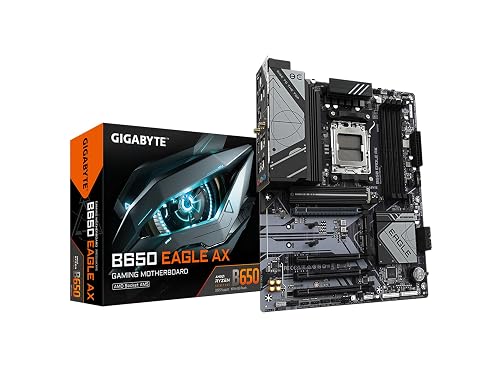 | Best Budget AM5 | Socket: AM5 | Form Factor: ATX | Memory Type: DDR5 | VIEW LATEST PRICE | Read Our Analysis |
| ASUS ROG Strix X870-A Gaming WiFi Motherboard | 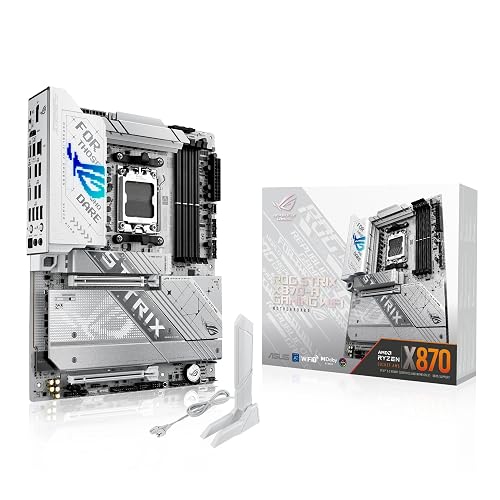 | Best Premium Pick | Socket: AM5 | Form Factor: ATX | Memory Type: DDR5 | VIEW LATEST PRICE | Read Our Analysis |
| GIGABYTE B550 Eagle WiFi 6 AM4 Motherboard | 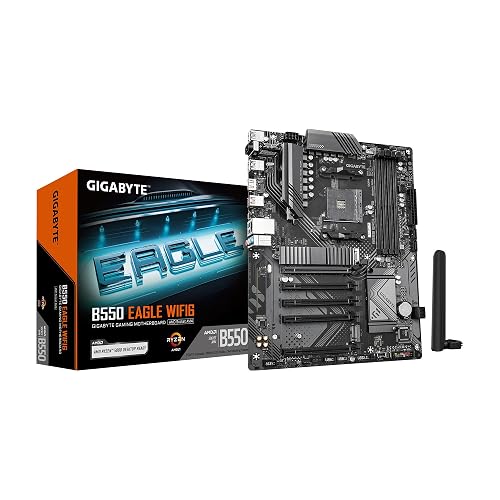 | Best AM4 Value | Socket: AM4 | Form Factor: ATX | Memory Type: DDR4 | VIEW LATEST PRICE | Read Our Analysis |
| MSI MAG X870 Tomahawk WiFi Gaming Motherboard | 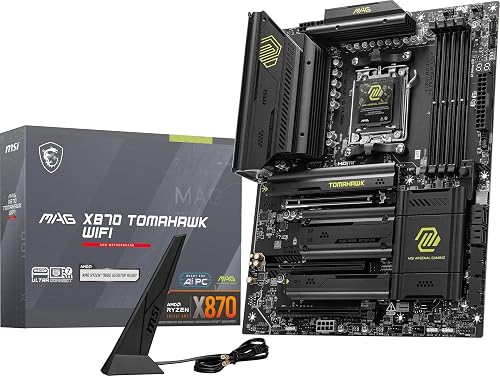 | Best High-End | Socket: AM5 | Form Factor: ATX | Memory Type: DDR5 | VIEW LATEST PRICE | Read Our Analysis |
| ASUS TUF Gaming X870-PLUS WiFi Motherboard | 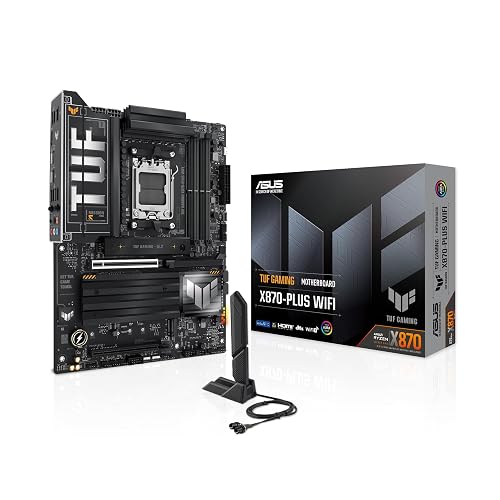 | Best AI-Ready | Socket: AM5 | Form Factor: ATX | Memory Type: DDR5 | VIEW LATEST PRICE | Read Our Analysis |
| GIGABYTE B550M AORUS Elite AX Motherboard | 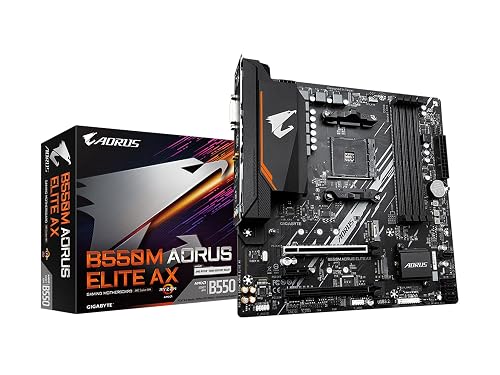 | Best Micro-ATX | Socket: AM4 | Form Factor: mATX | Memory Type: DDR4 | VIEW LATEST PRICE | Read Our Analysis |
More Details on Our Top Picks
GIGABYTE B650 Eagle AX AM5 ATX Motherboard
If you are building a modern AMD system and want a strong all-around ATX board, the GIGABYTE B650 Eagle AX is a smart pick. You get an AM5 socket with Ryzen 7000, 8000, and 9000 support, plus DDR5 memory up to 128 GB. Its triple M.2 layout includes one PCIe 5.0 slot and two PCIe 4.0 slots, so you can load fast storage. The 12+2+2 phase VRM and M.2 Thermal Guard help keep things steady and cool. You also get Wi-Fi 6E, dual Ethernet, USB 3.2 Gen 2×2 Type-C, and 18 total USB ports.
- Socket:AM5
- Form Factor:ATX
- Memory Type:DDR5
- Wi-Fi:Wi-Fi 6E
- M.2 Slots:3
- USB-C:USB 3.2 Gen 2×2
- Additional Feature:PCIe 5.0 M.2
- Additional Feature:12+2+2 VRM
- Additional Feature:M.2 Thermal Guard
ASUS ROG Strix X870-A Gaming WiFi Motherboard
The ASUS ROG Strix X870-A Gaming WiFi is a strong pick if you want an AM5 motherboard built for Ryzen 7000, 8000, and 9000 desktop processors with serious performance headroom. This ATX board uses a 16, 2, 2 power stage design with 90A per stage, dual ProCool II connectors, and sturdy alloy chokes for stable multi-core loads. ASUS includes AI Overclocking, AI Cooling II, AI Networking, and AEMP for smarter tuning. You also get WiFi 7, USB4, PCIe 5.0, four M.2 slots, DDR5 support, and Q-Release Slim for a cleaner build.
- Socket:AM5
- Form Factor:ATX
- Memory Type:DDR5
- Wi-Fi:Wi-Fi 7
- M.2 Slots:4
- USB-C:USB4
- Additional Feature:16+2+2 power stages
- Additional Feature:90A per stage
- Additional Feature:ASUS AI Overclocking
GIGABYTE B550 Eagle WiFi 6 AM4 Motherboard
With WiFi 6, PCIe 4.0 support, and a digital twin 10+3 phase VRM, the GIGABYTE B550 Eagle WiFi 6 AM4 motherboard is a strong pick if you want a well-rounded ATX board for Ryzen 5000, 4000, or 3000 series CPUs. You get four DDR4 slots for up to 128 GB, with AMD EXPO support and 3200 MHz speeds. It also provides two M.2 slots, 1 GbE LAN, USB 3.2 Gen 2, and a Type-C port. Enlarged VRM heatsinks, premium components, and EZ-Latch features make building easier.
- Socket:AM4
- Form Factor:ATX
- Memory Type:DDR4
- Wi-Fi:Wi-Fi 6
- M.2 Slots:2
- USB-C:USB 3.2 Gen 1
- Additional Feature:Digital twin VRM
- Additional Feature:Pre-installed I/O Armor
- Additional Feature:PCIe EZ-Latch
MSI MAG X870 Tomahawk WiFi Gaming Motherboard
MSI’s MAG X870 Tomahawk WiFi Gaming Motherboard is a strong pick if you want a modern AM5 board that is ready for Ryzen 9000, 8000, and 7000 series processors. It uses an ATX layout and supports DDR5, PCIe 5.0, and M.2 Gen5 storage for fast builds. The built-in USB4 port delivers 40 Gbps speed; Wi-Fi 7, Bluetooth 5.4, and 5 Gbps LAN keep you connected. Extended heatsinks, an enhanced power design, and Audio Boost 5 help you game, stream, and push your CPU harder with confidence.
- Socket:AM5
- Form Factor:ATX
- Memory Type:DDR5
- Wi-Fi:Wi-Fi 7
- M.2 Slots:2
- USB-C:USB4
- Additional Feature:USB4 40Gbps
- Additional Feature:Wi-Fi 7
- Additional Feature:Bluetooth 5.4
ASUS TUF Gaming X870-PLUS WiFi Motherboard
If you are building an AI-focused gaming or workstation PC on AM5, the ASUS TUF Gaming X870-PLUS WiFi stands out as a strong all-rounder. You get support for Ryzen 9000, 8000, and 7000 processors, plus AI-ready features like AI Overclocking, AI Cooling II, AEMP, Dynamic OC Switcher, Core Flex, and PBO Enhancement. Its 16+2+1 power design, 80A SPS stages, and 8-layer PCB help keep performance steady. You also get DDR5, PCIe 5.0, four M.2 slots, USB4, Wi-Fi 7, 2.5Gb LAN, and HDMI in an ATX layout.
- Socket:AM5
- Form Factor:ATX
- Memory Type:DDR5
- Wi-Fi:Wi-Fi 7
- M.2 Slots:4
- USB-C:USB4
- Additional Feature:16+2+1 power design
- Additional Feature:8-layer PCB
- Additional Feature:USB4 40Gbps
GIGABYTE B550M AORUS Elite AX Motherboard
The GIGABYTE B550M AORUS Elite AX is a strong fit if you want an AM4 mATX motherboard that balances modern connectivity and solid upgrade headroom. You can pair it with Ryzen 3000, 4000, or 5000 CPUs, and push DDR4 across four DIMM slots up to 128 GB and 4733 MHz with XMP. It provides PCIe 4.0 x16, two M.2 slots, six SATA ports, WiFi 6E, Bluetooth 5.3, and dual GbE LAN. The 5+3 power design, enlarged heatsink, Q-Flash Plus, and RGB Fusion make for a practical, durable board with Windows 10 and Windows 11 support.
- Socket:AM4
- Form Factor:mATX
- Memory Type:DDR4
- Wi-Fi:Wi-Fi 6E
- M.2 Slots:2
- USB-C:USB 3.2 Gen 1 Type-C
- Additional Feature:Pure Digital 5+3
- Additional Feature:4733 MHz memory
- Additional Feature:Q-Flash Plus
Factors to Consider When Choosing Amd Motherboards
When choosing an AMD motherboard, check socket compatibility first so your CPU fits and functions correctly. Compare chipset capabilities, memory support, expansion options, and power delivery to ensure the board meets your performance requirements. Balance these features to build a system that runs reliably and allows for future upgrades.
Socket Compatibility
Socket compatibility is the first thing you should verify, because AMD AM5 and AM4 aren’t interchangeable, and each supports different Ryzen families. You need to match the motherboard socket to your CPU exactly, or the processor won’t fit and the system won’t boot. AM5 boards support Ryzen 7000, 8000, and 9000 series desktop chips, while AM4 boards work with Ryzen 3000, 4000, and 5000 series processors. Even if your memory or storage looks compatible, a socket mismatch stops everything. Check the socket type and the supported CPU generations before you buy, so you know the board will handle your intended chip. Your socket choice also shapes which AMD platform you can build on.
Chipset Capabilities
Chipset capabilities determine how much your AMD motherboard can do, including which CPU generations it supports and what memory, storage, and expansion standards you can use. A newer chipset generally provides broader CPU compatibility, faster interfaces, and more room to grow. If you want faster storage, choose a board with PCIe 4.0 or PCIe 5.0 M.2 support so your SSDs can perform at their best. Higher-end chipsets also provide more USB ports, stronger networking options, and additional I/O lanes for add-in cards and peripherals. They can improve power delivery and thermal management as well, which matters when you are using a high-core-count CPU or overclocking. Pick a chipset that matches your current needs and leaves upgrade headroom for the future, so you do not pay for features you will not use.
Memory Support
Memory support is one of the first things you should check on an AMD motherboard, because AM5 boards use DDR5 while AM4 boards use DDR4, and the two are not interchangeable. You should also check how many DIMM slots the board offers. Many full-size boards give you four slots, which makes upgrading easier later. Next, confirm the maximum memory capacity; 128 GB is common on many modern AMD boards, so make sure that matches your needs. Then review the rated memory speeds and overclocking support. Some boards advertise higher speeds, such as 4733 MHz, while others prioritize standard DDR5 profiles. Finally, verify compatibility with XMP or EXPO, since the right tuning standard helps you set up memory quickly and keep performance stable.
Expansion Options
When you evaluate expansion options, consider how much room the motherboard provides for future upgrades. Check the number of M.2 slots, SATA ports, and PCIe lanes so you can add SSDs, drives, and expansion cards without running out of space. For a future-ready system, choose a board with PCIe 5.0 support for next-generation graphics cards or NVMe storage. Make sure it has at least one full-length PCIe x16 slot for your GPU, plus extra slots for capture cards, sound cards, or network adapters. More rear USB ports, along with USB Type-C or USB4, make external devices easier to use. If you plan networking upgrades, built-in Wi-Fi and multiple Ethernet options can save you hassle later.
Power Delivery
Power delivery matters because it determines how steadily your AMD motherboard can feed the CPU under heavy load and boost bursts. Look for stronger VRM designs with more phases and higher current stages, since they keep voltage steadier when your processor works hard. For high end chips, a 16+2+2 layout with 90A stages gives you more headroom than a basic setup. Digital options such as 12+2+2 or 10+3 can also boost efficiency and reduce stress on the board. You want alloy chokes, durable capacitors, and solid power connectors for long term reliability. Extended heatsinks are important as well, because they help move VRM heat away during long gaming sessions or rendering jobs, keeping your system stable and ready for sustained performance without throttling.
Connectivity Features
Once you have checked the motherboard’s power delivery, the next thing to weigh is connectivity, since it determines how easily your AMD system fits into your network, storage, and peripherals. Start with wireless support; Wi‑Fi 6E is solid, but Wi‑Fi 7 gives you lower latency and better speeds if your router supports it. Then compare Ethernet. 1GbE works for basic use, while 2.5GbE or 5GbE helps on faster local networks. Inspect the USB layout closely, because USB4 and USB 3.2 Gen 2×2 Type‑C can make external drives and docks much more useful. Do not forget HDMI and DisplayPort if you plan to use integrated graphics. Finally, favor boards with multiple M.2 slots and PCIe 5.0 for flexible, high-speed expansion.
Frequently Asked Questions
Which AMD Motherboard Chipset Suits Future CPU Upgrades Best?
Breezy B650 boards strike the best balance between future-proofing and affordability, and you can upgrade easily on AM5. Choose X670E if you need extra lanes; however, B650 provides excellent longevity, strong support, and smarter spending for most builds.
Do I Need PCIE 5.0 for Gaming Performance?
No, you do not need PCIe 5.0 for gaming performance today. You will generally see no meaningful frame-rate improvement, so invest in a stronger GPU, a faster SSD, or better cooling instead.
How Many M.2 Slots Are Ideal for Most Builds?
Two M.2 slots are ideal for most builds: one for your OS drive, and one for storage. This setup keeps things simple, fast, and flexible, while avoiding extra cost for unused lanes.
Is Wifi Built Into Motherboards Worth Paying Extra For?
Yes, if you dislike adapters cluttering your setup, Wi-Fi is worth it. You will pay a bit more, but you get cleaner builds and easier connectivity. Skip it only if you will always use wired Ethernet.
What BIOS Features Matter Most for Easy Setup?
You should prioritize BIOS Flashback, clear boot-order controls, XMP or EXPO memory profiles, smart fan tuning, and straightforward reset options. These features let you install, tweak, and recover quickly without hassle, especially on a brand-new build.




