


If you want smooth 1440p gaming with high refresh rates, you need a card that balances raw horsepower, VRAM, and cooling, not just a big name on the box.
The seven models here take different routes to that goal, from AMD’s strong value picks to NVIDIA’s ray tracing edge and Intel’s budget-friendly option.
The right choice depends on where you play most.
One of these stands out for a reason you will want to see.
| GIGABYTE Radeon RX 9060 XT Gaming OC 16G Graphics Card |  | Best AMD Pick | GPU Model: Radeon RX 9060 XT | Memory Capacity: 16 GB | Memory Type: GDDR6 | VIEW LATEST PRICE | Read Our Analysis |
| Gigabyte Radeon RX 9060 XT Gaming OC 16G Graphics Card | 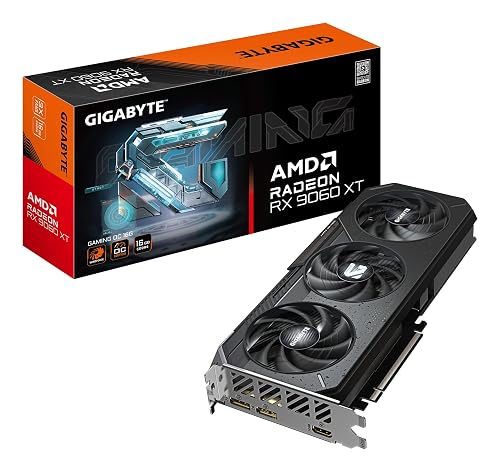 | Best Value AMD | GPU Model: Radeon RX 9060 XT | Memory Capacity: 16 GB | Memory Type: GDDR6 | VIEW LATEST PRICE | Read Our Analysis |
| PNY NVIDIA GeForce RTX 5070 Epic-X ARGB OC Graphics Card |  | Best AI Performance | GPU Model: GeForce RTX 5070 | Memory Capacity: 12 GB | Memory Type: GDDR7 | VIEW LATEST PRICE | Read Our Analysis |
| ASUS Prime GeForce RTX 5070 Graphics Card |  | Best SFF Option | GPU Model: GeForce RTX 5070 | Memory Capacity: 12 GB | Memory Type: GDDR7 | VIEW LATEST PRICE | Read Our Analysis |
| ASUS TUF GeForce RTX 5070 Ti OC Graphics Card |  | Best Premium Pick | GPU Model: GeForce RTX 5070 Ti | Memory Capacity: 16 GB | Memory Type: GDDR7 | VIEW LATEST PRICE | Read Our Analysis |
| ASRock Intel Arc B580 Challenger 12GB OC Graphics Card |  | Budget 1440p Pick | GPU Model: Arc B580 | Memory Capacity: 12 GB | Memory Type: GDDR6 | VIEW LATEST PRICE | Read Our Analysis |
| Gigabyte Radeon RX 7800 XT Gaming OC 16G Graphics Card | 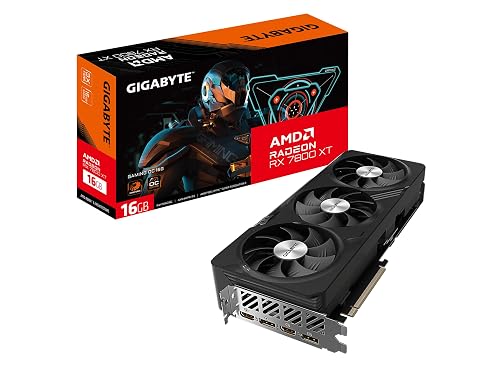 | Best 1440p Value | GPU Model: Radeon RX 7800 XT | Memory Capacity: 16 GB | Memory Type: GDDR6 | VIEW LATEST PRICE | Read Our Analysis |
More Details on Our Top Picks
GIGABYTE Radeon RX 9060 XT Gaming OC 16G Graphics Card
If you want a 1440p gaming card that balances strong frame rates with headroom for modern games and creative work, the GIGABYTE Radeon RX 9060 XT Gaming OC 16G is a solid fit. It features AMD RDNA 4, 16 GB of GDDR6 memory, and a 2700 MHz boost clock for smooth performance. WINDFORCE cooling, a Hawk Fan design, and server-grade thermal conductive gel help keep temperatures in check. The card includes RGB lighting, DisplayPort and HDMI outputs, PCIe 5.0 compatibility, and support for up to 8K resolution.
- GPU Model:Radeon RX 9060 XT
- Memory Capacity:16 GB
- Memory Type:GDDR6
- PCIe Interface:PCIe 5.0
- Display Outputs:DP/HDMI
- Cooling System:WINDFORCE
- Additional Feature:20,000 MHz memory clock
- Additional Feature:RGB lighting
- Additional Feature:3-year warranty
Gigabyte Radeon RX 9060 XT Gaming OC 16G Graphics Card
The Gigabyte Radeon RX 9060 XT Gaming OC 16G is a strong pick for 1440p gamers who want 16GB of GDDR6 memory and a quieter, better cooled card without giving up performance. You get a Radeon RX 9060 XT with a 3,320 MHz listed core clock, 20,000 MHz memory, and a 128-bit interface. Gigabyte pairs it with WINDFORCE triple-fan cooling, a reinforced structure, and Dual BIOS modes for Performance or Silent tuning. With PCIe 5.0 support, RGB lighting, and two DisplayPort plus one HDMI output, it fits a desktop gaming build well.
- GPU Model:Radeon RX 9060 XT
- Memory Capacity:16 GB
- Memory Type:GDDR6
- PCIe Interface:PCIe 5.0
- Display Outputs:2 DP + HDMI
- Cooling System:WINDFORCE
- Additional Feature:Dual BIOS modes
- Additional Feature:3-fan WINDFORCE
- Additional Feature:Reinforced structure
PNY NVIDIA GeForce RTX 5070 Epic-X ARGB OC Graphics Card
Built on NVIDIA’s Blackwell architecture, the PNY GeForce RTX 5070 Epic-X ARGB OC provides 12GB of GDDR7 memory, a 2685 MHz boost clock, and PCIe 5.0 support for strong 1440p performance with modern ray tracing and DLSS features. It also offers a 192-bit bus, HDMI, and DisplayPort 2.1 for flexible display setups. Its triple-fan, 2.4-slot cooler helps keep temperatures in check, and SFF-ready sizing fits smaller builds. Fourth-generation RT Cores, fifth-generation Tensor Cores, Reflex, and NVIDIA Studio support make the card equally useful for gaming, content creation, and AI workloads.
- GPU Model:GeForce RTX 5070
- Memory Capacity:12 GB
- Memory Type:GDDR7
- PCIe Interface:PCIe 5.0
- Display Outputs:HDMI + DP 2.1
- Cooling System:Triple-fan
- Additional Feature:12GB GDDR7
- Additional Feature:SFF-ready design
- Additional Feature:Fifth-gen Tensor Cores
ASUS Prime GeForce RTX 5070 Graphics Card
For gamers who want strong 1440p performance in a compact build, the ASUS Prime GeForce RTX 5070 stands out with its SFF-ready 2.5-slot design and 12GB of GDDR7 memory. You get NVIDIA’s Blackwell-based RTX 5070, a 2542 MHz clock, PCIe 5.0 compatibility, and three DisplayPort 2.1b outputs plus HDMI 2.1b for high-refresh displays. ASUS also uses three Axial-tech fans, heat pipes, and a phase-change thermal pad to keep temperatures in check. Dual BIOS support adds flexibility, and the card fits small form factor systems without giving up modern connectivity.
- GPU Model:GeForce RTX 5070
- Memory Capacity:12 GB
- Memory Type:GDDR7
- PCIe Interface:PCIe 5.0
- Display Outputs:HDMI 2.1b + 3 DP 2.1b
- Cooling System:Triple Axial-tech fans
- Additional Feature:Dual BIOS included
- Additional Feature:Phase-change thermal pad
- Additional Feature:3-year warranty
ASUS TUF GeForce RTX 5070 Ti OC Graphics Card
ASUS’s TUF GeForce RTX 5070 Ti OC Edition is a strong fit if you want a 1440p card that can also push into 4K, thanks to its 16GB GDDR7 memory, PCIe 5.0 support, and factory overclocked Blackwell GPU. You get a 2610 MHz OC boost clock, three Axial-tech fans, and a 3.125 slot cooler with a massive fin array for steady thermals. DisplayPort 2.1a and HDMI 2.1b outputs handle modern monitors, while GPU Tweak III lets you tune performance. Its rugged build, PCB coating, and 3 year warranty add reliability.
- GPU Model:GeForce RTX 5070 Ti
- Memory Capacity:16 GB
- Memory Type:GDDR7
- PCIe Interface:PCIe 5.0
- Display Outputs:2 HDMI + 3 DP 2.1a
- Cooling System:Triple Axial-tech fans
- Additional Feature:16GB GDDR7
- Additional Feature:Protective PCB coating
- Additional Feature:Military-grade components
ASRock Intel Arc B580 Challenger 12GB OC Graphics Card
If you want a 1440p card with 12GB of VRAM and modern AI-assisted upscaling, the ASRock Intel Arc B580 Challenger 12GB OC is worth a close look. It uses Intel’s Xe2-HPG GPU with 20 compute units and 160 XMX engines for XeSS 2 and AI-accelerated tasks. The 12GB GDDR6 memory runs on a 192-bit bus at 19 Gbps, and the card boosts to 2740 MHz. Dual axial fans, a metal backplate, and a 0dB fan stop help keep noise low. You will need a 650 W PSU, and the three DisplayPort 2.1 ports plus HDMI 2.1a support up to four displays.
- GPU Model:Arc B580
- Memory Capacity:12 GB
- Memory Type:GDDR6
- PCIe Interface:PCIe 4.0 x8
- Display Outputs:3 DP + HDMI 2.1a
- Cooling System:Dual-fan
- Additional Feature:Intel XeSS 2
- Additional Feature:0 dB Silent
- Additional Feature:Single 8-pin connector
Gigabyte Radeon RX 7800 XT Gaming OC 16G Graphics Card
The Gigabyte Radeon RX 7800 XT Gaming OC 16G is a strong pick if you want a high-refresh 1440p card with plenty of headroom, thanks to its 16GB of GDDR6 memory, 256-bit bus, and RDNA 3-powered Radeon RX 7800 XT GPU. It features fast 19.5 Gbps memory, PCIe x16 support, and DisplayPort plus HDMI outputs for modern displays. Gigabyte cools the card with three WINDFORCE fans, includes a metal backplate, and adds RGB Fusion lighting. At 11.9 inches long, it fits many desktop builds, and it can also drive 8K-class output when you need extra display flexibility.
- GPU Model:Radeon RX 7800 XT
- Memory Capacity:16 GB
- Memory Type:GDDR6
- PCIe Interface:PCIe x16
- Display Outputs:DP + HDMI
- Cooling System:WINDFORCE
- Additional Feature:256-bit memory bus
- Additional Feature:RGB Fusion lighting
- Additional Feature:Metal backplate
Factors to Consider When Choosing Graphics Cards for 1440p Gaming
When choosing a graphics card for 1440p gaming, begin with your target resolution and confirm the card can handle your preferred settings and frame rates. Make sure the card has sufficient VRAM and strong memory bandwidth, which helps modern games run smoothly at higher detail levels. Finally, verify cooling performance and power requirements so the card fits your case and PSU, and meets your noise expectations.
Target Resolution
For 1440p gaming, choose a GPU that can hit your target frame rate natively, whether that is 60, 120, or 144+ FPS, without depending on upscaling to carry the load. Check real 2560×1440 benchmarks in the games you play, not just peak specs on the box. A card that is fast in one architecture may perform differently in another, so focus on raster and compute results where they matter. If you want ray tracing or higher settings, make sure the GPU can still keep your target FPS at 1440p. Also match your monitor’s refresh rate and adaptive sync support to the performance you are buying, so you actually see smoother motion, lower latency, and less tearing when frame rates climb.
VRAM Capacity
At 1440p, VRAM is a practical limit you should check before you buy. Eight to 12 GB is usually enough for medium to high settings, but 12 to 16 GB or more gives you room for ultra textures, mods, and future games. You will also want extra headroom if you use ray tracing, large texture packs, multi monitor setups, or VR, since those can push usage past 10 to 12 GB. VRAM holds textures, framebuffers, ray tracing data, and shader assets, so demanding scenes can fill it quickly. If you are tight on capacity, lower texture quality, shadow maps, and draw distance first. Do not ignore usage in real games. When VRAM runs out, the system pages assets to RAM or storage, which causes stutters and frame time spikes.
Memory Bandwidth
VRAM capacity tells you how much data a card can hold, but memory bandwidth tells you how fast it can move that data to the GPU. At 1440p, that speed matters because larger frame buffers, sharper textures, and heavier shading all increase throughput demands. You can estimate bandwidth from memory clock and bus width, and wider buses or faster memory, like GDDR6X or GDDR7, raise GB/s. A 256-bit interface will usually feed data better than a 128-bit one, especially in high-detail games. If bandwidth is too low, your GPU may stall even when shader power looks strong, which can hurt average FPS and make frame times less consistent. Compare GB/s, bus width, and memory type, not just VRAM.
Cooling Performance
Cooling matters just as much as raw GPU power when you are gaming at 1440p, because a card that runs hot will boost less aggressively and can throttle under sustained load. You should favor multi-fan designs or large heatsinks that keep core temperatures below about 85°C during long sessions. A roomy case with strong intake and exhaust can drop GPU temps by 5 to 10°C, so airflow matters more than many buyers expect. Look for direct-touch heat pipes, vapor chambers, or phase-change thermal pads, since they move heat away from the die more efficiently than basic pads. Also check fan curves, aggressive cooling can raise noise while larger, slower fans often stay quieter. Good VRM cooling adds thermal headroom for steadier boost clocks and safer overclocking.
Power Requirements
Power requirements can make or break a 1440p build, because even a fast GPU needs enough clean, stable power to hold boost clocks under load. Size your PSU with 25 to 35 percent headroom above peak system draw, not just the GPU’s rating. If your setup can hit 450 W at full load, a 600 W to 650 W unit is the safer pick. Check the card’s connectors too; it may need 6-pin, 8-pin, or a PCIe Gen5 cable, and your PSU must supply the right plugs and enough 12 V amperage. Include the CPU, drives, fans, and any overclocks in your total. For higher-end cards, choose a Gold-rated PSU or better, with tight voltage regulation and low ripple. Strong case airflow also helps sustain stable power behavior.
Ray Tracing Support
Ray tracing can transform a 1440p game’s lighting and reflections, but it also carries a steep performance cost, so you need a GPU with strong hardware RT support and good driver optimization to keep your target frame rate intact. Look for dedicated RT cores or equivalent units, and compare real 2560×1440 ray-traced benchmarks in demanding titles. That tells you far more than marketing claims. Expect frame rates to drop 30 to 60% or more when you enable reflections, shadows, or global illumination, so you will want enough headroom to absorb that hit. Temporal denoising and AI or spatial upscaling can recover quality and performance, making ray tracing much more practical. Also check cooling and boost behavior, since sustained RT loads can expose weak thermal or power delivery limits.
Card Size Compatibility
Even the best 1440p GPU will not help if it does not fit your case, so check size compatibility before you buy. Measure your case clearance and PCIe slot space, because many modern cards span 2.5 to 3.5 slots and run 250 to 330 mm long. Confirm your chassis can handle the card’s length, thickness, and cooler height. In compact mid-towers or small form factor builds, bulky heatsinks and three fan designs can crowd side panels, drive cages, and intake fans. Also verify power connector routing; long cards often place 8 pin or 12VHPWR plugs near the front edge, and tight cases make cable bends difficult. Finally, compare the GPU’s dimensions with radiator, bay, and motherboard layout so you do not block adjacent slots or airflow.
Frequently Asked Questions
Which Card Offers the Best Ray Tracing Performance for 1440P Gaming?
You’ll get the best ray tracing performance at 1440p from Nvidia’s GeForce RTX 4090. For most gamers, the RTX 4080 Super is the smarter buy, as it delivers excellent RT performance without the extreme price tag.
Do These Graphics Cards Support DLSS, FSR, or Xess Upscaling?
Yes, you get upscaling support on most of them. NVIDIA cards use DLSS, AMD cards use FSR, and Intel Arc supports XeSS as well. It is a game-changing boost, letting you squeeze gorgeous 1440p performance from less brute force.
How Much Power Supply Wattage Do These GPUS Typically Require?
You will typically need a 650 W to 850 W PSU for these GPUs, depending on the model and your CPU. High-end cards may require 750 W or more. Midrange options usually run fine on 550 W.
Which Card Is Best for Compact or Small-Form-Factor PC Builds?
For compact builds, choose the RTX 4060 Ti or the RX 7600 XT, as they draw less power and fit in shorter cards. If you need top-end performance, check mini ITX compatible models carefully.
Which GPU Has the Quietest Cooling System Under Gaming Loads?
You typically get the quietest gaming cooling from NVIDIA RTX 4070 Ti Super cards and ASUS ROG Strix models. They keep fan speeds low and temperatures steady, so your PC remains notably quiet under load.




