


Nearly 80% of training bottlenecks come from GPU memory, not raw compute, so your choice matters more than ever.
If you are trying to balance tensor performance, VRAM, cooling, and budget, the right card can change how fast you iterate and how stable your runs remain.
Here are seven GPUs that can help you push training further, plus the tradeoffs you should watch before you buy.





More Details on Our Top Picks
PNY NVIDIA GeForce RTX 5070 Epic-X ARGB OC Graphics Card
If you want a compact, AI-ready GPU for machine learning and creative work, the PNY NVIDIA GeForce RTX 5070 Epic-X ARGB OC stands out with its Blackwell architecture, 12 GB of GDDR7 memory, and fifth-generation Tensor Cores. It includes built-in AI processors, DLSS neural rendering, and fourth-generation ray tracing cores for fast, efficient workloads. The 2685 MHz boost clock, PCIe 5.0 interface, and 192-bit bus help move data quickly. A triple-fan ARGB cooler keeps temperatures in check, and the SFF-ready design fits tighter builds. You also get HDMI and DisplayPort 2.1, plus NVIDIA Studio driver support for reliable creative work.
- GPU Model:GeForce RTX 5070
- Memory Size:12 GB
- Memory Type:GDDR7
- Memory Bus:192-bit
- PCIe Interface:PCIe 5.0
- Display Outputs:HDMI + DisplayPort 2.1
- Additional Feature:Fifth-gen Tensor Cores
- Additional Feature:Fourth-gen ray tracing
- Additional Feature:ARGB triple-fan cooling
ASUS Prime GeForce RTX 5070 Graphics Card
The ASUS Prime GeForce RTX 5070 is a strong pick for machine learning builders who want a modern, compact GPU with solid performance and broad compatibility. It features NVIDIA’s Blackwell architecture, DLSS 4 support, and a PCIe 5.0 interface. The card includes 12 GB of GDDR7 memory for training smaller models or handling mixed workloads. Its SFF-ready, 2.5 slot design fits tighter builds without sacrificing cooling. ASUS uses Axial-tech fans and a phase change GPU thermal pad to keep temperatures low. HDMI, DisplayPort 2.1, and Dual BIOS round out a practical, reliable card.
- GPU Model:GeForce RTX 5070
- Memory Size:12 GB
- Memory Type:GDDR7
- Memory Bus:Not specified
- PCIe Interface:PCIe 5.0
- Display Outputs:HDMI + DisplayPort 2.1
- Additional Feature:Phase-change thermal pad
- Additional Feature:Dual BIOS
- Additional Feature:Axial-tech fans
ASRock Intel Arc B580 Challenger 12GB Graphics Card
With 12GB of GDDR6 memory, the ASRock Intel Arc B580 Challenger provides enough headroom for lighter machine learning workloads, 1440p gaming, and AI-accelerated tasks. Intel’s Xe2-HPG architecture and 160 XMX engines help it handle Intel XeSS 2 features efficiently. You also get 20 compute units, a 192-bit bus, and 19 Gbps memory speed for solid throughput. Its 2740 MHz boost clock, dual axial fans, and 0 dB Silent Cooling keep it responsive and quiet. Use the PCIe 4.0 x8 card with a 650W PSU, and enjoy four-display support.
- GPU Model:Intel Arc B580
- Memory Size:12 GB
- Memory Type:GDDR6
- Memory Bus:192-bit
- PCIe Interface:PCIe 4.0 x8
- Display Outputs:HDMI 2.1a + DisplayPort 2.1
- Additional Feature:Intel XeSS 2
- Additional Feature:Zero dB silent cooling
- Additional Feature:4-display support
ASUS Dual GeForce RTX 5060 8GB OC Edition
The ASUS Dual GeForce RTX 5060 8GB OC Edition is a smart pick if you want a compact, SFF-ready GPU for entry-level machine learning and mixed AI workloads, without giving up modern features like DLSS 4 and 623 AI TOPS. It uses NVIDIA’s Blackwell GPU, includes 8GB of fast GDDR7, and has a slight OC boost to 2565 MHz. The dual-fan, 2.5-slot design stays manageable in smaller cases, and 0dB idle keeps noise down. You also get PCIe 5.0 support, HDMI 2.1b, three DisplayPort 2.1b outputs, and a 3-year warranty.
- GPU Model:GeForce RTX 5060
- Memory Size:8 GB
- Memory Type:GDDR7
- Memory Bus:Not specified
- PCIe Interface:PCIe 5.0
- Display Outputs:HDMI 2.1b + DisplayPort 2.1b
- Additional Feature:623 AI TOPS
- Additional Feature:0dB technology
- Additional Feature:3-year warranty
GIGABYTE GeForce RTX 5070 AERO OC 12G Graphics Card
If you want a GPU that balances AI acceleration, modern memory bandwidth, and strong everyday versatility, the GIGABYTE GeForce RTX 5070 AERO OC 12G fits the bill. You get NVIDIA’s Blackwell architecture, DLSS 4, enhanced RT Cores, and Tensor Cores for faster training support and sharper visuals. Its 12GB GDDR7 memory on a 192-bit bus, plus a 2600 MHz clock and PCIe 5.0 x16 interface, helps you move data efficiently. WINDFORCE cooling with three fans keeps it steady, and DisplayPort, HDMI, and 8K support make it practical for gaming, creative work, and professional tasks.
- GPU Model:GeForce RTX 5070
- Memory Size:12 GB
- Memory Type:GDDR7
- Memory Bus:192-bit
- PCIe Interface:PCIe 5.0
- Display Outputs:HDMI + DisplayPort
- Additional Feature:WINDFORCE cooling
- Additional Feature:4.7-star rating
- Additional Feature:3-year warranty
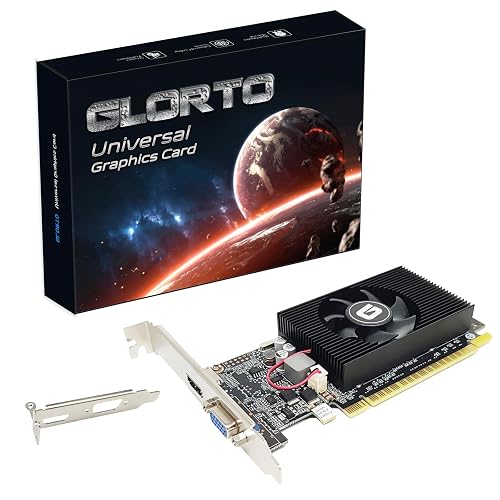
GeForce GT 610 2GB Low Profile Graphics Card
The GeForce GT 610 2GB Low Profile Graphics Card is a compact, entry-level option that fits best in small form factor desktops and HTPC builds, where space matters more than raw performance. It includes 2GB of DDR3 memory, a 523 MHz core clock, and a 64-bit bus, so it handles basic display tasks rather than machine learning training. It supports HDMI and VGA and works with Windows 11. It also includes DirectX 11, OpenCL, CUDA, and DirectCompute 5.0. Its low-profile bracket helps you install it in tight cases, and Glorto backs it with a 1-year warranty.
- GPU Model:GeForce GT 610
- Memory Size:2 GB
- Memory Type:DDR3
- Memory Bus:64-bit
- PCIe Interface:PCIe 1.1 x16
- Display Outputs:HDMI + VGA
- Additional Feature:Low-profile form factor
- Additional Feature:Windows 11 compatible
- Additional Feature:DirectX 11 support
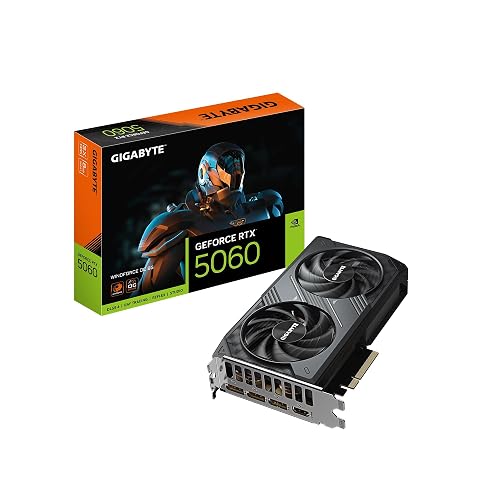
GIGABYTE GeForce RTX 5060 WINDFORCE OC Graphics Card (GV-N5060WF2OC-8GD)
GIGABYTE’s GeForce RTX 5060 WINDFORCE OC 8G is a compact, factory overclocked Blackwell card that pairs 8GB of GDDR7 memory with NVIDIA’s latest RT and Tensor Cores, making it a solid choice for an affordable desktop GPU for entry level machine learning, AI assisted creative work, and gaming. It includes DLSS 4 and AI acceleration, and a two fan WINDFORCE cooler that helps keep noise and thermals in check. The card uses a PCIe 5.0 x16 interface, offers 28000 MHz memory, and supports output resolutions up to 7680 by 4320. A three year warranty provides additional peace of mind.
- GPU Model:GeForce RTX 5060
- Memory Size:8 GB
- Memory Type:GDDR7
- Memory Bus:128-bit
- PCIe Interface:PCIe 5.0
- Display Outputs:HDMI + DisplayPort
- Additional Feature:WINDFORCE cooling
- Additional Feature:Factory overclocked
- Additional Feature:3-year warranty
Factors to Consider When Choosing Graphics Cards For Machine Learning
When choosing a graphics card for machine learning, first check GPU memory capacity, since larger models require more VRAM. You should also prioritize strong CUDA and Tensor Cores, high memory bandwidth, and stable drivers to keep training fast and reliable. Do not overlook cooling and thermals, because a card that runs too hot can throttle and reduce performance.
GPU Memory Capacity
GPU memory capacity is one of the biggest limits you will encounter when choosing a card for machine learning, because bigger models and larger batch sizes quickly consume VRAM. If you want to train larger networks without constant gradient accumulation or CPU GPU swapping, aim for 16 to 48+ GB when possible. Once you move into large transformers or diffusion models, even 24 GB per GPU can feel tight. You may need multi GPU or model parallel setups. Remember that memory bandwidth matters too, since limited capacity often forces tensors into slower host memory or slicing paths. Mixed precision and activation checkpointing can extend your budget, but they trade precision or require extra compute. In data parallel training, each GPU still needs enough local memory for model shards and optimizer states.
CUDA and Tensor Cores
Beyond memory capacity, you should also look closely at CUDA cores and Tensor Cores, because they determine how fast a card can actually crunch ML workloads. CUDA cores handle general-purpose parallel work, so more of them can speed up data preprocessing and custom ops that do not map to matrix math. Tensor Cores matter even more for training and inference, since they accelerate mixed-precision matrix multiplies and can deliver huge gains on GEMM-heavy models. Check that the card supports the precisions your stack uses, such as FP16, BF16, or FP8, so you do not trade speed for accuracy. You should also verify CUDA, cuDNN, and driver compatibility, because your framework can only use Tensor Cores when the software stack dispatches operations correctly.
Memory Bandwidth
Memory bandwidth, measured in GB/s, determines how quickly a card can feed tensors and activation maps to the GPU cores, so it has a direct impact on throughput for large models and high-resolution data. If you train with huge batch sizes or parameter counts, you need enough bandwidth to keep compute units busy instead of stalled. Compare cards by bandwidth, since memory type, bus width, and clock speed all shape the final number. GDDR on a narrow bus can lag behind HBM on a wider one. You should also consider your access pattern: contiguous, coalesced reads can nearly saturate the link, while scattered accesses waste it. Pair bandwidth with FLOPS to judge whether your workload is memory-bound or compute-bound, then tune accordingly.
Driver Stability
Driver stability matters just as much as raw performance. If the driver stack is flaky, your training jobs can fail, drift, or produce inconsistent results. Favor GPUs with long term driver support and frequent security and bug fix updates so your setup keeps pace with evolving ML frameworks and CUDA, cuDNN, ROCm, or vendor runtimes. Check that the vendor certifies support for your target libraries and lists compatible toolkit versions, since mismatches can break launches or silently skew training. Read release notes and known issue trackers for regressions in determinism, mixed precision math, kernel launches, and multi GPU sync. Make sure the ABI stays stable and validated. Before rolling out updates, trial them in staging with real workloads and datasets.
Cooling and Thermals
Once you’ve picked a stable driver stack, the next limiter is often heat. You need a GPU with enough thermal headroom to stay below throttling limits during long training runs, so prioritize strong heatsinks, high-flow fans, and vapor chambers or heat pipes that reduce die-to-ambient resistance. Monitor GPU core, memory, fan RPM, and sustained boost clocks while running real batches; those metrics indicate whether the card’s cooling can hold steady. In multi-GPU rigs, avoid packing cards tightly, because trapped heat quickly raises junction temperatures. Add spacing, strong intake and exhaust airflow, and reverse-flow or additional exhaust when needed. If your accelerator draws significant power, its cooling path and chassis ventilation must handle the load, or you will see hot spots, weaker clocks, and less reliable training.
Power Supply Needs
Power matters just as much as cooling when you choose a GPU for machine learning. Check each card’s TDP or board power, then add up the GPU, CPU, and peripheral draw to size your PSU properly. High-end ML cards can pull 200 to 450 W each, so a dual, or quad, GPU rig can demand a serious supply. Add 20 to 30% headroom above your estimated continuous load to handle long training runs and boost spikes without instability. Make sure you have the right PCIe plugs, whether that is 6-pin, 8-pin, or 12VHPWR, and confirm adapters are rated for full current. Also verify your cables and connectors can carry the load cleanly. For multi-GPU builds, check 12V rail amperage and spread cards across rails, or use dual PSUs with synchronized startup.
Form Factor Compatibility
Even with enough PSU capacity, a GPU still has to fit and breathe inside your system. Measure your case’s GPU clearance first, including length, height, and slot width; many small form factor builds need two-slot or thinner cards under about 270 mm. Next, check your motherboard’s PCIe layout and leave room for adjacent slots, because 2.4 to 2.5 slot coolers can block expansion cards. Make sure your PSU cables can reach the card’s 6 or 8 pin connectors without awkward bends in a tight chassis. Also verify airflow and cooler clearance so triple-fan or tall heatsink designs can pull in and exhaust air properly. For rackmount or HTPC systems, choose low-profile or single-slot cards that match the bracket and cooling limits.
Frequently Asked Questions
Which GPU Matters More for Machine Learning, VRAM or Raw Compute?
VRAM usually matters more for machine learning. If you cannot fit the model, raw compute will not save you; you will hit the memory wall quickly. Prioritize memory first, then optimize for training speed once you are comfortable.
Can a Budget GPU Train Models Effectively?
Yes, you can train smaller models effectively on a budget GPU, especially if you are patient and optimize batch sizes. You will hit limits with big datasets, but you can still learn, prototype, and fine tune.
Is NVIDIA Always Better Than AMD or Intel for ML?
No, you should not assume Nvidia is always better. You will often get stronger ML support and tooling from Nvidia, but AMD and Intel can work well depending on the software, budget, and your specific training stack.
How Much VRAM Do I Need for Deep Learning Workloads?
You will usually want 12 GB minimum for deep learning, 16 to 24 GB for comfortable training, and 48 GB or more for larger models or bigger batches. More VRAM lets you fit models, data, and activations without constant compromises.
Does Cooling Affect Long Machine Learning Training Runs?
Absolutely, cooling matters, because you cannot train all day if your GPU overheats like a blacksmith’s forge. You will throttle performance, waste power, and risk crashes. Keep airflow strong and temperatures low for consistent training.




